You need fast, affordable product images that look professional, yet studio shoots drain time and budget. I know the pain—slow turnarounds, scheduling, and inconsistent results make scaling ecommerce feel impossible.
That frustration grows when teams juggle retakes, model bookings, and editing queues. I’ve seen brands stall shipments because photos weren’t ready. Users complain about billing hiccups, queue delays, and mixed platform claims about trials—small issues that add up to real headaches for merchants.
Enter a web-based product founded in Australia in 2023 that promises AI fashion model generation and virtual photoshoots. I’ve tested the app end-to-end to see how it turns simple garment photos into on-model images, and whether it truly saves time without sacrificing quality.
I’ll walk you through features, pricing (starts at $29/month), real user feedback, trade-offs with traditional photography, and a hands-on case—so you can decide if it fits your workflow.
Let’s dive in — and, if you’ve used it, share a write review comment to help other users.
Key Takeaways: PicJam Review
- Comprehensive look at the product’s fit for modern fashion teams.
- Features: AI models, virtual photoshoots, and catalog-ready outputs.
- Pricing starts at $29/month; trial claims vary in listings.
- Many users praise speed and ease; some report billing or queue issues.
- Includes a personal test of upload-to-photos timing and quality trade-offs.
PicJam Review: An Overview

Raamish’s Take
PicJam delivers a slick AI photo and video generator tailored for fashion brands.
It turns one product image into a full photoshoot—multiple angles, models, and videos—in just 60 seconds, slashing studio costs from $2K-$30K monthly.
The model swap feature stands out, letting you refresh audiences with diverse looks without new shoots. Users like Jasmine Huie praise its accuracy for online stores, while Dadamtees saw customer interest soar with lifelike visuals.
It’s trusted by 600+ brands generating 1M+ images.
One of the unique platform of it’s kind, PicJam offers ecommerce-ready content at a better value. Ever dread pricey photoshoots? This saves 99% on production, perfect for quick, scroll-stopping shots.
With a $1 first-week trial, it’s a smart pick for boosting sales.
Introduction to PicJam: Where AI Fashion Imaging Is Heading this age
PicJam is a web-based software company founded in Australia in 2023 that aims to speed up product photography for ecommerce. I’ve used the platform and seen how its Virtual Photoshoot and AI Fashion Model Generators produce on-model outputs from simple garment shots.
Who built it and where it fits
The small team positions the company among tools trying to replace or augment studio shoots. They host a public gallery and claim usage by 600+ stores — useful adoption signals when you evaluate vendors.
Purpose, adoption signals, and what to expect
The purpose is simple: help fashion brands create consistent product images faster. The platform includes training videos, online support, and pricing from $29/month. Note: listings often list a free trial, but the company stated in July 2025 that trials are paid — plan for that when budgeting.
| Feature | Claim | Why it matters |
|---|---|---|
| Web-based | No install, access anywhere | Good for distributed teams and agencies |
| Public gallery | 600+ stores cited | Shows real customer outputs and use cases |
| Training | Videos + support | Shortens ramp-up and improves results |
| Pricing | From $29/month | Lower cost than many studio shoots for scale |
My experience: This tool works best when you feed it consistent flat shots and clear styling guidance.
Expect fast iteration, but plan a few passes to match your brand experience. In the rest of this review I’ll test quality, speed, and real-world fit for busy ecommerce teams.
What is PicJam?
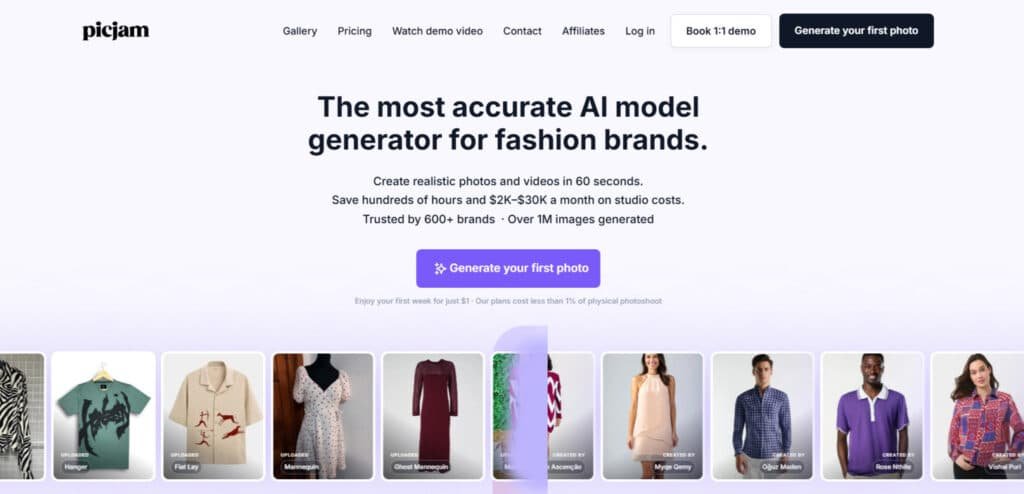
At its core this software converts simple clothing photos into styled on-model visuals. I’ve used it to move flat lays and pack shots into gallery-ready outputs that match a brand look without a full studio day.
Under the hood: AI fashion model generators and virtual photoshoots explained
The system rests on two pillars: an AI fashion model generator that produces diverse models and a virtual photoshoot flow that controls lighting, angle, and styling. You get selectable model profiles and scene presets to keep a consistent brand feel.
How garments become virtual model images
The workflow is simple: upload your garment images, pick a model profile and scene, then add short prompts with fit or fabric notes. The engine composes shots and returns multiple model images you can reuse across listings.
- Upload flat lay, ghost mannequin, or pack shot.
- Choose styling, pose, and camera framing.
- Refine with concise prompts and reuse model profiles for consistency.
Benefits for ideal users: fashion brands, designers, and ecommerce teams
For small labels and in-house teams, this cuts time-to-site and reduces reliance on booked shoots. Designers can iterate visuals quickly, and ecommerce teams get repeatable product photography outputs that scale.
Final note: inputs matter. Standardize your photos and style guide to get the best on-brand virtual model images and product content.
Key Takeaways at a Glance
I found the clearest win: Repeatable on-model images without scheduling a studio. If you publish many SKUs, this saves time and produces cohesive catalog visuals quickly.
Trial note: listings often mention a free trial, but recent user reports and company comments indicate trial terms can be unclear—confirm the checkout before you commit.
Who will get the most value (and who may not)
- Best fit: brands with steady SKU drops and standardized garment photos who need predictable styling across product families.
- Not ideal: editorial shoots, location-heavy campaigns, or teams that need airtight refund/trial guarantees for legal compliance.
What stands out versus typical product photography workflows
The platform converts plain garment shots into consistent on-model images faster than booking and coordinating studio time. Customers report time savings and better throughput for PDPs and lookbooks.
| Area | Why it matters | Action |
|---|---|---|
| Speed | Faster turnarounds for catalog launches | Run a pilot batch to measure time saved |
| Consistency | Reusable model profiles and scenes | Create brand presets and apply across SKUs |
| Risk | Billing/refund friction reported by some customers | Confirm terms and test purchase flow (especially for trial) |
Bottom line: For teams that prioritize speed-to-content and consistent fashion images, this offers real workflow advantages. Be proactive about billing, test a pilot, and build brand presets to maximize ROI.
Best Features of PicJam
I’ve found the standout features focus on fast, repeatable imaging that helps teams ship collections quicker. Below I break down the core tools, why they matter, and how you can use them in real workflows.
1. Core Image Generation: Fashion Generator
PicJam’s Fashion Generator stands out as a powerhouse for apparel brands, converting simple uploads into polished, realistic photos optimized for e-commerce. By leveraging advanced AI, it crafts visuals that mimic professional studio work, helping teams bypass lengthy shoots and focus on sales-driven content creation.
1.1 Fit to Model
Fit to Model seamlessly drapes plain-colored garments onto AI-generated figures, capturing natural folds and sizing for authentic looks. Apparel creators use this to diversify product displays effortlessly, ensuring every listing reflects a broad customer base without the hassle of custom fittings.
1.2 Fixed Product
Fixed Product safeguards intricate details like logos or patterns during model placement, preventing any warping or fade. This precision keeps branded elements sharp, allowing marketers to showcase signature designs consistently across digital storefronts.
1.3 One Click, Multiple Angles
One Click, Multiple Angles delivers a full suite of perspectives—from front to dynamic side views—with adjustable lighting in moments. Retailers streamline their workflow by generating comprehensive galleries, which enhance buyer confidence and reduce return rates through better-informed purchases.
1.4 Model Replacement and Diversity
Model Replacement and Diversity refreshes existing shots with inclusive AI stand-ins from diverse ethnic backgrounds, all without reshoots. Global brands tap into this for targeted campaigns that resonate culturally, fostering stronger connections and higher engagement on international platforms.
1.5 Model Compatibility
Model Compatibility handles everything from tailored slims to loose athleisure, adapting fits across body types flawlessly. This flexibility empowers designers to experiment with styling variations, keeping seasonal collections fresh and adaptable to emerging trends.
1.6 Brand Consistency
Brand Consistency enforces stylistic rules via royalty-free models, ensuring every output matches your aesthetic guidelines. Marketing leads maintain a unified voice in visuals, which builds recognition and trust among loyal shoppers over time.
1.7 Reuse Existing Photos
Reuse Existing Photos revitalizes old archives into modern assets, extending their utility without new investments. Small businesses leverage this to update outdated catalogs economically, freeing resources for growth initiatives.
1.8 Targeted Marketing
Targeted Marketing produces tailored visuals for specific demographics, amplifying relevance in niche promotions. E-commerce specialists deploy these to personalize feeds, directly lifting click-through and conversion metrics.
1.9 High-Quality Output
High-Quality Output yields images so lifelike they rival human photography, with superior fabric rendering. Shop owners stand out in crowded marketplaces, where authentic details turn browsers into buyers.
1.10 Test New Visuals
Test New Visuals facilitates A/B comparisons of generated creatives against live data. Content strategists refine approaches based on real feedback, optimizing for peak performance in ad rotations.
2. Background and Environment Customization
Background tools in PicJam immerse clothing in captivating contexts, turning flat products into storytelling assets. These features unlock lifestyle narratives that draw viewers in, ideal for brands aiming to evoke desire through relatable scenes.
2.1 Swap Background
Swap Background lets users layer items onto vivid settings like urban cafes or serene beaches with a tap. Photographers-in-training create aspirational content that highlights versatility, encouraging impulse buys.
2.2 Unlimited Possibilities
Unlimited Possibilities opens doors to infinite scene combinations, fueling endless creative explorations. Agencies generate seasonal themes on demand, maintaining momentum without creative blocks or extra hires.
2.3 Engage Your Audience
Engage Your Audience positions products in everyday scenarios that spark imagination and interaction. Social sellers use this to boost shares, as contextual visuals prompt comments and saves.
2.4 Remove Background
Remove Background strips away distractions for pristine isolations, perfect for clean e-commerce grids. Editors achieve pro-level focus swiftly, speeding up asset prep for tight deadlines.
3. Video Generation and Animation
Video capabilities breathe life into stills, crafting short clips that demonstrate movement and wear. This shift to motion content meets the surge in dynamic media demands, helping brands capture attention in fast-scrolling environments.
3.1 From Still to Stunning
From Still to Stunning animates poses with smooth transitions, revealing how fabrics move in real life. Product managers showcase usability, addressing common hesitations like fit concerns.
3.2 Boost Engagement
Boost Engagement illustrates garments in active use, from twirls to walks, to heighten viewer interest. Influencer collaborators extend reach, as videos naturally outperform static posts in algorithms.
3.3 Cost-Effective Creation
Cost-Effective Creation forgoes video crews for on-the-fly production, slashing budgets dramatically. Startups produce high-volume reels affordably, scaling promotional efforts without strain.
3.4 Dynamic Showcasing
Dynamic Showcasing rotates through angles in fluid sequences, emphasizing textures and details. Video editors build versatile libraries for TikTok or YouTube, maximizing cross-channel reuse.
4. Image Editing and Refinement Tools (Creative Multi-Tool)
The editing suite refines raw captures into gallery-ready gems, tackling common flaws with surgical AI precision. These tools consolidate workflows, saving hours for visual teams juggling multiple projects.
4.1 Clean Up
Clean Up vanishes blemishes or stray elements instantly, delivering spotless clothing presentations. Retail photographers polish shots for flawless online appeal, minimizing post-shoot tweaks.
4.2 Upscaler
Upscaler amplifies clarity by doubling pixels and smoothing noise, ideal for zoomed inspections. Designers upgrade legacy files for modern screens, ensuring crispness in high-res formats.
4.3 AI Image Analysis
AI Image Analysis scans uploads to suggest enhancements, offering actionable insights for superior results. Analysts gain efficiency, turning diagnostics into streamlined improvement plans.
4.4 Highlight Your Product
Highlight Your Product sharpens focal points amid compositions, guiding eyes to standout features. Ad creators emphasize unique selling propositions, elevating persuasive power in visuals.
5. SEO and Marketing Optimization
Optimization features weave search smarts into creative outputs, ensuring visuals drive traffic alongside aesthetics. This integration arms marketers with tools to climb rankings organically.
5.1 SEO Keywords
SEO Keywords extracts and generates terms tied to product visuals, propelling listings to top spots. SEO pros integrate these for holistic strategies, blending imagery with discoverability.
6. Workflow and Catalogue Management
Management options automate bulk tasks, transforming chaotic inventories into organized powerhouses. Brands handling vast SKUs find relief in these accelerators, reclaiming time for innovation.
6.1 Update Your Whole Product Catalogue
Update Your Whole Product Catalogue overhauls collections in bulk, syncing refreshes across platforms. Catalog managers launch updates swiftly, keeping assortments current amid fast fashion cycles.
6.2 Instant Edits & Quick Iterations
Instant Edits & Quick Iterations enable on-the-spot adjustments, collapsing approval timelines. Collaborative teams iterate collaboratively, arriving at polished finals faster.
6.3 See How It Works
See How It Works provides step-by-step prompts to demystify processes. Newcomers navigate intuitively, accelerating adoption in busy routines.
6.4 Watch the Demo Video
Watch the Demo Video breaks down full pipelines visually, clarifying advanced uses. Learners absorb techniques quickly, applying them to real scenarios immediately.
7. Commercial and Integration Use Cases
Commercial integrations make PicJam’s assets plug-and-play across ecosystems, all cleared for profit use. This breadth supports end-to-end campaigns, from online to offline touchpoints.
7.1 E-Commerce Marketplaces
E-Commerce Marketplaces tailors shots for platform specs like Amazon, grabbing shopper focus. Vendors climb search results with compelling thumbnails.
7.2 E-Commerce Websites
E-Commerce Websites fortifies pages with trust-building imagery, spurring add-to-bags. Site owners report smoother funnels from enhanced visuals.
7.3 Social Media Campaigns
Social Media Campaigns powers feeds on Instagram with scroll-stopping variety. Community builders spark viral threads through relatable content.
7.4 Email Marketing
Email Marketing embeds eye-catchers in blasts, lifting open and click rates. Newsletter curators convert subscribers via immersive previews.
7.5 Printed Marketing Materials
Printed Marketing Materials scales digitally born art to physical formats seamlessly. Print coordinators ensure brand parity across mediums.
7.6 Digital Advertisements
Digital Advertisements slots into PPC networks with adaptive precision. Performance marketers track uplifts from unified ad creatives.
7.7 Blogging and Content Marketing
Blogging and Content Marketing infuses posts with narrative visuals, deepening reader immersion. Writers craft compelling stories that hold attention longer.
7.8 Press Releases
Press Releases enriches announcements with vivid product shots, amplifying media pickup. PR teams craft newsworthy hooks visually.
7.9 Presentations & Pitches
Presentations & Pitches arms decks with pro visuals, sealing deals persuasively. Executives deliver pitches that resonate on sight.
8. Additional Platform-Wide Capabilities
Overarching supports like scalability underpin PicJam’s endurance for growing operations. These elements ensure seamless expansion, from solo creators to enterprise teams.
8.1 Input Optimization Tips
Input Optimization Tips guide optimal uploads with lighting and pose advice, via handy image references. Users hit peak quality from day one, avoiding common pitfalls.
8.2 Scalability
Scalability powers 600+ brands with millions of generations, handling surges without hiccups. Expanding retailers scale visuals in tandem with sales growth.
8.3 Performance Edge
Performance Edge eclipses generic tools in apparel realism and speed. Pros secure outputs that convert better, outpacing the field.
9. Time Savings and Cost Efficiency
This tool often saves time and replaces routine studio sessions—freeing budget for hero shoots.
| Feature | Benefit | Use Case |
|---|---|---|
| Virtual Photoshoot | Fast on-model photos | PDPs, quick launches (minutes to output) |
| AI Model Generator | Diverse representation | Size-inclusive merchandising |
| Batch Catalog Tools | Consistent product images | Seasonal drops and lookbooks |
| Export Presets | Social-ready crops & video content derivatives | Grid-ready posts and ads |
Pricing Plans of PicJam
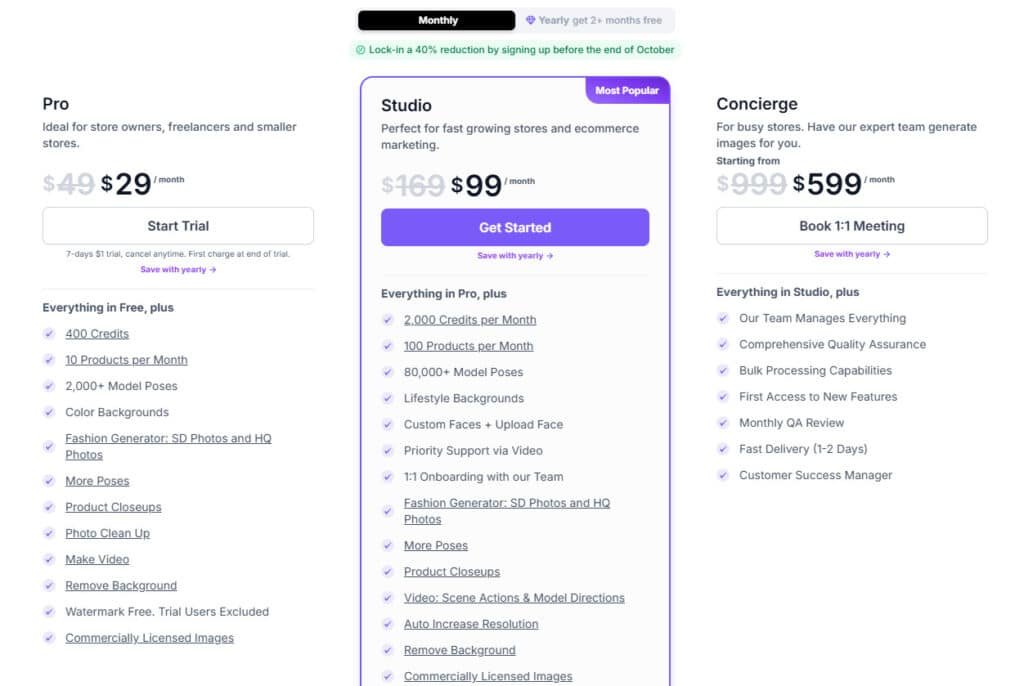
Pro Plan
Monthly at $49 (discounted to $29), annual at $276 ($23/month, 2+ months free), with a 7-day $1 trial.
Offers 400 credits, 10 products monthly (4,800/120 yearly); 2,000+ poses; color backgrounds; SD/HQ Fashion Generator; closeups; clean up; video; remove background; watermark-free; commercial license.
Studio Plan
Monthly at $169 (discounted to $99), annual at $948 ($79/month, 2+ months free), includes $1 trial.
Includes Pro features plus 2,000 credits, 100 products monthly (24,000/1,200 yearly); 80,000+ poses; lifestyle backgrounds; custom faces; priority support; onboarding; advanced video; auto resolution; commercial license.
Concierge Plan
Monthly at $999 (discounted to $599), annual at $5,748 ($479/month, 2+ months free), with $1 trial and 1:1 meeting.
Adds to Studio: team-managed generation, quality assurance, bulk processing, new feature access, monthly QA, fast delivery, dedicated manager.
| Feature/Plan | Pro | Studio | Concierge |
| Price | $29/$23 mo. ($276/yr) | $99/$79 mo. ($948/yr) | $599/$479 mo. ($5,748/yr) |
| Credits | 400 mo./4,800 yr. | 2,000 mo./24,000 yr. | Team-managed |
| Products | 10 mo./120 yr. | 100 mo./1,200 yr. | Unlimited |
| Poses | 2,000+ | 80,000+ | 80,000+ |
| Backgrounds | Color | Lifestyle | Lifestyle |
| Support | Standard | Priority + Onboarding | Dedicated + QA |
Getting Started and Onboarding
Begin with a short pilot and a tight brief. Sign up on the web-based app, watch the short training videos, and set basic brand presets (background, lighting, pose shortlist). That three-step start helps you keep outputs consistent and saves time on edits.
Web-based setup, training videos, and first-project workflow
I recommend uploading 3–5 representative garments for your first run. Define target model profiles and scenes, then generate a small batch to validate the look before scaling.
Use the built-in videos and support articles the first time you test prompts. A quick review cycle (approve, tweak, rerun) gets you usable assets in minutes.
Tips to optimize prompts and garment inputs
- Keep prompts concise — fabric, fit notes, background preference, and pose energy.
- Supply high-res, well-lit garment photos on a clean background; smooth fabric and aligned hems reduce artifacts.
- Tag SKUs, create folders by drop/season, and label outputs for PDP vs lookbook content.
- For reels or rotations, plan batches so frames match for easy video cut assembly.
| Step | Why it matters | Tip |
|---|---|---|
| Sign up | Access the platform quickly | Set presets first |
| First batch | Validate brand look | 3–5 garments |
| QA | Catch drift early | Zoom seams and logos |
If you get stuck, watch the video again or ping support — early feedback saves more time than brute-forcing generations.
Use Cases for Fashion and Retail
Here are concrete, role-based use cases that show where the tool really saves time and keeps visuals consistent.
SMB apparel brands
I’ve seen small teams move from basic clothing shots to finished product images for PDPs, line sheets, and launch-day pages in minutes. This turns launch day from a scramble into a routine.
Mid-market and enterprise
Large merch teams batch-generate seasonal refreshes across hundreds of SKUs. Standardized styling creates coherent category pages and speeds up catalog rollouts.
Designers and makers
Design teams use fast iterations to show samples to buyers. You can test multiple looks, tighten design choices, and present collections earlier in the cycle.
- Social media: create square crops and carousel sets for coordinated drops.
- Wholesale: produce clean line sheets for B2B portals and buyer decks.
- Founders on a budget: reserve studio funds for hero shoots and use AI for routine catalog work.
- Content ops: empower non-design users with templates so content pipelines don’t bottleneck.
“Catalog creation went from hours to minutes for several users—quality that works for ecommerce and social channels.”
| Role | Common Outputs | Why it matters |
|---|---|---|
| SMB Brands | PDP product images, line sheets | Faster launches, lower shoot costs |
| Enterprise | Batch catalogs, seasonal pages | Consistency across categories |
| Designers | Sample mockups, lookbooks | Faster buyer feedback loops |
| Marketing | Social-ready assets, ads | Align drops with campaigns |
Caveat: Always add a human review step to verify fabric color, fit cues, and brand fidelity before publishing.
Performance, Image Quality, and Speed
When you need catalog pages to look cohesive, control over scenes, models, and framing matters most. I tested visual consistency across varied garment types to see how well the system preserved a brand aesthetic.
Consistency and brand aesthetics
Lock scenes, angles, and model profiles you like, then reapply them across SKUs. That keeps your product pages aligned and reduces editing downstream.
Clean inputs set the ceiling for quality—sharp photos, clear seams, and concise directions yield better drape and more trustworthy fit cues.
Queue times and throughput
When the web-based platform is steady, first passes arrive in minutes. Still, some users saw brief queue delays after upgrades; those were largely resolved.
Plan batches in chunks, run overnight jobs, and prioritize hero SKUs first. That minimizes risk from stalled queues and keeps launches on schedule.
- Throughput tip: use versioned presets so updates don’t shift a look mid-run.
- Video workflow: batch outputs with consistent framing for a clean video cut in your editor.
- Ops metric: track average time per batch and acceptance rate to forecast credit needs.
| Focus | Action | Benefit |
|---|---|---|
| Consistency | Reuse model profiles | Cohesive catalog look |
| Speed | Chunk batches | Reliable delivery |
| Quality | Clean garment photos | Better images |
Pros & Cons of PicJam
This section breaks down practical wins and the operational caveats to expect.
Pros — Users and my tests agree on clear benefits: the product moves you from upload to usable images fast. It shines for standardized ecommerce photography and keeps look-and-feel repeatable with presets.
More pros: reasonable entry pricing, flexible options for models and scenes, and a workflow that helps non-creative team members produce consistent outputs for catalogs, PDPs, and social.
Pros summary: give it clean inputs and you get reliable outputs—less dependence on constant studio bookings, more predictable content ops.
Cons — Several customers reported billing and refunds frustrations; clarify terms before buying to avoid disputes. Expect occasional queue delays and some variability with tricky fabrics or visible logos.
Requests also include more model categories (kids, specialty sizes). Customer support is online-first; complex billing cases may need escalation, so document interactions.
| Area | Positive | Drawback |
|---|---|---|
| Speed | Fast generation | Occasional queue delays |
| Quality | Good for standard garments | Variability with tricky fabrics/logos |
| Pricing | Reasonable entry cost | Credit model scales with volume |
| Support | Online help and docs | Billing cases need escalation |
Bottom line: Strengths sit with speed, consistency, and cost control. Weaknesses are operational (billing, rare quality edges). If those issues matter, explore alternatives next.
Customer Support, Reliability, and Billing Experience
If you value quick how-to answers, the platform’s online help is useful—billing is a different story. I found that most operational questions get solved via the web-based support portal and concise training videos. That covers setup, presets, and prompt tips quickly.
Support channels and responsiveness
The company offers online support only: help center articles, video guides, and an in-app contact form. For common workflow issues, responses are fast and practical.
For complex cases (especially billing) some users reported multiple exchanges and delays. One queue problem was fixed quickly after a phone-style escalation; others said refunds took many messages.
Billing clarity, refunds, and regional considerations
Always verify whether your trial is paid before entering card details. The public company stance is that trials are not free and refunds for change-of-mind may be declined.
If you operate in the EU, save all confirmations—one customer cited a 14-day withdrawal right and used durable proof to challenge a charge. For US teams, secure written terms on credits, expiry, and SLAs before scaling.
- Actionable steps: run a small pilot, keep screenshots of checkout pages, and save email confirmations.
- For scale: request written billing terms (credits, refunds, SLAs) before annual commits.
- Reliability tip: prepare a backup workflow for launch days in case queues spike.
| Area | What to expect | Practical step |
|---|---|---|
| Support | Fast for how-to; slower for billing | Use guides first, escalate with screenshots |
| Payments | Trial clarity varies; refunds limited | Confirm trial type and keep records |
| Regional rules | EU consumer rights may apply | Save durable confirmations; escalate quickly |
Net: Customer support handles technical snags well, but the onus is on you to manage payments risk. Keep documentation, run a tight pilot, and get billing terms in writing before big launches.
Security, Compliance, and Brand Safety Considerations
When you replace physical photography sessions with AI imagery, governance and clear rules become non‑negotiable. I find that a short policy and a quick QA loop save a lot of headaches later.
Data handling, consent, and model image ethics
Consent & rights: Only upload designs and prints you own or have licensed. Don’t let auto-composites introduce unapproved logos or altered trademarks.
Synthetic imagery ethics: Treat generated fashion models like hired talent. Document representation choices, avoid stereotypes, and disclose AI use where it matters.
Virtual try-ons vs. virtual models: If your images imply fit or try-on accuracy, qualify that language. Don’t promise physics you can’t prove—avoid misleading claims that raise returns.
- Access control: Limit who can upload and publish to protect pre‑launch content.
- Diverse photography: Use varied model presets intentionally and record the rationale for inclusivity choices.
- Content lifecycle: Archive inputs, outputs, and preset versions so you can trace changes and address disputes fast.
| Risk Area | Practical Step | Benefit |
|---|---|---|
| Legal claims | Run a legal review of ad copy and disclaimers | Reduces regulatory risk |
| Customer expectation | Validate fit on a sample set (measure returns) | Keeps product pages truthful |
| Brand safety | Gate publishing and keep approval logs | Prevents accidental logo misuse |
Bottom line: Treat AI-generated assets like any production resource — govern who creates them, validate fit and claims, and keep clear records. That way your brand stays honest, compliant, and trusted.
Alternatives to PicJam
If you’re Fashion AI imaging, it helps to map out realistic alternatives and the trade-offs they bring. I’ll list practical options and explain when to pick a different path.
Tired of flat product photos that scream “amateur”?
PicJam fixes that fast with model swaps and clean backgrounds—great entry point at $23/month (free plan available). But when you’re ready to turn those visuals into actual leads and sales, these five competitors go way further with try-ons, videos, and automation that pull in customers.
SellerPic – Personalized Try-On Magic
Upload a customer’s selfie → instant virtual outfit fits with lipsync videos. Shopify stores use it for hyper-personal DMs and emails. Free trial + $29/month.
Pic Copilot – CTR-Boosting Reels & Ads
Alibaba-backed tool that turns one photo into dozens of social ads/Reels. Users report 40-50% higher click-throughs. Free tier + $19/month pro.
WeShop AI – From Static to Scroll-Stopping Video
Converts product pics into full lifestyle videos with diverse AI models. TikTok shops explode with these—free start, $20/month unlimited.
Huhu AI – SEO + Try-On Automation
Chat-based agent creates try-on images while optimizing PDPs for Google. Cuts shoot costs 70% and drives organic leads. $49/month.
Uwear AI – Pay-Per-Use Flexibility
No subscription—pay $0.10 per credit for unlimited model swaps and scenes. Perfect for testing outreach creatives without commitment.
| Tool | Main Strength | Ideal For |
|---|---|---|
| PicJam | Quick model swaps & background removal | Basic e-com photo upgrades |
| SellerPic | Selfie-based virtual try-ons + video | Personalized outreach & UGC-style ads |
| Pic Copilot | High-CTR Reels & ads from one photo | Social media lead generation |
| WeShop AI | Photo-to-lifestyle video with diverse models | TikTok/Reels shops & dynamic content |
| Huhu AI | Try-ons + automatic SEO optimization | Organic traffic & PDP ranking |
| Uwear AI | Pay-per-credit, no-sub endless variations | Bootstrappers & creative testing |
Practical tip: Run a short side-by-side sprint across two platforms to compare acceptance rate, retouch time, and cost per approved image before procurement.
Case Study / Personal Experience
I ran a small catalog experiment to see if the app really cuts production time. Ten SKUs, two poses each — what used to take hours per item became a matter of minutes once presets were dialed. I used default scenes, tweaked lighting, and saved a pose set. After two iterations the acceptance rate rose and retouch time fell sharply.
Real-world results: From hours to minutes for catalog creation
Outcome: same-day turnaround for the batch. PDP coverage was ready first; lookbook assembly was nearly plug-and-play. Social teaser assets shipped ahead of schedule and stakeholders called it “worth the money.”
My experience: What worked, what didn’t, and how I’d roll it out
What worked: a small pilot, a tight style guide, and concise prompts. Ops loved the predictable file names; merch liked consistent faces and framing.
What didn’t: one batch queued longer than expected. I split it into two smaller runs and it cleared — lesson learned: stagger critical SKUs first. Also, logo alignment needed an extra pass; adding the prompt “center logo; crisp embroidery” improved the next round.
Rollout plan: start with one category, set presets, document acceptance criteria, then expand. Reserve editorial or hero product shoots for studio work.
“Run a 5-SKU starter pack, refine prompts, then scale — it saves time and reduces surprises in launch weeks.”
- Actionable insights: set KPIs (time saved, acceptance rate, cost per approved product image) and review after a month.
- Get started: begin with a starter pack of 5 SKUs — refine, then scale.
Conclusion
Raamish’s Take
PicJam delivers a slick AI photo and video generator tailored for fashion brands.
It turns one product image into a full photoshoot—multiple angles, models, and videos—in just 60 seconds, slashing studio costs from $2K-$30K monthly.
The model swap feature stands out, letting you refresh audiences with diverse looks without new shoots. Users like Jasmine Huie praise its accuracy for online stores, while Dadamtees saw customer interest soar with lifelike visuals.
It’s trusted by 600+ brands generating 1M+ images.
One of the unique platform of it’s kind, PicJam offers ecommerce-ready content at a better value. Ever dread pricey photoshoots? This saves 99% on production, perfect for quick, scroll-stopping shots.
With a $1 first-week trial, it’s a smart pick for boosting sales.
For teams juggling launches, the right tool can turn hours of fashion photography into minutes of usable assets. If your catalog needs consistent on-model shots for PDPs and social media, this web-based software is a pragmatic choice—especially at the $29/month entry point.
My experience: Presets, training videos, and online support sped our pilot; occasional retries happened, but net time savings were real.
Two cautions: Confirm whether your trial is truly free trial or paid, and get payments/refund terms in writing before you scale. If you need specific model categories or strict billing contracts, wait or run a hybrid approach.
Final recommendation: Run a small pilot, measure acceptance rate and cost per approved image, then scale. If you try it, please write review notes in the comments so others benefit from your experience.
Frequently Asked Questions
What can I expect from the AI fashion photo and virtual model creation platform?
You can expect a web-based tool that converts garment photos or flat lays into on-model images and lookbook-style visuals. It combines an AI fashion model generator with a virtual photoshoot studio to produce multiple styled outputs, speed up catalog creation, and reduce some in-person shoot needs.
Who should use this tool and who might not benefit as much?
Ideal users are small-to-mid apparel brands, ecommerce teams, designers, and marketing managers who need fast, consistent product images. Brands that require extremely bespoke creative direction or high-end editorial photography may still prefer traditional studios or hybrid workflows.
How does the platform turn garment photos into realistic model images?
The system uses AI model generators and image synthesis to map garment shapes, textures, and colors onto diverse virtual models. You upload clean product photos (or flat lays), choose model looks and poses, then the platform renders on-model results with background and styling options.
Are virtual models diverse and customizable?
Yes — you can typically select body types, skin tones, hairstyles, and poses to reflect your brand’s diversity. Results vary by prompt quality and input photos, so optimizing garment shots and settings improves realism and fit representation.
How long does it take to create images and videos?
Basic image outputs often render in minutes per job; more complex scenes or batch jobs take longer depending on queue and credits. Video or animated cut previews may take additional time—plan for slightly longer processing when you need motion content.
Is there a free trial or paid trial available?
Many platforms in this category offer a free trial or limited credits so you can test quality and workflows. Paid plans unlock higher-resolution outputs, more credits, and priority processing. Check current listings in the app to confirm trial length and limitations.
How is pricing generally structured and what should I watch for?
Pricing is usually tiered: a low-cost entry plan, mid-tier for growing teams, and enterprise plans with custom usage. Watch for credit consumption per image, overage fees, and restrictions on commercial use or redistribution.
Can I use the images for product pages, social media, and ads?
In most cases, yes — generated images are intended for PDPs, social posts, and marketing. Verify license terms for commercial use, especially for paid plans and when producing large-volume campaigns.
What input quality do I need to get the best results?
Provide clear, high-resolution photos with neutral backgrounds, accurate color representation, and consistent flat-lay or mannequin shots. Good inputs reduce artifacts and improve how the AI maps fabric, seams, and fit onto virtual models.
How do prompt settings affect outputs and what tips help optimize them?
Prompts control model appearance, pose, scene, and styling. Be specific about fabric behavior, desired poses, and brand aesthetics. Use reference images and test small batches — iterative tweaks yield the most consistent, on-brand results.
Does the platform support batch catalog creation and lookbooks?
Yes — batch processing and catalog export tools are common. They speed up seasonal refreshes and help maintain visual consistency across hundreds of SKUs when you standardize model presets and lighting profiles.
How reliable is customer support and what channels are available?
Support usually includes email, chat, and help-center docs or guides. Response times vary by plan level — enterprise customers typically receive faster, dedicated support. Look for documentation, onboarding videos, and active user communities.
What are the main limitations and common artifacts to expect?
Limitations include occasional fabric misrendering, sleeve or hem artifacts, and imperfect fit for complex garments. Highly reflective fabrics, fine lace, or unusual silhouettes may need manual touch-ups or traditional photography for perfection.
Are there ethical or legal considerations with virtual model images?
Yes — consider consent, likeness rights, and transparent labeling if images represent models rather than real people. Review data handling, IP terms, and whether the platform permits use of generated content for commercial purposes without restrictions.
When should I choose traditional photography or a hybrid workflow?
Use traditional shoots for hero imagery, complex textures, or exacting brand campaigns. A hybrid approach works well: AI-generated images for volume SKU pages and quick launches, plus studio sessions for flagship pieces and hero assets.
What alternatives should I compare before deciding?
Compare other AI imaging tools, virtual try-on platforms, and full-service photography studios. Evaluate output quality, cost per image, processing speed, editing tools, and how well each option preserves brand aesthetics.
How secure is my product data and are there compliance concerns?
Platforms vary — check data retention policies, encryption standards, and model-training disclosures. If you handle sensitive samples or pre-release designs, confirm non-disclosure measures and regional data regulations.
Can this tool create short video previews or animated product cuts?
Some services offer basic video or animated “product cut” previews derived from rendered frames. For polished video content you may still need external editing, but built-in clips can speed up social and ad creative production.
How do I budget for scaling image production across seasons?
Estimate credits per SKU (images + variations + video), then multiply by SKU count and seasonal frequency. Factor in overage costs, retouching, and staffing for QA — larger teams often save money by standardizing presets and workflows.
Where can I find onboarding help and best-practice guides?
Look for in-app tutorials, knowledge bases, and creator communities. Many platforms provide step-by-step onboarding, prompt libraries, and templates to shorten the learning curve for ecommerce teams.