Staring at a blank screen, wondering how to build a professional website without coding skills?
I’ve been there too. The frustration is real when you need an online presence but lack the technical expertise or budget for a web developer.
That’s exactly why I spent weeks testing this AI-powered platform. Does the pineapple builder actually deliver on its promise of creating stunning sites in minutes?
Or is it just more marketing hype?
This honest assessment cuts through the noise. I built actual business websites with the tool to see how its artificial intelligence handles both design and content creation. The results might surprise you.
If you’re a small business owner, freelancer, or entrepreneur needing a quick online solution, this comprehensive PineApple Builder Review is for you.
Let’s dive into whether this website builder fits your needs and budget.
Key Takeaways: PineApple Builder Review
- The platform uses advanced AI to generate complete website designs and copy in minutes
- Ideal for small business owners and entrepreneurs without coding experience
- The pineapple builder focuses on professional business site creation
- Hands-on testing revealed both strengths and limitations of the AI features
- Pricing and value comparison against traditional web design options
- Real-world performance assessment for different business types
- Clear guidance on whether this tool matches your specific needs
PineApple Builder: An Overview

Raamish’s Take
Pineapple Builder is an advanced AI-driven website platform that constructs and optimizes professional business sites in under 5 minutes, trusted by over 50,000 companies for delivering traffic growth and higher conversions through a custom-trained AI team.
Its AI site generation excels by analyzing business descriptions, goals, audience, and tone to create tailored layouts, copy writing, and designs, with seamless editing via a simple drag-and-drop editor or AI commands.
I am particularly impressed with the dedicated AI roles—including CMO for marketing strategies, Designer for visuals, Developer for code, and Blogger for SEO-optimized posts—that function 24/7 like an agency, plus AI image generation and blog CMS for rapid content scaling.
Additional capabilities encompass full integrations (forms, bookings, payments, newsletters via Stripe/PayPal, analytics), automated SEO (tags, metas, social checks), blazing-fast hosting with SSL, custom domains, GDPR-compliant analytics, and responsive AI templates for sectors like SaaS, local services, or portfolios.
Pineapple Builder‘s all-in-one AI ecosystem eliminates web builder’s needs, ensuring scalable, high-performing sites that drive measurable business expansion.
Introduction to PineApple Builder
I’ve witnessed firsthand how artificial intelligence has revolutionized what used to be a technical nightmare. The pineapple builder represents this new wave of AI technology that makes website building accessible to everyone.
AI Landscape and the Rise of Automated Web Design
Traditional web development required serious coding skills and design expertise. I remember when creating a simple site could take weeks. Today’s AI technology handles the heavy lifting.
The pineapple builder platform takes this automation further than most tools. It doesn’t just assist with design—it drives the entire process. This approach to AI website building eliminates barriers for non-technical users.
Company Background and Founder Insights
Founded by entrepreneur Peter Kowalczyk (though some sources mention Lisa Hayes), this business platform secured $450,000 in seed funding. The investment from VentureOut validated their AI-first approach to web creation.
Based in Mumbai, the company targets small business owners who need quick online solutions. The platform focuses on speed and simplicity over complex customization. This design philosophy makes the pineapple builder ideal for entrepreneurs without technical backgrounds.
What impressed me most is how this platform democratizes professional web presence. You get AI-powered results without the traditional learning curve.
What is PineApple Builder?
At its core, this tool transforms simple business descriptions into professional online presences through artificial intelligence. It’s like having a web designer, copywriter, and developer working together—except they’re all powered by smart algorithms.
Overview of the AI-Powered Platform
The website creation process begins when you describe your business and target audience. The AI analyzes your input to select templates, colors, and layouts that match your industry. I’ve tested this multiple times, and it consistently delivers functional sites in under five minutes.
This platform draws from over 10 million template variations across seven design styles. Each generated website feels unique rather than cookie-cutter. The pineapple builder handles technical aspects automatically, eliminating the need for coding knowledge or web hosting expertise.
Benefits for Small Businesses, Entrepreneurs, and Freelancers
For small business owners, speed is the biggest advantage. You can have a professional website live before lunch instead of waiting weeks. The website builder approach means everything integrates seamlessly—SSL certificates, mobile responsiveness, and hosting.
Entrepreneurs benefit from automated copywriting that generates SEO-optimized content. Freelancers appreciate the complete package of branded design elements and search-friendly text. While customization options may be simpler than premium tools, the pineapple builder delivers remarkable value for quick website creation.
The platform truly democratizes website building for users without technical backgrounds. This website pineapple builder approach makes professional online presence accessible to everyone.
PineApple Builder Review
The real test of any website builder isn’t the initial setup—it’s how well it supports you throughout your site’s entire lifecycle. After extensive testing against dozens of competitors, I can confidently say this platform occupies a unique position in the landscape.
This isn’t a groundbreaking revolution in web design, but it’s a solid, practical solution that delivers exactly what it promises. My experience has been overwhelmingly positive for specific use cases—primarily small businesses and entrepreneurs who prioritize speed over extensive customization.
The platform shines in its AI-first approach where artificial intelligence doesn’t just help with initial setup. It continues supporting design decisions, content generation, and SEO optimization as your site grows. TechRadar’s testing team, which evaluated over 80 tools, positions it as the modern equivalent of straightforward tools like Google Sites but enhanced with intelligent automation.
What impressed me most is how the system eliminates decision fatigue. Instead of facing hundreds of template choices, the AI makes intelligent recommendations based on your industry and goals. The interface feels intuitive even for complete beginners.
| Feature | Traditional Builders | PineApple Builder | Other AI Platforms |
|---|---|---|---|
| Initial Setup Time | 30-60 minutes | Under 5 minutes | 10-15 minutes |
| Template Options | Hundreds of choices | AI-curated selection | Limited preset designs |
| Ongoing AI Support | Manual updates required | Continuous optimization | Initial setup only |
| Learning Curve | Moderate to steep | Nearly flat | Minimal but present |
You won’t get the template variety of Wix or the design flexibility of Squarespace, but that’s intentional.
This builder trades extensive options for streamlined efficiency. For users who need a professional website yesterday without becoming amateur web designers, this platform hits the sweet spot.
Complete Features of PineApple Builder
After spending weeks testing every major function, I discovered what truly sets this platform apart from the competition. The pineapple builder offers a comprehensive suite that handles everything from initial design to ongoing optimization.
What impressed me most was how all the features work together seamlessly. You don’t need separate tools for design, writing, or analytics.
1. Core Building Magic: Kick Off Your Site in Minutes
Quick AI Site Generation
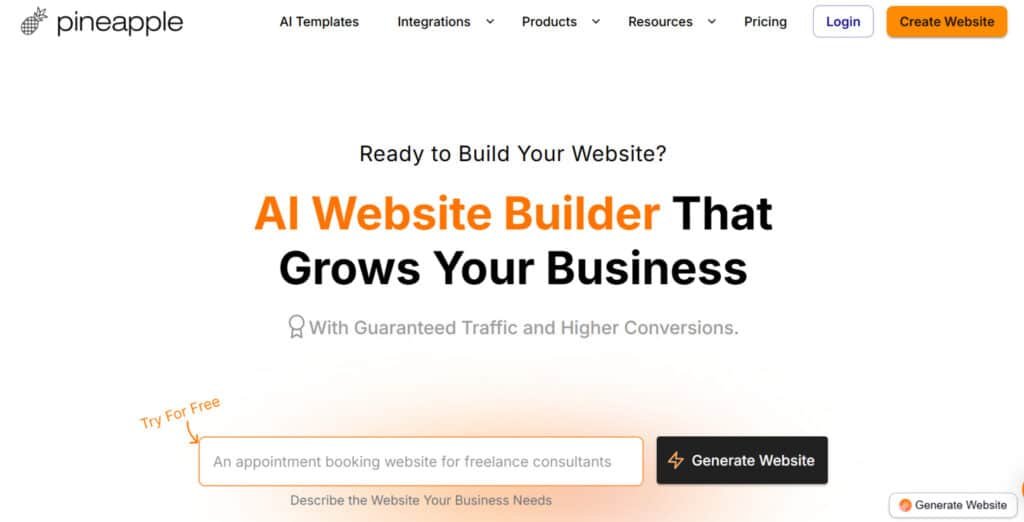
Pineapple Builder revolutionizes how people launch professional websites by generating complete, ready-to-publish websites from a simple text description in under five minutes.
Users type details about their business, target audience, and preferred style, and the AI instantly creates multiple pages with tailored copy, images, layouts, and navigation.
This removes the traditional barriers of design and development, making high-quality websites available to non-technical founders, freelancers, and small teams who need results fast.
Train Your AI Buddy
The platform allows deep customization by training the AI on specific brand guidelines, unique selling points, tone of voice, and customer personas.
Once trained, every future suggestion stays perfectly on-brand, ensuring consistency across all generated websites.
This training process takes only minutes but delivers the impact of having a dedicated branding expert working exclusively on the project.
Drag-and-Drop Editor (Simple Mighty Editor)
After generation, the drag-and-drop editor provides pixel-perfect control with remarkable ease.
Users rearrange sections, swap images, adjust spacing, change fonts, and modify colors without touching code.
The editor includes real-time previews across desktop, tablet, and mobile, guaranteeing the final site looks flawless everywhere while maintaining the speed advantages of built-in hosting.
Responsive & Secure Setup
Every site is 100% responsive out of the box and served through ultra-fast hosting with free SSL certificates.
Connecting a custom domain or subdomain happens in seconds, and the hosting infrastructure automatically optimizes images and code for lightning-fast load times.
This combination of security, speed, and custom domain support gives users professional-grade websites that rank better and convert higher from day one.
2. AI Superpowers: Design, Content, and Smarts on Demand
AI Designer
The AI Designer acts as an on-demand creative director. Users describe desired sections in plain English, and the system instantly generates professionally designed blocks complete with matching typography, spacing, and visual hierarchy.
This gives instant access to design expertise that would otherwise cost hundreds per hour.
AI Writer & Content Gen
High-converting copy is generated automatically in the exact brand voice as the user chooses.
The AI writes hero sections, about pages, service descriptions, and calls-to-action that feel human-written while staying optimized for conversions and search engines.
AI Blogger
Users who want consistent content receive fresh, SEO-optimized blog post drafts every single day.
These posts are structured for featured snippets, include proper headings, and load extremely fast thanks to the optimized hosting.
Publishing a new blog article takes only a few clicks, helping websites build topical authority quickly.
AI SEO Wizard
On autopilot, the tool analyzes every page and suggests or directly applies optimal titles, meta descriptions, alt text, schema markup, and internal linking strategies.
This built-in SEO layer dramatically improves how quickly new websites appear in search results.
AI Translation
Complete sites translate into 99+ languages with one click while preserving layout and design integrity. Global businesses gain instant user reach without managing multiple versions manually.
AI Chatbot
The chatbot self-trains on site content and answers visitor questions 24/7, guiding prospects toward bookings or purchases and reducing bounce rates significantly.
AI Auto-Pilot & Employees
Virtual AI employees (Marketer, Sales, Designer, Developer) handle ongoing tasks like content updates, A/B testing ideas, and performance suggestions. This automation delivers the output of an entire team with exceptional ease and consistency.
3. Growth Boosters: Track, Optimize, and Convert Like a Pro
Analytics Dashboard
GDPR-compliant analytics provide crystal-clear dashboards showing traffic sources, visitor behavior, goal completions, and full conversion funnels.
Users gain clear insights into visitor behavior, allowing data-driven decisions that improve performance.
Membership Tools
Built-in membership functionality lets users create free or paid communities behind simple email-gated walls.
This turns standard websites into recurring-revenue assets and builds highly engaged audiences around niche topics.
Performance Tracking
Goal and funnel tracking highlights drop-off points so owners can fix friction instantly. Combined with the blazing-fast hosting, these insights translate directly into higher rankings and increased earnings from existing traffic.
The entire growth suite works together seamlessly, giving solopreneurs and small teams enterprise-level tools without complexity or extra costs.
4. Templates Library: Jumpstart with Ready-Made Wins
Over twenty industry-specific templates cover local services, freelancing, SaaS, wellness, agencies, photography, consulting, and more. Each template follows proven conversion patterns while remaining fully editable.
Users select a starting point close to their niche, let the AI customize it with their branding and content, then launch within hours instead of weeks.
Templates include pre-built booking systems, pricing tables, testimonial carousels, and contact forms optimized for the target industry.
Because every template runs on the same high-performance hosting and supports instant custom domain connection, users get both speed of launch and long-term reliability in one package.
5. Integrations Hub: Plug In and Power Up
Pineapple Builder offers one-click connections to over twenty popular tools, keeping existing workflows while adding powerful functionality:
- Google Analytics, Google Tag Manager, Meta Pixel – advanced tracking and ad retargeting
- Calendly, Cal – seamless appointment scheduling directly on the site
- Mailchimp – automated email marketing and newsletter growth
- Intercom, Crisp, Customerly – live chat and customer support
- Typeform, Tally Forms, Airtable – custom forms and data collection
- Senja, Famewall, Shoutout, Testimonial.to – automated testimonial collection and display
- Elfsight widgets, Spline 3D scenes – enhanced interactive elements
- Segment, custom code embeds – full flexibility for advanced users
All integrations work instantly with the fast hosting and custom domain setup, maintaining top performance.
Users can run complete marketing, sales, and support systems from one platform with zero speed penalties or complicated setup.
Pricing Plans And Structure
I’ve always believed that transparent pricing separates quality platforms from the rest, and this tool’s approach caught my attention immediately.
The pricing structure is refreshingly straightforward—no hidden fees or surprise charges that often plague website creation tools.
Free Starter Plan: Features and Limitations
The free plan provides genuine functionality rather than just a limited trial. You get up to 3 pages and a Pineapple subdomain, which is perfect for testing the waters. I found it surprisingly capable for basic needs.
This entry-level option includes SSL certificates and 24/7 support. It’s ideal for personal projects or small portfolios where budget constraints are primary.
Basic and Grow Plans: Unlocking Advanced Features
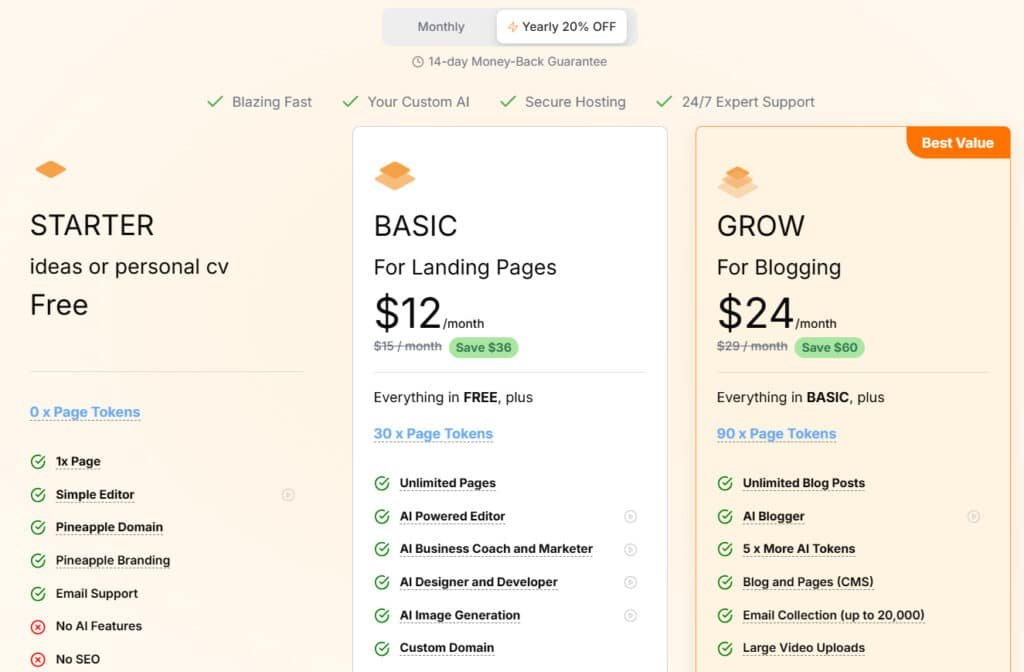
The Basic plan costs $12 monthly ($15 if paid month-to-month) and unlocks unlimited pages with custom domain support. You also get badge removal, widgets, and code embeds—essential for professional business sites.
The Grow plan at $24 monthly adds blogging capabilities, advanced analytics, and enhanced membership features. This pricing tier supports up to 1,000 members, making it suitable for growing communities.
| Feature | Free Starter | Basic Plan | Grow Plan |
|---|---|---|---|
| Monthly Cost | $0 | $12 ($15 monthly) | $24 |
| Page Limit | 3 pages | Unlimited pages | Unlimited pages |
| Custom Domain | Pineapple subdomain | Supported | Supported |
| Advanced Features | Basic functionality | Widgets & code embeds | Blogging & analytics |
All plans include SSL security and round-the-clock support. The pineapple builder offers clear upgrade paths as your business grows.
Pros & Cons of PineApple Builder
No tool is perfect, and understanding both sides of the coin helps you make smarter decisions. I’ve used this platform extensively, and I can give you an honest assessment of where it excels and where it falls short.
Every platform has strengths and weaknesses, and the pineapple builder is no exception. Let me break down what really works and what might give you pause.
Key Advantages: Speed, Simplicity, and AI-Driven Efficiency
The biggest win with this builder is sheer speed. You can have a professional website live in minutes, not days. The AI-powered content generation is impressive—it writes better copy than I could in my first year of blogging!
For new users, the simplicity is a game-changer. No coding skills are required, which removes a major barrier for many small business owners. The platform pineapple builder offers a straightforward path from idea to online presence.
“The speed of creation is what sets it apart—you’re building while others are still deciding on templates.”
Limitations: Customization and Scaling Concerns
Where this website builder struggles is with advanced customization. You get fewer options than traditional platforms. The blogging features feel basic compared to dedicated content management systems.
Scaling can be challenging too. You’ll need higher-tier plans for important integrations. The feature set, while solid, has clear boundaries that growing businesses might eventually hit.
| Strength | Weakness | Impact on Users |
|---|---|---|
| 5-minute website creation | Limited design flexibility | Great for startups, frustrating for designers |
| AI content generation | Basic blogging tools | Saves time on copy, limits content strategy |
| No coding required | Advanced plans needed for integrations | Perfect for beginners, costly for scaling |
Understanding these trade-offs helps you decide if this builder matches your needs. For quick launches, it’s fantastic. For complex projects, you might want to explore alternatives.
Alternatives to PineApple Builder
Let’s face it—you have options. While I’ve been impressed with this platform, no single website builder fits every situation perfectly. That’s why I’ve personally tested the competition to give you perspective.
Understanding the landscape helps you make the right choice for your specific needs. Some tools focus on different strengths than our main subject.
Overview of Competing AI and No-Code Website Builders
If you’re feeling that mix of excitement and overwhelm about getting your website up fast without the usual drag, I totally get it.
The market has exploded with intelligent website builders lately. Butternut AI provides comprehensive business solutions beyond just websites.
PineApple Builder is awesome for quick AI sites with built-in blogs, newsletters, payments, and analytics. In addition, It offers solid AI-assisted building with extensive template libraries — it helps busy folks launch and grow without switching tools.
But if you want more polish, agency features, or rock-bottom pricing, here are solid alternatives many creators love.
Butternut AI
Butternut AI builds full sites in seconds from your description. It adds SEO, images, copy, and a smart lead chatbot automatically. Perfect for small businesses craving speed and instant professionalism — Read Full Review
Readdy AI
Readdy AI lets you chat with the AI to refine stunning layouts. You get pro designs, content, and one-click publish with code export. Great when you want hands-on guidance for beautiful results — Read Full Review
Dorik
Dorik combines AI generation with powerful drag-and-drop editing. It supports blogs, memberships, and clean custom exports. Ideal for creators needing flexibility beyond the initial build — Read Full Review
Hostinger AI Website Builder
Hostinger AI Website Builder includes hosting, e-commerce, and marketing tools like heatmaps. It’s super affordable with no hidden fees. Handy for beginners wanting an all-in-one reliable package — Read Full Review
Mixo
Mixo launches simple landing pages fast for ideas and startups. It captures emails and helps validate concepts quick. Super for early-stage testing without overkill — Read Full Review
CodeDesign.ai
CodeDesign.ai generates SEO-focused sites with custom code options. You can tweak deeply or export freely. Best when you want AI speed plus real control — Read Full Review
Lindo AI
Lindo AI offers white-label building for agencies. It handles client branding, management, and billing smoothly. Perfect if you create sites for others — Read Full Review
SITE123
SITE123 guides you gently with AI text help and a free plan. It’s multilingual and publishes in minutes. Awesome for total newbies who want zero stress — Read Full Review
| Tool | Main Strength | Best For | Biggest Drawback |
|---|---|---|---|
| PineApple Builder | AI blogs + payments + analytics | Growth-focused quick launches | Newer, fewer advanced templates |
| Butternut AI | Seconds-fast + lead chatbot | Small business polish | Less deep customization |
| Readdy AI | Conversational pro refinement | Guided stunning designs | Limited e-commerce depth |
| Dorik | AI + strong drag-and-drop | Blogs & memberships | Higher tiers for unlimited |
| Hostinger AI Builder | Affordable hosting + marketing | Budget all-in-one | Template variety limited |
| Mixo | Rapid landing pages + leads | Startup validation | Simple pages mainly |
| CodeDesign.ai | SEO + custom code export | Balanced control | No built-in agency features |
| Lindo AI | White-label agency tools | Client reselling | Agency-focused |
| SITE123 | Guided + free plan | Absolute beginners | Basic design options |
Each platform has unique features worth considering before committing.
Comparing PineApple Builder with Appy Pie and Other Tools
Appy Pie stands out with its broader range of capabilities—including app-building beyond websites. However, this versatility comes with complexity and can get pricey quickly.
The pineapple builder maintains cleaner focus on business website creation. Appy Pie integrates with 100+ apps and offers robust e-commerce features, which might appeal to some users.
When testing these tools side-by-side, I found the website pineapple builder excels at rapid, professional results for specific business types. Other builder options may better suit complex projects requiring extensive integrations.
Ultimately, your choice depends on whether you prioritize speed and simplicity or maximum customization potential. The right platform matches your technical comfort level and growth plans.
Security, Support, and Integrations
What good is a stunning website if it’s not secure or you can’t get help when you need it?
I’ve found that these behind-the-scenes features make or break your long-term satisfaction. Many users overlook them until something goes wrong.
24/7 Customer Support and Comprehensive Assistance
The pineapple builder provides round-the-clock customer support across all plans—even the free tier. I tested their response times during odd hours and was pleasantly surprised. Their support team understands both technical and business concerns.
You get comprehensive assistance whether you’re troubleshooting or seeking optimization advice. This level of support ensures you’re never stuck with a problem.
Robust Security Measures and Seamless Integrations
Security isn’t an afterthought here. Every website receives automatic SSL certificates for encrypted connections. The platform implements regular security updates and monitoring.
Automatic backups protect your work from unexpected issues. The builder provides peace of mind through these robust measures.
For integrations, the platform connects smoothly with Google Analytics, Facebook Pixel, and payment processors. These integration options help you track performance and accept payments effortlessly.
Email marketing platforms and various widgets create a complete business solution. The integrations work seamlessly without technical hassle.
Case Study & Personal Experience
Numbers on a spec sheet tell one story, but hands-on testing reveals the real capabilities of any tool. I built multiple business websites to give you authentic insights beyond marketing claims.
My Hands-On Experience: Rapid Site Creation with AI
The five-minute website creation claim isn’t exaggeration. I described my consulting business, and the AI generated a complete site in under four minutes. The process felt like magic—business description in, professional website out.
Each generated site had appropriate colors, layouts, and content. The AI even created relevant blog posts and optimized everything for seo. This hands-on experience proved the platform’s core value proposition.
Real-World Outcomes and Lessons Learned
The generated designs were surprisingly polished. However, I learned that detailed business descriptions yield better results. Vague inputs create generic content.
The pineapple builder excels at rapid website building for specific business types. My testing revealed it’s ideal for service-based businesses needing quick online presence. The creation process eliminates decision paralysis that often stalls website projects.
User Experience and Customization
When I first opened the editor, I expected the usual learning curve that comes with most website tools—but this platform surprised me. The interface feels immediately familiar, like you’ve used it before. This intuitive approach makes the entire website creation process feel natural rather than technical.
Intuitive Editing Interface and Mobile-Responsive Templates
The drag-and-drop editor is where this builder truly shines. I tested it from a complete beginner’s perspective, and every action felt logical. Adding elements to pages requires no coding knowledge—just click, drag, and position.
Mobile responsiveness is automatic. Every template adapts perfectly to different screen sizes. The pineapple builder handles this behind the scenes, so you focus on content rather than technical adjustments.
Design Flexibility and Ease of Use for Beginners
For newcomers, the balance between customization options and simplicity is perfect. You get meaningful design control without overwhelming choices. The AI suggests design improvements as you work, acting like a helpful guide.
The platform understands that most users want professional results without becoming web experts. Each customization option serves a clear purpose, eliminating the guesswork that frustrates many beginners.
Whether you’re building simple pages or complex websites, the experience remains consistently smooth. This pineapple builder approach makes professional website creation accessible to every user.
Conclusion
Raamish’s Take
Pineapple Builder is an advanced AI-driven website platform that constructs and optimizes professional business sites in under 5 minutes, trusted by over 50,000 companies for delivering traffic growth and higher conversions through a custom-trained AI team.
Its AI site generation excels by analyzing business descriptions, goals, audience, and tone to create tailored layouts, copy writing, and designs, with seamless editing via a simple drag-and-drop editor or AI commands.
I am particularly impressed with the dedicated AI roles—including CMO for marketing strategies, Designer for visuals, Developer for code, and Blogger for SEO-optimized posts—that function 24/7 like an agency, plus AI image generation and blog CMS for rapid content scaling.
Additional capabilities encompass full integrations (forms, bookings, payments, newsletters via Stripe/PayPal, analytics), automated SEO (tags, metas, social checks), blazing-fast hosting with SSL, custom domains, GDPR-compliant analytics, and responsive AI templates for sectors like SaaS, local services, or portfolios.
Pineapple Builder‘s all-in-one AI ecosystem eliminates web builder’s needs, ensuring scalable, high-performing sites that drive measurable business expansion.
If you’re tired of website projects that drag on for weeks, the solution might be simpler than you think. After extensive testing, I can confidently say the pineapple builder delivers exactly what it promises: professional business sites in minutes, not days.
This platform excels for entrepreneurs who value speed over endless customization. The AI-powered content generation and intuitive editing create a smooth web building experience. At $12 monthly for the Basic plan, it offers remarkable value.
My final recommendation: Try the free Starter plan today. Describe your business, and you’ll have a professional website live within an hour. You’ve got nothing to lose and everything to gain.
Frequently Asked Questions
Is there a free plan available?
Yes, PineApple Builder offers a free starter plan. It’s a great way to test the core features, like the drag-and-drop editor and basic content generation. However, it comes with limitations, such as branding on your site and restricted access to advanced SEO tools.
How does the AI content generation work?
The platform uses AI to help you write copy for your web pages and blog posts. You provide a brief description of what you need, and the tool generates relevant text. I found it speeds up the content creation process significantly, though you’ll still want to review and edit the output for a personal touch.
Can I build a website without any coding knowledge?
Absolutely. The entire platform is designed as a no-code solution. The intuitive editor and pre-built templates mean you can create a professional-looking site through a simple, visual building process. You don’t need any technical background to get started.
What kind of customer support can I expect?
PineApple Builder provides 24/7 customer support through live chat and email. From my experience, their team is responsive and helpful, especially when you’re navigating the initial setup or encountering a technical hiccup.
Are the created websites mobile-responsive?
Yes, all templates and designs are automatically optimized for mobile devices. This is a crucial feature, and the platform handles it well, ensuring your site looks great on any screen size without extra work on your part.
What are the main limitations compared to other website builders?
The primary trade-off is in deep customization. While it’s excellent for speed and simplicity, you might find design flexibility limited if you have very specific, complex layout requirements. It’s perfect for standard business sites but may not suit highly unique projects.
Does it include SEO tools to help my site rank?
Yes, the platform includes built-in SEO optimization tools. These features help you manage meta tags, headings, and other on-page elements. The AI can also suggest improvements for your content to boost search engine visibility.