Ever spent hours wrestling with complicated photo software, only to end up with mediocre results?
I’ve been there. The frustration of needing professional-looking images without the design skills or time is real—especially for business owners and content creators.
That’s why I was excited to test this AI-powered platform that promises to simplify the entire process. After weeks of hands-on use, I can share what really works (and what doesn’t) for everyday users who need stunning visuals fast.
This Pixelcut Review is a practical guide based on real experience, designed to help you decide if this tool fits your workflow. We’ll explore features, pricing, and performance to give you the complete picture.
Ready to see if this solution delivers on its promises?
Let’s dive into what makes this platform stand out in today’s crowded editing landscape.
Key Takeaways: Pixelcut Review
- AI-powered editing eliminates the steep learning curve of traditional software
- Perfect for e-commerce sellers and social media managers needing quick results
- Background removal and enhancement tools work with impressive accuracy
- Mobile-friendly interface makes on-the-go editing surprisingly effective
- Subscription pricing offers good value for frequent users
- Ideal for those who want professional outcomes without design expertise
Pixelcut Review: An Overview

Raamish’s Take
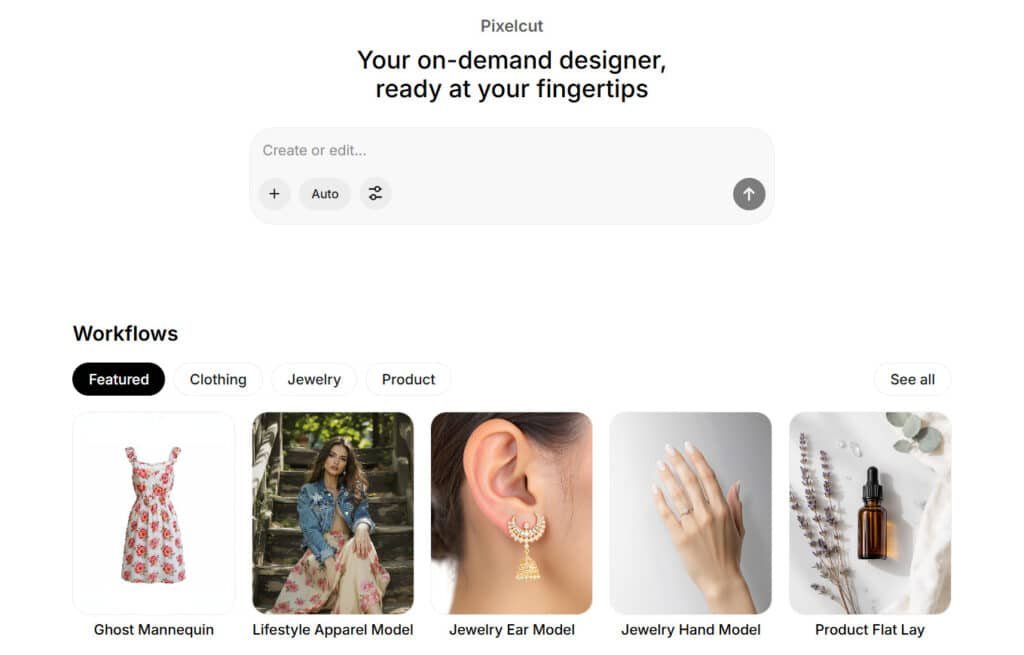
Pixelcut AI is a versatile tool that acts as an on-demand designer for quick photo edits and creations, making professional visuals accessible without advanced skills or software.
Its background remover is a key strength, delivering pixel-perfect cuts in seconds for clean, transparent results ideal for product listings.
I’m really impressed with the retouch and generative fill features, which let you erase objects, expand images in any direction, or fix details with simple prompts, while upscale boosts resolution for sharp, high-quality outputs.
The AI image generator turns text or reference photos into realistic images using models like Flux or Veo, and the video generator creates clips from prompts or stills in minutes via Sora or Runway. Specialized agents like Ghost Mannequin for apparel, Jewelry Hand Model, or Product Flat Lay automate styled shots, with batch editing for efficiency.
Collaboration shines through shared folders for team riffing and organization.
Pixelcut AI‘s speed and all-in-one workspace save hours on marketing assets, turning ideas into polished content effortlessly.
Introduction to Pixelcut
The birth of this editing platform came from recognizing how intimidating traditional design software can be for regular users.
I’ve watched friends struggle with complex interfaces when all they needed was a clean product photo. That frustration sparked the creation of something genuinely helpful.
Background & Company Origins
Dominique Yahyavi founded Pixelcut in 2021 with a clear mission: make professional editing accessible to everyone. His vision wasn’t about competing with Photoshop’s endless features. Instead, he focused on removing technical barriers that keep small business owners from creating great visuals.
The company’s goal resonates with my own experience. They want to help businesses and creators produce stunning images in minutes instead of hours. No design degree required—just a need for quality visuals.
Pixelcut in the Current AI Landscape
In the current digital landscape’s crowded AI editing space, this platform stands out by prioritizing simplicity over complexity. While legacy tools offer comprehensive control, Pixelcut delivers speed and automation. It’s built for people who need results fast, not endless customization options.
I see e-commerce sellers on Etsy and Shopify adopting these editing tools daily. Social media managers and content creators appreciate the cross-device workflow. You can start editing on your phone during lunch and finish on your desktop later.
The platform’s growing user base speaks volumes. While it may not have celebrity endorsements, real-world performance is earning trust across creator communities. This represents a new generation of tools built for practical needs, not professional egos.
What is Pixelcut?
The gap between amateur snapshots and professional-grade visuals has never been easier to bridge. This platform represents a fundamental shift in how we approach photo editing—prioritizing automation over manual control.
I’ve found that the software handles the technical heavy lifting while you focus on creative decisions.
The machine learning models analyze uploaded images with impressive accuracy, identifying subjects and detecting edges even in complex scenarios like hair or transparent objects.
“The best technology disappears into the background, letting creativity take center stage.”
The workflow is beautifully simple: upload your image through the web browser or mobile app, select your edit (background removal, object erasure, template application), and watch the AI process it in seconds. You can then download or share directly to social platforms.
How the Tool Works
This photo editor uses advanced AI integrations to automate tasks that traditionally required multiple steps. The technology understands image composition, allowing it to handle everything from simple product shots to complex images with fine details.
Benefits for Creators and Businesses
Different users gain distinct advantages from this approach. The table below shows how specific groups benefit:
| User Type | Primary Benefit | Real-World Impact |
|---|---|---|
| E-commerce Sellers | Transforms product photos into catalog-ready images | Higher conversion rates through professional presentation |
| Content Creators | Eliminates design bottlenecks | Faster content production for social media algorithms |
| Small Business Owners | Designer-quality results at fraction of cost | Professional visual marketing on tight budgets |
For those who value speed and convenience over granular control, this tool delivers “good enough to great” results in minutes rather than hours. It’s perfect when you need quality images fast without the learning curve.
Complete Features of Pixelcut
After testing numerous AI editing tools, I discovered that genuine innovation lies in how features actually perform rather than just being labeled ‘AI-powered’.
The platform’s standout capabilities delivered impressive results during my hands-on evaluation.
1. Core Photo Editing Tools – Fix It Fast
This feature group serves as the foundation for efficient photo editing in Pixelcut’s photo editor. It delivers quick enhancements to raw images, making professional results accessible.
Users benefit from streamlined workflows that save time on daily tasks. The tools integrate seamlessly, supporting various image types for consistent outputs.
1.1 AI-Powered Background Remover
The background remover processes complex removals with precision across product shots and portraits. It detects context, handling fine details like hair against matching backgrounds. Operations finish in 3-5 seconds, far outperforming manual methods.
This feature aids sellers in creating isolated visuals for listings. Reviews on the website highlight its reliability for e-commerce. Readers gain faster photo cleanup, improving catalog quality with minimal effort.
1.2 Magic Eraser
Eraser eliminates objects like logos or blemishes, producing natural fills. It pairs with AI Expand for border extensions and mockup creation.
This extends photo editing versatility beyond basics. Content makers remove distractions quickly, enhancing photos for social platforms. The editor ensures artifact-free results, as confirmed in user reviews.
1.3 Retouch
Retouch applies subtle fixes to skin, eyes, and spots while preserving authenticity. It avoids unnatural effects, ideal for portrait work. Photographers achieve client-ready photos rapidly. This photo editor tool boosts efficiency in professional sessions.
1.4 Image Upscaler
Upscaler increases resolution up to 4x without detail loss. It sharpens low-quality captures for print or web use. Marketers prepare high-res photo assets easily, supporting ad campaigns.
1.5 Image Expander
Expander extends images directionally without distortions. It adapts crops to fit templates, reducing rework in photo editing.
1.6 AI Recolor
Recolor changes object colors realistically, maintaining textures. Brands create variations for photos, ensuring branding consistency.
2. Batch Editing and Ready-Made Templates – Scale Your Workflow
This feature set scales photo editing for volume, using batch processes and templates. It removes barriers for users lacking design expertise. Platform-specific options optimize content for social and sales channels.
2.1 Batch Editing
Batch applies uniform edits to multiple photos, like 12 images in minutes. It cuts processing time significantly. Operators manage inventories with data-consistent results. This aids high-volume photo handling in e-commerce.
2.2 Templates Library
Library supplies designs for Instagram, Etsy, and Pinterest. Professional starters prevent overload, enabling fast tweaks. Creators build posts efficiently, leveraging photo editor assets for better reach.
3. AI Generation Magic – Create from Scratch
Generator functions produce new content via prompts in the photo editor. Advanced models ensure quality, filling creative needs without starting assets.
3.1 Image Generator
Generator creates realistic images from text or references, leveraging models like Imagen 3 and Flux Kontext Pro. It delivers outputs in seconds, helping designers prototype visuals. Users generate custom photos for marketing, filling gaps in stock libraries with data-accurate results.
3.2 Video Generator
This generator converts text or images into short clips using models like Veo 3.1 and Runway Gen3a. It renders in minutes, up to 5 seconds per credit. Video marketers create dynamic ads, enhancing engagement beyond static photos.
3.3 Generative Fill
Fill selects areas and adds described elements, blending seamlessly. It modifies existing photos creatively, useful for ad variations.
3.4 AI Shadows
Shadows add natural drops to products, making flat photos appear three-dimensional. It elevates product presentations professionally.
3.5 AI Backgrounds
Backgrounds generation suggests or creates custom scenes, placing subjects in lifestyle settings. It transforms basic photos into compelling stories.
4. E-Commerce & Product Boosters – Sell Smarter
These tools target online sellers, optimizing photo visuals for conversions with data-backed suggestions.
4.1 Ghost Mannequin
Mannequin removes clothing forms for invisible-model displays. It produces clean hangs, improving apparel listings.
4.2 Lifestyle Apparel Model
Models dress AI figures in user gear within real scenes. It skips photoshoots, saving costs for shops.
4.3 Jewelry Models (Ear/Hand)
Models showcase items on virtual parts, highlighting details. Jewelers display products accurately.
4.4 Product Flat Lay
Lay arranges items in styled compositions with suggestions. It maximizes appeal based on sales data.
4.5 Virtual Try-On
Try-on maps clothes onto models for customer previews. It reduces returns by enabling virtual fits.
4.6 Composition Suggestions
Suggestions analyze shots and recommend angles. It boosts sales through optimized photo layouts.
5. Collaboration & Workspace Vibes – Team Up Easy
Workspace support facilitates team photo editing with shared access.
5.1 Shared Folders
Folders create team spaces for real-time edits and generations. Agencies collaborate without file transfers.
5.2 AI Image Editing Workspace
Dashboard centralizes tools for generation and organization. 2025 Updates have improved flow for group use.
5.3 Team Seats
Seats add up to 20 users with shared credits. Teams scale editor access efficiently.
6. Design Extras – Beyond Basic Edits
Extras enhance content creation in the photo editor.
6.1 Story & Collage Maker
Maker builds stories or boards with drag-drop and AI enhancements. Creators produce platform-ready content quickly.
6.2 Export Options
Exports reach 4K without watermarks on paid plans. It supports multiple formats for versatile use.
6.3 Agent v3 (Current Update)
Agent handles complex prompts with faster accuracy. It refines generator outputs.
7. Tech Under the Hood – Models & Integrations
Underlying tech powers reliable performance with broad support.
7.1 Image Models
Models include Veo 3.1 and Luma Photon for high-quality generations. They ensure consistent photo results.
7.2 Video Models
Models like Pixverse v3.5 optimize credit use. They deliver efficient video from generator prompts.
7.3 Integrations
APIs provide background remover and upscaler access for developers. Web, iOS, and Android support extends to brands.
The website hosts reviews praising integration ease. Pixelcut photo tools integrate seamlessly, aiding custom workflows with data security.
| Feature | Primary Function | Time Saved |
| Background Remover | Automatic background removal | 15-20 minutes per image |
| Batch Editing | Process multiple photos simultaneously | 80% faster workflow |
| Magic Eraser | Remove objects and blemishes | Seconds versus manual editing |
Pricing Plans of Pixelcut
Let’s be honest – most of us check the pricing page before we even download the free trial. I appreciate when companies are transparent about costs upfront, and this platform delivers exactly that.
Free Plan
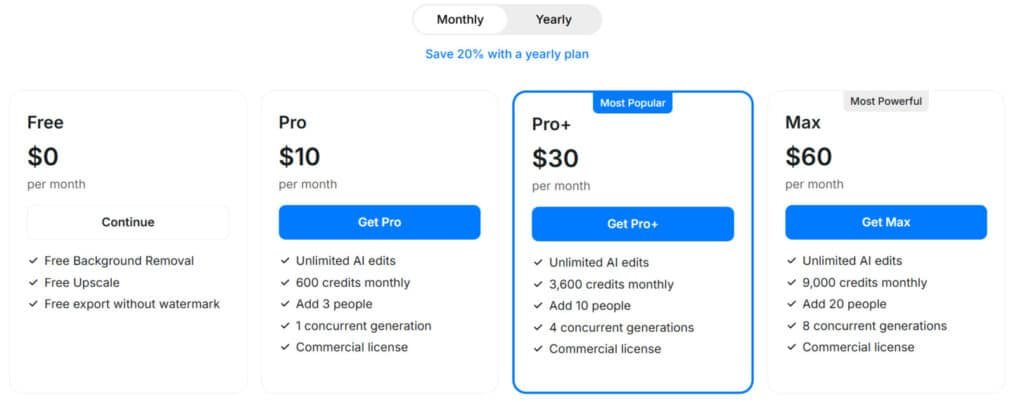
$0 monthly or annually – no cost to start.
Unlimited basics like background removal, upscale, and watermark-free exports. Great for testing the app waters.
Pro Plan
$10 monthly or $96 annually (20% off).
Unlimited AI edits, 600 credits/month for advanced gens, add 3 users, 1 concurrent job, commercial license. Top pick for solo creators – boosts your subscription value fast.
Pro+ Plan
$30 monthly or $288 annually (20% off).
Unlimited AI edits, 3,600 credits/month, add 10 users, 4 concurrent jobs, commercial license. Ideal for teams scaling app workflows.
Max Plan
$60 monthly or $576 annually (20% off).
Unlimited AI edits, 9,000 credits/month, add 20 users, 8 concurrent jobs, commercial license. Beast mode for big ops.
| Plan | Monthly Price | Annual Price | Key Features |
| Free | $0 | $0 | Basics: Removal, upscale |
| Pro | $10 | $96 | 600 credits, 3 users |
| Pro+ | $30 | $288 | 3,600 credits, 10 users |
| Max | $60 | $576 | 9,000 credits, 20 users |
Pros & Cons of Pixelcut
No tool is a perfect fit for every user, and understanding both strengths and weaknesses is crucial before committing. I’ve found this platform excels in specific scenarios while having limitations in others.
Advantages of Using Pixelcut
The biggest win is the steep learning curve—or rather, the lack of one. I was creating polished edits within minutes of signing up. The interface feels intuitive, not intimidating.
Speed is another major advantage. Background removal takes seconds instead of the 20 minutes I’d spend in Photoshop. Batch processing handles dozens of images simultaneously, saving incredible time.
For small business users, the cost-effectiveness is game-changing. It’s a fraction of Adobe subscriptions or freelance designer fees. The cross-device flexibility let me edit on my phone, refine on my tablet, and export from my laptop.
Potential Drawbacks to Consider
Complex images with intricate backgrounds sometimes required manual cleanup. The AI struggled with fine details like hair against similar-colored walls.
If you need precise control over every aspect of your editing, this tool will feel restrictive. It’s designed for speed over granular customization.
Practical limitations include requiring a stable internet connection and basic video features. The free version’s ads can interrupt workflow during extended sessions.
These drawbacks won’t matter if you need quick product photos. But for those requiring different capabilities, several alternatives approach image editing from different angles.
Alternatives to Pixelcut
I’ve personally put dozens of competing photo editors through their paces to understand where each one shines. These comparisons come from real hands-on experience rather than just reading spec sheets.
Popular Competing Products
Editing photos & visuals content doesn’t have to be complicated. Trust me, finding tools that handle cleanups, enhancements, and creative generation makes everything smoother.
Pixelcut AI is solid for fast background removal and product tweaks. But these tools go deeper into AI image & visuals editing, with smarter enhancements and creative options.
Here’s an easy rundown.
Phot.AI
Phot.AI packs tools for retouching, object removal, and generative fills. Handles full photo makeovers quick. Great for creators needing pro results without complex software – Read Full Review
Claid AI
Claid shines at product photo fixes—upscaling, lighting, and color corrections. Bulk processing for catalogs. Ideal for online sellers wanting consistent, high-quality visuals – Read Full Review
Flair AI
Flair lets you drag-and-drop scenes for branded product shots. Generates on-model images fast. Suits marketers building ads or lifestyle pics easily – Read Full Review
Orshot
Orshot automates visual content like personalized images and PDFs. API-friendly for workflows. Perfect for marketing teams scaling custom graphics – Read Full Review
Pika.style
Pika.style focuses on style transfers and creative image tweaks. Adds artistic flair quick. Good for designers experimenting with unique looks – Read Full Review
LetsEnhance
LetsEnhance upsizes images while fixing noise and details. Strong face and texture recovery. Best for reviving old photos or sharpening low-res shots – Read Full Review
| Tool | Key Focus | Best For | Pricing Starts |
|---|---|---|---|
| Phot.AI | Retouching & generation | Full photo makeovers | $19.99/month |
| Claid AI | Product enhancements | E-commerce catalogs | $9/month |
| Flair AI | Branded scenes | Ads & lifestyle shots | $8/month |
| Orshot | Automated visuals | Marketing automation | $25/month |
| Pika.style | Style transfers | Creative experiments | $8/month |
| LetsEnhance | Upscaling & fixes | Photo restoration | $9/month |
Key Comparison Highlights
When comparing these tools, clear patterns emerge. The pixelcut photo editor wins on ease of use and speed for quick product edits. Photoshop dominates for professional control but requires significant learning.
For background removal specifically, Remove.bg is fastest for single images. Photoroom handles bulk product editing better. This platform strikes a balance between specialization and versatility.
My personal workflow uses multiple tools. I reach for different editors depending on the project. No single solution does everything perfectly.
Case Study & Personal Experience
I hit my breaking point with product photography when a customer’s honest feedback about my amateurish images forced me to find a real solution.
My vintage pin business was struggling because my kitchen-table product shots looked anything but professional.
My Personal Journey with Pixelcut
That first experience was transformative. I uploaded my messiest pin photos with cluttered kitchen background and watched the AI work its magic. The pixelcut background remover cleaned edges around metal pin backs in seconds.
The relief was immediate. Within an hour, I processed 40 backlogged images—a task that would have taken me a weekend manually. The entire process felt like finally having the design assistant I couldn’t afford.
Real-World Results and Workflow Impact
My editing time per product dropped from 20 minutes to just 2-3 minutes. This workflow improvement meant I could list new inventory 5-7 times faster.
The business impact was real. My conversion rate improved noticeably after implementing professional-looking background-free photos. Even complex edits became manageable with the refine tool for tricky edges.
This tool transformed my entire creative workflow, turning photo editing from a bottleneck into a competitive advantage.
Pixelcut and the Future of AI in Image Editing
What struck me most during my testing was how the platform anticipates where creative technology is moving, not just where it’s been. Understanding these trends helps you make smarter long-term decisions about which tools deserve your investment.
Emerging Trends in AI-Driven Editing
We’re shifting from AI as enhancement to AI as co-creator. Tools like Pixelcut now generate entire content from text prompts—not just fix existing image files. This changes the creative process from executing your vision to exploring possibilities with AI assistance.
The integration with Google’s Veo 3 model shows a key trend: platforms leveraging best-in-class AI rather than building everything in-house. This “platform of platforms” approach means users get cutting-edge processing power without waiting for proprietary development.
The democratization effect is real. Professional-quality visual content is becoming accessible to anyone with a smartphone. This eliminates the skill gap that once separated professional designers from everyday creators.
Seamless Cross-Device Integration and Innovation
This isn’t just convenience—it’s a fundamental workflow shift. I photographed products on my phone, started editing during my commute, refined on my tablet, and exported from my laptop. Everything synced automatically through cloud storage.
The app demonstrates innovation in real-time processing. Background removal happens as you shoot, representing “invisible AI” that enhances image creation rather than requiring separate editing steps.
For social media posts, the specialization is crucial. The platform understands platform-specific requirements, optimizing content for how it will actually be used. This makes the entire pipeline more efficient for creators and media professionals.
Conclusion
Raamish’s Take
Pixelcut AI is a versatile tool that acts as an on-demand designer for quick photo edits and creations, making professional visuals accessible without advanced skills or software.
Its background remover is a key strength, delivering pixel-perfect cuts in seconds for clean, transparent results ideal for product listings.
I’m really impressed with the retouch and generative fill features, which let you erase objects, expand images in any direction, or fix details with simple prompts, while upscale boosts resolution for sharp, high-quality outputs.
The AI image generator turns text or reference photos into realistic images using models like Flux or Veo, and the video generator creates clips from prompts or stills in minutes via Sora or Runway. Specialized agents like Ghost Mannequin for apparel, Jewelry Hand Model, or Product Flat Lay automate styled shots, with batch editing for efficiency.
Collaboration shines through shared folders for team riffing and organization.
Pixelcut AI‘s speed and all-in-one workspace save hours on marketing assets, turning ideas into polished content effortlessly.
The real question most readers want answered is simple: does this tool actually solve the photo editing frustrations you’re experiencing?
After extensive testing, my answer is a qualified yes for most creators and business owners.
The AI background removal works remarkably well, saving hours on product photos. Batch processing and ready-made templates streamline your entire workflow. This Pixelcut review confirms it’s perfect for e-commerce sellers and social media managers.
Honestly, it struggles with very complex images where subjects blend with backgrounds. Professional photographers needing pixel-level control should look elsewhere.
Start with the free version to test the app with your own images. If you regularly create content, the Pro subscription pays for itself quickly.
This platform has become my first choice for quick editing tasks. The features deliver professional results without the steep learning curve. Try the free tool today—your most challenging photo editing problems might just disappear.
Frequently Asked Questions
Is there a steep learning curve to using Pixelcut?
I found the platform surprisingly intuitive. The interface is clean, and core actions like background removal are one-click simple. While advanced features like shadow creation have a slight learning curve, it’s nowhere near the complexity of traditional editing software. You can start creating polished images in minutes.
How good is the AI background remover tool for complex subjects like hair?
The background remover is impressive, but it’s not flawless. For product shots against a clean background, it’s nearly perfect. With complex edges like fine hair, you might need to make minor manual touch-ups. For most social media content, however, the results are more than sufficient and save a tremendous amount of time.
Can I use Pixelcut to create content for different social media platforms?
Absolutely. This is one of its biggest strengths. The app includes a library of ready-made templates perfectly sized for Instagram posts, Stories, TikTok, and more. You can batch edit product shots to maintain a consistent brand look across all your channels, streamlining your entire content creation workflow.
What are the main limitations of the free version?
The free plan is great for testing the core features. The main limitations are a cap on the number of high-resolution downloads per day and restricted access to the full template library and premium editing tools like advanced shadows. For casual users, it’s sufficient, but serious creators will likely need the Pro plan for unlimited processing.
How does Pixelcut compare to other photo editors like Canva or Adobe Express?
Pixelcut excels in AI-powered editing, specifically for product photography and object isolation. While Canva offers broader design tools, Pixelcut’s AI background remover and magic eraser are often faster and more accurate for those specific tasks. It’s a specialized tool that complements rather than replaces all-in-one platforms, depending on your primary needs.
Does the image quality hold up after editing and background removal?
Yes, the image processing is high quality. When you download your edits, especially with a Pro subscription, the resolution remains sharp. This is crucial for professional-looking social media posts and product listings where clarity can impact engagement and sales.