Ever feel like digital advertising is a full-time job you didn’t sign up for? I’ve been there. Creating effective ads can feel like trying to solve a puzzle with missing pieces—especially when you’re juggling multiple roles.
The traditional process involves endless steps: brainstorming ideas, writing compelling copy, designing eye-catching visuals, and managing campaigns. It’s enough to make any small business owner or solopreneur want to pull their hair out. Without a dedicated marketing team, the whole process becomes overwhelming fast.
Here’s the kicker: businesses typically make double their money back on Google ads—earning $2 for every $1 spent. That’s why I got excited when I discovered QuickAds. This AI-powered platform tackles these pain points head-on by automating the entire ad creation process.
After testing this tool extensively, I’m ready to share my honest findings. Let’s dive into whether this tool lives up to the hype and can truly transform your advertising game.
Key Takeaways: Quickads Review
- QuickAds uses artificial intelligence to streamline ad creation from start to finish
- The platform generates both visual content and compelling copy automatically
- Small businesses can achieve professional-quality ads without design expertise
- Google Ads typically generate $2 return for every $1 spent when executed properly
- The tool includes competitor analysis features to help you stay ahead
- This review covers real-world performance based on hands-on testing
- We’ll explore who benefits most from this AI advertising solution
Quickads Review: An Overview
Introduction to Quickads Review
When I first encountered the crowded field of AI advertising platforms, I was skeptical about yet another solution claiming to simplify everything. The AI marketing space exploded in 2024-2025, with tools promising to democratize professional capabilities for businesses that couldn’t afford agencies.
Context in the Current AI Landscape
This platform entered the competitive scene in August 2023. Founder Nitin Mahajan built it specifically for small business owners and marketing teams. His mission was clear: help brands create professional campaigns without specialized skills.
The results speak for themselves. Over 401,000 ads have been generated through this tool. Brands report a staggering 240% increase in ROAS. That’s real-world effectiveness you can’t ignore.
Background and Company Origins
Nitin Mahajan launched Quickads to address a genuine pain point. Small brands and startups were struggling with ad creation. They needed quality content but lacked resources for expensive photoshoots and design work.
The platform‘s rapid adoption shows how well it solves these challenges. It eliminates manual brainstorming and complex design tasks. This generation of AI tools is changing how businesses approach marketing.
Who Uses Quickads and Why
Primary users include solopreneurs overwhelmed by ad creation. Small marketing teams juggling multiple clients also benefit. E-commerce businesses needing constant product promotion find it invaluable.
Startups with limited budgets choose this solution because they can’t hire full creative teams. The content generation capabilities allow them to compete with larger players. Rising ad costs make efficient campaigns essential.
| User Type | Primary Need | Key Benefit |
|---|---|---|
| Solopreneurs | Time-saving ad creation | Professional quality without design skills |
| Marketing Agencies | Scalable client work | Faster campaign deployment |
| E-commerce Stores | Constant fresh content | Automated product promotion |
| Startups | Budget-friendly solutions | Competitive ads without large teams |
These users select the platform because it addresses today’s marketing challenges. Increased competition demands more ads produced faster. This review will explore how well it delivers for different business types.
What is Quickads?
What if you could replace your entire creative team with artificial intelligence that works 24/7? That’s essentially what this platform delivers. It’s an AI-powered ad generation tool that handles everything from analysis to deployment.
The system consolidates multiple marketing roles into one accessible interface. You get copywriting, design, video editing, and media buying capabilities without needing specialized skills.
Inner Workings and Technology
The workflow is surprisingly straightforward. You input basic product details—either through a URL or manual entry. Then select your preferences for language and target platforms.
The AI then springs into action. It fetches relevant images, generates compelling copy, and creates professional visuals. The entire content creation process happens in minutes instead of days.
Core capabilities include static image ads for social media, video ads with AI avatars, and virtual product photoshoots. The tool also clones competitor ads and analyzes performance before launch.
Key Benefits for Users
Solopreneurs can create professional ads without hiring freelancers. Small teams scale their output without expanding headcount. Agencies service more clients with faster turnaround times.
Instead of spending hours on a single creative or hundreds on designers, you generate multiple variations quickly. This allows for rapid testing and iteration based on real performance data.
The platform essentially functions as your virtual marketing department. It handles competitor research through its massive ad database and optimizes campaigns through built-in analytics.
Quickads in the AI Landscape
With so many AI ad tools promising to revolutionize marketing, I wondered what actually sets one platform apart from the rest. The market is flooded with options like Canva, AdCreative.ai, and Creatify—each claiming to simplify ad creation.
Integration within a Crowded Market
While most competitors focus solely on generation, this website takes a comprehensive approach. It combines research, creation, optimization, and deployment into one seamless ecosystem.
For small business owners, this integration means you’re not juggling multiple subscriptions. The tool handles everything from competitor analysis to final campaign deployment.
Competitive Edge and Unique Selling Points
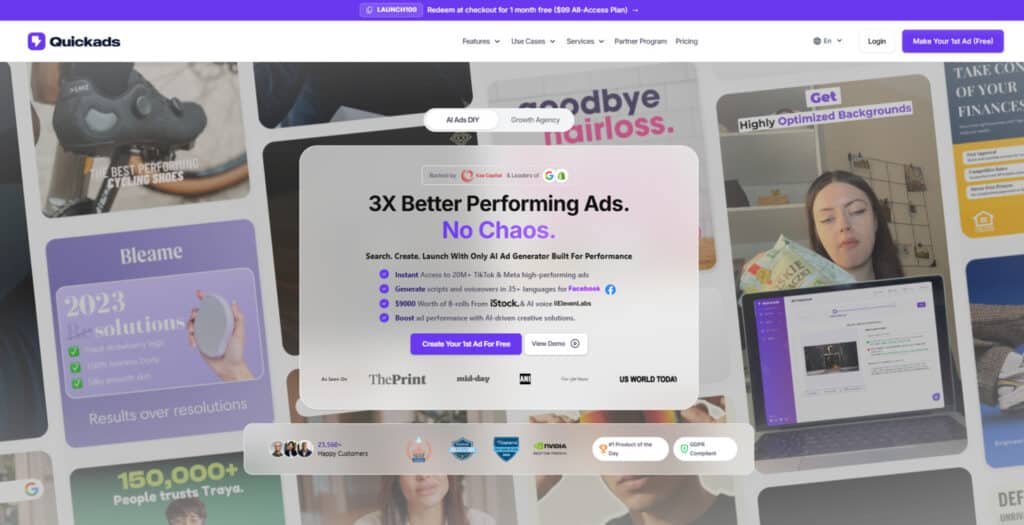
The massive ad library truly differentiates this solution. With over 10 million ads updated daily from TikTok, YouTube, and Meta, users can research what’s working before creating anything.
The competitive spying feature lets you analyze rival campaigns and clone successful approaches. This gives small brands access to strategies typically reserved for larger companies.
Ad scoring is another game-changer. The system evaluates your creatives before spending money—assessing hooks, CTAs, and audience engagement to prevent costly mistakes.
For agencies and business users, having research tools, creation capabilities, and analytics in one platform provides exceptional value. The streamlined workflow from concept to live campaign saves significant time.
Key Features & Capabilities of Quickads
What separates adequate AI tools from exceptional ones often comes down to their foundational feature set. After testing this platform extensively, I identified several capabilities that truly stand out for advertisers needing scalable solutions.
The system goes beyond basic design tools with features specifically built for high-volume content creation. You get professional-grade ads without the usual creative bottlenecks.
1. Ads Discovery and Research
This feature delivers extensive tools for exploring advertising trends, enabling marketers to make informed decisions. Businesses searching for competitive intelligence can rely on this feature to uncover high-performing strategies that improve campaign outcomes.
Ad Inspiration Library
The platform provides access to a vast library containing over 20 million proven ads from TikTok, Meta, and other sources. Users can apply advanced filters by format, country, theme, or use case, which helps identify elements that resonate with customer audiences and drive conversions for any company.
AI-Powered Ad Analysis
Artificial intelligence automatically scores ads for predicted performance and tags key themes such as urgency or emotional appeal. This feature generates similar scripts and variations, allowing a company to refine ideas quickly and elevate overall campaign rating through data-backed adjustments.
Competitor Spying
Tools within this feature enable monitoring of rival campaigns, extracting trend intelligence and category-specific insights. Marketers can benchmark their efforts against competitors, discover winning hooks, and adapt strategies—often through cloning successful creatives—that enhance customer acquisition and retention.
Versatile Ad Templates and Cloning Tools
The platform offers over 10,000 high-converting templates as starting points, with cloning functionality to analyze and adapt top-performing competitor creatives. This feature provides market intelligence, helping a company learn from proven ideas and scale effective formats efficiently.
2. Creative Generation and Design
Quickads stands out with robust feature capabilities for producing professional visuals at scale. Companies can generate tailored content that aligns with customer preferences, increasing engagement across social media channels.
Innovative Ad Generation Process
Users input a product URL or brief description, and the AI fetches details, suggests relevant images, and writes compelling text copy. This automated process creates multiple ad variations rapidly, supporting A/B testing and enabling quick production of platform-ready creatives for any company.
Image Ads Generation
Users convert text prompts, product photos, or concepts into static image ads using high-converting templates. The feature includes the advanced Nano Banana Pro model, delivering superior-quality images that help achieve higher click-through rates and improved campaign rating.
Video Ads Generation
This feature allows creation of short-form videos optimized for TikTok, YouTube Shorts, and Instagram Reels. The generator incorporates transitions, text overlays, effects, and B-roll, enabling efficient production of engaging videos that capture attention quickly.
AI Video and Voice Tools
Generate high-definition videos with durations up to several minutes, supported by over 100 lifelike avatars and premium voice capabilities through Eleven Labs in 35+ languages. This feature ensures authentic lip-sync and automated editing, making it easier to reach global customer segments effectively.
Virtual Product Photoshoots
Upload simple product shots to produce professional visuals without traditional photography setups. This feature generates multiple variations, saving time and costs while providing studio-quality results for e-commerce listings.
Virtual Fashion Photoshoots
Specialized for apparel brands, users describe model characteristics to create diverse, customizable visuals. The feature accelerates fashion content production and supports varied representations for customer appeal.
Brand Kits and Guidelines
Save customizable kits containing logos, colors, and fonts, automatically applied for consistency. This feature maintains brand alignment across creatives and supports team collaboration.
Promo Video Ads and Social Media Post Generator
Convert product links directly into revenue-focused videos or automate posts and Reels. The generator includes image cleanup tools, streamlining content for social media platforms.
UGC Content Integration and Copyright-Free Assets
Incorporate authentic user-generated styles alongside royalty-free assets from Getty Images. This feature ensures compliance and enhances credibility.
3. Optimization and Analytics
These advanced feature tools focus on testing and refining creatives to maximize return on ad spend. Marketers can use them to identify top-performing elements and improve overall campaign rating.
Performance Testing
AI-driven A/B testing evaluates variations and scores creatives based on predicted engagement and ROAS. This feature guides resource allocation toward high-potential ideas, delivering measurable improvements for any company.
Brand Compliance Scoring
Automated evaluation ensures all visuals and text adhere to brand guidelines and regulatory standards. The feature reduces compliance risks and maintains professional quality.
AI Agents
Autonomous agents schedule tasks, analyze performance, and generate new creatives. This feature streamlines operations, freeing teams to concentrate on strategy.
Insights and Reporting
Weekly reports highlight trends, patterns, and impact metrics, including ROAS calculators. Users gain actionable insights that refine strategies and elevate campaign rating.
4. Publishing and Management
This feature category simplifies deployment and campaign oversight. Professionals can launch and manage ads efficiently across multiple platforms.
One-Click Deployment
Schedule and publish creatives directly to YouTube, TikTok, Meta, Google, or Shopify. This feature eliminates manual uploads, accelerating time-to-market.
Campaign Management
Automate audience targeting, copy, graphics, and optimizations. Higher tiers support running full campaigns with substantial budgets.
Collaborative Scheduling
A unified dashboard enables team-based management of ads and social media content. The feature supports refinements and cross-platform scaling.
No Watermark Exports
Download assets without branding in licensed plans. This feature ensures professional, ready-to-use files.
5. Additional Capabilities
Quickads extends its core feature set with versatile tools that enhance flexibility and scalability. These capabilities support long-term growth and international campaigns.
Credits System
Link a Meta account to earn credits for generations, with unlimited in premium plans. This feature allows sustained use without interruptions.
Multilingual and Customizable Options
Generate text, scripts, and voice in over 35 languages, creating relevant messaging beyond direct translations. Combined with automatic brand kit application, this feature ensures culturally appropriate content and consistency for diverse customer markets worldwide.
Workflow Automation
End-to-end automation reduces manual effort, allowing ads to be created in seconds. This feature delivers exceptional efficiency for high-volume production.
Enterprise Customizations
White-label options, custom dashboards, and integrations cater to agencies. This feature provides tailored access to advanced tools, enabling multi-brand management and elevated operations for any company.
| Feature Category | Core Capability | User Benefit |
| Ad Generation | AI-driven from URLs/descriptions | Rapid content creation |
| Competitor Analysis | Ad cloning and performance insights | Market-informed strategies |
| Brand Consistency | Automated logo and palette application | Professional brand image |
| Multilingual Support | 30+ languages with cultural adaptation | Global campaign readiness |
These features work together to create a streamlined workflow. You can generate product ads from various sources while maintaining brand consistency across all creatives.
Image Ads and Video Ads Creation
I was genuinely surprised by how realistic the virtual try-on feature looked when I tested it with my own product images. The platform offers five distinct tools for creating image ads and another five for video ads—each serving different marketing needs.
AI-Driven Image and Video Tools
The AI Ad Creation process is remarkably simple. You paste a product URL, select your preferences, and the system fetches product information to generate complete ads in seconds. While the prompt-based editing can feel limiting for precise control, the speed is impressive.
For video ads, you get five creation methods including Direct Response Videos with AI avatars and Blog to Video conversion. The HD quality exports include accurate auto-generated captions that align with your brand voice.
| Image Ad Type | Primary Function | Best For |
|---|---|---|
| AI Ad Creation | Fully automated from URL | Rapid campaign launches |
| Fashion Photoshoot | Virtual try-on technology | Apparel and accessories |
| Product Photoshoot | AI-generated product images | E-commerce listings |
| Social Media Posts | Platform-optimized formats | Social media campaigns |
Features like Virtual Try-on and Product Photoshoots
The Virtual Try-on feature eliminates expensive photoshoots. Upload your garment, choose from AI models, and get four realistic variations. I found the results surprisingly accurate during testing.
The product photoshoot capability automatically detects items and places them in customized backgrounds with adjustable lighting—perfect for creating professional visuals without a studio.
While the video creation has a learning curve, the trade-off of speed versus customization works well for non-designers. The platform delivers solid content creation capabilities that address real business challenges.
Optimization, Analytics, and Scheduling
Creating ads is one thing, but knowing which ones will actually perform is where the real magic happens. The analytics suite acts as the platform’s analytical brain—helping you create better ads before spending money and improving performance after launch.
Performance Metrics and Ad Scoring
The ad scoring system provides a comprehensive rating before deployment. It analyzes your creatives across multiple dimensions to predict potential results.
| Metric Category | What It Measures | Impact on Performance |
|---|---|---|
| Creative Score | Visual appeal and design quality | Initial audience engagement |
| Performance Score | Historical success patterns | Predicted conversion rates |
| Hook Effectiveness | Attention-grabbing capability | Viewer retention |
| CTA Strength | Call-to-action clarity | Conversion likelihood |
The Growth Strategy feature visualizes this analysis with pie charts showing percentage scores. You get actionable suggestions for improvement—downloadable as PDF reports for client presentations.
The platform-specific optimization tools for TikTok and Meta understand each platform’s unique requirements, helping you tailor creatives for maximum performance rather than using generic approaches.
Scheduling and Deployment Features
Planning your campaigns becomes straightforward with the built-in content calendar. This saves significant time compared to manual scheduling.
Direct integration allows deployment to Facebook, Google Business, and TikTok. The “Deploy Ad” feature is currently in beta mode—showing promise but needing refinement.
The Compliance Analysis tool is particularly valuable for beginners. It checks your ads against platform guidelines to avoid rejections and wasted time.
While the optimization recommendations can sometimes feel generic, the overall process provides genuine insights. This elevates the platform beyond simple creative generation toward true campaign optimization.
Integrations and Customer Support
Integrations and support can make or break your experience with any marketing platform – here’s what I discovered. The tool’s ability to connect with your existing workflow matters as much as its core features.
Brand Kit and Social Media Integrations
The Brand Kit feature impressed me immediately. You input your website once, and it automatically fetches your logo, colors, fonts, and tone. This ensures consistent brand identity across all generated content.
Social media integrations are comprehensive. You can post directly to YouTube, Facebook, Instagram, and TikTok. This eliminates the manual download-and-upload dance that wastes precious time.
| Platform | Integration Type | Primary Benefit |
|---|---|---|
| Facebook/Instagram | Direct posting & ad deployment | Streamlined campaign management |
| TikTok | Business account integration | Platform-optimized content |
| YouTube | Direct video upload | Rapid content distribution |
| Google Business | Ad deployment integration | Expanded advertising reach |
Support Channels and Response Times
Customer support options include in-dashboard chat, email, and a contact form. During business hours, chat responses typically arrive within 15-20 minutes.
However, I found concerning feedback from users. Some reported 24-hour delays, especially during trials. Meetings are scheduled on IST time, creating challenges for US-based customers.
The knowledge base is genuinely helpful with tutorials under each feature. But when you need urgent support, the timezone differences can be frustrating for international users running time-sensitive campaigns.
User Experience and Interface
I’ve learned that a platform’s interface can either be your best friend or your worst enemy in getting work done efficiently. The initial user experience sets the tone for everything that follows.
Dashboard Layout and Usability
When you first log in, you’re greeted by a clean, modern dashboard that loads quickly. The homepage immediately shows your analyzed campaigns, image creatives, and video projects. Navigation feels intuitive with a left-side menu organizing all major features.
The “My Assets” section centralizes your uploaded content, while the Ad library offers robust filtering options. You can search by keyword, brand, format, or platform. This organization saves significant time when managing multiple campaigns.
Learning Curve and In-App Guidance
There’s a definite learning curve here. The sheer number of features means new users need to invest time upfront exploring different sections. It’s not immediately intuitive for complete beginners.
However, the platform provides excellent in-app guidance. Helpful tutorials sit directly under features, with contextual tooltips throughout. Once you understand the workflow, creating ads becomes genuinely quick.
My advice? Plan to spend your first hour exploring rather than expecting instant productivity. The initial investment pays off with faster ad creation once you’re familiar with the system.
Pricing Plans of QuickAds AI
Let’s talk money – because when it comes to AI tools, the pricing model often determines the real value for your business. The regular pricing for this platform has two tiers: Software & Services.
Software
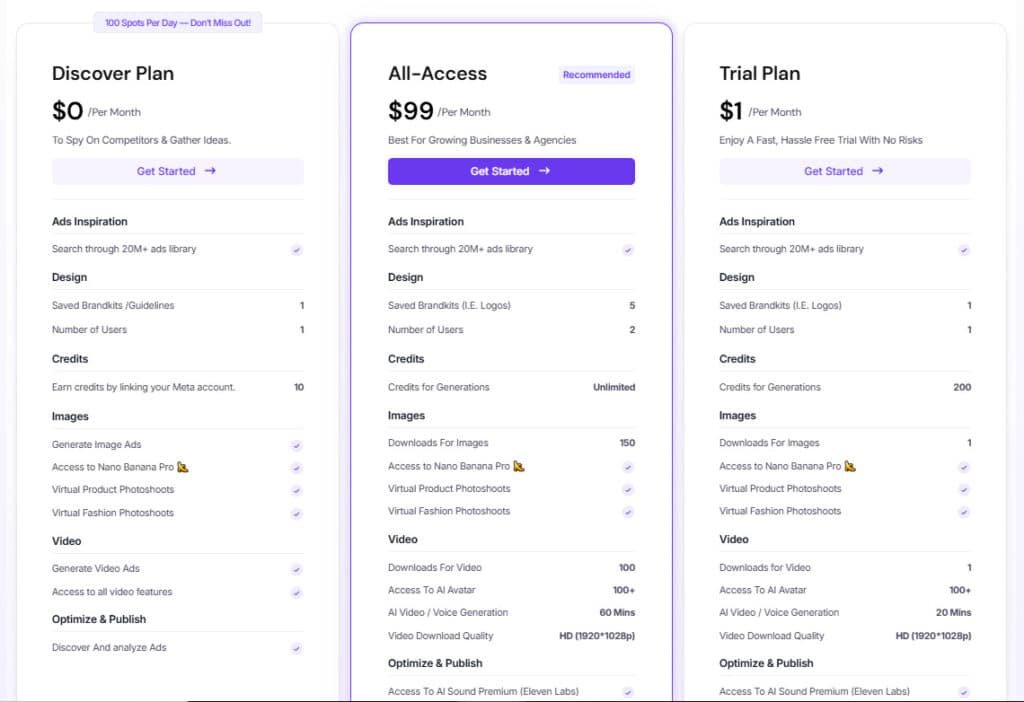
Discover Plan
$0 per month. This free tier is ideal for competitor spying and idea gathering, offering access to the 20M+ ads library, 1 saved brand kit, 1 user, 10 credits (earned via Meta link), generation of images and videos (limited previews), Nano Banana Pro, virtual photoshoots, and basic optimization with 100 daily spots.
Trial Plan
$1 per month. A low-risk entry for testing, providing 200 credits, 1 image and 1 video download, access to 100+ AI avatars, 20 minutes of HD video/voice generation, Eleven Labs premium sound, performance testing, compliance scoring, and AI agents.
All-Access Plan
$99 per month. Recommended for growing businesses, featuring unlimited credits, 5 brand kits, 2 users, 150 image and 100 video downloads, 100+ AI avatars, 60 minutes of video generation, premium sound, performance testing with creative rating, compliance scoring, and AI agents.
Service
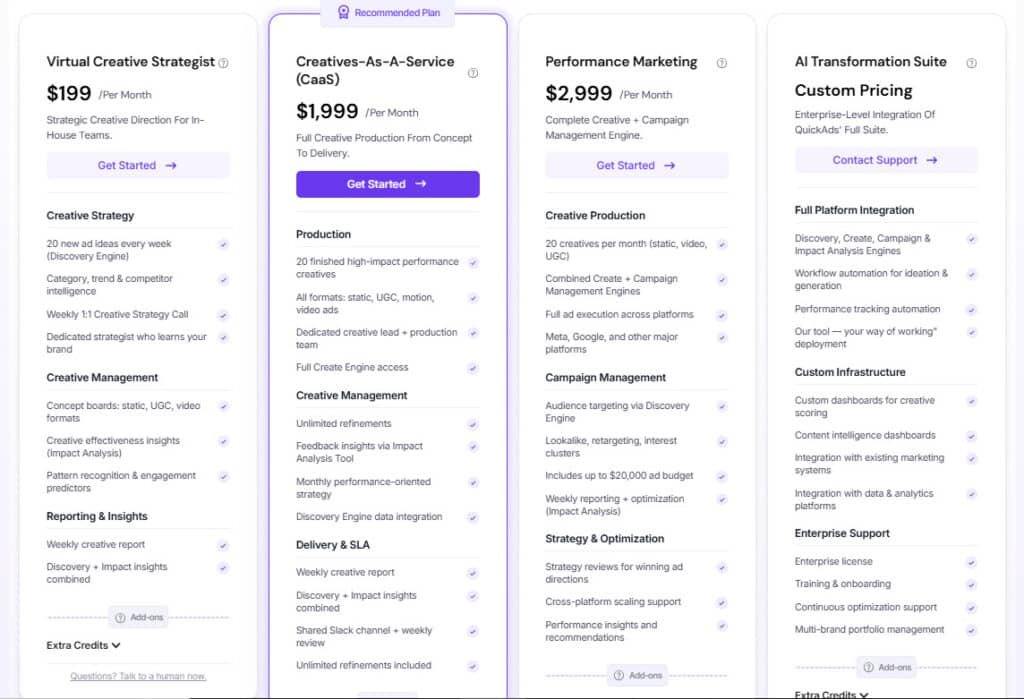
Virtual Creative Strategist
$199 per month. Provides strategic direction with 20 weekly ad ideas, trend intelligence, 1:1 calls, concept boards for videos, effectiveness insights, and weekly reports.
Creatives-as-a-Service (CaaS)
$1,999 per month. Full production of 20 high-impact creatives (static, UGC, videos), unlimited refinements, monthly strategy, Slack integration, and reports.
Performance Marketing
$2,999 per month. Includes 20 creatives, full execution across platforms, targeting, up to $20,000 budget, optimization, and insights.
AI Transformation Suite
Custom pricing. Enterprise integration with workflow automation, custom dashboards, integrations, training, and multi-brand support.
Pros and Cons of QuickAds AI
No AI tool is perfect, and after extensive testing, I’ve identified both brilliant strengths and frustrating weaknesses. Understanding both sides helps you make an informed decision about whether this platform fits your needs.
Key Advantages and Strengths
The ad creation speed is genuinely impressive. You can go from idea to finished ads in seconds with just 2-3 steps. The massive database of 10+ million creatives, updated daily, provides incredible research power.
I found the copywriting assistant invaluable for crafting hooks and CTAs. The 30+ language support and automatic Brand Kit ensure global-ready content with perfect consistency. The editing features are robust, especially for videos.
Additional strengths include competitor ad cloning, virtual try-ons that save model costs, and AI product photoshoots. Bulk creation capabilities and detailed performance metrics round out a powerful toolset.
Notable Drawbacks and Limitations
There’s a definite learning curve requiring initial time investment. Video rendering can be slow, and the templates feel limited compared to competitors. Occasional glitches interrupt workflow.
User feedback highlights concerning support delays beyond promised response times. IST-based scheduling creates challenges for US users. Some image quality issues persist, raising value questions given the price point.
This tool offers tremendous value for specific users—especially those needing advertising-specific features and multilingual support. However, the limitations around support, templates, and pricing mean alternatives might better suit some businesses.
Alternatives to Quickads
Choosing the right AI ad tool feels like picking the perfect assistant—each has different specialties. If the limitations I noted concern you, several strong competitors offer distinct value. Let’s explore your options.
Overview of Competing Platforms
The market is crowded with capable tools. I’ve found the main contenders fall into three categories: all-in-one design suites, specialized ad generators, and video-focused platforms.
- Canva: The budget-friendly giant for general design.
- AdCreative.ai: A direct competitor focused purely on high-conversion ads.
- Creatify/Vidnami: Specialists in AI-powered video creation.
Each serves a different primary need for users.
How Alternatives Compare in Features and Price
Canva Pro costs about $15 monthly—far less than many specialized tools. You get incredible template variety and user-friendly features. However, it lacks deep advertising intelligence like competitor research.
AdCreative.ai matches closely on ad-specific features. It promises similar speed and optimization. Pricing is competitive, but compare their ad database size and analytics depth.
For video-first users, specialized platforms often provide more avatar options and faster rendering. They excel in one area but don’t offer the integrated workflow.
You could combine Canva with a research tool and a video platform. This might cost less and give you best-in-class features for each task. The trade-off is managing multiple subscriptions instead of one unified platform.
The best choice truly depends on your budget, need for support, and specific content mix.
Case Study and Personal Experience
Numbers can tell a compelling story, but real-world testing reveals the truth behind the marketing claims. The platform reports brands achieving a 240% increase in ROAS with over 401,000 ads generated.
These statistics suggest real effectiveness, though your results will vary based on industry and implementation.
Real-World Results and Case Studies
I spent considerable time testing the major features to see if the promises held up. My experience was genuinely mixed—some aspects impressed me while others fell short.
The virtual try-on feature surprised me with accurate, realistic results. Both AI-generated garments and actual product photos produced professional-quality images. The models looked natural and clothing fit believably.
My Personal Experience: Successes and Setbacks
The product photoshoot tool created excellent visuals for e-commerce listings. Video content felt natural rather than robotic. When everything worked, I generated complete ad concepts in seconds.
However, the prompt-based editing system frustrated me. Describing changes in text rather than direct adjustment felt clunky. Template variety felt limited compared to other platforms.
Rendering times were inconsistent, and I encountered occasional glitches. More concerning was one user’s feedback about warped product images and slow support response. This suggests quality and support may be inconsistent.
The platform shows promise but has clear room for improvement. Your experience may differ, so thorough testing is essential before commitment.
Conclusion
The final verdict on any tool comes down to one simple question: does it solve more problems than it creates for your specific situation?
For small business owners needing comprehensive ad creation, Quickads delivers exceptional value. The integrated research, generation, and analytics features create remarkable efficiency. You get competitor intelligence alongside content creation capabilities.
However, this platform isn’t for everyone. US-based users requiring responsive support should proceed cautiously. Advanced designers wanting extensive template libraries may feel constrained.
If you’re an international team or e-commerce brand leveraging virtual try-ons, pursue the AppSumo deal. The 60-day guarantee lets you test properly. Avoid the regular pricing without refund protection.
Quickads offers innovative AI ads generation with high-quality visuals and brand consistency. But weigh the learning curve against your immediate needs. The right users will find tremendous value here.
Frequently Asked Questions
Is there a free trial available for Quickads?
Yes, there is a free trial that gives you access to the core features. It’s a great way to test the AI ad generation process, experiment with the video ads and image ads tools, and see if the platform fits your workflow before committing to a paid plan.
How long does it take to generate an ad with this tool?
The generation process is incredibly fast. You can create a complete video ad, complete with voice-over and high-quality visuals, in under 60 seconds. This speed is a game-changer for small business owners and marketers who need to produce content quickly.
Can I maintain brand consistency across all my creatives?
Absolutely. The Brand Kit feature is designed for this. You can upload your logos, select brand colors, and choose approved fonts. Once set, the AI will use these assets to ensure every ad it generates maintains your visual identity, which is crucial for building a recognizable brand.
What kind of customer support can I expect?
Support is primarily handled through email and a knowledge base. While they don’t offer live chat, I found their email support to be responsive. For more complex issues related to ad performance or tool functionality, they provide detailed guidance.
Does it work for e-commerce product photoshoots?
Yes, one of its standout features of the website is the AI product photoshoot & AI avatars. Instead of a physical shoot, you can upload a product image and the AI will generate it in various realistic settings and styles. This can save a tremendous amount of time and money on content creation.
Are the AI avatars and voices realistic enough for professional use?
The quality is impressive and constantly improving. The AI avatars are diverse, and the text-to-voice engine offers multiple languages and convincing tones. For most marketing campaigns, the resulting avatars is more than sufficient to create engaging and professional-looking video ads.
How does the platform handle different social media formats?
It has a library of templates pre-formatted for all major platforms like Instagram Reels, TikTok videos, and Facebook ads. You simply select your target platform, and the tool automatically generates content optimized for that aspect ratio and style, streamlining your campaign deployment.