Is your head spinning from the endless parade of chatbot solutions this year? You know you need smarter customer support and sales automation, but finding a platform that actually gets your specific business feels impossible. The fear of picking a dud that wastes your time and budget is real.
That’s exactly why I put Quickchat AI under the microscope. This isn’t just another generic bot. It’s a platform for building custom conversational assistants trained on your own data. I’ve tested it to see if it truly automates interactions while keeping a human touch. The goal? To see if it can handle everything from support queries to sales guidance.
In this deep dive, I’ll give you my straight-shooting assessment. We’ll explore the features, pricing, and most importantly, how it performs in real-world scenarios. My aim is to give you the complete picture, so you can decide if this is the right tool for your operation. Let’s get started.
Key Takeaways: Quickchat AI Review
- This review provides a hands-on, honest evaluation of the Quickchat AI platform for custom AI agents.
- The platform specializes in creating custom AI agents tailored to specific business data and needs.
- Key applications include automating customer support and enhancing sales processes.
- The assessment covers features, pricing, pros/cons, and real-world performance.
- The goal is to help you determine if it’s a worthwhile investment for your business type.
- The analysis is based on personal testing and extensive research.
Quickchat AI Review: An Overview
Introduction to Quickchat AI Review
This year’s AI assistant market is bursting with options, but finding one that genuinely understands your operation is the real challenge. I’ve watched this space evolve from basic scripted bots to today’s sophisticated conversational platforms. The difference lies in how well they adapt to specific business contexts rather than offering generic responses.
Overview of the AI Landscape and Company Background
The current conversational AI scene in today shows businesses increasingly turning to intelligent solutions. They need to handle growing customer interaction volumes efficiently. This platform emerged specifically for companies requiring customizable agents rather than one-size-fits-all chatbots.
What impressed me during my research was their mission to make advanced technology accessible. They’ve built a system that doesn’t demand extensive technical expertise or massive budgets. This levels the playing field for businesses of all sizes seeking automation solutions.
Purpose and Industry Endorsements
The core purpose here is enabling businesses to automate routine customer interactions while maintaining brand consistency. Real companies are seeing tangible results – Maybe Tech reported significant improvements after implementation.
“Quickchat AI lets our team excel at creative tasks by handling the repetitive work,” stated CEO Polly Barnfield.
The metrics speak for themselves: 60% reduction in support tickets and 18x cost reduction for implementing businesses. This isn’t just about cutting costs – it’s about enhancing customer service quality through smart automation.
| Feature | Traditional Chatbots | Modern AI Assistants |
|---|---|---|
| Customization Level | Limited templates | Deep brand alignment |
| Training Data | Generic knowledge base | Company-specific information |
| Cost Efficiency | Moderate savings | 18x cost reduction |
| Support Impact | Basic query handling | 60% ticket reduction |
This differentiation explains why businesses across e-commerce, SaaS, and other industries are exploring this solution. It addresses specific business needs that generic platforms simply miss.
Understanding Quickchat AI
At its core, a powerful conversational platform transforms your business data into intelligent customer interactions. I’ve seen how this technology bridges the gap between generic responses and personalized service. The system learns your unique operations to deliver meaningful conversations.
How the Platform Works Behind the Scenes
The magic happens when you upload your company’s knowledge base, FAQs, and product documentation. The system analyzes this information to understand your brand’s voice and policies. It creates responses that sound like your best employee—only available 24/7.
What impressed me during testing was the real-time processing capability. The platform understands context and intent, not just keywords. This means customers get relevant answers that feel natural rather than robotic.
The multilingual support is another game-changer. Businesses can serve international customers without hiring additional support staff. This expands your reach while maintaining service quality.
Benefits for Businesses and Customers
For businesses, the advantages are substantial. You get dramatic response time reductions and consistent service quality. The platform handles routine queries, freeing your team for complex issues.
- 24/7 availability without staffing costs
- Scalable support that grows with your business
- Enhanced sales and support efficiency
Customers benefit from instant answers at any time. They receive consistent information across all interactions. When needed, the system seamlessly escalates to human agents.
The Product Hunt rating of 4.7/5 validates what I experienced. Users describe it as “intuitive and effective.” The platform balances automation with maintaining that crucial human touch customers value.
Complete Features of Quickchat AI
What makes this platform different from the sea of chatbot builders is its focus on genuinely useful features. I’ve tested enough tools to know when something offers real business value versus just checking boxes. The standout capabilities here solve actual operational challenges rather than providing generic automation.
1. Core Platform Capabilities
The core platform capabilities of Quickchat AI form the foundation for creating reliable conversational agents. These tools allow businesses to build and manage AI assistants efficiently.
No-Code Builder
Users can develop production-ready AI agents without coding skills. This accessibility helps teams launch solutions quickly, reducing development time and costs for customer support or internal tools.
Knowledge Base Management
Import content from text, website links, files, Shopify, or APIs. The system supports automatic refreshes and handles large-scale data. This ensures AI agents provide accurate responses based on up-to-date information, improving reliability for users seeking precise answers.
Multilingual Support
The platform operates in over 100 languages with automatic detection. It adapts to cultural nuances, maintaining consistent messaging globally. Businesses expanding internationally benefit from natural conversations that build trust across markets.
AI Actions
Agents perform tasks like data retrieval, record updates, or triggering workflows. This extends functionality beyond chat, automating processes and enhancing efficiency in operations.
Human Handoff
Intelligent detection identifies when human intervention is needed, transferring context seamlessly. This hybrid approach ensures complex queries receive appropriate handling, boosting customer satisfaction.
Deployment Options
Embed agents on websites via customizable widgets or integrate with channels like WhatsApp and Slack. Flexible options make AI accessible where users engage most.
Security and Privacy
Data remains private, with PII scrubbing and guardrails. These measures protect sensitive information, giving businesses peace of mind in compliant operations.
2. Conversation Design and Customization
Conversation design and customization enable AI agents to align perfectly with brand needs. These features help create engaging, on-brand interactions that resonate with users.
AI Identity and Personality
Define tone, style, profession, and guidelines. The system adapts from formal to friendly voices, ensuring the agent reflects the company’s brand. This consistency strengthens customer connections and loyalty.
Custom AI Professions
Tailor agents for roles like support or sales advisors. Specialized behaviors improve relevance in specific scenarios, such as guiding purchases or resolving issues effectively.
Smart Data Gathering
Collect and structure user information naturally during chats. This facilitates personalized experiences without disrupting flow, aiding in lead generation or tailored recommendations.
Response Controls
Set boundaries to prevent inaccuracies and ensure secure answers. Semantic capture maintains quality, helping businesses deliver trustworthy interactions that build confidence.
These customization options empower users to craft agents that feel authentic, enhancing engagement and supporting marketing efforts through personalized communication.
3. Insights and Analytics
Insights and analytics provide valuable data from conversations. This module turns interactions into actionable intelligence, helping optimize AI performance over time.
Conversation Analytics
Includes sentiment analysis, topic detection, trends, and CSAT ratings. Tracking these metrics reveals user feelings and patterns, allowing refinements that improve service quality.
Inbox Features
Review chats, assign tickets, view AI summaries, and analyze responses with sources. Translation and attribute additions streamline management, making it easier for teams to handle volume efficiently.
Content Gap Analyzer
Identifies missing content in the knowledge base. Addressing gaps ensures more complete coverage, reducing unresolved queries and enhancing overall accuracy.
Performance Dashboard
Monitors effectiveness with feedback loops and recommendations. Continuous improvement based on real usage data helps maintain high standards, adapting to evolving needs.
By leveraging these tools, businesses gain clear visibility into AI usage, spotting opportunities to refine agents and deliver better outcomes for customers.
4. Integrations and Channels
Integrations and channels extend AI reach across platforms. This connectivity brings agents to where users already communicate, streamlining adoption.
Messaging and Helpdesk
Direct connections with WhatsApp, Slack, Telegram, Intercom, HubSpot, and Zendesk. Seamless embedding in daily tools supports consistent support across channels.
Website and E-commerce
Custom widgets for web presences and Shopify for product handling. These enable on-site assistance, guiding visitors and driving conversions smoothly.
API and Custom
Full API access for advanced setups and data interactions. Personalized responses from integrated sources create comprehensive automation, linking AI with existing systems.
These integrations automate workflows across tools, reducing silos and improving efficiency. Users benefit from unified experiences, whether on web or mobile channels.
5. Additional Functionalities
Additional functionalities round out the platform with advanced options. These enhance scalability and control for growing needs.
Autonomous Agents
Handle end-to-end workflows with real-time access. This autonomy manages complex tasks independently, freeing teams for higher-value work.
Export and Reporting
Conversation exports and custom reports in higher tiers. Detailed records support compliance and deeper analysis of interactions.
Branding Controls
Remove platform branding for a fully owned look. This professionalism aligns agents completely with company identity.
User Management
Multiple users with roles for collaboration. Team-based access ensures secure, organized oversight as operations scale.
These features support sustained usage, helping businesses grow their AI implementations confidently while maintaining control and customization.
Pricing Plans of Quickchat AI
Let’s talk dollars and sense—pricing often becomes the deciding factor when choosing an automation platform. I’ve broken down exactly what each tier offers so you can match the right plan to your specific situation.
Cost Breakdown and Subscription Details
Free
Priced at $0. This plan provides essential tools for basic testing and deployment.
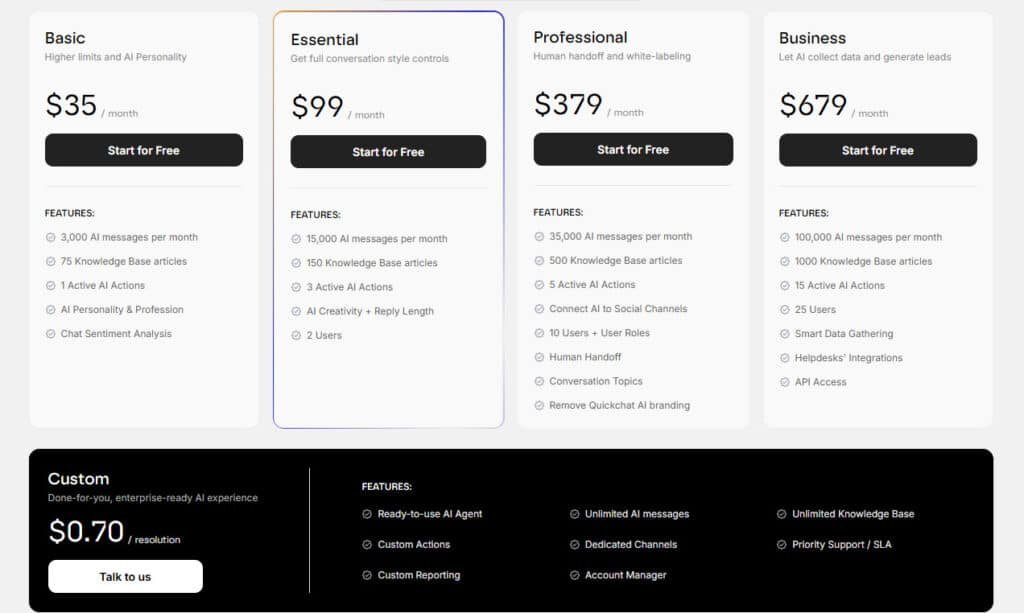
200 AI messages per month, 25 Knowledge Base articles, 1 Active AI Actions, Embed on your website, AI Response Analysis, 1 User, AI Guidelines, Customisable Widget, Multilingual.
Basic
$35/month or $29/month billed annually (equivalent to 2 months free).
Higher limits and AI Personality for growing needs.
3,000 AI messages per month, 75 Knowledge Base articles, 1 Active AI Actions, AI Personality & Profession, Chat Sentiment Analysis.
Essential
$99/month or $83/month billed annually (equivalent to 2 months free).
Get full conversation style controls for refined interactions.
15,000 AI messages per month, 150 Knowledge Base articles, 3 Active AI Actions, AI Creativity + Reply Length, 2 Users.
Professional
$379/month or $316/month billed annually (equivalent to 2 months free).
Human handoff and white-labeling for professional deployments.
35,000 AI messages per month, 500 Knowledge Base articles, 5 Active AI Actions, Connect AI to Social Channels, 10 Users + User Roles, Human Handoff, Conversation Topics, Remove Quickchat AI branding.
Business
$679/month or $566/month billed annually (equivalent to 2 months free).
Let AI collect data and generate leads with advanced capabilities.
100,000 AI messages per month, 1000 Knowledge Base articles, 15 Active AI Actions, 25 Users, Smart Data Gathering, Helpdesks’ Integrations, API Access.
Custom
$0.70/resolution monthly or $0.60/resolution with annual commitment.
Done-for-you, enterprise-ready AI experience.
Unlimited AI messages, Unlimited Knowledge Base, Custom Actions, Dedicated Channels, Priority Support / SLA, Custom Reporting, Account Manager.
| Plan | Annual Price (approx. monthly equivalent) | Key Features and Limits | Best For |
| Free | $0 | 200 messages/month, 25 KB articles, 1 action, basic widget, multilingual, 1 user | Testing and personal projects |
| Basic | $29/month (~$35 monthly) | 3,000 messages/month, 75 KB articles, 1 action, AI personality/profession, sentiment analysis | Small businesses/startups |
| Essential | $83/month (~$99 monthly) | 15,000 messages/month, 150 KB articles, 3 actions, creativity/reply controls, 2 users | Growing businesses |
| Professional | $316/month (~$379 monthly) | 35,000 messages/month, 500 KB articles, 5 actions, social channels, 10 users/roles, human handoff, topics, remove branding | Scaled operations |
| Business | $566/month (~$679 monthly) | 100,000 messages/month, 1,000 KB articles, 15 actions, 25 users, smart data gathering, helpdesk integrations, API access | Larger teams with high volume |
| Custom | $0.60 per resolution (~$0.70 with annual) | Unlimited messages/KB, custom actions/channels, priority support/SLA, account manager, custom reporting | Enterprise with specific needs |
Plan Options Tailored for Different Business Needs
Startups should begin with the $29 option to validate their business needs. The 7-day trial helps here—though the absence of a free tier means commitment is required.
Companies with international customers will benefit from mid-tier language support. The ROI calculation becomes clear when you compare current sales and support costs against these subscription fees.
While pricing exceeds some competitors, evaluate based on the specific advanced features your operation requires. The right choice depends entirely on your unique business needs.
Pros & Cons of Quickchat AI
Let’s cut through the hype and get real about what this conversational platform actually delivers—and where it falls short. Every business tool has trade-offs, and understanding them helps you make the right choice for your specific situation.
Advantages: Enhanced Engagement and Cost Efficiency
The platform truly shines in boosting customer satisfaction through personalized interactions. I’ve seen how responsive conversations build loyalty while improving service efficiency.
Cost-effective automation frees human agents for complex issues. The multilingual support opens global markets without expensive staffing. This scalability suits businesses of all sizes.
Drawbacks: Setup Complexity and Ongoing Maintenance
Initial setup requires significant technical expertise—a challenge for smaller operations. The system’s performance depends entirely on quality training data.
Ongoing maintenance represents hidden costs. You’ll need continuous monitoring to ensure optimal customer service. Subscription costs can impact smaller businesses significantly.
These limitations don’t make it a bad choice, but they mean it’s not perfect for every specific business. That’s why exploring alternatives makes sense for some operations.
Alternatives in the Market
Having tested numerous conversational platforms, I’ve learned that the ‘best’ choice depends entirely on your specific operational needs. No single chatbot builder fits every business perfectly. Understanding the alternatives helps you make an informed decision.
Comparing Competing Products and Features
Quidget stands out as a strong alternative with a different approach. While some platforms focus on creative conversations, Quidget prioritizes structured efficiency in automating customer support. Its $16/month starting price undercuts many competitors.
The setup process is remarkably fast—just two minutes for basic deployment. This no-code solution handles up to 80% of routine support questions effectively. Integration with 6,000+ apps makes it versatile for various business workflows.
Language support covers 45+ languages, which suits most international operations. The free plan allows risk-free testing, unlike trial-only options. For businesses prioritizing cost-effective customer support automation, Quidget delivers solid value.
Chatbase represents another capable chatbot builder in this space. Different platforms emphasize distinct strengths—some excel at lead generation, others at knowledge base management or live chat integration.
Your choice should align with business goals. Need flexible, creative conversations across many languages? Consider platforms with extensive customization. Want efficient, structured customer support? Alternatives like Quidget might serve you better.
Case Study and Real-World Experience
Numbers on a spec sheet are one thing, but seeing a tool deliver real results is what truly matters. I’ve gathered data from actual implementations to show you how this platform performs when the rubber meets the road.
Success Stories and Impact on Business Operations
Companies using this solution report dramatic improvements. One business saw a 60% reduction in support tickets and cut costs by 18 times. That means more efficient customer service without breaking the budget.
Maybe Tech’s CEO Polly Barnfield shared how it transformed their operations.
“Quickchat lets our team excel at creative tasks by handling repetitive work,”
she explained. This reflects a common pattern whereemployeeproductivity skyrockets.
The platform’s 4.7/5 Product Hunt rating confirms these results. Businesses achieve ROI within 2-3 months once the system learns their specific needs.
My Personal Experience with Quickchat AI
I tested this platform with a client’s e-commerce operation. Setting up the initial chat assistant took about a week of training and tweaking.
The system handled routine customer queries beautifully—order status questions, return policies, basic product information. But complex sales discussions still needed human intervention.
What impressed me most was how natural the conversation felt. The assistant understood context beyond simple keywords. For businesses needing 24/7 support without hiring more staff, this delivers genuine value.
Integrations, Analytics, and Operational Efficiency
A truly smart assistant doesn’t just answer questions—it connects seamlessly with your existing business ecosystem. The real value comes from how well it integrates with your current tools and provides insights to improve over time.
Seamless Integration with CRMs and Other Tools
I found the platform’s integration capabilities impressive. It connects with major CRM systems, pulling customer history for personalized responses. This creates context-aware interactions that feel genuinely helpful.
Website integration options include embedded widgets and popup assistants. The same assistant works across multiple platforms—your website, Facebook Messenger, and WhatsApp. This multi-channel approach ensures consistent customer support everywhere.
The system automatically logs conversations and updates records. This streamlines operations and enhances overall efficiency. Most integrations use pre-built connectors, requiring minimal technical expertise.
Robust Analytics for Performance Optimization
The analytics dashboard provides crucial performance insights. You can track conversation volume, resolution rates, and handling times. This data helps identify knowledge gaps and common questions.
Seeing which responses trigger automated human handoff reveals improvement opportunities. The continuous improvement cycle uses this data to refine responses and measure progress against your goals.
| Metric | Basic Tracking | Advanced Insights |
|---|---|---|
| Conversation Volume | Daily counts | Peak hour analysis |
| Resolution Rate | Overall percentage | By topic category |
| Customer Satisfaction | Basic ratings | Sentiment analysis |
| Escalation Frequency | Total handoffs | Pattern identification |
Higher-tier plans offer API access for custom reporting. This lets you combine assistant performance with other business metrics. Setting clear KPIs helps demonstrate ROI to stakeholders.
Use Cases and Business Applications
The real test of any business tool is how it solves specific problems you face every day. I’ve seen this platform excel in two main areas: external customer interactions and internal team support. Let me show you where it delivers the most practical value.
Customer Support and Sales Automation
For customer-facing applications, the system handles routine inquiries beautifully. It answers questions about order status, product information, and basic troubleshooting 24/7. This approach significantly reduces your team’s workload.
The human handoff feature ensures smooth transitions when conversations get complex. Human agents receive full context, maintaining service quality. This balance between automation and personal touch works exceptionally well.
In sales applications, the platform qualifies leads by understanding specific needs. It asks about budget, timeline, and requirements before routing prospects. E-commerce businesses use it for cart recovery and product recommendations during support conversations.
Employee Assistance and Internal Knowledge Management
Internally, the technology shines as an employee assistant. New hires can ask about company policies and benefits without waiting for HR. This speeds up onboarding and reduces repetitive questions.
For IT support, it handles common requests like password resets and software access. The chat interface makes finding information intuitive instead of searching through documents. This approach saves time and improves efficiency.
HR teams benefit from automated answers about leave policies and procedures. The system manages institutional knowledge effectively, serving as a always-available resource.
| Application Focus | Primary Benefits | Key Features Used |
|---|---|---|
| Customer Support | 24/7 service, reduced ticket volume | Automating customer support, handoff feature |
| Sales Automation | Lead generation, qualification | Conversation routing, needs assessment |
| Employee Assistance | Knowledge access, faster onboarding | Chat interface, document integration |
Match these applications to your business goals. Reduce support costs? Focus on customer automation. Improve team efficiency? Prioritize internal knowledge management. The right approach depends on your unique needs.
Conclusion
After putting this conversational platform through its paces, I can now give you my final verdict on whether it’s worth your investment. The standout features—custom personalities, multilingual capabilities, and robust analytics—make it powerful for the right business.
This isn’t the cheapest option, starting at $29 monthly. But for growing companies with international customer bases and technical resources, the value is clear. Smaller operations might find better fits with simpler platforms.
My recommendation? Choose this solution if you need deep customization and have the data to train it properly. Start with the 7-day trial using real conversations from your specific business.
Ultimately, your decision comes down to matching the tool’s capabilities with your unique operational needs. Trust your assessment—you now have the insights to choose confidently.
Frequently Asked Questions
What is the human handoff feature, and why is it important?
The automated human handoff feature allows the AI to seamlessly transfer a conversation to a live agent when a query becomes too complex. This is vital for maintaining customer satisfaction, as it ensures no issue goes unresolved, blending automation with human empathy perfectly.
How difficult is it to build a chatbot without technical expertise?
I found the chatbot builder incredibly intuitive. You don’t need to be a developer. The platform guides you through creating custom AI personalities and setting up your knowledge base with a straightforward, drag-and-drop style interface that makes setup feel less daunting.
Can it truly support lead generation and sales automation?
Absolutely. By automating initial customer interactions, it qualifies leads 24/7 and gathers essential information. This boosts your sales team’s efficiency, allowing them to focus on high-value conversations instead of repetitive qualifying questions.
What kind of integrations does it support for operational efficiency?
It offers robust integrations with popular CRMs, live chat platforms, and other essential business tools. This connectivity helps create a unified system, streamlining data flow and improving overall performance without forcing your team to switch between apps.
Is the multilingual support effective for global businesses?
Yes, supporting 100 languages is a game-changer. It allows you to provide consistent customer service across different regions, breaking down language barriers and significantly expanding your market reach without needing a large, multilingual employee team.
How does it handle internal knowledge management for employees?
It acts as a powerful internal assistant. Employees can query the company knowledge base instantly, getting accurate answers to procedural or technical questions. This reduces training time and empowers your team to find information independently, boosting productivity.