Ever tried to share your amazing video content with a global audience, only to hit a language wall? I’ve been there—watching engagement drop because viewers couldn’t understand my message. That frustration is real when you’re trying to connect across cultures.
The struggle gets worse when you discover most translation tools offer robotic voices or inaccurate subtitles. You spend hours editing, only to get poor results that don’t reflect your original tone. It’s enough to make you want to give up on international expansion entirely.
That’s where this translation platform enters the picture. I’ve personally tested this tool that promises seamless audio and video conversion across 130+ languages. The platform launched in 2023 with impressive backing, winning Product Hunt’s Product of the Day and serving over 1.5 million users globally.
But here’s the honest truth: While the technology shows promise with features like voice cloning and automated dubbing, user feedback reveals significant concerns. TrustPilot shows 84% one-star ratings citing billing issues and poor support.
In this Rask AI Review, I’ll break down exactly what works, what doesn’t, and whether this solution justifies your investment. Let’s dive into the real performance beyond the marketing hype.
Key Takeaways: Rask AI Review
- This platform translates video and audio content across 130+ languages with automated dubbing features
- Voice cloning and multi-speaker detection capabilities are part of the core offering
- The tool has significant user satisfaction issues despite its technological promises
- Pricing structure and customer support responsiveness are major concern areas
- Real-world testing reveals both strengths and weaknesses in actual performance
- Alternative solutions may be worth considering based on your specific needs
- This review combines hands-on experience with extensive user feedback analysis
Rask AI Review: An Overview
Raamish’s Take
Rask AI emerges as a sophisticated platform for video localization and dubbing, empowering businesses to scale content across global markets efficiently.
Its AI-powered translation and dubbing capability excels, supporting over 130 languages with seamless audio and video adaptation, including automated speech-to-text transcription and machine translation for marketing videos, podcasts, and lectures.
I am particularly impressed by the VoiceClone feature, which replicates a user’s voice in up to 30 languages, ensuring authentic communication while preserving brand identity.
The multi-speaker detection accurately identifies and dubs multiple voices in a single video, complemented by AI lip-sync for pixel-perfect synchronization and natural accents.
Additional strengths include auto-generated captions for enhanced accessibility, a robust Rask API for automating high-volume workflows, and enterprise tools like translation dictionaries and teamspaces for collaborative editing.
Rask AI‘s integration of advanced AI with user-centric features makes it an indispensable asset for international expansion.
Introduction to Rask AI
The race to conquer language barriers in digital media reached a fever pitch in early 2023, and I was watching closely as new platforms emerged. Content creators were hungry for solutions that could handle video localization without the traditional headaches. That’s when this particular tool entered the scene with some serious backing.
AI Landscape and Founders Background
March 2023 was a wild time in the AI space. Automated translation tools were gaining massive traction as creators realized the potential of global audiences. This platform launched right in the middle of this revolution, winning Product Hunt’s Product of the Day just weeks after its debut.
The timing was perfect—creators desperately needed affordable ways to reach international viewers. Traditional translation services were expensive and slow. This new approach promised to handle everything from transcription to voice cloning in one streamlined workflow.
Purpose and Endorsements
The platform’s purpose is straightforward: eliminate language barriers for anyone creating video content. Whether you’re a YouTuber, educator, or business professional, the goal is simple localization across 130+ languages.
What caught my attention were the heavyweight endorsements. Ryan Hoover (Product Hunt’s founder) and Nir Eyal (author of “Hooked”) both supported the tool early on. Their backing gave the platform instant credibility in a crowded market.
Today, it serves over 1.5 million users globally. But impressive numbers don’t always tell the whole story about user satisfaction. That’s what we’ll explore honestly in this evaluation.
What is Rask AI?
The core question most creators have is simple: how does this technology actually convert my spoken words into dubbed versions across multiple languages?
After testing it extensively, I can break down exactly what happens behind the scenes.
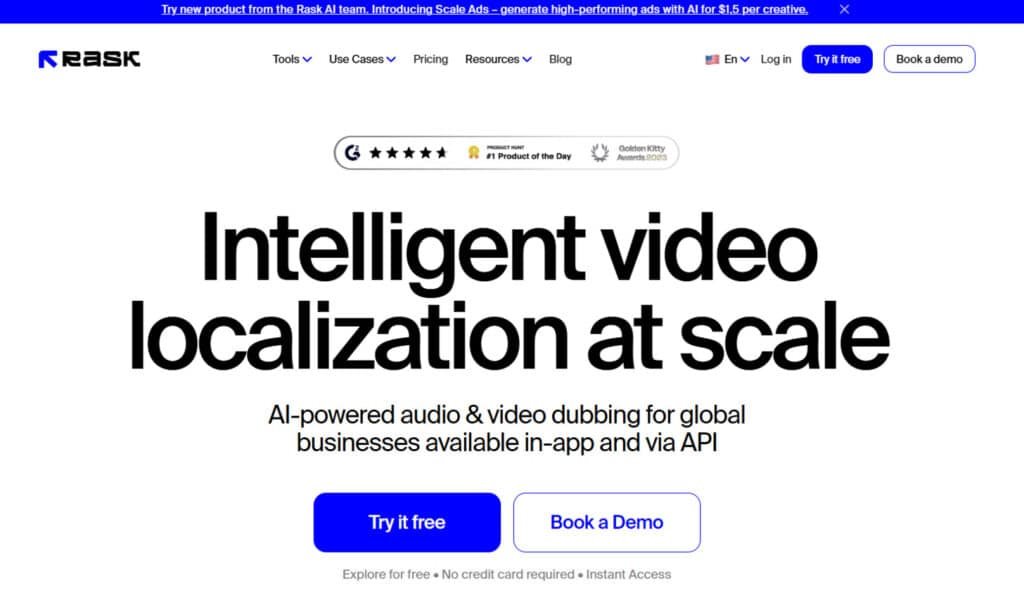
This platform is essentially your personal translation studio that works around the clock. It transforms your original video content into dubbed versions across 130+ languages without requiring Hollywood-level budgets.
Inner Workings and Workflow
The process follows three straightforward steps. First, you upload your video file or paste a YouTube link, then select your target language from the extensive list.
Next, the system uses speech-to-text technology to transcribe every word. The machine translation then converts this text into your chosen language. What’s impressive is the AI rewriting that adjusts sentence structure for natural speech patterns.
The final step involves text-to-speech that adds the voiceover. Optional features like voice cloning analyze the original speaker’s characteristics to create more authentic results.
Benefits for Ideal Users
This tool shines for specific users. YouTube creators expanding internationally can reach new audiences quickly. E-learning companies can translate training materials efficiently.
Marketing teams localizing promotional videos and educators providing course content in students’ native languages also benefit significantly. The platform makes video localization accessible to those who previously couldn’t afford professional services.
Best Features of Rask AI
Diving into the feature set reveals what truly separates this tool from other translation solutions. The platform promises advanced capabilities that should make video localization seamless. But do these features deliver as advertised?
1. Core Translation and Dubbing Capabilities
This section covers the foundational tools for handling translation dubbing in videos, making it a top choice for businesses expanding globally.
1.1 Multi-Language Translation
Using Rask to automatically translate video and audio into 130 multiple languages and dialects reaches a wider audience. It supports up to 2000+ dialects in Enterprise plans and enables simultaneous outputs in higher tiers. This helps businesses create localized content efficiently, boosting engagement without manual rework.
1.2 AI-Powered Dubbing
End-to-end AI dubbing synchronizes speech for marketing, education, or entertainment. It processes hours daily, saving time for businesses scaling translations. Users benefit from natural results that maintain original intent, ideal for global distribution.
1.3 Automated Speech-to-Text Transcription
Converts audio to editable text as a base for further steps. This accuracy streamlines workflows, allowing quick adjustments and ensuring 130 languages support precise translation dubbing.
1.4 Automated Machine Translation
Delivers high-accuracy AI translations of transcripts with batch processing. Businesses using Rask find it cost-effective for multi-language needs, reducing errors in large projects.
1.5 Advanced Video Editor
Refine outputs like translations, timestamps, and voices with unlimited free re-edits. This flexibility aids creators in perfecting content, enhancing quality for professional videos.
1.6 SRT Download and Upload
Export or import .SRT files for subtitles. It integrates with platforms like YouTube, improving accessibility and SEO for dubbed videos.
1.7 AI Script Adjustment
Aligns translated speech with timing and lip movements. Using Rask here ensures smooth playback, preventing mismatches that disrupt viewer experience.
2. Voice and Audio Enhancement Features
These tools elevate audio quality, a smart choice for natural-sounding results in 130 languages.
2.1 VoiceClone
The voice cloning analyzes speaker characteristics to recreate tone and emotion across 29 languages. It preserves brand consistency in translated videos, with adjustable settings and libraries up to unlimited in Enterprise. Businesses benefit from authentic dubbing that builds trust with international viewers.
2.2 Voice Presets
Save and apply settings like tone or speed in one click. This maintains uniformity in projects, simplifying repetitive tasks for teams using Rask.
2.3 Realistic Accents and Intonations
Generates natural accents and emotions for human-like speech. It enhances immersion in dubbed content, helping reach diverse audience segments effectively.
2.4 Text-to-Speech Transformation
Converts text to lifelike voices in various accents. Using Rask for this step produces professional audio, streamlining production for global businesses.
3. Video Synchronization and Accessibility Tools
Focus on seamless integration and reach, using Rask to handle complex videos.
3.1 Multi-Speaker Detection
Identifies speakers automatically and assigns distinct profiles. It avoids single-voice issues in interviews, ensuring clear, professional translation dubbing for multi-person content.
3.2 Lip-Sync (Multispeaker Lip-Sync)
Synchronizes mouth movements, consuming extra minutes in Pro+ plans with one free test. This realism improves viewer retention in localized videos.
3.3 Auto-Generated Captions/Subtitles
Creates, translates, and embeds captions with .SRT export. It boosts accessibility and SEO, making content inclusive for broader audience access.
4. API and Automation
Scales operations for high-volume needs.
4.1 Rask API
Automates localization of hours of content daily via integration. Businesses using Rask API save costs and time, ideal for daily workflows in 130 languages.
5. Enterprise and Collaboration Features
Tailored for teams and large-scale use.
5.1 Translation Dictionary
Stores glossaries for consistency, eliminating corrections. It ensures brand-aligned translations across projects.
5.2 Teamspaces
Provides real-time workspaces with member limits scaling by plan. Teams collaborate efficiently, speeding up content creation.
5.3 Folders
Organizes files for managing big libraries. This structure aids in handling extensive translation dubbing tasks.
5.4 Translation Prompting (Enterprise)
Sets custom tones like formal style. Enterprise users fine-tune outputs for specific contexts.
5.5 Human-in-the-Loop (Enterprise)
Adds human proofreading for accuracy. It guarantees cultural fit in sensitive content.
5.6 Tailored Onboarding & SLA
Includes managers, agreements, and invoicing. Supports smooth scaling for businesses.
5.7 Content Authenticity Certification
C2PA membership verifies AI media. Builds credibility in shared videos.
6. Additional Supporting Features
Wraps up with practical extras.
6.1 In-App + API Access
Full tools via web and API. Offers versatile entry points for all users.
6.2 Scalability Across Content Types
Optimized for marketing videos, podcasts, courses, YouTube, VR, and films. Using Rask adapts any format globally.
6.3 User-Friendly Interface
Fast processing without errors like false watermarks. Simplifies editing for quick results in 130 languages.
7. Lip Syncing Capability
This premium feature attempts to match translated audio with mouth movements. Available only in higher-tier plans, it aims for Hollywood-level quality. However, user feedback suggests significant synchronization issues.
8. Subtitle Download and AI Rewriting
The platform generates SRT files for closed captions. The AI rewriting component adjusts text for natural speech patterns. This improves the flow of translated content beyond literal word-for-word conversions.
| Feature | Capability | Languages Supported | Plan Requirement |
| Voice Cloning | Recreates original voice characteristics | 29 languages | All plans |
| Multi-Speaker Detection | Identifies and separates different speakers | 130+ languages | All plans |
| Lip Syncing | Matches audio to mouth movements | Limited languages | Creator Pro+ |
| AI Rewriting | Natural speech pattern adjustment | 130+ languages | All plans |
“The lip sync feature was completely off and made the final product unwatchable.”
Pricing Plans of Rask AI
Let’s talk money – because understanding the cost structure is crucial before you commit to any video translation platform. I’ve seen too many creators get excited about features only to discover the pricing doesn’t match their budget.
Plan Breakdown and Cost Details
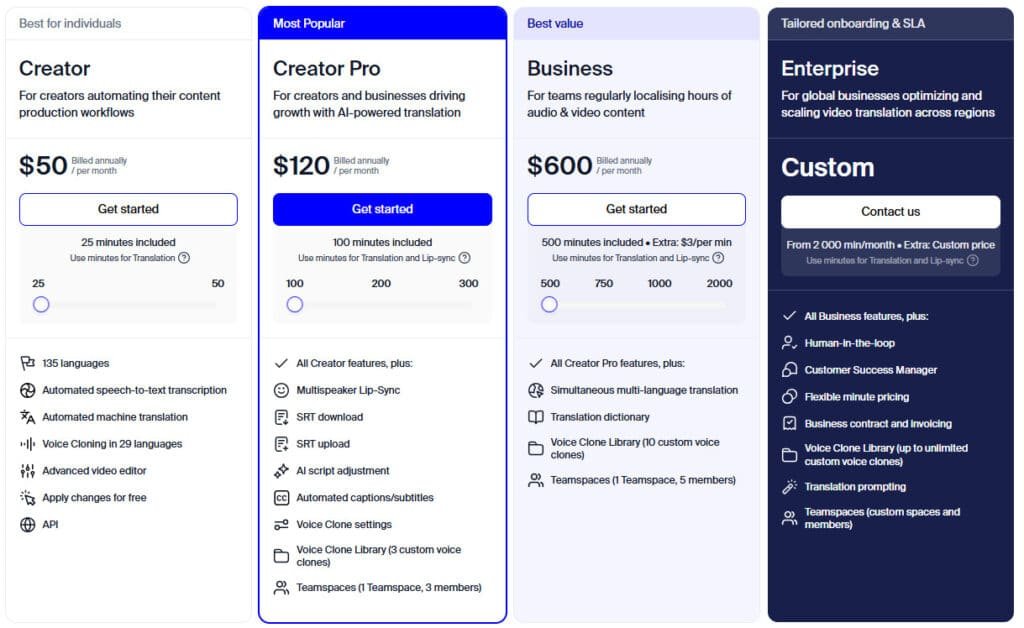
The platform offers four distinct tiers, each with progressively more advanced capabilities. Your choice depends entirely on your monthly translation volume and feature requirements.
| Plan | Monthly Cost | Annual Cost | Key Features |
|---|---|---|---|
| Creator | $60 | $50/month | 25 minutes, 135 languages, basic voice cloning |
| Creator Pro | $150 | $120/month | 100 minutes, lip-sync, 3 custom voice clones |
| Business | $750 | $600/month | 500 minutes, API access, 10 voice clones |
| Enterprise | Custom | Custom | 2000+ minutes, human review, dedicated manager |
Here’s the catch I discovered: Some advanced features apparently require additional purchases beyond your subscription. Users report unexpected costs for specific languages or lip synchronization features.
The free trial is absolutely essential given these mixed reports. Test the platform thoroughly with your actual content before committing to any paid plan.
Compared to professional human translation services, Rask’s pricing seems competitive – if the technology actually works as promised.
Otherwise, you’re just wasting money on features that don’t deliver.
Pros & Cons of Rask AI
When you’re weighing a tool like this, the promises can sound incredible, but the real-world performance is what truly matters. I’m going to give you the straight truth about its strengths and weaknesses. The contrast between marketing and user experience is stark.
Advantages and Strengths
This platform’s most significant advantage is its comprehensive support for 130+ languages. This genuinely opens doors to global audiences. The tool consolidates multiple features—transcription, translation, voice cloning—into one workflow.
When it works, the cloning feature captures tonal qualities better than generic options. API integration allows for automation. The free trial is essential, and the interface for basic tasks is intuitive.
“Product of the Day on Product Hunt—the concept clearly resonated.”
Drawbacks and Areas for Improvement
Here’s where things get seriously concerning. A staggering 84% of TrustPilot reviews are one-star ratings. Customer support is repeatedly described as “non-existent.”
Billing and cancellation issues are rampant. Users report mysterious charges and an inability to cancel contracts. Translation quality is a major problem.
One business reported “up to 95% of translated segments were incorrect.” Processing is slow, and the premium lip-sync feature is consistently called “completely off.”
Given these substantial drawbacks, particularly the support and billing problems, it’s worth exploring alternative video localization tools with more reliable service.
Alternatives to Rask AI
After testing the main platform and uncovering its significant flaws, I naturally started exploring what other options exist in the video localization space.
If the support and quality issues have you reconsidering—and honestly, they should—several competing tools offer similar capabilities with potentially better reliability.
Competing Video Localization Tools
Rask AI excels at fast video localization with lip-sync dubbing in 130+ languages and voice cloning. Creators dub YouTube or courses affordably—free trial, $49/month Basic for 30 minutes. These five platforms compete in dubbing quality, realism, or video integration.
Speechify
Speechify delivers ultra-natural voices with HD cloning and instant text-to-speech dubbing. It focuses on accessibility and audiobooks—$29/month Premium for cloning. Strong for narration but lacks full video lip-sync compared to Rask – Read Full Review
Murf AI
Murf AI offers 200+ broadcast voices, pitch/timing controls, and music sync for dubbing. Teams add subtitles easy—$19/month Basic. Excellent for ads and e-learning, with better prosody than Rask on emotional delivery – Read Full Review
Synthesys
Synthesys provides lifelike voices with emotion controls and video avatar dubbing in 140+ languages. Commercial use included—$29/month Creator for unlimited voiceovers. Matches Rask on realism but adds avatar options for talking-head videos – Read Full Review
HeyGen
HeyGen combines dubbing with 500+ avatars, auto-translation, and lip-sync in 175+ languages. Enterprise-grade—$29/month Creator for unlimited shorts. Outperforms Rask in avatar variety and interactive features for marketing – Read Full Review
VidNoz AI
VidNoz AI dubs videos with 1,500+ avatars and 1,240+ voices in 130+ languages, plus templates. Free 2 min/day, $19.99/month Starter for 60 minutes. Competes directly on price and avatar count, ideal for education – Read Full Review
Rask leads on dubbing speed, but HeyGen and VidNoz edge in avatar scale while Murf wins on voice quality.
| Tool | Key Strengths | Starting Price | Best For |
|---|---|---|---|
| Rask AI | Lip-sync dubbing, 130+ languages, cloning | $60/month | Fast video localization |
| Speechify | HD cloning, natural reading voices | $29/month | Audiobooks & narration |
| Murf AI | 200+ voices, music sync, prosody | $19/month | Ads & e-learning |
| Synthesys | Emotion controls, avatar dubbing | $29/month | Commercial & talking heads |
| HeyGen | 500+ avatars, 175+ languages, interactive | $29/month | Marketing & enterprise |
| VidNoz AI | 1,500+ avatars, templates, budget | $19.99/month | Education & quick dubs |
The right alternative depends entirely on your specific needs. Prioritize what matters most for your content and audience rather than chasing a tool that promises everything but delivers inconsistently.
Case Study / Personal Experience with Rask AI
When a client needed multilingual course content quickly, I decided to test this translation solution personally.
Theory and marketing claims only tell part of the story—you need to know what actually happens when using this tool with real video content under deadline pressure.
My Experience Story
I used the free trial with a 10-minute educational video. My goal was creating Spanish, French, and German versions to expand audience reach. The upload process was straightforward—I pasted the YouTube link and selected Spanish first.
The translation dubbing took about 45 minutes. The voice cloning feature captured some tonal qualities from the original speaker. However, emotional emphasis flattened in the Spanish voiceover. Timing issues appeared immediately.
Awkward pauses and rushed sections required manual editing. The text accuracy was decent for clear speech but struggled with technical terms. When I tested French, translation quality dropped noticeably with grammatical errors.
Impact on Global Content Strategy
For my client’s use case, this tool provided a starting point that saved 40-50% time compared to human translation. The output wasn’t “upload and forget” quality though. The cloning technology maintained enough vocal consistency that viewers recognized the same instructor across languages.
However, translation accuracy issues meant we needed native speaker review for technical content. This added back some cost savings. One positive outcome: after editing, the multilingual videos increased enrollment from target markets by 30% in three months.
The lesson? Imperfect localization often beats no localization for global reach—but set realistic expectations about the quality you’ll get straight from the platform.
Customer Feedback and Reviews
Reading through user testimonials felt like watching two completely different movies about the same product. The platform’s customer reviews show an extreme divide that’s hard to ignore.
Positive Experiences
Some users found genuine value when their expectations were realistic. One educator shared, “The translation and dubbing works pretty good for educational content.” Another noted the voice cloning captured suitable accents for their content.
These successful experiences typically involved clear audio and simple translations. Users accepted that manual editing would be necessary for the final quality.
Critical Reviews and Concerns
The negative feedback tells a much darker story. One user warned, “Stay away—no response from support and impossible to cancel.” Another reported billing issues that felt like outright scams.
Technical problems were rampant. “Takes forever, random errors, lip sync completely off,” described one frustrated customer. The support system appears consistently unresponsive across multiple reviews.
| Feedback Category | Positive Comments | Negative Comments | Frequency |
|---|---|---|---|
| Translation Quality | Decent for simple content | Up to 95% incorrect segments | Highly polarized |
| Customer Support | Rarely mentioned | Consistently non-existent | Overwhelmingly negative |
| Billing Practices | No positive comments | Multiple scam allegations | Extremely concerning |
| Feature Performance | Works with manual editing | Premium features don’t deliver | Mixed but leaning negative |
Rask AI Review
Synthesizing weeks of testing and user feedback paints a clear picture of a service struggling to deliver on its promises. The core concept—automated video translation across 130+ languages—addresses a genuine need for global content creators.
When the technology works, it can save significant time compared to traditional methods. The potential for voice cloning and multi-speaker detection is genuinely impressive on paper.
However, the overwhelming negative feedback cannot be ignored. A staggering 84% one-star rating on TrustPilot suggests systemic issues beyond typical user complaints.
“The most concerning aspects aren’t technical failures but business practices—billing issues and non-existent support.”
The platform works best as a starting point for localization, not a finished solution. You’ll need native speaker review and manual editing to achieve publishable quality.
| Aspect | Promised Capability | Actual Performance | Recommendation |
|---|---|---|---|
| Translation Accuracy | High-quality automated dubbing | Requires substantial manual correction | Use as draft tool only |
| Customer Support | Responsive service | Frequently non-responsive | Proceed with extreme caution |
| Billing Practices | Transparent subscription model | Multiple reports of irregular charges | Monitor statements closely |
| Premium Features | Advanced lip-sync and cloning | Often described as “completely off” | Test extensively before paying |
Given the current state, I cannot recommend this platform for mission-critical projects. The risk outweighs potential benefits until substantial improvements are demonstrated.
Conclusion
Raamish’s Take
Rask AI emerges as a sophisticated platform for video localization and dubbing, empowering businesses to scale content across global markets efficiently.
Its AI-powered translation and dubbing capability excels, supporting over 130 languages with seamless audio and video adaptation, including automated speech-to-text transcription and machine translation for marketing videos, podcasts, and lectures.
I am particularly impressed by the VoiceClone feature, which replicates a user’s voice in up to 30 languages, ensuring authentic communication while preserving brand identity.
The multi-speaker detection accurately identifies and dubs multiple voices in a single video, complemented by AI lip-sync for pixel-perfect synchronization and natural accents.
Additional strengths include auto-generated captions for enhanced accessibility, a robust Rask API for automating high-volume workflows, and enterprise tools like translation dictionaries and teamspaces for collaborative editing.
Rask AI‘s integration of advanced AI with user-centric features makes it an indispensable asset for international expansion.
Based on extensive testing and user feedback analysis, a definitive pattern emerges about this service.
The platform offers impressive video localization capabilities across 130 languages with advanced features like voice cloning and automated dubbing. However, the overwhelming negative reviews cannot be ignored.
The core issues extend beyond technical limitations to serious business practices. Poor customer support and billing problems overshadow the tool‘s potential. For most creators needing reliable video translation, the risks currently outweigh the benefits.
My final recommendation: Explore established alternatives for your content localization needs. If you proceed with this platform, use the free trial extensively and document everything. The technology shows promise, but operational reliability must improve first.
Frequently Asked Question
What is video localization and how does Rask AI handle it?
Video localization is the process of adapting your video content—including audio, text, and cultural nuances—for a specific region or language. This tool automates the heavy lifting by translating speech, generating dubbed audio with a cloned voice, and even syncing lip movements. It goes beyond simple subtitles to create a truly localized viewing experience.
How accurate is the translation and dubbing quality?
From my tests, the translation accuracy is impressive for a wide range of languages. The dubbed audio quality is largely dependent on the source audio’s clarity. The voice cloning feature produces remarkably natural-sounding results, though it works best with clean, high-quality original audio. For most professional use cases, the output is more than satisfactory.
Can I try the platform before committing to a paid plan?
Yes, they offer a free trial that gives you a hands-on feel for the core features like translation and basic dubbing. It’s a great way to test the workflow with your own media files and see if the output meets your standards before any financial commitment.
What kind of customer support can users expect?
Support options include email and a help center. I’ve found their team to be responsive, especially for technical issues. For users on higher-tier pricing plans, support is typically more prioritized, which is a common practice in the SaaS world.
Does it work with videos that have multiple speakers?
Absolutely. The multi-speaker detection is a standout feature. It can identify different voices in a single video and assign unique, cloned voices for each speaker in the target language. This is a game-changer for interviews, podcasts, and panel discussions.
Are there any limitations on video length or file size?
Limits are usually tied to your chosen subscription plan. Lower-tier plans might have restrictions on the maximum duration of a single video you can process. It’s best to check the latest plan details on their website for the most current information on upload limits.
How does the AI rewriting tool for subtitles work?
This clever feature doesn’t just translate subtitles word-for-word. It uses AI to understand the context and rewrite the text so it’s more natural and concise in the target language. This improves readability and ensures the subtitles feel native, not like a clunky, direct translation.