Choosing the right website builder in the current digital age feels like navigating a digital jungle.
The AI landscape has exploded with options, but most platforms trap you in their ecosystem. You get beautiful designs but lose creative control and ownership of your final product.
I’ve tested dozens of these tools, and the frustration is real. You invest time building your site, only to discover you can’t export clean code or move to another platform. The mixed signals in the market don’t help—some users praise flexibility while others report billing issues.
That’s why I decided to personally test Readdy AI.
This platform takes a different approach, combining conversational design with production-ready code export. Unlike typical drag-and-drop tools, it creates stunning, multi-page websites in minutes—then lets you export clean HTML, React, or UniApp code.
This comprehensive Readdy Review comes from hands-on experience, not marketing claims. I’ll cover features, pricing, real-world testing, and honest pros and cons. You’ll get the full picture to make an informed decision about whether this tool fits your needs.
Ready to see if Readdy AI delivers on its promise of speed, style, and complete creative freedom?
Let’s dive into what makes this website builder stand out in today’s crowded market.
Key Takeaways: Readdy AI Review
- Readdy AI creates fully functional websites from simple prompts in minutes
- The platform exports clean, production-ready code without platform lock-in
- Target users include entrepreneurs, designers, and developers seeking creative control
- This review covers both impressive capabilities and legitimate user concerns
- The tool combines conversational design with professional-grade code export
- Testing reveals strengths in speed and flexibility compared to traditional builders
- Final recommendation based on hands-on experience with real website projects
Readdy AI Review: An Overview

Raamish’s Take
Readdy AI is a user-friendly AI website builder that creates professional, mobile-friendly sites in minutes from a simple text prompt, eliminating the need for coding or design skills.
Its prompt-to-site generation stands out, turning business descriptions into full layouts with content, images, SEO optimization, lead forms, and social links in seconds.
I am particularly impressed with the Readdy Agent, a 24/7 AI assistant that engages visitors, captures leads proactively, books appointments, and sends emails like a team member, boosting conversions without extra plugins.
Users can launch instantly or customize via intuitive AI-assisted tools for real-time previews, domain connection, or template tweaks from a growing library (e.g., e-commerce, travel, or restaurant designs).
It supports unlimited sites on higher plans, with built-in hosting and SSL. User testimonials highlight its speed, as one developer noted building an app site in under 30 minutes.
Readdy AI‘s automation and no-code ease make it a practical choice for quick launches and growth.
Introduction to Readdy AI
Finding a web design tool that balances ease of use with professional control can feel like searching for a unicorn. This is the gap this new platform aims to fill. It emerged during the recent wave of AI-first software, launching on Product Hunt to immediate interest.
Positioning in the AI Website Builder Landscape
I’ve noticed many platforms like Wix and Squarespace offer beautiful templates. However, they often lock you into their ecosystem. This new product sets itself apart by guaranteeing true code ownership.
Its philosophy is simple: merge stunning design with clean, exportable code. This gives you the creativity of a designer and the control of a developer. You save time building your website without sacrificing future flexibility.
Background and Founding Story
While specific founder details are not widely publicized, the tool’s origin is clear. It was born from a desire to challenge the status quo of web tools. The mission is to make professional web design accessible to everyone.
This approach resonates with a diverse group. Solo entrepreneurs use it to launch their first website.
Agencies prototype client projects rapidly. Even developers appreciate the clean starting code for their business applications.
| Feature | Traditional Builders (e.g., Wix, Squarespace) | Readdy’s Approach |
|---|---|---|
| Code Export | Typically not available or limited | Full export of clean HTML, React, or UniApp code |
| Design Flexibility | Constrained by pre-built templates and modules | AI-generated, unique designs from conversational prompts |
| Platform Lock-in | High – your site is tied to the provider | None – you own the final product and can host it anywhere |
| Ideal User | Beginners needing a simple, all-in-one solution | Users who value both speed and long-term creative freedom |
As a newer entrant, it doesn’t yet have the brand recognition of decade-old competitors. But its technical capabilities represent a genuine shift in how we think about building for the web.
What is Readdy AI?
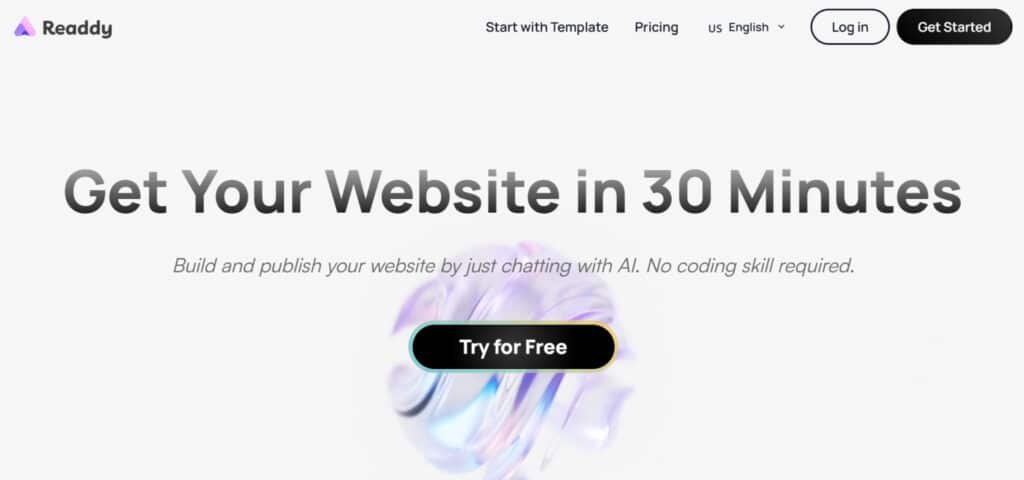
Imagine describing your dream site in plain English and watching it materialize before your eyes. That’s the core promise of this platform. It’s not another template filler—it’s a conversational builder that understands your vision.
How Readdy AI Operates Behind the Scenes
When you provide natural language prompts, the system interprets your requirements. It generates semantic HTML structure, responsive CSS, and clean component code. The technology creates complete pages with navigation in minutes.
You can even use voice commands for hands-free design. The AI writes contextual copy and builds functional elements based on your specific needs. This approach differs significantly from traditional templates.
Benefits for Entrepreneurs, Designers, and Developers
Entrepreneurs get professional websites without hiring developers. Designers can rapidly prototype and export to Figma for refinement. Developers receive clean starter code they can customize.
The platform gives you true ownership of your site. Unlike locked-in builders, you export production-ready files. This means complete creative freedom for all users.
Complete Features of Readdy AI
Where this platform truly shines is in its robust feature set.
It masterfully blends beginner-friendly automation with professional-grade technical capabilities that most competitors simply don’t offer. This combination is its core strength.
1. Conversational Design and Real-Time Editing: Chat Your Way to a Custom Site
I found the natural language interface incredibly intuitive. You literally chat with the system using text or voice prompts to build and modify your site. It’s like having a design partner who gets your vibe right away.
Type something simple like “cozy bakery with online orders in Michigan,” and in under 30 seconds, Readdy’s AI spits out a full multi-page setup: layout, high-quality content, royalty-free images, logical navigation – not just a basic lander. Everything’s mobile-responsive and SEO-smart from the jump.
The real-time editing is a game-changer.
Request a change like, “make the hero section darker blue and add more images,” and watch it happen instantly. This live preview eliminates constant reloading and menu diving. Tweak colors, fonts, spacing, or add entire sections of fresh content on the fly. Upload your own pics or let AI generate stunning images. For pros, there’s a custom CSS panel too.
Why does this rock? It skips the drag-and-drop grind – I’ve built a friend’s portfolio this way and felt like a pro without the sweat.
2. Exportable Code and Design Tool Integration: Own It, Tweak It, Share It
The standout feature is the ability to download clean, production-ready code. You get full ownership of HTML files (React or UniApp exports aren’t spotlighted, but the site’s geared for that handoff freedom). This complete export option is rare – no lock-in headaches.
For designers, the integration with tools like Figma is brilliant. You can export layouts for pixel-perfect refinement and team collaboration. It bridges the gap between AI generation and professional design workflows seamlessly.
Hit publish or grab your files – either way, you’re in control. A quick win? I exported a mockup to Figma last week and nailed client feedback in half the time.
3. Readdy Agent: Your 24/7 Lead Closer That Feels Human
This is where Readdy shines like a neon sign. The Agent isn’t some stiff bot – it’s a proactive chatbot that spots visitors and jumps in with a friendly “Hey, looking for menu ideas?” It chats naturally, pulls from your site’s content to answer FAQs, and grabs leads without feeling salesy.
Book meetings? It syncs to your calendar on autopilot. Snag emails, send follow-ups – turns window shoppers into booked calls while you’re out. Always on, it cuts drop-offs and boosts revenue for your business.
Imagine waking to three new appointments. Users rave about this; one restaurant owner said it doubled bookings overnight. If leads are your game, this agent’s like hiring a salesperson who never sleeps.
4.Built-in E-Commerce: Sell Products Without the Setup Struggle
Want to hawk gear?
Readdy handles basic online stores like a champ – and yeah, the ease of setup shines across tiers, though deeper integrations (like advanced carts) might nudge you toward Pro for extras.
AI generates listings with images, descriptions, and shopping carts. Tie in Stripe or PayPal for checkouts, and track orders/inventory from a clean dashboard.
Templates are built for high-converting sales pages, SEO-smart and mobile-first, so shoppers convert on the go. No deep e-com experience?
Start simple and scale.
A buddy’s tee shop went live in an hour and rang up first sales by evening. It’s worth noting that sophisticated e-commerce integration often requires the Pro plan, but the basics feel impressive right out the gate.
5. Domains & Hosting: Go Live Without the Hassle
No more juggling providers. Readdy bundles hosting right in – all plans get unlimited bandwidth, so traffic spikes won’t crash your business. Connect your custom domain with one click (or use their free subdomain to test).
SSL certificates? Free and automatic, keeping things secure for visitors dropping emails. Backups run daily in the background, and it’s all optimized for speed via a global CDN. Load times stay snappy, even from halfway around the world.
I’ve seen folks waste weekends on this setup – Readdy makes it feel like flipping a switch. What’s your domain story? Ever bounced a launch over tech glitches?
6. Analytics & Extras: The Tools That Keep Things Humming
Readdy layers on smart bits without overwhelming. AI content gen crafts headlines and blurbs tailored to you – edit to nail your tone. Embed videos, maps, or widgets easily; add blogs, galleries, or contact forms with reCAPTCHA to dodge spam.
Social media buttons? Auto-included. Analytics dashboard tracks visitors, hot pages, and sources – no Google setup required. Add Instagram feeds, TikTok videos, or any social media embeds you want. Password-protect spots for VIP content, or go multi-language for global reach.
It’s the glue: One tool for forms, embeds, everything. Keeps your site humming without app overload.
(Quick aside: How many plugins have you ditched in the past? This cuts that noise.)
7. Collaboration and Management: Scale Solo or With a Crew
Right now, you can whip up unlimited sites under one account – great for testing ideas or client work. The Agent feels like a team member, handling chats so you focus elsewhere. Team invites? Rolling out soon for shared edits.
Priority support’s there via email or FAQs, keeping things smooth. For small ops, it’s solo-friendly; as you grow, it’ll adapt. I’ve used similar for freelance gigs – manages multiple without chaos.
8. Security and Performance: Built Tough, Runs Smooth
Under the hood, it’s solid. 99.9% uptime, DDoS shields, and auto-updates keep threats at bay. Sites load fast thanks to that CDN, and responsive design means no device drama. SEO’s baked in – meta tags, alt text, clean URLs – for better search juice.
No manual testing needed; it just works. In a world of hacks and slow loads, this quiet reliability lets you sleep easy.
9. Template Library: Ready-Made Wins (Full Current List)
Stuck on blank-page syndrome? Readdy’s got a growing library of 50+ free templates, all mobile-responsive, SEO-tuned for conversions, and AI-editable. You get instant access to every single one the moment you sign up. Pick one for your niche – like a sleek dental clinic or vibrant restaurant menu – and tweak in real time.
They’re not rigid either – mix elements from different templates or AI-overhaul them. Perfect for quick launches. Here’s the full current lineup with full access:
- Apparel Sales Promo – High-converting fashion drops and flash sales
- Norway Travel Agency – Stunning tours and adventure booking
- Architectural Designs – Portfolio grids and project case studies
- Spa & Massage Therapy – Calm wellness vibe with booking widgets
- Wedding Planner – Romantic galleries and timeline sections
- Japanese Restaurant – Menu tabs, food photos, reservation button
- Lumi Dental Clinic – Trust-building layout with smile galleries
- Luxury Real Estate – Premium property carousels and virtual tours
- Coffee Shop & Café – Warm menu boards and loyalty signup
- Fitness Gym & Personal Trainer – Class schedules and membership tables
- Online Coaching / Consulting – Packages, testimonials, calendar booking
- Barber Shop – Bold cuts gallery and appointment slots
- Bakery & Pastry Shop – Product grids with pickup/delivery options
- Yoga Studio – Minimalist timetable and retreat signups
- Law Firm / Attorney – Practice areas and free consultation forms
- Photography Portfolio – Full-screen galleries and proofing links
- Event Planner – Venue showcases and quote requests
- Car Rental Service – Vehicle fleet grid and booking calendar
There you have it — unlimited access to pro-level content, images, social media tools, and templates starting at just $15/month. Your business deserves this kind of setup. Drop your idea below and I’ll help you launch it today.
Pricing Plans for Readdy AI
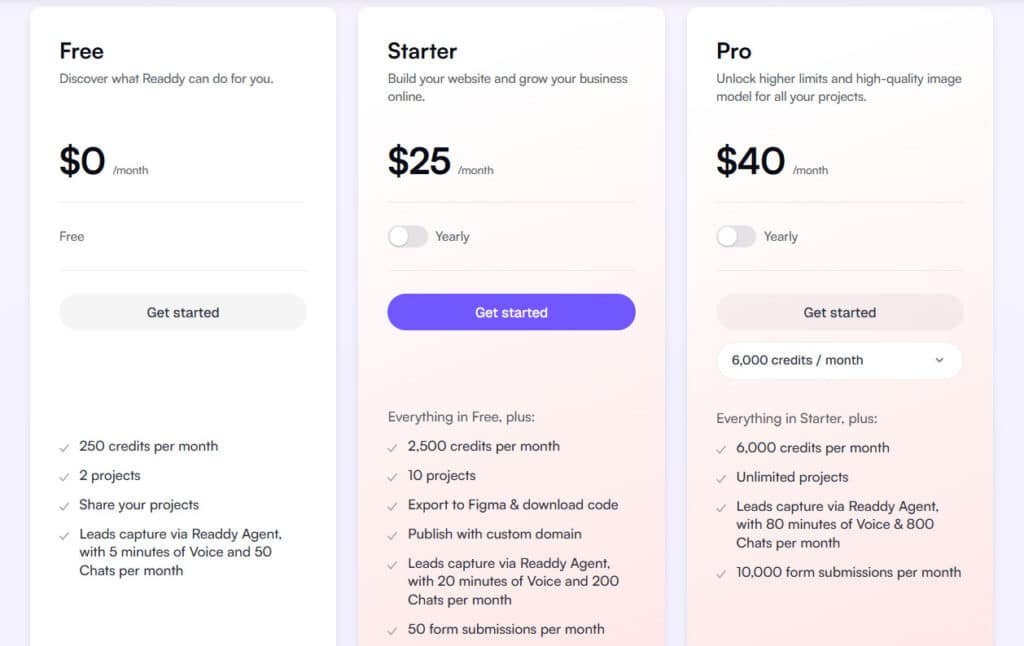
Let’s cut straight to the numbers—because nobody likes hidden fees or confusing pricing models that complicate your decision. Understanding the cost structure helps you evaluate whether this tool fits your budget and workflow.
Free Plan
Dip your toes in at $0/month (no annual needed). This gives 250 credits per month, 2 projects, project sharing, and basic Readdy Agent leads (5 mins voice, 50 chats per month).
Starter Plan
Level up your business site for $25/month (or $15/month annual, save $120). Builds on Free with 2,500 credits per month, 10 projects, Figma/code exports, custom domain publishing, 1 free domain/year, Agent boosts (20 mins voice, 200 chats), and 50 form subs per month.
Pro Plan
Go unlimited for heavy hitters at $40/month (or $24/month annual, save $192). Everything in Starter, plus 6,000 credits per month, endless projects, premium image models, 1 free domain/year, Agent pro (80 mins voice, 800 chats), and 10,000 form subs per month.
Readdy’s pricing feels fair—start free, scale without shock
| Plan | Monthly | Annual (Save) | Projects | Credits/Mo nth | Agent Chats/Month | Free Domain/Y ear |
| Free | $0 | $0 | 2 | 250 | 50 | No |
| Starter | $25 | $15 ($120) | 10 | 2,500 | 200 | Yes |
| Pro | $40 | $24 ($192) | Unlimited | 6,000 | 800 | Yes |
Pros & Cons of Using Readdy AI
After extensive testing, the platform reveals a compelling mix of powerful features and some real-world frustrations. A balanced look is essential for your decision.
Key Advantages in Functionality and Flexibility
I found several standout benefits during my review. The conversational interface is genuinely intuitive, saving you significant time. You can generate multi-page sites in minutes, not hours.
The true game-changer is the full code export. You get clean HTML, React, or UniApp files, granting complete ownership. This eliminates platform lock-in.
- True creative freedom with exportable, production-ready code
- Figma integration for seamless design team workflows
- Responsive layouts that work perfectly on all devices
- A credit system that offers pay-for-what-you-use flexibility
In short, it delivers fast, flexible website creation with technical control most competitors lack.
Notable Drawbacks and Areas for Improvement
However, real-world usage and user reviews highlight significant drawbacks. The AI-generated images often look uncanny and low-quality, forcing manual replacement.
More concerning are technical hiccups. Prompt execution sometimes fails silently, consuming credits without applying changes. Combined with reported billing issues and slow support response time, these problems can undermine trust.
While these issues don’t disqualify the platform, they mean you should carefully weigh the trade-offs and explore alternatives.
Alternatives to Readdy AI
While this platform offers unique advantages, it’s smart to survey the competitive landscape before committing. Your ideal website builder depends entirely on your priorities—whether that’s stunning design, maximum ease of use, or budget-friendly pricing.
Competitive AI Website Builders Compared
Building a website from scratch used to take weeks. Now, with AI, you can have something live in minutes.
Readdy AI turns simple text prompts into full sites, with code exports and easy tweaks. But these alternatives offer great AI website generation too, some with stronger templates or ecommerce focus.
Here’s a quick rundown.
PineApple Builder
PineApple uses AI to create business sites quick, with blogs, newsletters, and payments built-in. It adds SEO tools and support. Good for entrepreneurs wanting fast launches with growth features – Read Full Review
Dorik
Dorik’s AI generates sites from prompts, plus drag-and-drop for custom touches. Unlimited storage and collections. Suits no-code fans building blogs or membership pages – Read Full Review
Mixo
Mixo builds landing pages in seconds for startups, with subscriber tools and integrations. Focuses on validation. Ideal for testing ideas and collecting emails early – Read Full Review
CodeDesign AI
CodeDesign regenerates designs unlimited times, with magic content tweaks and exports. Responsive templates galore. Perfect for pros needing control and code options – Read Full Review
Butternut AI
Butternut creates multi-page sites in seconds, with SEO and mobile optimization. Chatbot add-ons. Great for small businesses wanting polished looks affordably – Read Full Review
Hostinger AI Website Builder
Hostinger generates full sites cheap, with ecommerce and AI tools like heatmaps. Fast hosting included. Fits budget users adding stores or blogs – Read Full Review
SITE123
SITE123 offers simple AI-assisted building with templates and multilingual support. Ecommerce in higher plans. Handy for beginners needing quick, reliable sites – Read Full Review
Lindo AI
Lindo white-labels AI building for agencies, with client billing and custom blocks. Scalable for teams. Suits freelancers reselling branded services – Read Full Review
| Tool | Key Generation Features | Strengths & Real Benefits | Best For & Wins | Pricing Starts |
|---|---|---|---|---|
| Readdy AI | Prompt-to-site, code/Figma export, regenerations | Fast UI/code focus, no limits on tweaks | Developers & quick prototypes | Subscription plans |
| PineApple Builder | One-click business sites, blog/shop | SEO/analytics built-in, easy growth | Small business launches | $12/month |
| Dorik | Prompt gen + drag-drop, unlimited pages | CMS/collections, code export | Blogs & memberships | $18/month |
| Mixo | Seconds landing pages, subscriber tools | Idea validation, integrations | Startups & pre-launch | Subscription plans |
| CodeDesign AI | Unlimited regenerates, magic content | Responsive, export options | Custom control & exports | $29/month |
| Butternut AI | 20-second multi-page, SEO/mobile | Chatbot/forms, affordable polish | Speedy small sites | $20/month |
| Hostinger AI | Full sites + ecommerce, AI extras | Cheap hosting, fast setup | Budget ecommerce | $3/month |
| SITE123 | Guided AI templates, multilingual | Simple editor, reliable hosting | Beginners & stores | $12/month |
| Lindo AI | White-label, client management | Agency billing, custom blocks | Freelancers & resellers | $25/month |
Your choice ultimately depends on your primary need. Pick Framer for top-tier design, Wix for simplicity, or this platform when code ownership matters most.
Case Study / Personal Experience with Readdy AI
To put this tool through a real-world test, I created a portfolio website for a fictional UX designer. My goal was to see how it handled a professional design brief from start to finish.
My Experience and Real-World Results
I started with a detailed prompt: “Create a modern portfolio site for a freelance UX designer…” The setup was simple. In about 90 seconds, I had a complete four-page site with working navigation.
The initial layout was clean, and the generated content was surprisingly specific to the niche. Refining the design with conversational prompts was mostly smooth. I changed colors and added sections in minutes.
However, I hit some snags. Two edit requests failed silently, costing credits. The AI-generated images were unusable—awkward and low-quality. I spent 30 minutes replacing them with stock photos.
The export process was a highlight. I downloaded clean, well-structured HTML coding. This is a major advantage for teams or developers. Compared to manual coding, which could take 4-6 hours, this setup saved significant time.
This review of Readdy shows it delivers speed and ownership. For my test projects, it worked well. But the image issues and occasional glitches mean it’s not entirely frictionless.
Advanced Functionalities and Integrations
Beyond the initial ‘wow’ factor of instant site generation, this platform packs serious technical muscle for professional results.
These advanced features are what separate it from simpler builders, especially for teams and growing businesses.
SEO Optimizations and Responsive Designs
I found the built-in SEO tools genuinely impressive. The software automatically creates a proper heading structure (H1, H2, etc.) and SEO-friendly URLs. It also handles technical details like image compression.
This matters because search engines love fast, well-organized pages. You get a head start on rankings without manual tweaking. The designs are also fully responsive, looking great on any device right out of the box.
Custom Domain, Hosting, and E-Commerce Support
Paid plans include hosting and let you connect a custom domain. The setup guides you through DNS changes. For online sales, it creates product pages and integrates with tools like Shopify.
It’s not a full online store backend, but it’s a powerful starting point. The export options are a standout for collaboration. Developers get clean code, while designers can send layouts to Figma for refinement.
This workflow is perfect for teams that value both speed and control. The platform provides solid support for these professional features.
User Feedback and Community Insights
The community feedback surrounding this website builder tells a tale of two very different experiences—some users love it, while others face significant challenges. Understanding these real-world stories helps you make a more informed decision than relying on marketing claims alone.
Analyzing Reviews and Reported Issues
Many users genuinely appreciate the conversational interface. They describe it as intuitive and faster than traditional builders. The code export feature receives consistent praise from developers and agencies who value ownership.
However, concerning patterns emerge in negative reviews. User “Aminou Abdou” reported repeated prompt execution failures where actions consumed credits but produced no results. This pattern of opaque error handling was echoed by others.
Billing and credit issues also surfaced frequently. User “328 maruya” paid $40 for the Pro plan but immediately saw a downgrade with 5,000 missing credits. Days passed without support responses, forcing threats of payment-provider refunds.
Technical reliability concerns include runtime errors interrupting navigation and generated designs disappearing from projects. Security scanners flagged the platform’s recent domain registration as a potential trust friction point.
While the core technology is impressive, user feedback reveals significant concerns around support responsiveness and technical stability. Prospective users should weigh these against the innovative features carefully.
Conclusion: Readdy AI Review
Raamish’s Take
Readdy AI is a user-friendly AI website builder that creates professional, mobile-friendly sites in minutes from a simple text prompt, eliminating the need for coding or design skills.
Its prompt-to-site generation stands out, turning business descriptions into full layouts with content, images, SEO optimization, lead forms, and social links in seconds.
I am particularly impressed with the Readdy Agent, a 24/7 AI assistant that engages visitors, captures leads proactively, books appointments, and sends emails like a team member, boosting conversions without extra plugins.
Users can launch instantly or customize via intuitive AI-assisted tools for real-time previews, domain connection, or template tweaks from a growing library (e.g., e-commerce, travel, or restaurant designs).
It supports unlimited sites on higher plans, with built-in hosting and SSL. User testimonials highlight its speed, as one developer noted building an app site in under 30 minutes.
Readdy AI‘s automation and no-code ease make it a practical choice for quick launches and growth.
Having put this platform through its paces, I can now give you my straight answer about who should—and shouldn’t—consider adopting it.
The tool delivers genuine innovation with conversational design and exportable code. You get professional websites in minutes, not hours. The freedom to own your final site is a game-changer.
However, user reports of billing issues and technical glitches are concerning. The platform feels like it’s still finding its footing.
Choose this builder if you’re technical, value code ownership, and can troubleshoot independently. Avoid it if you need reliable support for mission-critical business sites.
Start with the free plan to test the waters. Let your actual experience guide your decision—not just the marketing promises.
Frequently Asked Questions
Is any coding knowledge required to use this platform?
Absolutely not. That’s the main appeal. You build your site using simple text prompts, and the AI generates the code for you. You can export clean HTML, CSS, and JavaScript if you want to customize it further in a design tool.
How does the export feature work, and what can I do with the code?
Once your site is built, you can export the entire project’s source code. This gives you full ownership. You can then host it anywhere, edit it in applications like Webflow or VS Code, or hand it off to a developer for advanced customizations.
What are the limitations of the free plan?
The free tier is great for testing the core functionality. However, it limits the number of projects you can create and pages you can generate. For serious business use, you’ll likely need a paid plan to unlock features like custom domains and removing branding.
Can I connect my own domain name to a site built with this software?
Yes, but this is a feature reserved for the Pro subscription plan. Connecting a custom domain is straightforward within the platform’s settings, giving your site a professional look with your own web address.
How good is the SEO optimization for the generated websites?
The platform automatically creates a solid technical foundation with clean code structure, which is great for SEO. However, true search engine success still depends heavily on your content strategy. You have control over meta titles, descriptions, and headings to optimize each page.
Is it suitable for building e-commerce websites or online stores?
A> Currently, it’s primarily focused on creating brochure-style websites, portfolios, and landing pages. While you can create a beautiful product showcase, full e-commerce functionality like shopping carts and payment processing would require integration with a dedicated e-commerce platform or custom development on the exported code.
How responsive are the generated designs on mobile devices?
The designs are inherently responsive. The AI builder automatically ensures that the layout, images, and text adapt seamlessly to different screen sizes, from desktop to tablet to mobile, which is a critical feature in today’s web environment.