
Staring at that blank wall or empty room and feeling completely stuck?
You’re not alone. According to recent data, a staggering 92% of homeowners face major challenges during renovation projects.
That “what if” paralysis is real—what if you choose the wrong colors?
What if the furniture doesn’t fit? What if it all just looks… wrong?
This frustration hits deep when you’ve invested time, money, and emotional energy into creating your dream space. The gap between your imagination and reality can feel impossible to bridge.
But here’s the exciting part: The AI interior design market is exploding, projected to reach nearly $7 billion by 2032. Technology is finally catching up to our creative dreams.
After hitting my own design roadblocks, I decided to test REimagine Home extensively. I’ve used this platform across multiple room types and design scenarios—from awkward corners to complete living space overhauls. My goal was simple: see if AI could actually deliver on its promises.
In this honest REimagine Home Review, I’ll break down exactly what this tool offers, how it works in practice, and whether it’s worth your investment.
You’ll get the real pros and cons, pricing details, and my final verdict. No fluff, just straight talk from someone who’s been in your shoes.
Ready to see how AI can transform your approach to interior design?
Let’s dive into what makes this platform stand out.
Key Takeaways: REImagine Home Review
- 92% of homeowners struggle with renovation projects, creating a real need for design assistance
- AI interior design is a rapidly growing market valued at over $1 billion
- This review is based on extensive personal testing across various room types
- We’ll cover how the platform works, its key features, and honest pros/cons
- You’ll get a clear pricing breakdown and final recommendation
- The tool aims to bridge the gap between imagination and reality
- Real Estate Interior/Exterior brings significant advancements in AI-powered design technology
REimagine Home Review: An Overview

Raamish’s Take
REimagineHome AI is an intuitive platform that generates photorealistic interior, exterior, and landscape redesigns from a single photo and prompt in minutes, empowering users to visualize changes without physical effort.
Its Virtual Staging tool stands out, converting vacant rooms to furnished scenes or clearing occupied spaces for blank canvases, while Furniture Swap/Add/Remove enables precise object manipulation like switching couches or adding lamps.
I am particularly impressed with the Surface Restyling for recoloring walls, floors, or cabinets, Style Swaps (e.g., modern to rustic), and Landscaping/Hardscaping for gardens, patios, pools, or lawns with seasonal/festive flips.
Additional capabilities include Day to Dusk/Sky Replacement, Image Enhancement/Straighten, Room Reuse (bedroom to office), and Conversational AI for idea generation in higher plans.
Watermark-free downloads, shareable sliders, and batch processing accelerate workflows.
Real estate pros praise faster listings—one noted winning approvals instantly.
REimagineHome AI‘s prompt-based flexibility and next-gen quality reduce guesswork, speeding decisions for stunning, sellable visuals.
Introduction to REimagine Home
Artificial intelligence is tearing down the barriers that once made interior design feel exclusive and intimidating. The landscape has shifted dramatically—what required years of training and expensive consultations now happens with a few clicks.
Understanding the AI Landscape
I’ve watched artificial intelligence transform this field from a professional-only service to something anyone can use. These new design tools bridge the gap between what homeowners envision and what they can actually create.
The current “AI interior design gold rush” brings incredible innovation. Advanced machine learning algorithms and protocols like ControlNet maintain architectural integrity while generating stunning results.
Company Background and Purpose
This particular platform emerged specifically to democratize interior design. The core philosophy centers on user empowerment—removing the fear of costly mistakes that paralyzes so many renovation projects.
The purpose is clear: eliminate expensive consultations and the physical labor of moving furniture. The technology serves real estate agents, interior designers, property developers, and photographers who need professional-grade visualization.
| Traditional Design | AI-Powered Design | Key Difference |
|---|---|---|
| Requires professional training | Accessible to beginners | Democratization of skills |
| Weeks of planning | Instant visualization | Time efficiency |
| High cost consultations | Affordable subscriptions | Financial accessibility |
| Trial and error approach | Precise digital previews | Risk reduction |
This ai-powered interior approach represents a fundamental shift in how we approach home decoration.
The technology empowers creativity without the traditional barriers that made professional design feel out of reach.
What is REimagine Home?
At its heart, this tool is a digital architect for your existing space. It’s an AI-powered platform that uses generative artificial intelligence.
You upload a photo, and it creates stunning, photorealistic design concepts in seconds.
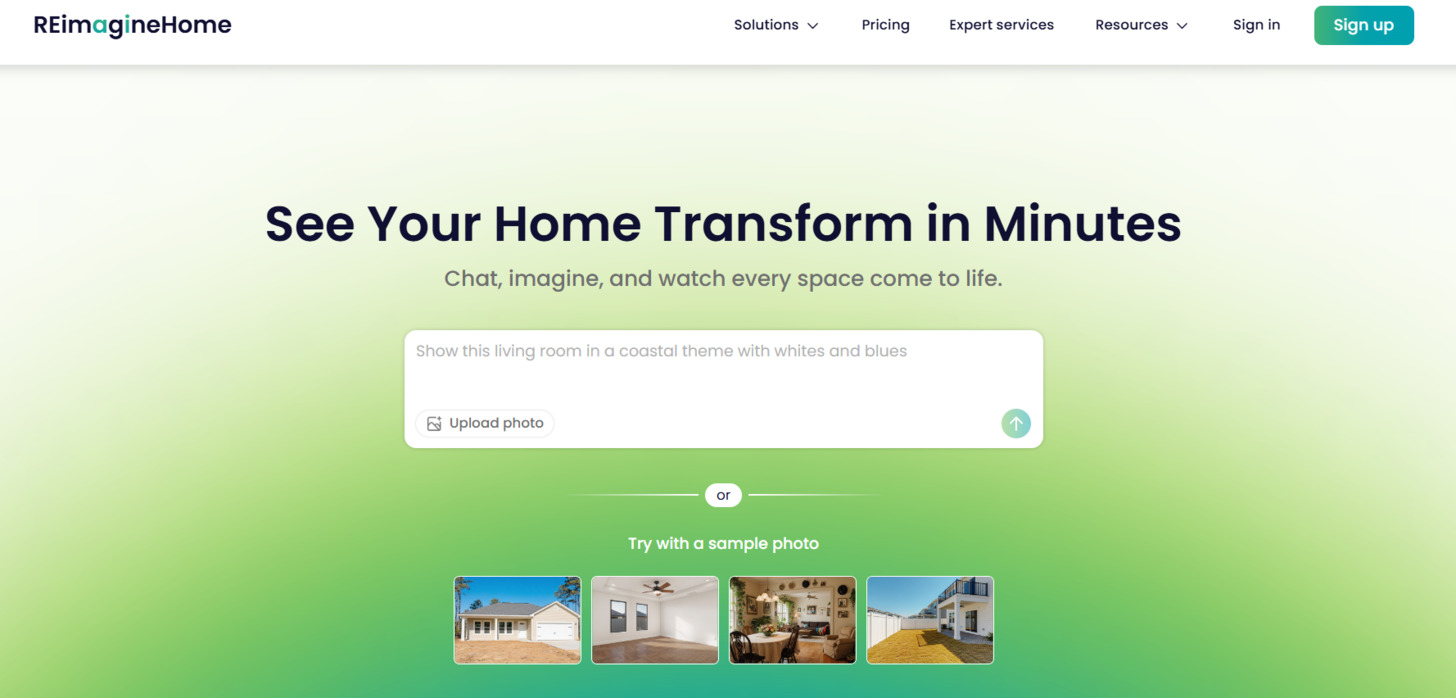
Inner Workings of the Platform
The process is brilliantly straightforward. After you upload a room photo, sophisticated algorithms get to work. They analyze everything—walls, windows, furniture. Then, the AI generates multiple interior styles tailored to your space.
I found the best part is the zero learning curve. You need no prior design experience. It empowers the user to experiment freely without fear.
Benefits for Homeowners, Agents, and Designers
This versatility is a game-changer for different professionals. Homeowners can visualize a “Modern Farmhouse” living room before spending a dime. It eliminates the guesswork and costly mistakes.
For real estate agents, the value is immense. Virtual staging costs a tiny fraction of physical staging. This allows agents to showcase a property’s full potential and sell faster.
Interior designers get a powerful efficiency tool. It handles the initial concept heavy lifting. This frees up their time for high-level creative strategy and client collaboration.
| User Type | Primary Benefit | Key Feature |
|---|---|---|
| Homeowners | Risk-free remodeling visualization | Style experimentation |
| Real Estate Agents | Massive cost savings on staging | Rapid property enhancement |
| Interior Designers | Dramatically faster concept generation | Creative workflow booster |
The platform is always on, acting as a round-the-clock digital consultant. This accessibility makes professional-grade design available to everyone.
How Does REimagine Home Work?
Ever wondered how AI can transform your living space in seconds?
The process feels like magic, but it’s actually sophisticated technology working behind the scenes.
The Technology Behind the Magic
This design tool uses advanced artificial intelligence to analyze your room photos. It identifies walls, windows, and furniture with impressive accuracy.
The real breakthrough comes from ControlNet protocols. These maintain your room’s actual structure instead of distorting it like older AI tools. The system generates photorealistic images in about 30 seconds.
| AI Component | Primary Function | User Benefit |
|---|---|---|
| Machine Learning Algorithms | Analyzes architectural elements | Accurate room understanding |
| ControlNet Protocols | Maintains structural integrity | Practical, usable designs |
| Style Transfer AI | Applies new design themes | Instant visual transformations |
User-Friendly Process Overview
The platform’s workflow is remarkably straightforward. You start by uploading a well-lit room photo. Then choose your design goal and preferred style.
“The ability to see multiple design options before committing saves both time and money—it’s like having a digital designer on demand.”
Each generation costs one credit, but you get five free credits to start. If the first result isn’t perfect, simply adjust your prompts and regenerate.
The entire process takes under ten minutes from sign-up to finished design.
Complete Features of REimagine Home
What truly impressed me during testing was the sheer versatility of the platform’s toolkit. It’s not a one-trick pony but a full suite of specialized AI features, each designed for a specific design challenge.
1. Core Upload and Quick Transforms
The core strength of Reimagine Home starts with simple photo uploads that deliver instant results.
Users can drag any room image into the platform, and the AI analyzes layout, lighting, and structure in seconds. This feature powers every redesign on Reimagine Home, making it accessible for beginners and professionals alike.
Photo Upload and Quick Transforms
Users upload a single photo or choose samples, and Reimagine Home generates redesigned versions in under five minutes. This speed helps real estate agents stage listings fast and homeowners test ideas without waiting.
Clutter and Furniture Removal
The updated Empty Your Space tool removes all furniture and objects with zero ghosting. Reimagine Home leaves clean walls and floors, giving users a blank canvas for accurate staging or redesign solutions. This saves hours compared to manual editing.
2. Indoor Redesign Magic
Reimagine Home excels at transforming interiors with photorealistic accuracy. The platform keeps original architecture while swapping furniture, colors, and decor to match preferences.
Virtual Staging and Redesign of Furnished Rooms
Empty rooms become fully furnished instantly on Reimagine Home. The AI adds realistic furniture that fits the space perfectly.
For furnished rooms, the system detects existing pieces and replaces them with modern alternatives while preserving layout. This dual feature helps sellers and designers show potential without physical staging.
Vacant to Furnished
Vacant spaces turn into inviting homes with one click. Reimagine Home fills empty rooms with coordinated furniture models, helping users visualize livability and increase property appeal quickly.
AI Interior Designer
Advanced interior design capabilities let users create complete room concepts. Reimagine Home follows text prompts for specific styles like Scandinavian or mid-century, delivering tailored interior design solutions that match individual preferences.
AI Color & Material Editor
Change wall colors, flooring, and fabrics instantly. Reimagine Home shows how new materials look under real lighting conditions, helping users make confident decisions before buying paint or tiles.
3. Outdoor and Exterior Boosts
Reimagine Home extends its power beyond walls to complete property visualization.
Empty Your Space and Outdoor Landscaping Design
The precision removal tool pairs perfectly with landscaping tools. Users clear interiors then redesign exteriors, adding pools, patios, and plants. Reimagine Home creates cohesive indoor-outdoor solutions that boost curb appeal.
AI Exterior Enhancement and Render Exterior Structures
Upload construction photos or sketches, and Reimagine Home generates finished exteriors with accurate siding, roofing, and paint options. This feature helps builders and homeowners preview major changes risk-free.
AI Landscape Designer
Professional-grade backyard transformations appear in minutes. Reimagine Home places pergolas, fire pits, and planting schemes that respect floor plans and terrain, giving users realistic outdoor models to plan budgets accurately.
4. Specialty Tools and Custom Vibes
Reimagine Home offers advanced tools for specific needs with deep customization.
AI Virtual Renovation
Complete room overhauls become possible without demolition. Reimagine Home shows structural changes like removing walls or adding islands, helping users evaluate renovation costs early.
AI Space Decluttering
Messy photos transform into clean showcases instantly. This feature on Reimagine Home benefits realtors who receive client photos in any condition.
AI Under Construction Property Visualizer
Construction sites appear fully finished. Reimagine Home helps buyers see potential in unfinished properties, speeding up sales for developers.
Surprise Me Mode
When inspiration runs dry, this tool generates unexpected but tasteful designs. Reimagine Home expands creative preferences automatically.
AI-Powered Customization
Every output follows dozens of preset styles or detailed text instructions. Users achieve exact results through simple prompts, making professional interior design accessible to everyone on Reimagine Home.
5. Editor and Workflow Perks
Reimagine Home provides professional-grade editing tools alongside smart workflows.
Basic Editor
Crop, straighten, and enhance images with legacy tools that maintain quality across all plans.
Advanced AI Editor
Next-generation editing refines materials, lighting, and details seamlessly. Available in higher tiers for precise control over every image.
Unlimited Projects
Store and organize unlimited designs privately. Users build complete portfolios or client libraries inside Reimagine Home.
Advanced Workflows
Team members process multiple images simultaneously. Premium plans include parallel generation for agencies handling high volume.
6. Output and Sharing Wins
Reimagine Home delivers commercial-ready results with zero restrictions.
Downloads
Every generation includes HD files and 4x upscaled versions. Output remains watermark-free across all plans.
Private Storage
Designs stay secure and accessible forever, protecting client work and personal projects.
Shareable Before-After Sliders
Create interactive sliders for listings or social media. This feature helps agents close deals faster with compelling visuals.
Team/Enterprise Extras
Agencies get API access, usage dashboards, and priority support. Reimagine Home scales from solo users to large teams handling hundreds of rooms monthly.
Reimagine Home combines all these capabilities into one platform, delivering complete interior design tools, powerful image transformation, advanced models, and flexible output options that serve every type of user according to their exact preferences.
From my tests, the virtual staging and redesign furnished tools delivered the most consistently impressive designs. This platform’s ability to handle both inside and outside room concepts sets it apart.
Pricing Plans for REimagine Home
Let’s talk numbers—because understanding the cost is crucial before you dive into any new tool. The platform uses a straightforward credit system. Each design you generate costs one credit. I found this transparent compared to vague “unlimited” claims from other services.
Free Trial and Credit-Based System
You get 5 free credits when you sign up, no credit card needed. This is enough to test all the major features. You can see if the tool meets your needs before committing to a paid plan.
Subscription Options and Value Proposition

Reimagine Home uses a simple credit-based system where one credit typically equals one high-quality generation or redesign.
All paid plans come with an introductory offer that gives you extra credits in the first month, plus unrestricted downloads, watermark-free images, and shareable before-after sliders on every tier.
Essential – $14/month
Legacy Tools & Basic Editor
- First month: 30 credits
- Ongoing: 20 credits/month (~$0.47 per credit)
This entry-level plan includes 5 core tools: virtual staging, vacant-to-furnished, redesign of furnished rooms, basic landscaping edits, and exterior rendering. Perfect for homeowners or occasional users who mainly need quick staging and simple redesigns.
Note: no kitchens, bathrooms, advanced outdoors, seasonal themes, pools, lawns, or next-gen AI quality. Single photo uploads only.
Optimal – $29/month
Full Design Studio & Unlimited Creative Freedom
- First month: 200 credits
- Ongoing: 150 credits/month (~$0.15 per credit)
Everything in Essential + full access to any space (kitchens, bathrooms, offices, outdoors, etc.). You unlock conversational AI, next-gen photoreal outputs, smart idea generation, batch uploads (up to 10 photos), parallel processing, and faster rendering.
This is the sweet spot for interior designers, frequent homeowners, and real estate pros who want complete creative control without limits.
Advanced – $49/month
Power Bundle for High Output
- First month: 500 credits
- Ongoing: 400 credits/month (~$0.10 per credit)
Includes everything from Optimal with a massive credit boost (5× the Essential plan). Ideal for top-producing agents and designers handling multiple listings or projects every month. The lower per-credit cost makes high-volume work extremely affordable.
Premium – $99/month
Agency Bundle for Teams & High-Volume Creators
- First month: 1200 credits
- Ongoing: 1000 credits/month (~$0.08 per credit)
Everything in Advanced + the largest monthly bundle (12× Essential). Built for real estate teams, staging companies, and agencies that need to generate hundreds of designs without slowdowns.
All plans can be canceled anytime, and the introductory credit bonus applies automatically on your first billing cycle. Compared to traditional physical staging (often $2,000–$10,000 per property), even the Essential tier delivers huge savings, while Optimal and above make professional-grade visuals practically unlimited for active users.
Choose the tier that matches your monthly volume and unlock the full power of Reimagine Home today.
Pros and Cons of REimagine Home
When evaluating any design tool, it’s crucial to weigh the benefits against the drawbacks with complete honesty. My testing revealed both impressive strengths and important considerations you should know before diving in.
Key Advantages and Strengths
The platform excels in user-friendliness. I generated professional-looking design concepts in minutes without any technical background. The photorealistic quality genuinely surprised me—these aren’t cartoonish mockups.
Speed is another major win. Each transformation takes about 30 seconds. The versatility covers interiors, exteriors, and landscaping in one tool. This experience is accessible to beginners and professionals alike.
The credit-based pricing feels transparent. You know exactly what each design costs. For real estate agents, the savings compared to physical staging are substantial.
Drawbacks and Considerations
However, I noticed occasional inaccuracies. The AI sometimes misidentifies complex furniture or room dimensions. The furniture library, while diverse, may not satisfy highly specific tastes.
Results can feel generic at times, requiring additional refinement. This isn’t a replacement for detailed CAD software—it’s for rapid visualization. You’ll need stable internet since it’s web-based.
While the interface is intuitive, less tech-savvy users might face a slight learning curve. These limitations are worth considering for your specific space needs.
Alternatives to REimagine Home
Before committing to any single platform, I always recommend exploring the competitive landscape.
The AI interior design gold rush has created numerous similar-looking tools, so understanding alternatives is essential.
I tested several competing design tools using the same empty room photo. Each generated a “Scandinavian” living room for direct comparison.
Competing AI Interior Design Tools
If you’re staring at empty rooms or outdated spaces, wondering how to make them pop without big costs, I totally understand that frustration.
REImagineHomeAI is fantastic for quick virtual staging, decluttering, redesigns, and even exteriors — it turns photos into photorealistic visions fast, perfect for real estate or home makeovers like a clean Scandinavian living room.
But if you crave more styles, precise control, or budget-friendly options, here are great alternatives designers use.
Collov AI
Collov AI delivers stunning realism with buyable furniture links. It excels at virtual staging in styles like Scandinavian — minimal wood, soft textiles, natural light. Great for agents wanting buyer-ready rooms quick — Read Full Review
HomeDesignsAI
HomeDesignsAI offers 75+ styles for interiors, exteriors, gardens. It generates endless ideas in seconds, handling Scandinavian coziness perfectly. Ideal for creative brainstorming without limits — Read Full Review
MyRoomDesigner
MyRoomDesigner keeps it super simple. Upload, pick a style like Scandinavian, and apply — modern, boho, or minimalist vibes easy. Perfect for beginners testing quick changes — Read Full Review
AI HomeDesign
AI HomeDesign handles bulk staging and item removal well. It creates realistic furnished spaces, including light Scandinavian looks. Handy for pros managing multiple listings — Read Full Review
Virtual Staging AI
Virtual Staging AI focuses on fast, affordable one-click fills. It supports Scandinavian among 30+ styles, with custom options. Great when speed and low cost matter most — Read Full Review
InstantDecoAI
InstantDecoAI provides instant pro staging with free trials. Over 50 styles, including Scandinavian moods and layouts. Super for trying before committing — Read Full Review
Archi AI
Archi AI shines with high-res renders from sketches or photos. It nails detailed Scandinavian minimalism for architects. Best for professional-grade accuracy — Read Full Review
Easy-peasy AI
Easy-peasy AI lives up to the name — ultra-simple generator. Pick room, style like Scandinavian, get instant cozy ideas. Ideal for casual, no-fuss home tweaks — Read Full Review
| Tool | Main Strength | Best For | Biggest Drawback |
|---|---|---|---|
| REImagineHomeAI | Declutter + interior/exterior redesign | Real estate visualizations | Credit limits on heavy use |
| Collov AI | Realistic staging + shoppable items | Buyer-ready listings | Credit-based pricing |
| HomeDesignsAI | 75+ styles & endless ideas | Creative inspiration | Can overwhelm with options |
| MyRoomDesigner | Simple upload & style apply | Beginner quick makeovers | Fewer advanced tweaks |
| AI HomeDesign | Bulk edits & staging | Multiple properties | Less style variety |
| Virtual Staging AI | Fast one-click affordable | Budget agents | Limited deep redesign |
| InstantDecoAI | Instant results + trials | Testing styles fast | Credit system |
| Archi AI | High-res from sketches | Pro architectural renders | Steeper for casual users |
| Easy-peasy AI | Super simple interface | Casual everyday ideas | Basic features only |
The choice depends on your specific needs. HomeDesigns AI suits architectural planning, while AI HomeDesign offers editing control.
For quick, beautiful visualizations, REimagine Home excels at its core promise.
Case Study and Personal Experience with REImagine Home
There’s nothing quite like seeing your own space transformed before your eyes—and that’s exactly what happened when I put this AI tool to the test. I’ll share my real-world results and walk you through the entire process.
Real-World Results Using the Platform
I had been staring at my empty living room for months, paralyzed by design indecision. The platform changed everything. Signing up took under two minutes, and I immediately received five free credits.
I uploaded a well-lit photo of my bare living room and selected “Virtual Staging” as my goal. Choosing “Modern” from the extensive style list felt exciting. Within 30 seconds, my empty space transformed into a fully furnished, photorealistic design.
My Experience: A Step-by-Step Story
The quality genuinely surprised me—no artificial “computer-generated” feel. When I tested the “Redesign Furnished Rooms” feature on my dated bedroom, the AI smartly replaced old furniture while keeping the room’s layout intact.
Occasionally, complex architectural features required prompt refinement. But within ten minutes total, I had professional-quality designs that would normally cost hundreds with a traditional designer.
This experience proved invaluable for my design planning process.
Competitive Analysis & Market Positioning
Navigating the crowded field of AI design tools requires understanding not just what they do, but where they fit.
The AI interior design market is exploding—valued at over a billion dollars and projected for massive growth. This isn’t a niche trend but a fundamental shift in how we approach spaces.
Comparison with Leading AI Design Tools
I’ve observed key differences. HomeDesigns AI excels in architectural planning but has a steep learning curve.
Archi AI is brilliantly simple yet often produces generic results. This platform finds the sweet spot.
It delivers professional-quality, photorealistic outputs with consumer-friendly ease. This is especially vital for real estate professionals, where traditional staging costs thousands.
The tool offers comparable visuals for a fraction of the price.
How It Stands Out in a Crowded Market
Its philosophy is collaboration, not replacement. The AI handles the heavy lifting of visualization. This frees up human designers for creative strategy and empathetic client work—things algorithms can’t replicate.
The strategic targeting of multiple segments—homeowners, agents, professional interior designers—builds resilience. Future positioning looks even stronger, evolving into a comprehensive ecosystem.
- E-commerce Integration: Shoppable designs link visualization to purchase.
- Immersive Tech: VR/AR walkthroughs for a deeper experience.
- Broader Scope: Versatility across interior and exterior projects sets it apart.
This positions the tool not just as a handy app, but as a foundational piece of the modern design and real estate workflow.
Tips and Tricks for Maximizing REimagine Home
Getting professional-looking results from AI design tools requires more than just clicking a button. I learned that the real magic happens when you master the input. Here’s how to squeeze every drop of value from this platform.
Step-by-Step Usage Guide
My most crucial tip? Photo quality is everything. The AI’s output is only as good as your input. Invest time in capturing the perfect shot of your room.
Follow this quick checklist for optimal photos:
- Shoot in bright, natural light.
- Use a straight-on angle at eye level.
- Ensure high resolution—no blurry shots.
- Declutter personal items for a clean slate.
- Capture the full context of the space.
Optimizing Photo Quality and Design Prompts
Don’t settle for your first result. The platform’s power lies in customization. Start with a broad style like “Modern,” then get specific.
“Use the text instruction box to add details like ‘add a large fiddle leaf fig plant in the corner.’ This granular control transforms generic design ideas into personalized design concepts.”
Test different styles on the same photo to compare living room vibes before buying a single piece of furniture. This iterative approach is a credit-saver.
For larger projects, photograph spaces from multiple angles. This lets you create a comprehensive set of redesign visuals. Remember, this tool is for inspiration and direction, not precise blueprints.
Conclusion: REimagine Home Review
Raamish’s Take
REimagineHome AI is an intuitive platform that generates photorealistic interior, exterior, and landscape redesigns from a single photo and prompt in minutes, empowering users to visualize changes without physical effort.
Its Virtual Staging tool stands out, converting vacant rooms to furnished scenes or clearing occupied spaces for blank canvases, while Furniture Swap/Add/Remove enables precise object manipulation like switching couches or adding lamps.
I am particularly impressed with the Surface Restyling for recoloring walls, floors, or cabinets, Style Swaps (e.g., modern to rustic), and Landscaping/Hardscaping for gardens, patios, pools, or lawns with seasonal/festive flips.
Additional capabilities include Day to Dusk/Sky Replacement, Image Enhancement/Straighten, Room Reuse (bedroom to office), and Conversational AI for idea generation in higher plans.
Watermark-free downloads, shareable sliders, and batch processing accelerate workflows.
Real estate pros praise faster listings—one noted winning approvals instantly.
REimagineHome AI‘s prompt-based flexibility and next-gen quality reduce guesswork, speeding decisions for stunning, sellable visuals.
Transforming uncertainty into actionable design plans is where this platform truly shines. After extensive testing, I can confidently say REimagine Home delivers professional-grade visualization that bridges imagination and reality. The photorealistic quality and 30-second generation speed make it accessible to everyone.
For real estate agents, this tool is a non-negotiable investment. The ROI compared to traditional staging is enormous. Homeowners tackling renovation projects will find it invaluable for overcoming “designer’s block” before spending money.
Interior designers should view it as a powerful assistant rather than a replacement. It accelerates initial concept work and client presentations beautifully. While occasional AI quirks exist, they don’t outweigh the benefits.
The pricing plans offer tremendous value, starting with free credits. If you’ve been paralyzed by home design decisions, this REimagine Home review concludes with a strong recommendation: try the free trial and see your space’s potential in minutes.
Frequently Asked Questions
Is REimagine Home suitable for professional interior designers?
Absolutely. I find it’s a powerful design tool for professionals to quickly generate concepts and present multiple design styles to clients. It accelerates the ideation phase, allowing you to focus on customization and client relationships.
How accurate is the AI-powered virtual staging?
The staging is impressively realistic for furnishings and decor. The key is your starting photo—good lighting and a clear shot of the empty space yield the best results. It’s a fantastic way to visualize furniture in a room before buying.
Can I use REimagine Home for exterior spaces and landscaping design?
Yes, that’s one of its standout features. You can redesign furnished outdoor areas or render new exterior structures. It’s great for planning a patio makeover or visualizing a new paint color on your home’s facade.
What’s the biggest advantage for real estate agents using this platform?
Speed and cost. Traditional staging is expensive and time-consuming. This tool lets you create compelling, furnished listings in minutes, which can help sell properties faster by helping buyers envision themselves living there.
Are the design concepts generated by the AI customizable?
Yes, to a significant degree. You can guide the AI with specific prompts and choose from various design styles. While it generates the core concept, you have control over the overall aesthetic, making each project feel personal.
How does the credit-based pricing system work?
Think of credits as tokens for generating designs. Each project, like redesigning a furnished living room or creating a new floor plan, consumes a certain number of credits. Plans offer a monthly credit allowance, which is very flexible for different project volumes.