Finding credible sources, extracting full text, and turning notes into draft sections eats time and breaks focus.
I’ve lost hours tracking down paywalled papers, verifying citations, and juggling scattered notes. If that sounds familiar, you’re not alone—this slows projects and raises stress.
Enter a research tool built to bridge discovery and writing. Trusted by 600k+ researchers and used within Fortune 100 teams, it searches 200M+ peer‑reviewed sources and bundles features like Search Abstracts, Literature Map, Get Full Text, citation export, AI‑powered writing, and visualization.
I’ll give you an honest, hands‑on article that shows where it shines (fast literature surfacing and AI‑assisted summaries) and where a human still matters. Expect clear pricing notes—Free, Basic, Premium, Teams—and candid pros and cons.
Ready for a practical, no‑fluff guide to finish more research with less effort? Let’s dive in.
Key Takeaways: ScholarAI Review
- Practical deep dive into how this AI research tool speeds literature search to draft.
- Combines discovery (200M+ sources) with AI summaries and full‑text access.
- Trusted by 600k+ researchers and enterprise teams—strong credibility signal.
- Pricing tiers fit casual users to teams; higher plans remove credit limits.
- I’ll cover real use cases, limits, and when to rely on human review.
ScholarAI Review: An Overview

Raamish’s Take
Scholar AI is your go-to AI research assistant for tackling academic tasks. It’s loaded with standout features to streamline your work, like AI-driven searches tapping into 200M+ peer-reviewed papers in seconds and summaries that cut through complex documents fast.
Data visualization turns raw data into clear charts, while multilingual support breaks language barriers with global access. Personalized study materials tailor notes for students, and advanced filtering zeros in on relevant sources quickly. Citation management keeps references neat and accurate.
Scholar AI speeds up your workflow with a tidy, efficient system, trusted by academics worldwide. Feeling overwhelmed by research? This streamlines it fast.
Introduction to ScholarAI: Where It Fits in Today’s AI Research Landscape
Researchers and practitioners need tools that turn scattered information into usable insights—fast. I’ve used the platform in literature sprints and found it emphasizes academic rigor over general chat. That focus matters when you must cite a verifiable source in a report or paper.
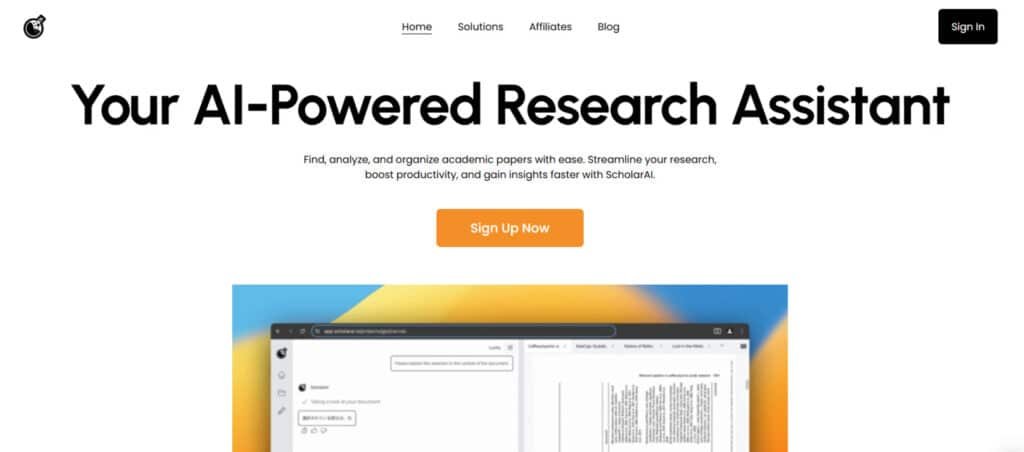
Who built it and a quick company background
The team behind the product grew from academic roots into a product company aimed at research workflows. They position the platform as an academic‑grade assistant that blends traditional indexing with modern AI. I find their roadmap geared toward reproducible outputs, not just conversational answers.
Adoption signals: real users, real scale
Adoption is a clear signal: trusted by 600k+ researchers and used inside Fortune 100 teams. That user base spans labs, consulting groups, and corporate R&D—showing the tool works across industries and use cases.
Where it sits among research tools
Think of it as a bridge between database searches and end‑to‑end assistants. It’s an AI for research platform—precision over breadth—so it fits in stacks that need traceable citations and fast synthesis.
- Discovery: AI‑driven search across 200M+ peer‑reviewed records.
- Summaries: Paper‑specific answers that anchor to sources.
- Workflow: Positioned between classic search and full research systems.
Later, I compare this approach with OpenAI Deep Research to show the tradeoff between agentic breadth and structured academic depth.
What is ScholarAI?
When deadlines loom, you need a single tool that turns scattered PDFs into clear, citable outputs. This is an end-to-end research assistant built for scientific literature: it combines search, summary, and citation workflows so you spend less time hunting and more time writing.
Inner workings: AI-driven discovery, summarization, and citation workflows
The platform searches 200M+ peer‑reviewed sources to surface relevant papers fast. It parses abstracts and dives into full text with a segment‑by‑segment approach to extract methods, results, and limitations.
AI components generate concise summaries and answer paper-specific questions while linking every claim back to the source. Save Citation and Related Paper Discovery keep references tidy and expand context automatically.
How it benefits students, developers, and professionals
For students: clear summaries, organized notes, and instant access to full text make literature reviews and coursework less painful.
For developers: quick scans of standards, patents, and technical papers speed feasibility checks and reduce rework.
For professionals: fast evidence gathering and traceable sources support market scans and due diligence. The systems approach—Literature Map, AI writing, and multilingual tools—helps teams maintain a shared understanding without bouncing between apps.
- Core output: structured information you can reuse in drafts.
- Switch between summary and full text when precision matters.
- Ideal for users who want fast, defensible research with fewer context switches.
How ScholarAI Works Under the Hood
In my experience, the smartest gains come from a tight, repeatable search-to-summary loop. Start by seeding a focused search with a few keywords. The tool returns a ranked list of abstracts so you can screen fit papers in minutes instead of hours.
From abstract screening to segment-by-segment reading
Open a promising result and trigger the full text parser. It reads the text in segments—methods, results, limitations—so you get targeted snippets for quick analysis.
That segmented view keeps you from digging through PDFs. You can ask paper-specific questions and jump to the exact section in the text.
Personalized recommendations and networked literature
The Literature Map builds a networked view of citations and related work. Recommendations are personalized against a corpus of over 200M+ peer‑reviewed sources, nudging you to adjacent studies you might miss.
- search → skim abstracts → map literature
- analyze full text → save citations → draft summaries
- refresh queries for near real time iteration
“Think of it like a power grid for knowledge—good systems route your energy to synthesis, not scavenging.”
For context, the orchestration mindset mirrors how AI optimizes complex infrastructure (even data centers). Net effect: your research processes run leaner, and you spend more time judging results than hunting for them.
Best Features of Scholar AI
A research assistant should turn a messy inbox of PDFs into a neat, citable outline. Below I highlight the standout features that make that possible and why they matter for your workflow.
1. Research & Discovery Tools
ScholarAI streamlines research tasks by providing access to over 200 million peer-reviewed papers, preprints, and patents, leveraging advanced algorithms to enhance productivity. This tool empowers users to uncover relevant information quickly, maximizing research impact for students, researchers, and professors.
1.1 AI-Driven Search and Retrieval
The AI-driven search uses natural language queries or keywords to retrieve academic resources instantly. Full metadata and summaries boost productivity, enabling users to focus on high-value tasks and unlock the potential of vast databases like PubMed and arXiv.
1.2 Personalized Recommendations
Tailored suggestions based on research interests ensure credible information delivery, enhancing knowledge acquisition. This feature saves time, aligning with trends in efficient research and amplifying impact for users seeking targeted content.
1.3 Advanced Filtering
Filtering by discipline, date, or citations refines results, optimizing tasks across fields. This technology supports precise information retrieval, increasing productivity for users aiming to explore specific academic trends with potential for breakthroughs.
2. AI-Powered Summarization and Extraction
This feature simplifies complex tasks by condensing papers into actionable insights, using algorithms to enhance knowledge retention. It supports multilingual users, making research accessible and increasing impact for diverse audiences.
2.1 Key Takeaways and Summarization
Automated summaries extract essential points from papers, saving time and boosting productivity. Multilingual support ensures language barriers are minimized, helping users grasp critical information for research tasks.
2.2 Insight Extraction
By identifying methodologies and findings, this tool enhances knowledge processing, enabling users to leverage information for impactful research. It supports tasks requiring deep analysis, unlocking potential for innovation.
2.3 Referenced Paper Handling
Automatic extraction of cited works streamlines literature reviews, enhancing productivity. This technology supports users by chaining relevant information, amplifying research impact across disciplines.
3. AI-Powered Research & Writing
This suite automates writing tasks, using technology to improve productivity and management. It supports drafting and visualization, helping users produce high-quality outputs with significant impact.
3.1 Automated Data Visualization
Complex data transforms into clear visuals, simplifying tasks and enhancing knowledge communication. This boosts productivity for users presenting information visually, aligning with trends in data-driven innovation.
3.2 Paper Structuring and Drafting
AI-assisted drafting and structuring streamline writing tasks, ensuring academic rigor. Citation management tools save time, enhancing productivity and enabling users to focus on innovation in their work.
3.3 Multilingual Support
Translations and intuitive tools make English-centric content accessible, removing language barriers. This maximizes impact for global users, supporting tasks requiring cross-lingual knowledge access.
4. Learning & Education Tools
These tools transform resources into study aids, enhancing productivity for students and educators. They leverage technology to support learning tasks, unlocking academic potential.
4.1 Customized Study Materials
AI generates notes, quizzes, and flashcards from syllabi, streamlining tasks for exam prep. This boosts productivity, helping students master knowledge efficiently.
4.2 Interactive Study Aids
Adaptive quizzes and flashcards enhance learning tasks, leveraging algorithms to improve retention. This supports users seeking to maximize knowledge and academic impact.
4.3 Lecture and Reading Capture
Automatic extraction of key points from lectures ensures no information is missed, enhancing productivity. This supports students in organizing knowledge for study tasks.
5. Organization and Knowledge Management
This feature centralizes resources, boosting productivity through efficient management. Notilo enhances knowledge organization, supporting research tasks with potential for innovation.
5.1 Centralized Workspace
A searchable repository organizes papers and notes, streamlining tasks. This technology enhances productivity, helping users manage information effectively.
5.2 Notilo Integration
Notilo connects and transforms knowledge, enabling dynamic querying. This supports tasks like generating summaries, boosting impact for research organization.
It helps you store, connect, and transform knowledge—seamlessly integrating research papers, notes, and documents into productive formats. It organize your research in one place and enables chat with referring to your notes and papers
6. Collaboration and Team Features
These tools enhance team tasks, supporting management and innovation. They enable seamless collaboration, increasing impact for group projects.
6.1 Team Data Sharing
Secure sharing of information supports collaborative tasks, enhancing productivity. This helps teams maximize research potential across disciplines.
6.2 Collaboration Spaces
Real-time co-authoring spaces streamline group tasks, leveraging technology for innovation. This ensures efficient management of shared knowledge.
7. Integrations and Extensions
These tools extend ScholarAI’s potential, integrating with external platforms to enhance productivity. They support diverse tasks, amplifying research impact.
7.1 ScholarAI GPT
A ChatGPT-compatible extension supports on-the-go tasks, enhancing knowledge access. This boosts productivity for users needing flexible information retrieval.
7.2 ScholarAI Copilot
A GPT-4 Turbo-powered tool streamlines project tasks, offering free trials. This technology enhances management, supporting research innovation.
7.3 ScholarAI API
The API enables custom integrations, unlocking potential for developers. It supports tasks requiring advanced information processing, boosting impact.
8. Additional Functionalities
These features ensure versatility, enhancing productivity across research tasks. They maximize impact for diverse users, leveraging technology for knowledge growth.
8.1 Discipline-Agnostic Applicability
Supports all fields, from clinical to humanities, enhancing tasks across domains. This ensures broad impact, aligning with academic trends.
8.2 User Control and Customization
Customizable outputs enhance productivity, allowing users to tailor information processing. This supports tasks requiring specific knowledge outputs.
8.3 Accessibility and Scalability
Scalable technology ensures accessibility, supporting tasks for individuals and enterprises. This maximizes potential for global knowledge sharing.
“Keep the work close to sources—this is a systems-first approach to real, defensible research.”
| Feature | What it does | Why it helps |
|---|---|---|
| Search Abstracts | Rapid keyword screening | Finds relevant info without PDF overload |
| Get Full Text | Segmented methods/results/limits | Enables precise quotes and better analysis |
| AI Writing | Structure drafts and insert citations | Saves time while keeping your voice |
Getting Started With ScholarAI
Begin with a clear goal so your searches and notes stay focused instead of sprawling. Write a one‑line inquiry (for example: evaluate X method for Y outcome) and choose a plan based on expected use and credits.
Create an account and set research goals
Sign up, pick a tier, and set a primary objective. I recommend saving that objective in the project header—small habit, big payoff.
Seed keywords and refine with abstract and full‑text passes
Seed a handful of keywords, run Search Abstracts, then prune by domain terms. Shortlist promising hits and run the Get Full Text parser to extract methods and limitations.
Build your literature map and save citations
Drop in DOIs or seed papers to expand the Literature Map. Save citations as you go—export to your reference manager so you don’t clean up at the end.
Draft, visualize, and iterate with AI assistance
Use AI writing to create section outlines, embed inline citations, and generate simple figures. Iterate: update keywords, rerun abstracts, expand the map. For light due diligence, this flow gets you to a defendable outline fast.
| Step | Action | Quick benefit |
|---|---|---|
| Define inquiry | Write a one‑line research question | Keeps search focused and repeatable |
| Seed keywords | Run Search Abstracts and shortlist | Saves screening time |
| Full text & questions | Parse segments; ask paper‑specific questions | Clarifies methods before deep reading |
| Map & cite | Build Literature Map; save citations | Shows field systems and preserves references |
ScholarAI Plans and Pricing
Pricing should help your workflow, not interrupt it—so let’s map out what each plan gives you.
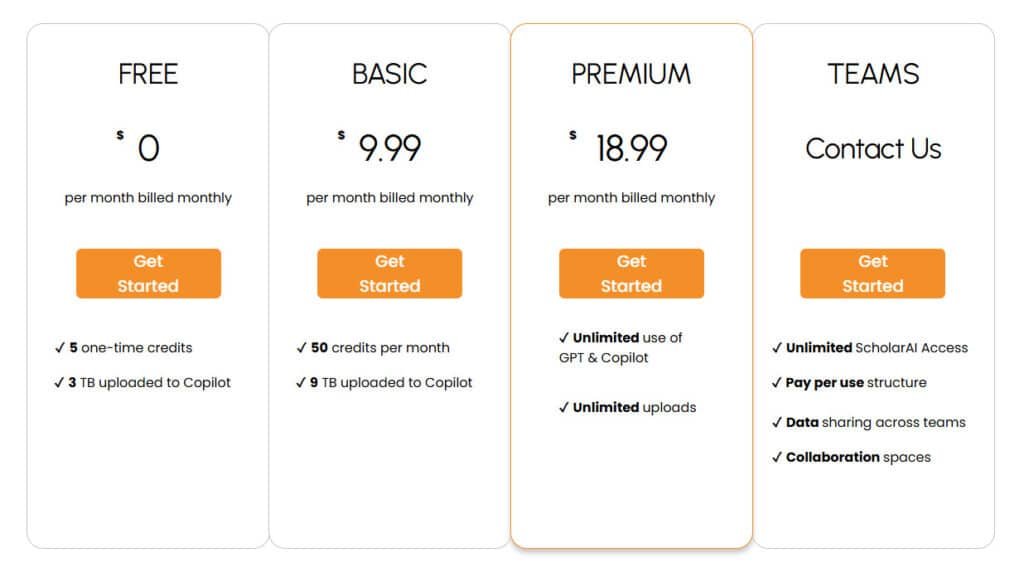
Free Plan
Best for quick trials. You get 5 one‑time credits and access to upload up to 3 TB to Copilot. Use this to test core systems and confirm early results without spending a dime.
Basic Plan
— $9.99 / month
50 credits per month and 9 TB of uploads. This tier fits regular research cycles, course work, and lightweight team processes. It’s a good starter if you want predictable monthly costs.
Premium Plan
— $18.99 / month
Unlimited use of GPT and Copilot plus unlimited uploads. Ideal if you work in literature weekly or ship client work—Premium removes credit math and speeds deep full‑text processes.
Teams
Contact sales for pay‑per‑use pricing, shared data, and collaboration spaces. Designed for orgs that handle repeat cases, centralize systems, and want shared access and QA controls.
- Credits meter advanced actions (deeper full‑text work); Premium removes that overhead.
- Tip: try Basic to log usage patterns, then scale to Premium or Teams if the time saved justifies the cost per year.
“Premium tends to be the no‑worry choice once you’re consistently in the tool.”
| Plan | Key limits / perks | Best for |
|---|---|---|
| Free | 5 one‑time credits, 3 TB uploads | Trials, quick tests |
| Basic | $9.99/mo, 50 credits, 9 TB | Students, solo researchers |
| Premium | $18.99/mo, unlimited use & uploads | Power users, consultants |
| Teams | Contact: pay‑per‑use, shared spaces | Organizations, enterprise cases |
ScholarAI Review
In practice, the platform sped up the boring parts of literature work so I could focus on insights. I ran a weekend of searches and tasks to judge speed, accuracy, and fit for real projects.
Hands-on impressions of speed, accuracy, and workflow fit
Speed: abstract search is snappy and full text parsing keeps pace with iterative sprints. I could tweak keywords and see updated shortlists in near real time.
Accuracy: Summaries match source claims most of the time. Asking pointed questions surfaced methods and caveats I might miss when skimming PDFs.
Workflow fit: The systems view (map + related) reduced tunnel vision. It helped me scope a field and draft an article outline without bouncing between tabs.
Value-for-money across tiers
Free is fine for a quick trial. Basic covers weekly coursework and solo projects. Premium is the sweet spot if you live in the literature; Teams makes sense for shared pipelines.
“For defensible academic analysis, it’s a strong value—especially when accountability to sources matters.”
- Rating observed: 4.1/5 from 27.1K+ users.
- Downside: credit limits and occasional indexing gaps where full text isn’t accessible.
- Compared to agentic deep research tools, it trades breadth for dependable depth.
Pros & Cons of Scholar AI
Let’s cut to the chase: What works well and where you’ll hit friction in day-to-day use. I tested the core end-to-end flow—Abstracts → Literature Map → Full Text → Q&A → Save Citation → AI writing/visualization—and this is what stood out.
Pros
- Cohesive systems that move you from discovery to drafting with fewer context switches. That workflow saves time across a per year research cadence.
- Rigorous analysis grounded in traceable citations—ideal for due diligence and structured write-ups.
- Learning aids (summaries, flashcards, visualizations) speed comprehension so your work time shifts toward interpretation.
- Fast access to related cases via the Literature Map and smooth citation exports for clean bibliographies.
Cons
- Credit limits on lower tiers can slow heavy use—Premium mostly removes this bottleneck.
- Dependence on available source material: paywalled or missing texts can bottleneck some topics.
- Niche fields may have sparse coverage, so you may still need specialty databases for deep dives.
Summary: if your day involves repeated analysis and organized review writing, this tool is a net win. It shines for academic and professional cases that demand verifiable sources.
“Best used when traceability and structured systems matter more than broad, agentic web scraping.”
If you need wide web synthesis or non‑academic sources, read on to explore alternatives and when to pick each tool.
Alternatives to Scholar AI
Quick framing versus deep verification—that tradeoff guides which platform you pick. I run an agentic pass when I want a draft fast, then re‑ground claims with a citation‑forward system for due diligence.
ScholarAI searches 200M+ papers, builds citation networks, and chats with PDFs—making lit reviews and gap spotting effortless at $9.99/month Pro. These six tools shift the focus toward drafting, editing, or deeper document interaction while still supporting research workflows.
Paperpal
Paperpal provides real-time grammar checks, plagiarism detection, and journal-ready templates across 250M+ papers. Ideal for final manuscript polish—$25/month entry – Read Full Review
JenniAI
JenniAI acts as a co-writer with autocomplete, thesis outlines, and citation management as you type. Perfect for overcoming blocks in long reports—free tier, $20/month unlimited – Read Full Review
Jotbot AI
JotbotAI turns voice/video notes into cited drafts and matches your writing style. Students juggling lectures love the speed—free basics, $14/month unlimited – Read Full Review
SciSpace
SciSpace chats with uploaded PDFs, extracts tables, and surfaces related studies from 280M+ sources. Lit-review powerhouse—free tier, $20/month premium – Read Full Review
WordVice
WordVice refines tone, paraphrases, and checks clarity for non-native speakers. Seamless Overleaf integration—$19/month Premium – Read Full Review
AI-Writer
AI-Writer (Writefull) generates abstracts, paraphrases, and academic phrases tuned for scholarly style. Great for quick rewrites—€10.58/month yearly – Read Full Review
These extend ScholarAI’s research core into drafting and polishing—choose based on your biggest bottleneck.
| Tool | Key Strengths | Starting Price | Best For |
|---|---|---|---|
| ScholarAI | Citation graphs, 200M+ papers, PDF chat | $9.99/month | Lit reviews & gap analysis |
| Paperpal | Grammar/plagiarism, journal templates | $25/month | Final submission polish |
| JenniAI | Co-writing, outlines, citation handling | $20/month | Theses & long drafts |
| Jotbot AI | Voice notes, style match, instant cites | $14/month | Student essays & lectures |
| SciSpace | PDF chat, table extraction, 280M+ papers | $20/month | Deep document analysis |
| WordVice | Paraphrasing, clarity, non-native support | $19/month | Tone refinement |
| AI-Writer | Abstracts, academic phrasing, Overleaf | €10.58/month | Quick scholarly rewrites |
“Run a short trial of both on the same topic—compare time to insight, citation quality, and the edit burden.”
ScholarAI vs OpenAI Deep Research: Which Suits Your Work?
Picking the right research tool starts with the question: do you need speed or auditability? I find this tradeoff clarifies choice fast—especially when deliverables carry different burdens of proof.
Agentic behavior vs. structured academic workflows
OpenAI Deep shows high‑initiative agentic behavior. It drafts outlines and short articles in near real time and helps you iterate ideas quickly.
By contrast, the structured academic tool puts source material first: full‑text extraction, segment‑level reading, and lineage for every claim. That makes method-aware analysis and defensible answers easier to produce.
Bias and source selection considerations
Agentic systems can over-index early hits. That speeds ideation but risks weighting certain sources more than others. If your work needs audited citations (thesis, client report, compliance), that bias matters.
The paper‑first approach prioritizes peer‑reviewed records and explicit citation chains. It reduces rework when someone asks for provenance during review.
“Start agentic, finish structured—prototype with a fast draft, then re‑ground claims with paper‑first sourcing.”
- When to pick agentic: rapid framing, brainstorming, and fast iterations in near real time.
- When to pick structured: audit-heavy deliverables, reproducible methods, and team processes that need teachable systems.
- Practical rule: prototype with openai deep, then substantiate core claims using the paper‑first workflow.
| Aspect | Agentic (OpenAI Deep) | Structured (paper‑first) |
|---|---|---|
| Speed | Very fast drafts (~5 minutes) | Slower, repeatable passes |
| Source strategy | Broad web & early hits; validate later | Peer‑reviewed priority; citation lineage |
| Best use cases | Ideation, sprints, strategy | Theses, due diligence, regulated reports |
Real-Time, Full-Text, and Citation Capabilities
When you need answers fast, the difference between an abstract and the full paper is everything. This tool chains search results from abstract screening into parsed full text, so your claims link back to verifiable source material.
From abstracts to full text: ensuring answers backed by source material
The Get Full Text parser reads segments—methods, results, limitations—so summaries keep context. Ask focused questions and the system returns exact passages in near real time, reducing guesswork and speeding reliable analysis.
Saving and exporting citations for reports and due diligence
Use Save Citation to export clean references with one click. Related Paper Discovery expands the literature neighborhood so you know whether a gap is real or just a search miss.
- Systems workflow: search → map → analyze preserves reproducibility across teammates.
- Inline links point to section and line—fewer “where did that quote come from?” moments.
- Wide coverage (200M+ peer‑reviewed sources) keeps reports defensible and faster to assemble.
| Capability | What it delivers | Why it matters |
|---|---|---|
| Full text parsing | Segmented methods/results/limits | Improves summary quality |
| Question tool | Exact passages in near real time | Speeds first-pass comprehension |
| Save Citation | One-click exports | Speeds reports & due diligence |
Who Is ScholarAI For?
I find this tool fits three clear audiences: students, developers, and professionals. Each group uses the same core systems but in different ways.
Students: coursework, theses, and literature reviews
Students get faster study cycles—summaries, flashcards, and guided outlines make dense papers approachable.
Use it to build semester‑long projects, keep citation hygiene, and produce defendable literature reviews without the usual hunting.
Developers: rapid tech scans, patents, and technical papers
Developers can scan standards and patents to decide what to build—or what to skip—before investing time in prototypes.
Fast access to segmented full text and clear information reduces guesswork during early design sprints.
Professionals: market scans, trend tracking, and reports across industries
Professionals use it for evidence‑backed market analyses and client deliverables. Quick access to citations makes reports defensible.
Teams benefit from shared systems—everyone sees the same map, notes, and saved references, which cuts duplication.
“Use it to prototype your argument fast, then lock claims to papers before you submit or present.”
| User | Typical use | Main benefit | Example |
|---|---|---|---|
| Students | Coursework, thesis literature reviews | Faster comprehension; consistent citations | Build a thesis literature map with exportable references |
| Developers | Standards, patents, technical scans | Quick feasibility checks; lower prototype risk | Scan patents to decide technology choices |
| Professionals | Market scans, reports across industries | Evidence-backed insights; shared team views | Run a trend analysis with inline citations for clients |
Security, Data Handling, and Team Collaboration
Teams need clear guardrails for sharing research without turning every draft into an email chain. I’ve seen groups waste hours reconciling files or chasing citation versions. Proper workspaces and controls stop that churn.
Team workspaces and data sharing controls
Teams get shared spaces with granular access—you pick who can view, edit, or export citations per project. That reduces accidental leaks and keeps client or IRB data in the right buckets.
Collaboration processes include shared literature maps, notes, and draft documents so your work isn’t siloed on one laptop. New analysts onboard faster because the context and sources are already visible.
- Pay‑per‑use + unlimited platform use simplifies budgeting for teams with variable demand.
- Built‑in systems for data sharing support cross‑functional reviews (R&D, clinical, policy).
- Not designed as a data centers replacement—it’s a pipeline from discovery to deliverable, not infra hosting.
For orgs using systems like structured knowledge bases, exported citations and summaries slot neatly into folders or wikis. Practical governance matters: decide upfront what stays internal vs. what can go to clients.
“Treat this as the evidence layer in your stack—fast to query, strict on provenance, and forgiving on handoffs.”
Bottom line: Fewer bottlenecks, clearer handoffs, and a repeatable path from assignment to outcome when teams adopt these controls and processes.
Limitations and What to Watch Out For
Before you hand over trust to an AI assistant, know the limits that affect high‑stakes work. The platform speeds discovery, but it depends on what literature is available. Coverage is wide, yet not exhaustive.
Scope of sources and the need for human verification
Coverage gaps exist: niche fields and paywalled journals can limit available source material and text. That affects downstream analysis and understanding.
- Validate key claims: always run a human check—automated analysis misses nuance.
- Ask targeted questions against full text to improve your understanding before committing.
- Plan credits: lower tiers can constrain heavy process cycles—schedule big searches or upgrade around milestones.
- Due diligence: cross‑reference diverse sources, seek replication, and use domain databases when needed.
- Keep systems disciplined: tag decisions with citation IDs so teams can retrace steps.
Practical rule: use deep research tools for brainstorming, then anchor final drafts in peer‑reviewed source material. That combo keeps speed without sacrificing defensibility as you move from question to case study.
“Fast saves time per year—but the final read of pivotal sections is non‑negotiable.”
Case Study and Personal Experience
For a recent client due diligence I ran a focused literature hunt that turned a messy inbox into a defensible outline in one afternoon. The goal was simple: prove or disprove a technical claim with traceable evidence and a quick report.
Case study: Building a literature map to support due diligence
I seeded eight keywords, ran abstract screens, and built a literature map around two seminal papers. Expanding via cited‑by links brought in related cases fast.
I opened full text on five core papers and extracted methods, sample sizes, and constraints. Targeted questions cleared up ambiguous statistics and prevented a misread study.
My experience: From question to draft report with citations in an afternoon
I saved citations as I went. By draft time the bibliography was clean, so I spent energy on interpretation, not formatting.
Results: a defendable outline and figure set in ~3 hours; Final narrative the same day. A separate trial compared an agentic deep research pass to the paper‑first approach — I kept creative ideas from the agentic run but anchored claims to peer‑reviewed research.
“Structured discovery + precise citations yields faster, clearer decisions — and fewer late‑night edits.”
| Step | Action | Outcome |
|---|---|---|
| Seed keywords | Abstract screens | Shortlist relevant studies quickly |
| Map literature | Cited‑by expansion | Found related cases and gaps |
| Get full text | Segment reads & targeted questions | Accurate methods and quotes for analysis |
| Save citations | Export to reference manager | Clean bibliography at draft time |
Conclusion
Raamish’s Take
Scholar AI is your go-to AI research assistant for tackling academic tasks. It’s loaded with standout features to streamline your work, like AI-driven searches tapping into 200M+ peer-reviewed papers in seconds and summaries that cut through complex documents fast.
Data visualization turns raw data into clear charts, while multilingual support breaks language barriers with global access. Personalized study materials tailor notes for students, and advanced filtering zeros in on relevant sources quickly. Citation management keeps references neat and accurate.
Scholar AI speeds up your workflow with a tidy, efficient system, trusted by academics worldwide. Feeling overwhelmed by research? This streamlines it fast.
When deadlines loom, practical tools that turn raw sources into usable drafts save real time.
I’ve found this platform streamlines research from discovery to drafting: clean citations, clear literature maps, and reliable full‑text pulls that keep your information tied to sources.
In my review, it’s a daily driver when auditability matters more than broad speculation. Start Free or Basic to learn the flow. Upgrade to Premium to remove credit friction, or pick Teams for shared access across projects.
Pair it with faster agentic tools for quick ideation, then re‑ground claims here before you publish a report or article. Try it on your next assignment or client report and see how much time you win back—then spend that time growing your business with better, faster insights.
Frequently Asked Questions
Who built ScholarAI and what is the company’s background?
ScholarAI was developed by a team with deep roots in academic search, NLP, and research tools — people who previously worked on large-scale literature platforms and AI systems. The company positions itself as a bridge between academic discovery and practical research workflows for students, developers, and professionals.
How many users and organizations trust the platform?
ScholarAI reports adoption signals in the hundreds of thousands of researchers and lists widespread use across enterprise customers, including a number of Fortune 100 companies — indicators of both individual and institutional uptake for literature discovery and analysis.
What exactly does ScholarAI do?
ScholarAI combines AI-driven discovery, summarization, and citation workflows. I find it helpful for rapid abstract screening, finding related work, extracting full-text passages, and producing paper-grounded answers with citations — all within a unified interface.
How does ScholarAI find and recommend papers?
The system searches across a large index of peer-reviewed sources (200M+ items in its claimed coverage), uses relevance ranking and citation networks to map relationships, then personalizes recommendations based on your seed keywords, saved items, and interaction patterns.
Can ScholarAI access full-text articles or only abstracts?
ScholarAI supports both abstract search and segment-by-segment full-text analysis where licensing or open access permits. In practice, you get rapid abstract screening and deeper full-text insights for many, but not all, papers — depending on source access.
How reliable are the AI-generated summaries and answers?
The summaries are generally useful for quick understanding and triage. I still recommend verifying key claims against the original paper — ScholarAI provides citations and source snippets to help with due diligence and to guard against over-reliance on AI interpretation.
What research workflows does ScholarAI support?
Workflows include discovery (seed keywords and abstract passes), building literature maps (citation and related-paper graphs), saving/exporting citations, drafting with AI-assisted writing, and visualizing results — making it suitable for literature reviews, reports, and technical scans.
How does citation management work?
You can save citations with one click, export to common reference formats, and keep a personal library tied to your projects. The tool aims to reduce manual citation cleanup by attaching source metadata and DOI where available.
What are the main features that help students and educators?
Students benefit from rapid summaries, study guides, quizzes and flashcards, citation exports for papers and theses, and structured literature maps that speed up literature review tasks and learning.
Is ScholarAI useful for developers and technical researchers?
Yes. Developers can use it to scan technical papers, patents, and conference proceedings, get code-relevant excerpts, and track citation chains for technical maturity and novelty — useful for prototyping and competitive analysis.
What pricing plans are available and what do they include?
Plans range from a Free tier (limited one-time credits and uploads) to Basic (monthly credits and larger upload allowance), Premium (unlimited GPT & Copilot use with unlimited uploads), and Teams (custom collaboration and pay‑per‑use). Choose based on volume and collaboration needs.
Are there limits on usage for lower tiers?
Lower tiers use credit limits for heavy tasks like full-text processing and Copilot uploads. If you need continuous, high-volume access (big datasets, many full-text passes), Premium or Teams is the better fit to avoid hitting caps.
How does ScholarAI compare to agentic systems like OpenAI Deep Research?
ScholarAI focuses on structured academic workflows — discover, cite, and synthesize — while agentic systems aim for autonomous multi-step research actions. If you want controlled, citation-grounded research, ScholarAI often fits better; for exploratory agentic synthesis you might consider an agentic platform like OpenAI Deep Research.
What about bias, source selection, and verification?
Source selection can introduce bias — ScholarAI provides filtering and source transparency, but you should still audit key papers and cross-check findings. I always cross-verify high-stakes claims with original sources and diverse databases.
Does ScholarAI support multilingual content?
Yes — there is multilingual support with tailored translations and summaries for primarily English-centric content. It helps non-English speakers access English literature and vice versa, though translation quality may vary by language pair.
Can teams collaborate securely within ScholarAI?
ScholarAI offers team workspaces, shared libraries, and data controls so you can manage who sees what. For sensitive or regulated data, review the platform’s security documentation and enterprise controls before onboarding.
What are common limitations to watch for?
Limitations include credit caps on lower plans, incomplete full-text access for certain publishers, and occasional over-summarization by AI. The system is a powerful assistant but not a substitute for human review in critical research.
How do I get started quickly?
Create an account, set clear research goals, seed with keywords, run abstract passes, build a literature map, and iterate with AI-assisted drafting and visualization — that sequence gets you from question to draft fast.
Are there alternatives I should consider?
Consider OpenAI Deep Research for agentic synthesis, traditional discovery tools like Google Scholar, and citation managers such as Zotero or Mendeley. Choose based on whether you prioritize agentic automation, citation fidelity, or collaborative features.
Can ScholarAI help with due diligence or market reports?
Yes — it accelerates literature collection, extraction of key findings, and citation-backed summaries useful for due diligence, trend tracking, and industry reports. I recommend pairing AI outputs with domain expert review for important decisions.