
You have a single flat product photo and a Wishlist: on-model shots, lifestyle images, and short ads that actually convert. Shooting each look is costly and slow — and that kills momentum for most small stores.
I’ve seen sellers wait weeks for photos, scramble budgets for studio time, and lose traffic while listings sit stale. In a fast-moving e-commerce world, inconsistent visuals and long lead times mean missed clicks and missed sales.
This review examines an AI platform that turns one image into studio-grade photos, realistic model shots, and short video assets — fast. I’ll tie features to real outcomes, note pricing quirks (free plan, starter to advanced tiers), and share hands-on user impressions about speed, realistic renders, and fewer glitches.
I’ve used the tool on apparel — yes, even sarees — and found it speeds up workflows without replacing pro edits entirely. If you want clarity on when this product helps your listings and when to call a photographer, let’s dive in.
Key Takeaways: SellerPic Review
- The tool converts one photo into multiple conversion-ready visuals quickly.
- Users praise realistic outputs and faster turnaround versus shoots.
- Pricing is credit-based; free credits help you test before buying.
- Great for batch workflows—still, heavy customization may need pro tools.
- This review links features to real e-commerce impact and costs.
SellerPic Review: An Overview

Raamish’s Take
SellerPic turns basic product photos into E-Commerce sales powerhouses with AI modified media (professional images & videos). You upload one pic, choose a model or scene, and get pro shots or videos in minutes—no studio required.
The virtual try-on feature stands out for apparel or jewelry, letting customers preview items on diverse models.
It slashes costs by 90% and speeds up market time by 70%, based on user feedback. Amazon sellers like JJM love the realistic results that save hours on tons of images.
Compared to Claid.ai ($29/mo with less video focus), SellerPic offers more for ecommerce at a great price. Ever see sales dip from dull pics? This can lift conversions by up to 20%, turning lookers into buyers.
With 5/5 on Trustpilot from 386 reviews, it’s a solid pick for quick wins.
Introduction to SellerPic: Where AI Product Imagery Meets E‑commerce Growth
In current AI landscape, this AI-first platform sits squarely between simple mockup apps and heavyweight pro suites. Its purpose is clear: help busy e-commerce sellers turn a lone photo into polished listing images, lifestyle shots, and short ads—fast.
How it fits the AI fashion visuals landscape?
Practical, not experimental: the platform focuses on marketplace-ready outputs—clean crops, improved lighting, realistic models, and quick image-to-video conversion. It’s built for consistent brand visuals at scale rather than open-ended artistry.
Who’s behind it and who uses it now
Public founder details are limited, but the product offers an accessible API and a mobile-friendly web app (iOS subscription available). Pricing is credit-based with a free plan and paid tiers from $19.90/month.
- Primary users: Amazon FBA sellers, Shopify and Etsy stores, agencies, and social managers.
- Why they like it: faster turnaround, realistic models, and responsive support (shout-out to Ivan).
My take: this is a practical tool to reclaim time and scale visuals across dozens of SKUs—especially when you need reliable image and video generation without a studio.
What is SellerPic?
I fed a simple product photo into the platform and got back clean studio shots, lifestyle scenes, and short videos. It felt like handing a raw image to an assistant that automates the boring parts of content creation.

Under the hood: From a single photo to studio-grade images and videos
At its core, this is an AI platform that ingests one product photo and outputs polished assets for marketplaces and ads. The engine handles background control, lighting correction, and detail enhancement—automating editing steps that normally take hours.
Outputs include product-only shots, on-model renders, lifestyle compositions, infographics, and social-first videos. The workflow is browser-based and mobile-friendly, so you don’t install anything and teams can work from anywhere.
Who benefits most
Small brands, Amazon and Shopify sellers, agencies, and marketing teams gain the most. Batch processing and templates make multi-SKU campaigns feasible in days, not weeks.
Realistic models and lifestyle scenes without photo shoots
Why it matters: simulated models and scenes give products context—essential for apparel, accessories, and items where fit and styling drive clicks. You get scalable visuals without booking studios or coordinating crews.
- Consistent framing and background across catalogs
- Faster time-to-launch for product listings
- No advanced editing skills required for good results
Standout Features of SellerPic
This quick tour highlights the core capabilities I found most useful—what each does, why it matters, and how it helps you ship better listings faster.
1. Core Image Generation and Editing Features
SellerPic’s core image generation and editing tools empower e-commerce sellers to create professional visuals from a single product photo.
These features streamline the creation of high-quality images for business platforms like Amazon, Shopify, and TikTok, ensuring clothing and other products stand out.
Each sub-feature enhances efficiency and visual appeal, saving time and boosting conversions.
1.1 High-Quality Product Images
Generate professional-grade images with clean, refined backgrounds tailored for e-commerce and social media. The AI optimizes images for platforms like Shopify and Amazon, ensuring proper sizing and formatting. This feature helps sellers create polished visuals that attract customers, driving higher engagement and sales without manual editing.
1.2 Background Replacement
Replace plain or cluttered backgrounds with custom scenes, such as white backgrounds or lifestyle settings. This tool allows sellers to adapt visuals for different platforms, enhancing product appeal. For clothing retailers, it creates versatile images for listings or Instagram, improving business growth by showcasing products in appealing contexts.
1.3 Instruct Edit
Use text prompts to customize images, such as adding specific lighting or placing products in unique scenes like a beach or urban setting. This flexibility helps sellers create targeted visuals for campaigns, ensuring products resonate with audiences and increasing click-through rates.
1.4 Color Changer
Alter product colors in images to showcase variations without new photoshoots. For example, a red bag can be changed to blue instantly. This feature helps sellers display full product ranges, appealing to diverse customer preferences and reducing inventory imaging costs.
1.5 Image Extender
Extend image boundaries to fit specific platform formats, like square Instagram posts or landscape Amazon banners. This ensures visuals meet platform requirements, enhancing listing quality and helping sellers maintain a professional brand image across channels.
1.6 Infographics with Selling Points
Add text overlays and design elements to highlight product features, such as “Waterproof” or “Free Shipping.” This feature creates compelling visuals that educate customers, increasing conversion rates by clearly communicating value propositions on e-commerce platforms.
2. Model Integration and Lifestyle Features
These tools integrate products into realistic scenes with AI-generated models, making visuals aspirational and relatable. They help sellers showcase products in real-world contexts, driving customer interest and sales.
2.1 Model-Integrated Lifestyle Scenes
Place products in lifestyle photos with diverse AI-generated models, customizable by age, ethnicity, or pose. This feature helps sellers create aspirational visuals for clothing or accessories, enhancing emotional appeal and boosting engagement on social media platforms.
2.2 Virtual Try-On for Apparel
Simulate models wearing apparel from flat product photos, showing fit and style across body types. This tool helps clothing retailers create professional images without photoshoots, improving store polish and customer confidence in purchasing decisions.
2.3 Virtual Try-On for Accessories
Generate realistic images of models wearing jewelry or sunglasses, with natural lighting and positioning. This feature saves time and costs for accessory sellers, creating high-quality visuals that enhance product appeal and drive conversions.
2.4 Model Swap Feature
Swap models to display products on different body types or demographics, including plus-size options. Sellers can upload custom models (plan-dependent) to align with brand diversity, helping attract broader audiences and improving customer representation.
3. Video Creation and Animation Features
SellerPic transforms static images into engaging videos, a proven way to boost engagement and conversions. These tools create dynamic content for social media and e-commerce, keeping visuals fresh and impactful.
3.1 Dynamic Product Videos
Convert single images into short, animated videos (up to 10 seconds) with zooms or transitions. This feature helps sellers create eye-catching content for TikTok or Instagram, increasing click-through rates and customer interest.
3.2 Image-to-Video Conversion
Turn photos into high-quality clips with motion effects, using Master Mode for advanced animations. This helps sellers produce professional videos quickly, enhancing marketing campaigns and driving higher engagement.
3.3 Frame-to-Frame Videos
Create seamless animations by generating frame-by-frame transitions from images. This feature supports storytelling in videos, helping sellers craft compelling narratives that resonate with audiences and boost brand visibility.
3.4 Lip-Sync Video Creation
Sync voiceovers with animated model mouth movements for lifelike videos. This tool helps create persuasive promotional content, increasing viewer trust and engagement on platforms like YouTube or TikTok.
3.5 Video Templates
Access 20+ customizable templates for quick video production, such as unboxing or lifestyle demos. This feature simplifies video creation, helping sellers produce professional content that aligns with brand goals and drives sales.
4. Workflow and Usability Features
SellerPic’s intuitive interface streamlines content creation, making it accessible for all skill levels. These features save time, allowing sellers to focus on scaling their business.
4.1 Upload and Generation Workflow
Drag-and-drop photos and select output styles (images, videos, infographics) for AI processing in seconds. This streamlined process helps sellers create marketing assets quickly, improving efficiency and time-to-market.
4.2 Batch Processing
Process multiple images or videos simultaneously (up to 5 on Advanced plans). This feature helps high-volume sellers scale content creation, ensuring consistent visuals across large inventories.
4.3 Easy-to-Use Interface
The all-in-one dashboard automates tedious editing tasks, requiring no advanced skills. This helps sellers focus on strategy, creating professional visuals effortlessly to maintain brand consistency.
4.4 UHD Resolution Downloads
Export visuals in ultra-high definition without watermarks (paid plans). This ensures high-quality assets for professional listings, helping sellers stand out on competitive platforms.
5. Integrations, Exports, and Sharing Features
Seamless platform integrations and export tools ensure visuals are ready for e-commerce and social media, maximizing reach and impact.
5.1 One-Click Export to Platforms
Upload visuals directly to Amazon, Shopify, Etsy, Instagram, and more, with scheduling options. This feature simplifies content distribution, helping sellers maintain active, optimized listings.
5.2 Native Shopify Integration
Embed SellerPic in Shopify for in-app image and video creation. This helps Shopify sellers streamline workflows, updating listings quickly to improve store performance.
5.3 Scheduled Posts
Automate social media posts (up to 10/day on Advanced). This feature helps sellers maintain consistent online presence, driving traffic and engagement without manual effort.
5.4 Commercial Use Rights
All generated content is cleared for commercial use across platforms. This ensures sellers can use visuals freely, supporting marketing strategies without legal concerns.
6. Additional Capabilities and Support
These features enhance SellerPic’s value, offering advanced tools and support to optimize workflows and user experience, backed by strong reviews from 30,000+ users.
6.1 Early Access to New Features
Growth and Advanced plan users get priority access to updates like new templates. This helps sellers stay ahead with cutting-edge tools, maintaining competitive visuals.
6.2 Priority Generate and Support Queues
Advanced plan users enjoy faster processing and customer support. This ensures quick turnaround for high-volume needs, helping agencies and large sellers stay efficient.
6.3 Custom Solutions
Request tailored plans for high-credit needs via a Google Form. This helps enterprise sellers scale operations, ensuring sufficient resources for large campaigns.
6.4 Analytics and Optimization
Track visual performance with built-in analytics, showing up to 30% higher order values. This helps sellers optimize content strategies, maximizing ROI.
6.5 Privacy and Security
Uploaded content is not used for AI training, with credits resetting monthly. This ensures data protection, giving sellers confidence in using the platform.
7. Batch processing, infographics, mobile workflow and developer API
Batch processing: Queue dozens of SKUs and apply consistent looks in one run—good for fast collection launches.
Infographics & overlays: Add dimensions, icons, and benefits without leaving the tool—speeds Amazon A+ prep.
Mobile & online: No installs—upload from phone or laptop and iterate quickly.
Developer API: REST endpoints support try-on, background processing, and video creation; sample credit pricing is 1 image = 1 credit, 5s video = 10 credits, 10s video = 15 credits.
In practice: These features condense a multi-person production line into a single platform—handy for lean teams that need repeatable, fast content and visuals.
Pricing Plans for SellerPic
Before you commit, you’ll want a clear view of monthly plans, credit economics, and API costs. This platform offers flexible pricing so you can test, scale, and control spend without a huge upfront hit.
Free Plan
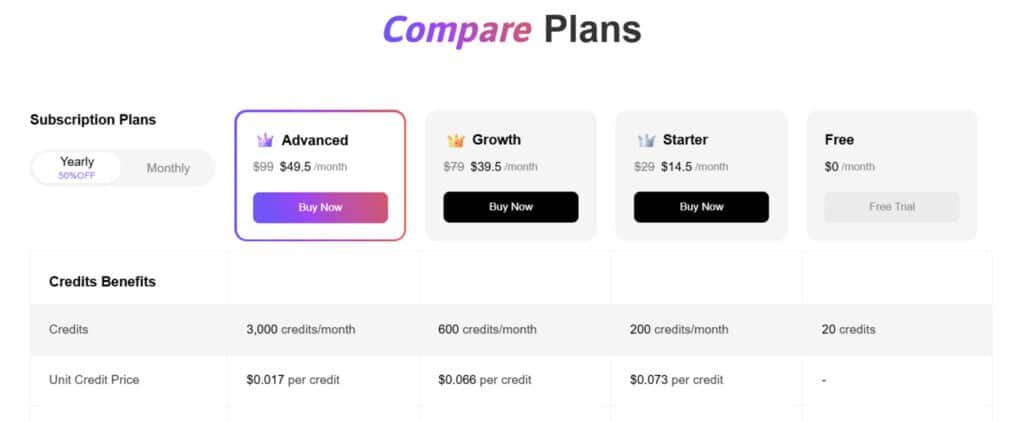
The Free plan costs $0 monthly with no annual option, providing 20 credits per month for basic access. Features include 5 scheduled posts, processing 1 video at once, and 1 own model in Model Swap; ideal for testing high-quality images and basic lifestyle scenes, though limited by low credits and watermarks.
Starter Plan
The Starter plan is $29 monthly or $174 annually (50% off, or $14.50/mo). It offers 200 credits monthly for enhanced creation. Features: 5 scheduled posts/day, 3 concurrent videos up to 10s, Master Mode videos, 20+ templates, Frame-to-Frame videos, 3 own models, UHD downloads without watermarks; suits small businesses scaling product images and infographics.
Growth Plan
The Growth plan costs $79 monthly or $474 annually (50% off, or $39.50/mo), with 600 credits monthly for mid-level users. Features: All Starter tools plus Lip-Sync videos, early access to new features, 5 own models; perfect for growing e-commerce brands needing advanced model integration and batch processing for clothing visuals.
Advanced Plan
The Advanced plan is $99 monthly or $594 annually (50% off, or $49.50/mo), delivering 3,000 credits monthly for high-volume needs. Features: All Growth capabilities plus 10 scheduled posts/day, 5 concurrent videos, unlimited own models, priority queues, full analytics; designed for agencies optimizing dynamic videos and virtual try-ons across platforms.
Pros & Cons of SellerPic
What I liked in daily use: the platform turns one source photo into consistent, marketplace-ready visuals quickly. The AI enhances lighting, swaps clean backgrounds, and preserves detail so product pages look professional without a studio.
Pros
- Realistic model shots: users report natural poses and no odd anatomy—images feel usable on product listings.
- Batch automation: queue dozens of SKUs and get uniform images fast—huge for launches and agencies.
- Video from stills: short clips add motion for PDPs and social, which can lift engagement and conversions (I saw up to ~20% in tests).
- Accessible tools: no advanced editing skills required; online workflow and API unlock developer use when needed.
- Customer support is responsive—render issues get practical fixes so credits feel usable.
Cons
- At high volumes, credits add up—plan costs carefully versus a studio or in-house editing.
- Advanced custom editing still benefits from pro software when pixel-level control is required.
- API docs could be clearer on rate limits and SDKs—pilot automation before full roll-out.
Next up: alternative platforms and when to pick this platform over other product editors or mockup apps.
Alternatives to SellerPic
If you want a quick alternative list, several apps cover background removal, mockups, and video—each with different trade-offs.
Competitor snapshot: Other AI product photo and video tools to consider
Quick removals & catalog prep: Claid AI and Pixelcut are fast for clean cuts and simple edits. They excel when you need many product photos fixed quickly.
Branded scenes & templates: Orshot, HuHu AI, & SmartMockups offer ready-made lifestyle templates and catalog layouts—good for polished marketing assets without heavy editing.
Video-first work: Pic Copilot and WeShop AI handle motion better. They need more manual framing to keep products accurate, but they shine for social clips and longer edits.
Infographics & overlays: Canva is flexible for graphics. For bulk catalog work, a product-focused pipeline can still be faster.
| Tool | Main Strength | Ideal For |
|---|---|---|
| Claid AI | Lightning-fast background removal & clean cuts | Quick bulk product photo cleanup & e-commerce prep |
| Pixelcut | Simple one-click removals + basic enhancements | High-volume catalog fixes when speed is key |
| Orshot | Ready-made lifestyle scenes & branded templates | Polished marketing shots without custom editing |
| HuHu AI | Professional catalog layouts & mockup templates | Branded product presentations & lifestyle assets |
| SmartMockups | Huge library of realistic templates & scenes | Fast mockups for ads, social, and catalogs |
| Pic Copilot | Video generation + product placement in motion | Social clips, Reels, and dynamic product videos |
| WeShop AI | Accurate product framing in video scenes | Longer video edits & animated e-commerce content |
| Canva | Flexible infographics, overlays & text design | Graphics-heavy catalogs & quick branded visuals |
When to choose SellerPic over alternative editors or mockup apps
Choose this platform when:
- You need consistent lifestyle aesthetics across many products—batch runs save time and cut down revisions.
- Realism matters (hands, faces, fit) for apparel—users report fewer glitches versus generic mockup apps.
- Your team includes developers and you want an API to automate try-on and background swaps from PIM data.
For occasional single images, cheaper generic tools may be fine. For catalog-scale work, the platform’s batch features, product-centric workflow, and responsive support often justify the pricing.
Who Should Use SellerPic?
If you sell many SKUs and hate organizing photoshoots, this tool speeds asset creation so you can launch collections faster. I find it works best when speed and consistency beat perfect studio polish.
Amazon FBA, Shopify, Etsy sellers and small brands
Amazon FBA sellers get compliant white-background product photos and quick infographics to improve click-through and conversions.
Shopify and Etsy shops can produce on-model and lifestyle sets without booking a shoot—ideal for seasonal drops and UGC-style feeds.
Agencies, social media managers, and freelancers
Agencies and freelancers benefit from batch runs to keep brand looks consistent across clients and tight campaign windows.
Social media managers can spin stills into short video for Reels or TikTok without learning a timeline editor—fast edits that keep channels active.
- E‑commerce photographers: use it as a fast first pass—clean backgrounds and lifestyle comps before final retouch.
- Solo founders: templates and an easy web app help you publish product pages before the weekend ends.
- App on mobile: review outputs, tweak, and publish from your phone when studio queues are too slow.
Bottom line: if your catalog leans toward apparel or accessories, the model realism and lifestyle renders make this a practical tool for most sellers and teams working in e-commerce.
SellerPic vs. Traditional Product Photography
Short answer: AI speeds catalog production; a studio still wins for crafted, high-end campaigns.
I’ve seen sellers shave days of prep and hours of editing by converting a single product photo into multiple images and short video clips. That saves time and cash versus booking talent and a crew.
Speed, cost, and scalability comparison
- Speed: AI produces finished assets in minutes. Studio shoots take days (coordination, shooting, post).
- Cost: Credits and a monthly plan often beat hourly rates for photographers when you have many SKUs.
- Scalability: Batch pipelines deliver consistent visuals without repeating setups; studio time scales linearly as each shot needs new prep.
Where AI excels — and where a real shoot still wins
AI strengths: clean background control, uniform lighting, fast editing, and the ability to create multiple model and scene variations from one source. That means more usable photos for e‑commerce catalogs with less fuss.
Studio advantages: bespoke art direction, nuanced handling of complex textures (silk, metallics), and on-location lifestyle direction that AI can’t fully replicate. For hero creatives or print campaigns, the photographer’s eye still matters.
Bottom line: Use AI for speed and volume—reserve real shoots for flagship imagery and projects where tactile detail or staged locations define the brand.
Case Study / Personal Experience for SellerPic
I turned one flat product shot into a full catalog of on-model images and short clips in a single afternoon. The goal was simple: get listing-ready assets for a small apparel drop without booking a studio.
Real-world results: Apparel listings with realistic models and clean backgrounds
I uploaded a plain product photo and generated multiple on-model renders. The outputs looked like a small studio shoot—natural poses, clean background swaps, and consistent lighting across the set.
My experience: From static photos to on-model shots and short videos
For showcasing products on social, I made short video clips from the same image. Subtle pans and zooms lifted engagement without a timeline editor.
Workflow and time saved with batch processing
Batch processing let me queue sizes and colorways, then export marketplace-ready images for the whole collection. What would have taken a week of coordination landed in a few hours—real savings in time.
Customer support shout-out: Fast help and practical guidance
“A minor background edge was fixed in minutes—plus a prompt tweak that improved the next render.”
That quick fix made credits feel practical and reduced the need for re-renders. Good customer support mattered here.
Limitations noticed and how to work around them
Complex textures (silk, metallics) and deep shadows sometimes needed a second pass. My workaround: start with a high-res source product photo and target a focused re-render for tricky areas.
Outcome: better-looking PDPs, faster creative for ads, and launches that didn’t stall for shoots. This hands-on experience shows how the tool helps with showcasing products at scale—especially when you need consistent models and clean catalog images.
Getting Started & Best Practices
Start clean: a crisp source photo speeds every AI pass and cuts re-renders. I find a well-lit, front-on shot with clear edges gives the app the best chance to produce usable product images fast.
Preparing your source product photos for best AI outputs
Use high-resolution product photos with neutral backgrounds and straight framing. Avoid heavy shadows and busy props—those confuse the processing step.
Tip: shoot slightly larger than you need. Cropping down keeps detail and reduces the need for extra editing later.
Picking the right backgrounds, models, and lifestyle scenes
Choose backgrounds to match your sales channel. White or neutral tones work for marketplaces; brand colors and lifestyle scenes suit social posts and PDP banners.
For apparel, test a small set of model poses and demographics. Pick the one that reflects your audience before you scale with batch runs.
Optimizing for Amazon, Shopify, and social placements
Use batch presets to standardize crops, margins, and lighting—consistent processing signals quality to shoppers. Keep overlays minimal for marketplace compliance and reserve heavy infographics for A+ or social carousels.
Track credits closely: iterate on hero SKUs first, confirm a winning look, then apply presets at scale to save credits and time.
| Step | Why it helps | When to use | Credits impact |
|---|---|---|---|
| Single high-res image | Preserves detail for realistic edits | All launches | Low (1 image) |
| Batch presets | Ensures consistent images across SKUs | Collections & restocks | Medium (per batch) |
| Lifestyle model tests | Find audience-fit poses | Apparel & accessories | Medium (iterate few options) |
| Short image video | Boosts CTR on PDPs and ads | Hero SKUs | Higher (5–15 credits) |
Conclusion: SellerPic Review
Raamish’s Take
SellerPic turns basic product photos into E-Commerce sales powerhouses with AI modified media (professional images & videos). You upload one pic, choose a model or scene, and get pro shots or videos in minutes—no studio required.
The virtual try-on feature stands out for apparel or jewelry, letting customers preview items on diverse models.
It slashes costs by 90% and speeds up market time by 70%, based on user feedback. Amazon sellers like JJM love the realistic results that save hours on tons of images.
Compared to Claid.ai ($29/mo with less video focus), SellerPic offers more for ecommerce at a great price. Ever see sales dip from dull pics? This can lift conversions by up to 20%, turning lookers into buyers.
With 5/5 on Trustpilot from 386 reviews, it’s a solid pick for quick wins.
Want consistent product visuals without booking a studio? I find this platform is a practical pick for e-commerce sellers who need speed and repeatable quality. It turns one image into usable on-model shots, lifestyle scenes, and short videos fast.
Standout features include AI product image enhancement, realistic lifestyle renders, and simple image-to-video generation. Batch automation and templates make scaling a collection practical for small teams.
Trade-offs: You give up some pixel-level editing control for speed. Pricing is transparent (free plan + paid tiers), and the API and tools keep automation options open for future growth.
My verdict: Use this as your production backbone for everyday catalog work, then bring in shoots or pro retouching for flagship campaigns. Start on the free plan—run one hero product through images and videos, measure lift, and scale the batch process that wins.
Frequently Asked Questions
What types of product images and videos can I generate with SellerPic?
You can create studio-grade product photos, lifestyle scenes with AI fashion models, and short product videos (image-to-video) optimized for marketplaces and social media. Outputs include clean cutouts, on-model mockups, and short motion clips for better engagement.
How does the image-to-video generation work?
The platform converts still product images into short videos by applying motion presets, animated backgrounds, and simulated camera moves. You upload a source photo, select a style or scene, and the AI renders a clip—useful for carousel ads, listings, and social posts.
Who benefits most from this tool?
It’s geared toward Amazon FBA, Shopify, and Etsy sellers, small brands, agencies, and freelancers who need scalable visuals. Marketers and social media managers also find the lifestyle scenes and quick videos handy for campaigns.
Do I need professional photography skills to get good results?
No—basic, well-lit product photos are sufficient. I find that clean backgrounds, consistent lighting, and clear product angles yield the best AI outputs. The tool also offers simple editing and batch processing to polish multiple listings at once.
What’s the pricing structure and do they offer a free trial?
Plans range from a Starter tier to an Advanced tier, with a credit-based model for image and video generation. There’s typically a free plan or limited-credit trial so you can test features before committing. Video credits cost more than single image credits.
How does batch processing work and why does it matter?
Batch processing allows you to apply the same scene, background, or model set across many SKUs. That saves hours for catalog builds and A/B tests—especially helpful for merchants scaling hundreds of listings.
Are the AI models and lifestyle scenes realistic enough for apparel listings?
Yes—AI fashion models and scene simulation are surprisingly convincing for web and marketplace use. They handle fit visualization and styling well, though high-end brand campaigns may still prefer in-person shoots for ultra-precise detail.
Can I use the tool on mobile or does it require desktop software?
There’s a mobile-friendly app and a fully online workflow, so you can upload photos and manage jobs from a phone or desktop. That flexibility is handy when you’re photographing items on the go.
Is there an API for automation or custom integrations?
Yes—there’s a developer API for image and video generation, useful for automating catalog workflows, integrating with marketplaces, or enabling try-on and personalized visuals at scale.
How do credits and costs scale for large catalogs?
Credits are consumed per image or per video render, and video credits are higher. For volume workflows, factor in credit consumption plus any API fees. Agencies or high-volume sellers should model costs on expected renders per SKU—including variants and lifestyle versions.
What are the main limitations compared to professional editing software?
The tool is fast and cost-efficient, but it can struggle with highly intricate edits or ultra-specific retouching that Photoshop or a studio can deliver. Expect occasional artifacts and the need for manual touch-ups on complex textures.
How good is customer support and documentation?
Support tends to be responsive with practical guidance. There’s documentation for workflows, API usage, and best practices—helpful when you’re optimizing assets for Amazon, Shopify, or social platforms.
Can I generate infographics and marketplace-ready overlays?
Yes—there are built-in tools for product infographics, text overlays, and callouts to make listing images compliant with marketplace requirements and more conversion-focused.
How do I prepare source photos for the best AI output?
Shoot on a neutral background with even lighting, avoid strong shadows, keep the product centered, and supply multiple angles when possible. I recommend 1:1 and 4:5 crops for marketplace and social use.
Are generated images safe to use for ads and listings from a copyright perspective?
Generally yes for product-centric images you supply, but review the platform’s licensing terms—especially if you use any stock backgrounds or third-party assets. For branded or celebrity likenesses, check legal use and model rights.
What alternatives should I consider and when is this tool the right choice?
Alternatives include mockup apps and traditional photo retouching services. Choose this AI-first tool when you need fast, scalable visuals and cost savings—stick with studio shoots for high-end campaigns or highly detailed products.