You are writing the minutes of an active meeting. You drown in meeting recordings and scattered notes. You need reliable transcripts and quick insights to turn spoken conversations into usable information.
I’ve seen teams lose time searching for quotes, chasing context, and rebuilding missed decisions. That friction slows projects and creates costly rework.
Enter a Toronto-based platform used by 100,000+ organizations that automates transcription, analysis, and insight surfacing. It supports 70+ languages, an AI meeting assistant for Zoom/Teams/Meet/Webex, explore dashboards, embeddable recorders, and magic prompts that pull action items from long calls.
In this Speak AI Review, I’ve tested setup, core features, pricing, and real workflows. This hands-on piece shows how the tool converts raw speech into searchable data and aligned outcomes for your team.
Expect clear steps, trust signals, and where it fits in your stack—plus how it meets common needs without unnecessary fluff.
Let’s dive in.
Key Takeaways: Speak AI Review
- Built in Toronto and trusted by 100,000+ organizations.
- Automated transcription + meeting assistant for major conferencing apps.
- Supports 70+ languages and extracts keywords, topics, and sentiment.
- Includes embeddable recorders, Zapier, Chrome extension, and shareable players.
- Free 14-day trial with transcription minutes and Magic Prompt credits.
Speak AI Review: An Overview

Raamish’s Take
Speak AI is a robust AI platform that transforms unstructured media like meetings, interviews, and surveys into actionable insights.
Its AI Meeting Assistant seamlessly integrates with Zoom, Microsoft Teams, and Google Meet, offering real-time transcription and analysis.
Unlike basic transcription tools, Speak delivers qualitative and quantitative insights, identifying trends, keywords, and sentiment across audio, video, and text data.
The AI Chat feature allows users to query data effortlessly, saving hours of manual work. With support for 150+ languages for translation and 70+ for transcription, it’s ideal for global teams.
The shareable insight repositories enable collaboration, while enterprise-grade security (data residency compliance and no AI training on user data) ensures trust.
Speak AI’s integrations, like Zapier and Vimeo, streamline workflows, and its embeddable recorder simplifies data capture.
Users report 92% faster insights and 89% cost reductions in research, making it a top choice for efficient, data-driven insights and meeting notes.
Introduction to Speak AI
Think of it as the bridge between messy call audio and a clean, searchable knowledge base.
Speak AI turns conversations into structured information so your team can find answers fast instead of hunting through recordings.
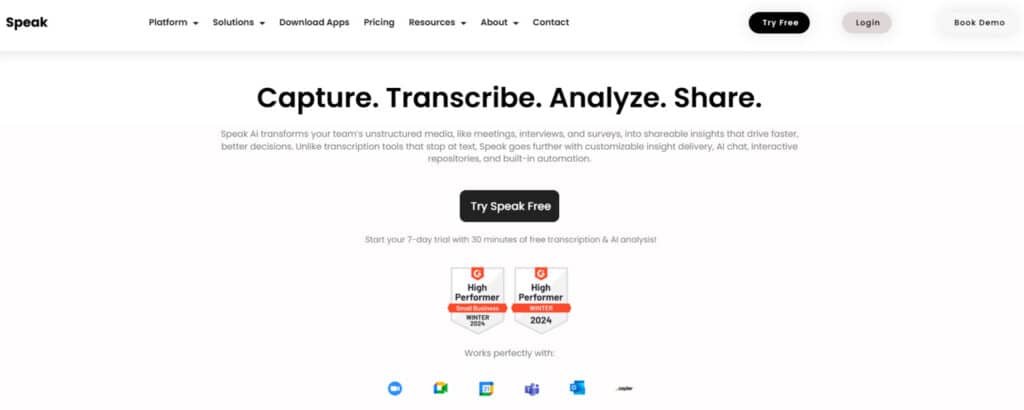
In the productivity stack it sits between call recording and knowledge management. It converts raw audio and video into indexed data, keywords, and summaries you can act on.
The company is Toronto-based and used by 100,000+ organizations. It supports 70+ languages, which helps when sources span countries or multilingual interviews.
Getting started is simple: create an account, take the 14-day free trial (30 minutes of transcription and Magic Prompt credits), then link calendars to capture meetings automatically. During onboarding it asks your role, organization, intended use, and preferred language so dashboards match your goals.
Who uses it?
Marketers, researchers, students in education, and enterprise teams that centralize qualitative data. Integrations with Zoom, Teams, Meet, and Webex add trust signals.
I found the support team, guides, and chatbot helpful when I needed a quick follow-up via email. Mark the date you start your trial so you can evaluate before it ends—this is the speak offers and the core speak key proposition: capture, transcribe, analyze.
What is Speak AI?
Imagine turning hours of recorded meetings into organized data you can search and act on in minutes. This platform converts audio, video, and text into searchable transcripts, dashboards, and exportable charts. It centralizes unstructured language into usable knowledge for teams.
A Toronto-based transcription and insights platform explained
Core capability: automated transcription across audio, video, and text + bulk uploads and CSV imports. Explore Insights extracts keywords, topics, and sentiment, with downloadable visuals. The app also includes an AI meeting assistant, embeddable recorders, and Magic Prompts to summarize or pull action items fast.
Key benefits for marketing, research, education, and enterprises
- Marketing — Faster interview turnarounds and content extraction for blogs and social. Keyword discovery helps SEO and content planning.
- Research — Bulk uploads, CSV imports, and Explore Insights make qualitative analysis repeatable and measurable across projects.
- Education — Students and faculty get lecture and interview transcripts, with summaries that speed learning and note-taking.
- Enterprise — Centralized media, shared taxonomies, and integrations (Zapier, Chrome extension) help meet cross‑team needs and governance.
| Use case | Main Advantage | Typical output |
|---|---|---|
| Marketing | Faster content production | Transcripts, keyword lists, topic charts |
| Research | Repeatable analysis | CSV exports, sentiment timelines |
| Education | Improved learning | Summaries, searchable lectures |
| Enterprise | Operational consistency | Shared dashboards, integrations |
Best Features of Speak AI
Below I highlight the tools that save time and turn meeting audio into actionable data.
1. Core Transcription and Media Processing
Speak AI’s transcription and media processing tools convert audio, video, and text into actionable insights using advanced software.
These features streamline workflows for researchers, marketers, and teams, saving time and enhancing data accessibility.
1.1 AI Audio-to-Text Converter
This software transforms audio files (e.g., MP3, WAV) into text with high accuracy. Researchers benefit by uploading interviews for quick transcription, saving money on manual work. Searchable text outputs enable faster decision-making and insight extraction.
1.2 AI Video-to-Text Converter
The video-to-text software converts videos (e.g., MP4) into text with subtitles. Content creators can navigate footage via keywords, improving accessibility. This automation saves time and money, making content shareable for marketing or education.
1.3 Automated Transcription
With 99%+ accuracy, this software transcribes audio and video in real-time or batch, including speaker identification. Meeting organizers gain reliable transcripts, reducing errors and enabling quick review of discussions for actionable outcomes.
1.4 Supported Media Formats
This feature supports diverse audio, video, and text formats with bulk CSV uploads. Analysts handling surveys benefit from this software’s compatibility, consolidating data processing into one platform for efficient workflow management.
1.5 Phone Calls & Meetings Capture
The software records and transcribes calls and meetings on platforms like Zoom. Professionals ensure no details are missed, enhancing the ability to document and act on insights from discussions as of the latest date.
1.6 Embeddable Audio and Video Recorder
Customizable recorders capture audio or video for surveys, embeddable on websites. Researchers scale data collection, with the software automating transcription, improving response rates and simplifying insight generation.
1.7 Direct In-App Recording
Users record directly in Speak AI, bypassing external tools. Qualitative researchers benefit from this software’s seamless integration with transcription, ensuring quick processing of fresh data for immediate analysis.
1.8 Web Scraping Tool
This software extracts text from webpages for analysis. Marketers gain competitive insights quickly, eliminating manual scraping. It supports rapid data processing, optimizing strategic planning without extensive effort.
1.9 Supported Languages
Transcription in 70+ languages and translation in 150+ enable global accessibility. Businesses use this software to process multilingual content, saving time on translations and ensuring effective communication across markets.
1.10 Automatic AI Model Selection
The software selects optimal AI models for performance. Analysts benefit from consistent, high-quality results without configuring settings, simplifying workflows and ensuring reliable outputs for all users.
2. AI Analysis and Insights Generation
These tools transform qualitative data into quantitative insights, helping researchers and teams uncover trends and opportunities efficiently.
2.1 Qualitative to Quantitative Insights
This software aggregates meeting and survey data to identify patterns and action items. Researchers save time by automating analysis, enabling faster hypothesis generation and strategic planning without manual effort.
2.2 Named Entity Recognition
Extracts keywords, brands, and topics from data. Marketers use this software to pinpoint critical insights, streamlining competitive analysis and enhancing the ability to focus on key trends.
2.3 Sentiment Analysis and Trends
This feature analyzes sentiment across datasets. Teams gain insights into emotions and opinions, supporting strategic decisions by identifying trends in feedback without extensive manual review.
2.4 Data Visualization
Customizable charts and reports visualize insights. Researchers benefit from clear, actionable representations of data, making it easier to communicate findings and drive informed strategies.
2.5 Deep Search and Filters
Global search with filters for speaker or topic enhances data navigation. Users save time finding specific insights, improving efficiency in analyzing large datasets for targeted outcomes.
2.6 Actionable Insights Extraction
This software uncovers competitive insights from interviews or reviews. Marketers identify opportunities quickly, streamlining research and supporting data-driven strategies.
2.7 AI Translation
Translates 150+ languages in seconds. Global teams benefit from rapid, accurate translations, ensuring accessibility and saving time on multilingual content processing.
2.8 Professional Transcription Add-On
Users can order human-reviewed transcription. Teams needing precision benefit from merged AI-human outputs, ensuring high-quality results for critical projects.
3. Collaboration and Sharing Tools
These features enable team collaboration and data sharing, enhancing accessibility and organization.
3.1 Branded Insight Repositories
Shareable hubs with customizable branding support collaboration. Teams benefit from permanent, searchable knowledge bases, streamlining access to insights across projects.
3.2 Shareable Media Players
Interactive players with transcripts and playback enhance sharing. Content creators distribute insights easily, improving accessibility for stakeholders or clients.
3.3 Project Folders and Media Management
Organize files in folders with cross-file search. Researchers manage large datasets efficiently, ensuring quick access to relevant content across media libraries.
3.4 Export Options
Supports TXT, SRT, PDF, CSV, and JSON exports with PII redaction. Teams share data securely in preferred formats, meeting diverse project needs.
3.5 Custom Shareable Repositories
Automated repositories with transcription and analysis enhance sharing. Professionals present insights professionally, staying ahead in competitive environments.
4. AI Chat and Generative Tools
These tools provide interactive AI-driven analysis, simplifying data exploration.
4.1 Speak AI Chat
This software offers chat-based analysis across all data. Researchers use prompts to get insights quickly, saving time on manual data exploration.
4.2 Speak Magic Prompts
Pre-built or custom prompts deliver powerful responses. Teams benefit from tailored insights, streamlining analysis for specific research needs.
4.3 Generative AI Integration
Uses large language models for summarization. Marketers generate hypotheses rapidly, enhancing efficiency in data-driven strategy development.
5. Meeting Assistant and Automation
Automation tools streamline meeting capture and insight delivery.
5.1 Speak AI Meeting Assistant
Joins Zoom, Teams, or Webex to record and transcribe. Professionals save time with automated notes, ensuring comprehensive meeting documentation.
5.2 Real-Time Capture
Captures meetings live. Teams benefit from instant transcription, enabling quick follow-up on discussions without delays.
5.3 Automation and Workflow Tools
Automates insight delivery. Users streamline repetitive tasks, focusing on strategic outcomes rather than manual processes.
5.4 Custom Keywords
Improves transcription accuracy with custom terms. Researchers ensure precise results, enhancing reliability for specialized projects.
6. Integrations and APIs
These tools integrate Speak AI into existing workflows.
6.1 Native Integrations
Supports Zoom, Vimeo, and YouTube. Teams automate transcription of videos or feeds, simplifying content processing.
6.2 Zapier Integration
Automates workflows like saving media to Drive. Users streamline data handling, reducing manual effort across platforms.
6.3 API and Webhook Access
APIs enable custom automations. Developers integrate Speak AI into existing systems, enhancing flexibility for enterprise needs.
6.4 Survey & Form Data Import
CSV/Zapier imports support bulk analysis. Researchers process survey data efficiently, scaling insights without complex setups.
7. Security, Compliance, and Support
These features ensure data protection and user success.
7.1 Data Sovereignty & Security
Canadian-based with enterprise-grade security. Teams retain data ownership, ensuring compliance and trust for sensitive projects.
7.2 PII Redaction
Redacts sensitive data in exports. Organizations share insights securely, meeting privacy requirements for client or research data.
7.3 Custom Development
Offers tailored solutions with 6+ years of expertise. Enterprises benefit from customized software, aligning with specific needs.
7.4 Human Onboarding & Training
Personalized support and demos ensure success. Teams adopt the software quickly, maximizing its value for projects.
7.5 Team Management
Manages shared access for teams. Organizations streamline collaboration, ensuring efficient use across multiple users.
7.6 White Label Solution
Customizable for branded deployments. Businesses present insights professionally, enhancing credibility with stakeholders.
8. Additional Platform Capabilities
These tools extend Speak AI’s utility for research and scalability.
8.1 Qualitative Research Tools
Reduces costs by 89% and time by 92%. Researchers automate analysis, streamlining complex qualitative tasks.
8.2 Competitive Analysis
Analyzes feedback for trends. Marketers gain insights quickly, supporting strategic planning with minimal effort.
| Feature | Primary benefit | Output |
| Automated Transcription | Fast, accurate transcripts with custom vocabulary | Transcripts, editable timestamps, updated insights |
| Meeting Assistant | Hands-off capture for major conferencing apps | Auto-joined recordings, calendar-sync logs |
| Explore Insights | Trend spotting and shareable visuals | Word clouds, sentiment charts, CSV/PNG exports |
| Capture Recorders | Embedded capture for research and testimonials | Auto-transcribed media in Insights hub |
| Magic Prompts | Instant summaries and action items | Summaries, Q&A lists, unresolved issues |
Speak AI Pricing Plans
Speak AI offers flexible plans tailored to individual and team needs, with pay-as-you-go options up to custom enterprise solutions. All plans include core transcription and analysis features, with annual billing saving 33% as of the latest date.
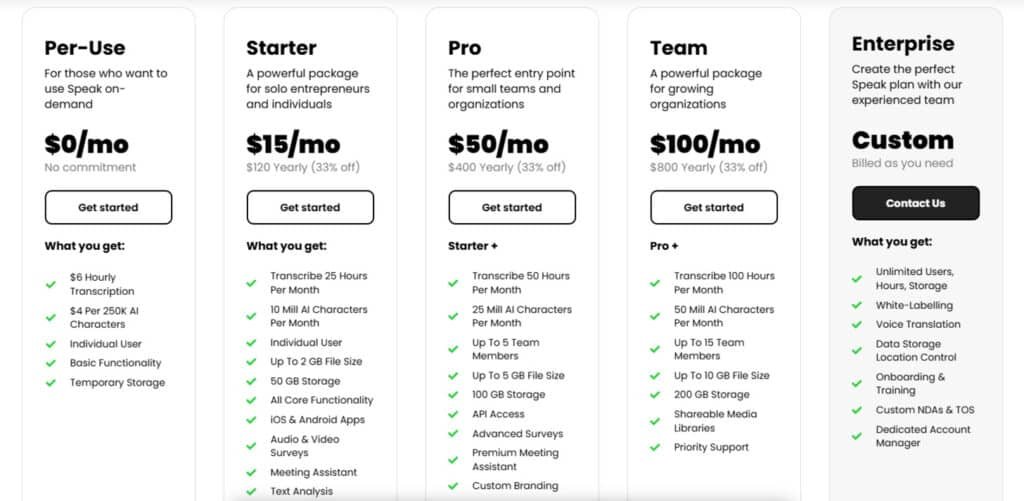
Per-Use
$0/mo with no commitment; billed per use at $6/hour for transcription and $4 per 250K AI characters. Features: Individual user access, basic functionality, temporary storage.
Starter Plan
$15/mo or $120 yearly (33% off).
Features: 25 hours transcription/month, 10M AI characters/month, individual user, up to 2GB file size, 50GB storage, all core functionality, iOS/Android apps, audio/video surveys, Meeting Assistant, text analysis, video/audio clipping, SSO, keyword/sentiment analysis, web scraping, translation, in-app recording.
Pro Plan
$50/mo or $400 yearly (33% off); includes Starter +.
Features: 50 hours transcription/month, 25M AI characters/month, up to 5 team members, up to 5GB file size, 100GB storage, API access, advanced surveys, premium Meeting Assistant, custom branding, CSV uploads, Zapier integration.
Team Plan
$100/mo or $800 yearly (33% off); includes Pro +.
Features: 100 hours transcription/month, 50M AI characters/month, up to 15 team members, up to 10GB file size, 200GB storage, shareable media libraries, priority support.
Enterprise Plan
Custom pricing, billed as needed. Features: Unlimited users/hours/storage, white-labelling, voice translation, data storage location control, onboarding/training, custom NDAs/TOS, dedicated account management.Start with a trial so you can measure real costs against real meetings. I recommend testing before you pick a subscription model—usage patterns make the difference.
Bottom line: The trial gives you time to test capture, prompts, and exports. Use that time to verify value before you pick a subscription or add premium features.
Pros & Cons of Speak AI
I’ll summarize the main wins and the practical limits I encountered. This helps you decide if the tool fits your workflow and team needs.
Pros
- Fast setup and wide language support: Automated transcription across 70+ languages gets you usable text quickly for global teams.
- Insight-driven outputs: Explore Insights turns raw data into keyword trends and sentiment you can act on.
- Magic Prompts save time: Long calls compress into bullet summaries and action items—huge savings when deadlines are tight.
- Collaboration and exports: Shareable players, cross-file search, and exports keep teams aligned without hunting links for hours.
- Workflow extensions: Zapier, Chrome extension, and embeddable recorders reduce manual steps in your process.
- Guided onboarding and help: Tutorials and a chatbot answer the common “how do I…” questions your team will have.
Cons
- Dashboard density: The interface can feel overwhelming at first—expect a short learning period as you explore features.
- Long-file processing: Very long recordings sometimes take extra time to finish, so plan for that in tight schedules.
- Feature learning curve: New or advanced features add mental overhead until they become routine.
- Narrow-use cases: If you need a hyper-focused meeting notetaker for sales handoffs, consider alternatives built specifically for that purpose.
“Powerful feature set and fast move from recording to insight—best for teams that will spend a few sessions to learn the platform.”
Overall experience: I find the product delivers strong velocity from capture to summary. If you value broad language support, deep insight tools, and collaboration features, the gains outweigh the short learning investment. For specific sales-centric needs, see the alternatives next.
Alternatives to Speak AI
Choosing the right transcription partner depends on whether your priority is translation, sales workflows, or compact summaries.
I’ve used several competitors and found clear trade-offs. Below I summarize when to pick each tool based on what you need from a meeting transcript or video caption.
Speak AI excels at transcribing audio/video, spotting sentiment, and pulling insights with AI questions—great for researchers handling interviews or meetings. Starts at $29/month with 30 hours included. But if you need blazing speed, team collab, or social-ready clips, these four competitors often deliver more bang for your buck.
Speechify crushes text-to-speech and reverse transcription with ultra-natural voices in 60+ languages. Podcasters love reading back transcripts aloud; free tier, pro $139/year. Best when you want to listen to notes on the go.
Simplified bundles accurate transcription inside its all-in-one suite—auto-captions, translations, plus video editing and AI writing. Teams crank social content fast; free plan solid, pro $30/month. One dashboard for everything? Yes please.
Crayo AI focuses on social video transcription—auto-captions, trending effects, and one-click Reels/TikTok exports. Creators turn long-form into viral shorts instantly; free + $19/month unlimited. Perfect if your goal is growth, not just accuracy.
Otter AI remains the meeting king: real-time transcription, speaker ID, live summaries, and Slack/Zoom integration. Sales and remote teams live in it; free 300 minutes, pro $17/user/month. Nothing beats its collaboration features.
| Tool | Key Strengths | Starting Price | Best For |
|---|---|---|---|
| Speak AI | Sentiment analysis, AI questions, data viz | $29/month | Research & deep insights |
| Speechify | Natural TTS voices, reverse transcription | Free / $139/year | Audiobooks & listening on the go |
| Simplified | Captions + editing + writing in one dashboard | Free / $30/month | Teams & full content creation |
| Crayo AI | Auto-captions + viral effects + Reels export | Free / $19/month | Social growth & quick shorts |
| Otter AI | Real-time, speaker ID, summaries, integrations | Free / $17/user/mo | Meetings & remote team collab |
My Rule: Pick the tool that gets you from conversation to content fastest for your workflow. If you need the best language coverage map it to your interview geographies. If you need CRM handoffs, choose the app focused on sales.
For language learning or a language learning app, remember those are different categories—these products help transcription and content, not teaching fluency.
Case Study / Personal Experience
Real results matter—so I ran a focused test to see how the app performs from setup to stakeholder delivery.
I used speak to process a week of customer interviews. Setup took minutes: create a workspace, invite the team, and connect calendars.
First step was uploading mixed media. I added Zoom recordings and a YouTube URL. Within a short time transcripts and searchable data were ready.
Real-world results: faster turnarounds and shareable insights
- Explore Insights: word clouds and sentiment charts highlighted trends fast.
- Magic Prompts: it feels like a tutor—ask for action items or summaries and get tidy phrases to paste into briefs.
- Shareable player: stakeholders scanned highlights without extra logins, shortening feedback loops and saving time.
My experience: steps, workflow, and outcomes
Using speak, I clicked terms to jump to exact timestamps when I had questions. That answered “where did we say that?” in seconds.
Bottom line: the process closed the gap between raw conversation and decision-ready notes. Our team shaved days off analysis time, and customer feedback improved. One step at a time—document a short SOP (upload, edit, insights, prompts, export) so new teammates ramp quickly.
Conclusion
Raamish’s Take
Speak AI is a robust AI platform that transforms unstructured media like meetings, interviews, and surveys into actionable insights.
Its AI Meeting Assistant seamlessly integrates with Zoom, Microsoft Teams, and Google Meet, offering real-time transcription and analysis.
Unlike basic transcription tools, Speak delivers qualitative and quantitative insights, identifying trends, keywords, and sentiment across audio, video, and text data.
The AI Chat feature allows users to query data effortlessly, saving hours of manual work. With support for 150+ languages for translation and 70+ for transcription, it’s ideal for global teams.
The shareable insight repositories enable collaboration, while enterprise-grade security (data residency compliance and no AI training on user data) ensures trust.
Speak AI’s integrations, like Zapier and Vimeo, streamline workflows, and its embeddable recorder simplifies data capture.
Users report 92% faster insights and 89% cost reductions in research, making it a top choice for efficient, data-driven insights and meeting notes.
For teams that value clear data and fast summaries, this service markedly reduces follow-up hours. The website app moves you from upload to export in a few simple steps. It supports 70+ languages, an assistant across Zoom/Teams/Meet/Webex, Explore Insights, embeddable recorders, Magic Prompts, and Zapier/Chrome integrations.
Use the free trial (14 days, 30 minutes, Magic Prompt credits) with one project and a couple of people on your account. Test the workflow, measure hours saved, then pick a subscription or premium add‑on (branded assistant available for $50/month).
Sign up with your work account, invite a colleague, run a real meeting through the trial, and see whether the information and phrases you get act like a useful tutor for your process.
Frequently Asked Questions
What does this transcription and insights platform do?
It converts audio and video into searchable text, extracts keywords, identifies sentiment and topics, and generates summaries and action items to speed up meeting follow‑ups and research workflows.
Which languages are supported?
The tool handles more than 70 languages and dialects, plus custom vocabulary options so you can improve accuracy for industry terms, names, and acronyms.
Is there a free trial and what does it include?
Yes — a 14‑day trial with roughly 30 minutes of transcription credits and a set number of prompt or summary credits so you can test core features like automated transcription, summaries, and basic integrations.
Which meeting platforms integrate with the app?
You can connect Zoom, Google Meet, Microsoft Teams, and Webex for live or recorded capture. There’s also a Chrome extension and embeddable recorders for browser‑based workflows.
How accurate are the transcriptions?
Accuracy is strong for clear audio and native speakers, and it improves with custom vocabulary. Expect lower accuracy with heavy background noise, overlapping speakers, or poor mic quality.
Can I use this for research or education projects?
Absolutely — researchers and educators benefit from searchable transcripts, sentiment and topic analysis, and exportable reports for qualitative coding and learning materials.
What are the main benefits for teams?
Faster meeting summaries, searchable knowledge, automated action items, collaboration on transcripts, and insight dashboards that surface trends across conversations.
Are there workflow automations like Zapier?
Yes — the platform supports Zapier automations and other integrations to push transcripts and metadata into CRMs, project management tools, and cloud storage.
Is there a browser extension or in‑app recorder?
There’s a Chrome extension plus embeddable audio/video recorders and screen capture tools so you can record directly from the web or within the app.
How does the Magic Prompts (instant summaries) feature work?
It uses prompt‑based generation to create concise summaries, action items, and Q&A from transcripts—helpful for fast turnarounds after meetings or interviews.
What are common limitations to expect?
Expect a learning curve for the dashboard, longer processing times for very long files, and occasional accuracy drops with noisy or overlapping audio.
How does pricing and paid plans work?
Plans include monthly subscriptions, pay‑as‑you‑go options, and premium add‑ons like a branded assistant. The free trial lets you evaluate core features before committing.
Can I export transcripts and insights?
Yes — exports typically include text transcripts, timestamps, speaker labels, keyword lists, and insight reports in common formats for easy sharing.
Is user data secure and private?
The platform follows standard security practices (encrypted storage and transfer), and enterprise plans often include stronger controls and compliance options—verify specifics on the website or with the support team.
What support channels are available if I need help?
Support options usually include email, in‑app chat, and documentation. Enterprise customers can get priority support and onboarding assistance from a dedicated team.
How well does the platform scale for large teams or enterprises?
It scales via team accounts, role management, centralized billing, and enterprise integrations—useful for marketing, research, customer success, and product teams.
Can this replace a human language tutor or conversation coach?
It’s a productivity tool rather than a replacement for human coaching. It helps with practice, transcription review, and highlighting recurring mistakes, but it won’t fully replicate a trained tutor’s personalized guidance.
What alternatives should I compare it to?
Consider Trint for captioning and translation, Otter.ai for meeting notes and CRM handoff, and MeetGeek for summaries and multilingual meeting capture—each has different strengths around mobile features, integrations, and pricing.
How do I get started and set up my account?
Sign up on the website, start the free trial, connect your meeting platforms or upload recordings, set custom vocabulary, and try Magic Prompts and export features to evaluate fit with your workflow.