Ever feel like you’re spending more time pushing pixels than actually designing? I’ve been there—staring at blank Figma canvases, wrestling with clunky handoffs, and wasting precious hours on basic wireframes. It’s frustrating when the creative process gets bogged down by tedious technical work.
What if you could cut your design time by 70%? That’s the promise of this new AI-powered platform that launched in 2025 from the United States. I’ve tested it extensively, and it genuinely transforms how teams approach UI creation.
This isn’t just another AI tool—it’s built specifically for designers, developers, and agencies who need to ship fast. The platform acts as a design copilot, converting text prompts, sketches, or even website URLs into polished interfaces and production-ready code.
What impressed me most was the multi-input flexibility. You can generate entire web layouts from simple descriptions or transform rough sketches into professional wireframes. It’s gaining traction among startups and freelance designers who value speed without sacrificing quality.
Ready to see how this could revolutionize your workflow? Let’s dive into what makes this platform stand out in today’s crowded AI landscape.
Key Takeaways: UXMagic.Ai Review
- This AI-powered design tool significantly reduces wireframing and UI creation time
- Converts text, sketches, and URLs into production-ready designs and code
- Specifically built for designers, developers, and teams needing fast turnaround
- Founded in 2025 with strong Figma integration capabilities
- Helps bridge the gap between initial concept and final product
- Ideal for freelance designers, agencies, and startup teams
- Multi-input approach allows flexible workflow adaptation
UXMagic.Ai Review: An Overview
Introduction to UXMagic.Ai Review
As someone who’s tested countless design tools, I can tell you this platform stands out for one simple reason: it actually understands designer workflows. While many AI tools try to replace human creativity, this one enhances it—turning repetitive tasks into seconds of work instead of hours.

Positioning in the AI Landscape
The current AI design market is crowded with developer-focused tools. What makes this platform different is its designer-first approach. Unlike tools that prioritize code output, it focuses on the creative process itself.
It serves as a true design copilot. The system helps with everything from initial wireframes to polished mockups. This saves precious time for creative teams racing against deadlines.
I’ve noticed it particularly shines for agencies handling multiple client projects. The rapid generation of ideas into tangible designs is impressive. It bridges that frustrating gap between concept and execution.
Company Background and Endorsements
Founded in 2025 and based in the United States, the company emerged from a clear market need. Designers were drowning in repetitive UI tasks while developers waited for assets. This bottleneck was killing product velocity across the industry.
The tool has gained traction among specific user groups. Startup teams building MVPs love the speed. Front-end developers appreciate the clean, production-ready code exports.
Large design system teams use it to accelerate screen creation. Freelance designers juggling tight deadlines find it indispensable. The multi-platform export capability makes it flexible for modern web workflows.
What is UXMagic.Ai and How It Empowers Designers
What if you could describe your vision in plain English and watch it transform into pixel-perfect interfaces before your eyes? That’s the core magic of this platform. It serves as your AI design copilot, bridging the gap between initial ideas and finished products.
Inner Workings of the Platform
The system processes various inputs—text descriptions, hand-drawn sketches, or website URLs—through trained AI models. It analyzes design patterns and component structures to generate complete UI designs.
Instead of static images, you get multi-screen Figma files with proper auto-layout components. The platform understands context remarkably well, creating exactly what you request rather than generic templates.
Benefits for Designers, Developers, and Agencies
Designers skip tedious wireframing and jump straight to creative refinement. The tool handles repetitive layout work, freeing you to focus on what matters most.
Developers receive clean, production-ready code in React or HTML formats. No more deciphering messy Figma-to-code conversions or rebuilding from screenshots.
Agencies can handle more client projects simultaneously. The initial design phase that took days now takes minutes with flexible export options.
| Designers | Developers | Agencies |
|---|---|---|
| Skip wireframing phase | Clean code exports | Handle more projects |
| Auto-layout components | React/HTML ready | Faster client delivery |
| Creative time saved | No manual conversions | Multi-platform support |
| Instant refinement | Component consistency | Scalable workflow |
Complete Features of UXMagic.Ai
I’ve discovered that the most valuable features aren’t the flashy ones—they’re the ones that save you real time. This platform delivers exactly that with intelligent automation that understands design workflows.
1. AI Design Generation
This essential category allows users to quickly transform ideas into professional UI designs using different inputs.
It supports designers and teams who want to start projects efficiently, reducing the time spent on initial creation and letting them focus on refinement.
Prompt-to-UI Generator
Users can enter simple text descriptions, like “dashboard with charts and navigation,” to receive complete, editable designs with accurate spacing and hierarchy.
This helps those building an app or website by turning vague ideas into structured visuals fast, making prototyping accessible even without advanced skills.
Image-to-UI Generator
Upload a design image or screenshot, and the tool creates production-ready code or layouts.
This benefits users with existing image references, such as mood boards or competitor screens, by converting them into editable UIs, saving effort on manual rebuilding.
Sketch-to-UI
Take a hand-drawn sketch and turn it into a refined digital interface that keeps the original vision while enhancing professionalism. For creators starting with rough sketch ideas on paper or digitally, this feature smoothly bridges early brainstorming to polished results, easing the transition to detailed work.
Clone a Website to UI
Enter a website url, and the tool accurately recreates its layout. This assists users studying or adapting current website designs, providing a quick base for redesigns or inspiration without starting from zero.
Connect/Import from Figma Designs
Easily link and import from existing Figma files to build on current work. Users in collaborative teams benefit from uninterrupted flows, maintaining consistency across projects.
Image to Wireframe
Transform an uploaded image into a clear wireframe. This supports planning by turning visual inspirations into structural outlines, helpful for early app development stages.
AI UI Design Generator
Create full, multi-page UIs from text, image, sketch, or url sources. It enables rapid development of comprehensive designs, ideal for users handling larger projects.
UXMagic Copilot
A helpful live AI tool that generates high-fidelity designs from prompts and offers step-by-step guide.
Users receive real-time support during creation, making the process less intimidating and more efficient for achieving desired outcomes.
2. AI-Enhanced Customization and Editing
These features provide flexible ways to refine designs, helping users achieve precise results that match their vision and brand requirements without overwhelming effort.
Agentic AI (Copilot)
The AI assistant offers ongoing guide, suggestions for layouts, and restructuring options. Describe changes naturally, and edits apply across devices, helping users save significant time on adjustments while ensuring consistency.
Apply Style Guide
Quickly enforce brand style rules on any UI. This ensures uniformity, benefiting teams who need every element to align with established style standards effortlessly.
Content Editing Features
Update text, image, or copy with smart AI recommendations. Users enjoy easier, more informed edits that enhance overall quality and flow.
Sectional Editing
Focus changes on specific areas without disrupting the rest. This gives confidence in tweaking details, allowing precise improvements safely.
3. Structure, Planning, and Responsiveness
These tools focus on building solid foundations and ensuring designs work well everywhere, supporting users in creating reliable, user-friendly experiences.
Wireframe Generator
Produce low-fidelity or detailed multi-page wireframe outlines from descriptions to map user flows and structure.
Users planning an app or website can visualize layouts early, clarifying ideas and reducing later revisions.
Responsive Design
Designs automatically adjust to any device or screen with proper auto-layout. This guarantees a smooth experience for every user, minimizing extra work on adaptations.
4. Export and Code Generation
These options make transitioning from design to development straightforward, helping teams move projects forward seamlessly.
Export Code (HTML/React)
Generate clean, developer-ready HTML and React code, with automatic asset handling. Users bridge design and coding efficiently, speeding up implementation for faster launches.
Export to Platforms
Current support for Figma, HTML, and React exports, with more platforms upcoming. This provides flexibility, allowing work in preferred environments without manual transfers.
5. Plugins and Specialized Tools
Integrations that enhance workflows directly in familiar tools.
AI UI Generator for Figma
Create UIs right inside Figma. Users stay in one place, boosting daily productivity.
AI Component Generator for Figma
Build reusable, customizable components quickly from prompts.
AI Wireframe Generator for Figma
Develop wireframe structures in Figma, aiding user journey planning within the design space.
6. Pre-Built Libraries and Resources
Ready-to-use assets speed up consistent building.
Figma Component Library
Access over 1000 pixel-perfect components for various needs. Users drag in professional elements, accelerating assembly.
React/HTML Component Library
1000+ production-ready items for seamless design-to-code alignment.
Framer Component Library
Upcoming 1000+ adaptive components for efficient site creation.
7. Additional Tools and Integrations
Extra capabilities for advanced and team-based work, ensuring scalability and brand alignment.
AI Design Copilot
This web-based tool supports ongoing refinement of designs with intelligent assistance.
It provides a dedicated space for polishing details, offering continuous guide to help users iterate effectively and achieve high-quality results without feeling stuck at any stage.
AI Site Builder
A comprehensive dashboard designed for constructing entire website projects from start to finish.
Users can manage full-site development in one place, streamlining the process of building and organizing multiple pages, which helps bring complete website visions to life more efficiently and with less fragmentation.
Enterprise Features
Tailored for larger teams, these include deep integration with existing design system rules, such as automatic application of colors and typography.
This ensures every output maintains brand consistency at scale, while added security and custom support help organizations collaborate securely and grow without compromising quality or user experience needs.
| Feature Type | Input Methods | Output Formats | Key Benefit |
|---|---|---|---|
| Design Generation | Text, Images, URLs | Figma Files | Rapid prototyping |
| Component Library | Pre-built elements | Figma + Code | Consistency across teams |
| Platform Export | One-click selection | Webflow, React, HTML | Production-ready deployment |
| Smart Editing | Voice/text commands | Cross-breakpoint updates | Efficient revisions |
Pricing Plans of UXMagic.AI
Before committing to any design platform, you need to understand exactly what you’re paying for and what you’re getting. The pricing structure is refreshingly straightforward with four clear tiers.
Transparent Pricing Tiers and Free Options
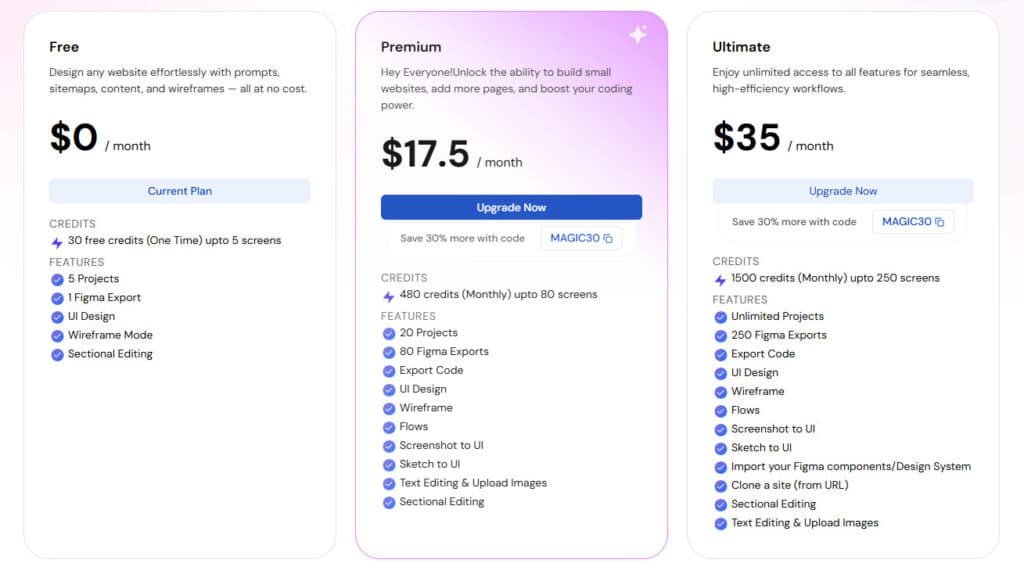
Free
$0 / month (no annual option). Ideal for testing with limited access: 30 one-time credits (up to 5 screens), 5 Projects, 1 Figma Export, UI Design, Wireframe Mode, Sectional Editing.
Premium
$25 / month or $17.5 / month (annual billing with 30% discount, using code MAGIC30). 480 monthly credits (up to 80 screens), 20 Projects, 80 Figma Exports, Export Code, UI Design, Wireframe, Flows, Screenshot to UI, Sketch to UI, Text Editing & Upload Images, Sectional Editing.
Ultimate
$50 / month or $35 / month (annual billing with 30% discount, using code MAGIC30). 1500 monthly credits (up to 250 screens), Unlimited Projects, 250 Figma Exports, Export Code, UI Design, Wireframe, Flows, Screenshot to UI, Sketch to UI, Import Figma components/Design System, Clone a site (from URL), Sectional Editing, Text Editing & Upload Images.
| Feature | Free | Premium | Ultimate |
| Monthly Price | $0 | $25 ($17.5 annual) | $50 ($35 annual) |
| Credits (Screens) | 30 (one-time, 5) | 480 (80) | 1500 (250) |
| Projects | 5 | 20 | Unlimited |
| Figma Exports | 1 | 80 | 250 |
| Advanced Features (e.g., Clone Site, Import Design System) | Limited | Partial | Full |
The Free plan offers one project and about 20 screens—enough for proper testing. Premium at $18 monthly suits freelancers with five projects and advanced features.
Power users and agencies will prefer the Ultimate tier. It provides unlimited projects and full React/HTML code exports for $35 monthly. Enterprise offers custom solutions for large teams.
Pros and Cons of UXMagic.AI
| Pros | Cons |
| Saves significant time by reducing wireframing efforts by more than half. | Credit limits on lower tiers restrict heavy usage. |
| Offers flexible inputs including text, images, sketches, and URLs for quick design generation. | Some advanced edits require additional manual refinement. |
| Provides an extensive library of over 1,000 components for consistent project outcomes. | Premium features like site cloning are limited to higher plans. |
| Enables seamless export to clean HTML/React code and Figma. | Certain platform exports remain in development. |
| Delivers automatically responsive layouts with proper structure. | Optimal results depend on well-crafted prompts. |
Advantages: Streamlining Workflows and Accelerated Design
The biggest advantage is time savings. I’ve cut wireframing time by more than half. This lets me handle more client work or refine details.
Multi-input flexibility is a game-changer. Start with text, images, or URLs and get designs in seconds. The component library ensures consistency across projects.
Drawbacks
Some advanced editing features need manual refinement. The credit system on lower tiers can feel restrictive for heavy users.
Alternatives to UXMagic.AI
When comparing alternatives, Magic Patterns focuses more on developer code generation. Other tools lack the same Figma integration or export flexibility.
| Platform | Primary Focus | Pricing Range | Best For |
|---|---|---|---|
| UXMagic.Ai | Designer workflow | $0-$35/month | Teams needing design-dev harmony |
| Magic Patterns | Code generation | $15-$60/month | Developer-first teams |
| Other competitors | Limited specialization | Varies widely | Basic prototyping needs |
Conclusion: Should You Buy UXMagic.Ai?
The real question isn’t whether this tool works—it’s whether it fits your specific workflow and budget constraints. After testing it across real client work, I can give you a straight answer.
My experience redesigning a SaaS dashboard in one afternoon instead of three days sold me. The platform got me 80% there instantly, then I refined with simple text commands. Both the client and dev team loved the polished results.
Freelancers should start with the Free tier on a real project. If it saves you time, the Premium plan pays for itself quickly. Agencies will find the Ultimate tier invaluable for handling multiple client projects across different platforms.
This isn’t magic—it’s a smart assistant that accelerates your work. You still need design expertise, but it eliminates the tedious parts. Try the Free plan with a real project today. If it clicks, you’ll likely subscribe.
Frequently Asked Questions
How does the AI generation handle complex layout and navigation?
The platform uses advanced AI to interpret your text prompts or uploaded sketches, generating production-ready code for intricate layouts. It intelligently structures components, creates logical navigation flows, and ensures the generated HTML and React code is clean and functional right out of the gate.
Can I export the generated designs to my existing design tools like Figma?
Yes, multi-platform export is a core feature. You can seamlessly export your AI-generated screens and components directly into Figma. This integration allows you to further refine the designs within your team’s established workflow, making it a powerful bridge between AI ideation and professional editing.
Is the generated code truly production-ready for developers?
Absolutely. One of the standout features is its focus on generating clean, semantic, and well-structured React HTML code. This significantly reduces the time developers spend on translating static designs, allowing them to focus on functionality and integration instead of rebuilding layouts from scratch.
How steep is the learning curve for designers new to AI tools?
The tool is designed for a smooth onboarding experience. The interface is intuitive, and the prompt-to-UI generation is straightforward. You can start transforming simple ideas into wireframes in seconds, with the agentic editing features guiding you through more complex refinements as you get comfortable.
What kind of support is available for teams and agencies?
UXMagic.Ai offers dedicated support channels and resources tailored for collaborative environments. This includes guidance on implementing the tool into team workflows, managing design systems, and ensuring that multiple users can work efficiently on the same project without conflicts.
How does the pricing structure work for freelancers versus large agencies?
The pricing tiers are transparent and scalable. Freelancers and individual designers can leverage a robust free plan or an affordable paid tier for personal projects. For agencies and larger teams, there are custom enterprise plans that offer advanced features, greater generation limits, and enhanced support to fit collaborative, high-volume workflows.