You need fast, consistent short-form and long-form video but your workflow is scattered across apps, editors, and slow render queues.
Frustration builds—deadlines slip, ideas cool off, and social media momentum vanishes while you wrestle with captions, voiceovers, and stock clips.
I’ve used this platform from concept to publish and found it speeds up content creation by handling scripts, visuals, narration, captions, and background styling in one place.
Created by Matt Par and Priyam Raj, this video generator aims to free creators and marketing teams from busywork. It promises rapid concept-to-publish output, useful features like gameplay backgrounds, multiple voices, and tiered plans with varying limits and pricing.
In this Vid.AI Review, I’ll walk you through what it does best, where it needs work, and how it fits your website and social media pipeline—so you can decide fast. Let’s dive in.
Key Takeaways: Vid.AI Review
- This Vid.AI Review explains whether the platform fits creators and marketing teams.
- It streamlines content creation—scripts, visuals, narration, and captions in one tool.
- Founders Matt Par and Priyam Raj position it for rapid short-form output and long-form options.
- Pricing and plans vary by source; I’ll flag what each plan actually includes.
- You’ll get practical tips on when to use automation and when to edit manually.
Vid.AI Review: An Overview

Raamish’s Take
VidAI simplifies creating faceless videos with ease. I value how you can input a prompt like “Top 10 tallest buildings” or a script, and it generates voiceovers, visuals, and edits in minutes—no skills needed.
The process is smooth: select from 35+ ElevenLabs voices, set a length from 1-10 minutes, preview clips, add music or captions, then export to YouTube or TikTok.
Creators like Jamie Nyland (10M+ subs) praise its ability to produce Shorts that hit 2M views quickly.
If you’re struggling with content volume, this cuts hours into seconds with templates for facts or stories. A pro editor noted it does his 3-hour work in 2-3 minutes.
Compared to InVideo, VidAI excels in automation for Shorts at a better value.
Backed by creators with 1B+ views, it’s a solid tool for scaling video output.
Introduction to Vid.AI in Today’s AI Video Landscape
Today’s video tools promise speed, but only a few combine script, narration, and platform-ready formatting into one clean workflow. I’ve used the software side-by-side with manual editing and found it favors speed without obliterating control.
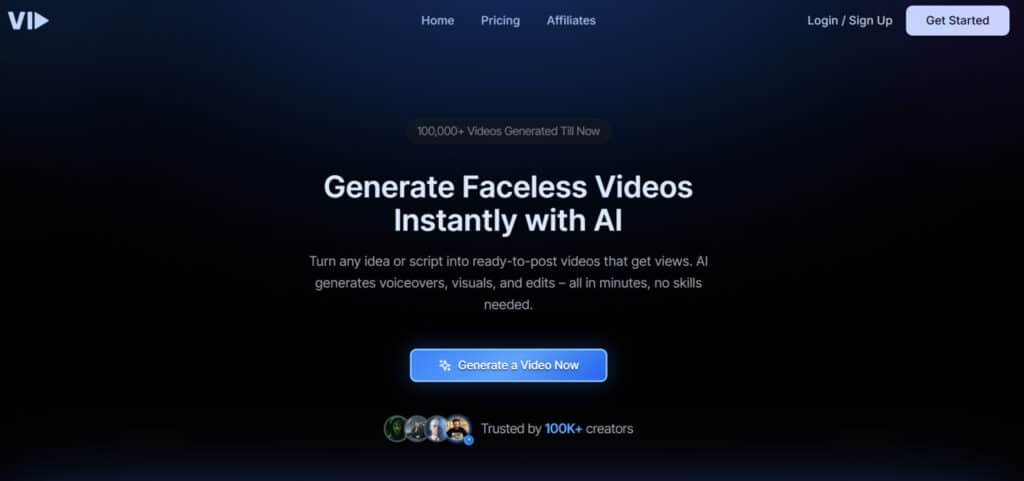
Who built it: Matt Par (Make Money Matt) and Priyam Raj designed this generator to help creators make high-quality, faceless videos for YouTube Shorts, TikTok, Reels, and Snapchat. Their aim: remove on-camera barriers and lower production overhead.
“Templates, natural voices, and automated captions turn ideas into publishable clips fast.”
Who benefits? Content creators, small business owners, and agencies all gain value. Creators get steady output. A small business gets polished promos with little fuss. Agencies scale variant assets across platforms.
- Core strength: template-driven production and brand tweaks (fonts, colors, pacing).
- Note: pricing, support, and access options vary by plan—check the official site before committing.
| Use Case | Primary Benefit | Typical Output | Best For |
|---|---|---|---|
| Creator Growth | Fast ideation-to-publish | Short social videos | Content creators |
| Small Business | Low-lift production | Product explainers | Local business & e‑commerce |
| Agency | Template scaling | Platform-specific variants | Clients across media |
Vid.AI Review: What It Is, Who It’s For, and How It Works Today
You can go from idea to a finished short in minutes using text prompts and built-in templates. At its core, this video generator converts scripts or prompts into polished shorts with natural text-to-speech, automated captions, and stocked visuals.
Faceless, Text-to-Video Creation for Shorts and Beyond
Faceless creation is ideal when you want consistent branding without filming. The system offers faceless templates, stock libraries, and gameplay backgrounds (Minecraft, Subway Surfers) to keep scroll-stopping visuals relevant.
Ideal Use Cases: Social Media, Marketing Campaigns, Education, and E‑commerce
Who benefits? Creators posting daily shorts, marketers running rapid campaigns, educators making bite-size explainers, and e‑commerce teams building quick product demos. Access to built-in media saves time and reduces app switching.
The Four-Step Workflow: From Prompt to Publish-Ready Video
- Project setup — choose format and platform (TikTok, Shorts, Reels).
- Input — write or paste a prompt; let the script draft appear.
- Edit — pick voices, stitch visuals (stock or gameplay), tweak captions and timing.
- Export — platform-optimized settings and final QC for brand fonts and CTAs.
| Step | Action | Outcome |
|---|---|---|
| Setup | Choose format and length | Platform-ready export |
| Input | Prompt or script | Drafted narration & captions |
| Edit | Visuals, pacing, voices | Polished videos |
| Export | Optimize and download | Publish-ready content |
“The editor gives control over subtitles, cuts, and timing—use it to keep energy high.”
Best Features of Vid.Ai
Think of this section as a quick tour of the tools that speed up creation without killing control. Below I break down the standout features and how they help you publish better video fast.
1. Text-to-Video
The text-to-video feature in Vid.Ai transforms written prompts or scripts into complete videos, enabling users to create content without manual editing.
Input a description like “create a fitness ad,” and the AI assembles scenes, transitions, and music in various styles, supporting up to 4K resolution.
Available across all subscription plans, it processes 50+ languages for global reach. Users like marketers can produce ads quickly, while educators craft tutorials effortlessly.
Reviews highlight its intuitive interface, making video generation accessible. For those seeking fast content creation, it simplifies workflows, delivering polished videos that align with branding or social media goals, saving significant time.
2. Script Generator
Vid.Ai’s script generator creates tailored scripts from keywords or topics, helping users plan video narratives efficiently.
It generates drafts for ads, vlogs, or tutorials in multiple styles, such as promotional or educational, integrating with video generation tools. Users customize tone and length, ensuring alignment with audience needs.
Available on all tiers, free plans offer basic templates, while paid subscriptions unlock advanced options. Reviews praise its ability to produce clear, engaging scripts.
For searchers needing content planning tools, it provides structured outlines, reducing preparation time. Businesses benefit from consistent storytelling, enabling faster video production for campaigns or social posts.
3. Multiple Voices
The multiple voices feature offers users over 100 AI-generated voiceovers for videos, eliminating the need for hired talent.
Spanning genders, tones, and 50+ languages, it includes accents like US, UK, or Hindi. Users select styles like upbeat for ads or calm for tutorials.
Pro subscription plans enable voice cloning for brand-specific narration. Reviews commend its versatility for global projects. For those searching for audio solutions, it provides flexible narration options, enhancing video accessibility.
Users like podcasters or marketers achieve professional audio quickly, aligning voiceovers with video generation needs for seamless content delivery.
4. Natural TTS
Vid.Ai’s natural TTS (text-to-speech) converts scripts into human-like audio, aiding users in adding realistic narration to videos.
With emotional inflections and lip-sync support, it offers customizable styles for engaging delivery. Available across tiers, paid subscriptions unlock advanced tweaks like pitch adjustment. Reviews note its non-robotic quality, ideal for faceless content.
For searchers seeking narration tools, it simplifies dubbing in 50+ languages, reducing costs compared to voice actors. Users in e-learning or marketing create immersive videos, ensuring clear, professional audio that enhances viewer engagement and supports efficient video production workflows.
5. Gameplay Backgrounds
Vid.Ai’s gameplay backgrounds feature provides dynamic overlays and loops, allowing users to enhance gaming videos with visuals like neon grids or animations.
AI matches backgrounds to footage, supporting 4K exports in gaming styles. Free plans offer limited options; Pro plans provide unlimited access. Reviews highlight its ease for streamers. For those searching for gaming video tools, it adds professional flair without complex software.
Users like esports creators or hobbyists craft engaging highlight reels, integrating backgrounds with video generation for polished outputs that attract viewers on social platforms.
6. Stock Media Access
Stock media access in Vid.Ai grants users a library of 10M+ royalty-free clips, images, and music for video enhancement. Searchable by keyword or mood, it offers diverse styles to fit any project.
Free plans limit to 50 assets monthly; paid subscriptions unlock unlimited use with AI-suggested pairings. Reviews emphasize its variety for budget-conscious users.
For those seeking media solutions, it eliminates licensing hassles, enriching videos with professional assets. Marketers and filmmakers streamline video production, accessing high-quality visuals to create impactful content without additional sourcing costs.
7. Faceless Templates
Faceless templates offer users pre-designed layouts for videos without on-camera presence, perfect for anonymous content. With 50+ animation-based styles, templates auto-populate with text and stock assets.
Free plans include watermarked basics; paid plans unlock customization. Reviews note its simplicity for quick posts. For searchers prioritizing privacy, it simplifies branded video creation for YouTube or TikTok.
Users like influencers or businesses produce consistent videos, leveraging video generation for rapid output. This feature supports scalable content strategies, enabling users to maintain engagement without personal visibility.
8. Subtitles
Vid.Ai’s subtitles feature auto-generates captions in 50+ languages, helping users make videos accessible. With 99% accuracy, it supports customizable fonts and timings, offering burned-in or SRT exports.
All tiers include it; Pro plans add styling flexibility. Reviews praise its precision across accents. For accessibility-focused searchers, it ensures inclusive video content, broadening audience reach.
Users in marketing or education enhance engagement by clarifying dialogue in noisy settings. Integrated with video generation, it streamlines workflows, delivering professional captions that align with global content demands.
9. Multi-Platform Optimization
Multi-platform optimization enables users to export videos tailored for platforms like TikTok or YouTube. It auto-adjusts aspect ratios (9:16, 16:9) and adds platform-specific intros.
Free plans cover basics; Pro includes analytics previews. Reviews highlight its ease for cross-posting. For searchers needing versatile video tools, it eliminates manual reformatting, ensuring algorithm-friendly outputs.
Users like social media managers optimize content quickly, maximizing visibility. This feature supports efficient video production, allowing seamless distribution across multiple channels with minimal adjustments.
10. AI-Powered Editor
The AI-powered editor automates editing tasks for users, streamlining video creation with smart cuts, transitions, and enhancements.
It trims pauses, applies 200+ transition styles, and upscales to 4K. Free plans support short clips; Pro handles 10-minute videos. Reviews commend its precision for polished results.
For those seeking efficient editing tools, it simplifies complex workflows, delivering professional videos without expertise.
Users like vloggers or agencies benefit from automated scene detection, ensuring high-quality video generation that saves time and maintains consistency across projects.
11. Brand Tweaks
Brand tweaks let users apply consistent logos, colors, and fonts across videos, ensuring cohesive branding. AI auto-inserts elements, with options for CTAs or watermarks.
Free plans offer manual tweaks; paid subscriptions automate full kits. Reviews note its value for small businesses.
For searchers focused on branding, it streamlines identity application, enhancing recognition. Users in marketing or content creation maintain professional aesthetics, supporting scalable video generation strategies.
This feature ensures videos align with brand guidelines, fostering trust and consistency across campaigns.
Pricing Plans of Vid.AI
Here’s a concise look at what you’ll pay per month and what each plan actually delivers. I compared multiple reports so you can spot differences fast and confirm current details on the website before buying.
Monthly and Annual Snapshot
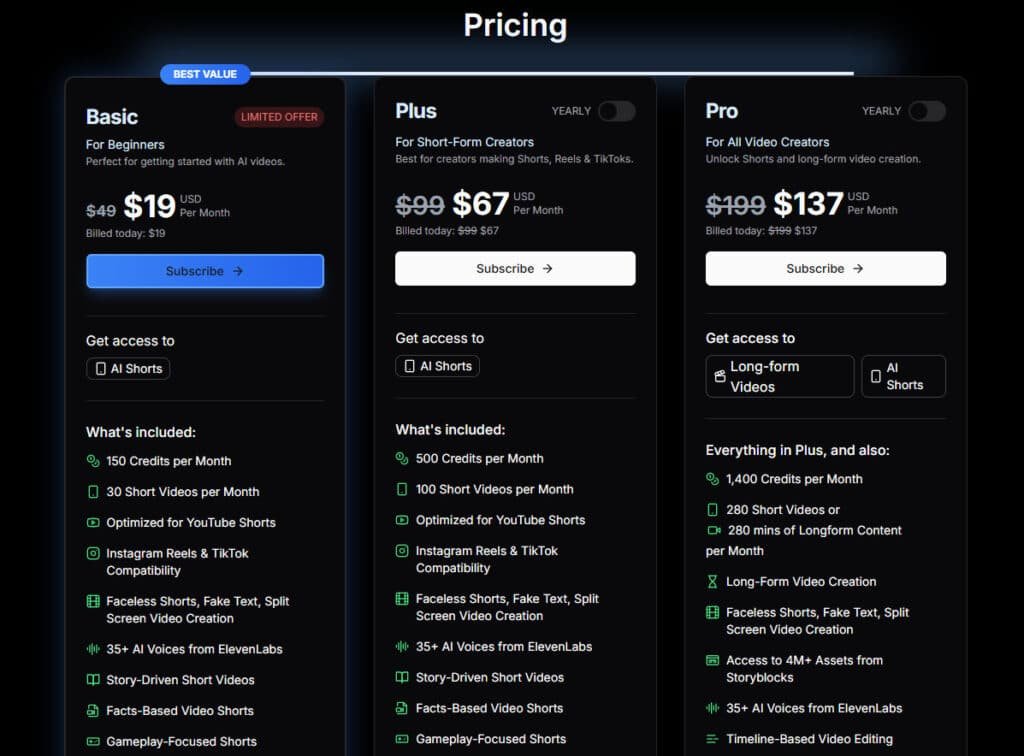
Reports differ. One source lists a single plan at $67 per month (about $58 per month if billed annually). Another shows tiered pricing: Basic ($19/month), Pro ($67/month), and Plus ($137/month).
What You Get
Per month limits vary by plan. The Pro-level often matches 500 credits and ~100 short videos. Higher tiers add long-form minutes (up to 280), StoryBlocks media, faster rendering, and priority support.
| Plan | Typical per month | Key limits/features |
|---|---|---|
| Basic | $19 | 150 credits, ~30 shorts |
| Pro | $67 ($58/Mo On Annual) | 500 credits, ~100 shorts |
| Plus | $137 ($114/Mo On Annual) | 1,400 credits, 280 mins long-form, priority support |
Trials, Refunds, and Coupons
Most reports show no free trial, but they note a 30-day money-back guarantee, which reduces risk. Support channels differ—some list live chat, others email-first—so verify response times if quick support matters.
“Discounts change often; if you find a valid coupon (example: EARLYACCESS), lock it in.”
Bottom line: check the exact pricing plans and monthly limits on the official site before you commit. Match the plan to your weekly output so you avoid overages and get the media access you need.
Pros and Cons of Vid.AI
Quick take: I find this generator shines when you need steady outputs for social feeds. It speeds up video production and trims the busywork from content creation without demanding deep editing skills.
Pros: Speed, Ease of Use, and Social Media-Ready Outputs
Speed: Go from idea to publishable videos in minutes—this cuts production overhead and keeps campaigns moving.
Ease of use: The editor covers essential editing tasks, plus templates reduce decision fatigue for busy creators.
Quality: Out-of-the-box audio and visuals are solid; a light manual pass raises final quality quickly.
Cons: Pricing, Trial Limits, and Brand Originality
Price: Reported monthly costs sit above some peers, so the price may matter if you produce high volumes.
Trial limitations: No free trial in many reports makes hands-on testing harder—use the refund window if you must test risk-free.
Brand originality: Automated templates can lead to similar-looking output across users; add custom overlays and unique CTAs to stand out.
Alternatives to Vid.AI
If this platform isn’t the right fit, here are solid options by need and budget:
- Short AI — better for niche storytelling formats and serialized shorts.
- Alphana — useful if you need strong repurposing workflows for existing long-form content.
- VideotoPage — choose this when you want landing page–friendly videos tied to conversion and media embeds.
| Need | Best alternative | Why |
|---|---|---|
| Storytelling | Short AI | Templates tuned to narrative pacing |
| Repurposing | Alphana | Automates clips from long-form sources |
| Landing pages | VideotoPage | Optimizes video for web conversion |
“If you value speed and social-first defaults, this generator is compelling; if brand originality matters more, consider a hybrid workflow.”
Conclusion
Raamish’s Take
VidAI simplifies creating faceless videos with ease. I value how you can input a prompt like “Top 10 tallest buildings” or a script, and it generates voiceovers, visuals, and edits in minutes—no skills needed.
The process is smooth: select from 35+ ElevenLabs voices, set a length from 1-10 minutes, preview clips, add music or captions, then export to YouTube or TikTok.
Creators like Jamie Nyland (10M+ subs) praise its ability to produce Shorts that hit 2M views quickly.
If you’re struggling with content volume, this cuts hours into seconds with templates for facts or stories. A pro editor noted it does his 3-hour work in 2-3 minutes.
Compared to InVideo, VidAI excels in automation for Shorts at a better value.
Backed by creators with 1B+ views, it’s a solid tool for scaling video output.
My hands-on tests show this tool shortens the video creation loop so you can publish more each week.
I recommend it for content creators and small business teams who need steady, social media-ready videos without a full studio. In my experience the templates, multiple voices, and quick audio fixes save time and keep output consistent.
Quick notes: map your target output per month to the plan you pick. Confirm current pricing and whether live chat or email support is included. No widely reported free trial means use the 30‑day refund window to test fast.
Bottom line: if you value speed and platform tools over bespoke originality, this workflow helps you scale video creation now. Choose the plan that fits your per month goals, verify access and pricing plans on the site, and start publishing within 24 hours.
Frequently Asked Questions
What exactly does the platform do for creators?
It turns text prompts and short scripts into ready-to-publish videos — both short-form and longer formats. You get automated narration, scene assembly, royalty-free backgrounds, captions, and basic editing tools so you can move from idea to shareable content quickly.
Who built the service and is it trustworthy?
The team includes founders with backgrounds in digital marketing and product development — they’ve focused on scaling templates, voices, and workflow automation for creators and small agencies. I find their roadmap and support channels responsive, which helps when you’re onboarding new tools.
What are the best use cases for this tool?
It works well for social posts (TikTok, Reels, Shorts), ad creatives, explainer clips, course previews, and product spots for e-commerce. If you need faceless videos, quick marketing variants, or consistent captioned content, it saves time compared with manual production.
How does the text-to-video process actually work?
You enter a script or prompt, choose a template and voice, then pick backgrounds or upload assets. The engine generates scenes, auto-syncs voice and captions, and offers an editor for trims and brand tweaks. You can export optimized versions per platform.
Are the voices realistic and what languages are supported?
The platform offers multiple AI voices with natural cadence — good for narration and faceless shorts. Language support varies but includes major languages for captions and speech; check the current voice library for exact options before committing.
Can I use my own audio, images, or video clips?
Yes — you can upload your own media and combine it with stock gameplay backgrounds or the built-in library. That flexibility helps maintain brand originality while speeding up production.
How are captions and subtitles handled?
Captions are automated and editable, with styling options to match platform aspect ratios. The tool generates burn-in subtitles and separate SRT files so you can upload to social platforms or fine-tune appearance in the editor.
What does pricing look like and is there a free trial?
Pricing tiers typically include monthly and annual plans with different credit allowances, short-video limits, and long-form minutes. There’s often a free trial or a limited free tier; promotions and discounts appear seasonally. Always review the current plan page for exact costs and refunds.
Are there limits on how many videos I can produce per month?
Yes — plans impose limits via credits, short-video counts, or total minutes for long-form content. Higher tiers unlock more exports, priority support, and advanced features such as brand presets and bulk generation.
Is there support if I run into issues during production?
Support is available via knowledge base and live chat or ticketing depending on your plan. Paid tiers typically include faster response times and priority help for campaign launches or technical problems.
How does this tool compare to other generators like StoryShort AI or Revid?
It’s competitive on speed and template variety — strong for faceless social formats and quick testing. Alternatives may offer different voice realism, finer-grain editing, or pricing models, so pick based on which features (long-form minutes, brand control, stock assets) matter most to you.
Can agencies and teams collaborate in the workspace?
Yes — higher-tier plans usually include multi-user access, shared brand assets, and team workflows so creative and marketing teams can collaborate on campaigns without juggling multiple accounts.
What should I watch out for before subscribing?
Check export limits, licensing for stock media, voice commercial rights, and whether the free trial gives enough credits to evaluate the tool. Also compare monthly vs annual pricing to find the best value for your output volume.
Is there a money-back guarantee or refund policy?
Many plans advertise a short refund window or satisfaction guarantee — often 7–30 days — but terms can change. Read the current refund policy and cancellation terms before purchasing to avoid surprises.
Will the generated videos perform well on TikTok, Instagram Reels, and YouTube Shorts?
The tool offers multi-platform optimization (aspect ratios, caption placement, and length presets) to increase odds of algorithm-friendly uploads. Performance still depends on hook, editing, and creative testing — the software speeds iteration, but strategy matters.