Ever stared at a blank slide, completely stuck on how to make your ideas look professional?
I’ve been there too. Creating engaging presentations without design skills can feel like trying to speak a foreign language you never learned.
The frustration is real. You know your content is valuable, but it gets lost in boring templates or clumsy layouts. Traditional tools often leave you spending hours on formatting instead of focusing on your message. That’s where AI-powered platforms are changing everything.
After testing numerous tools, I discovered this platform that truly understands design consistency. Their mission resonates deeply: Helping anyone translate thoughts into engaging visuals, no coding or design experience needed. That’s exactly what most of us are searching for.
In this detailed Visme Review, I’ll share my hands-on experience with the platform’s core features, pricing, and real user feedback.
You’ll get a balanced perspective on whether it deserves a spot in your content creation toolkit. Let’s dive into what makes this tool stand out in the current AI landscape.
Key Takeaways: Visme Review
- AI presentation tools are revolutionizing how non-designers create professional content
- Design consistency is a core strength of modern visual content platforms
- Hands-on testing reveals practical insights beyond marketing claims
- Understanding pricing and real user experiences helps make informed decisions
- The right tool should translate your ideas into engaging visuals effortlessly
- Balanced reviews combine personal testing with broader user feedback
- Your specific needs determine whether a platform fits your workflow
Visme Review: An Overview
Raamish’s Take
Visme delivers a powerful all-in-one platform for creating professional visual content, from presentations and infographics to social graphics and reports.
Its AI Designer stands out by generating fully editable designs from simple text prompts, speeding up the process significantly.
Key strengths include the Brand Wizard that instantly applies your fonts, colors, and logo for consistent branding, plus advanced data visualization tools to turn stats into engaging charts and graphs.
The vast library of customizable templates, millions of stock assets, and interactive elements like animations and hotspots add real polish.
Team collaboration features, including real-time editing and comments, make it smooth for group work.
With AI tools for image editing, text generation, and quick resizing, it helps non-designers produce high-quality results efficiently.
Trusted by over 27 million users worldwide, Visme combines ease with depth for reliable branded visuals.
Introduction to Visme
The AI design revolution didn’t happen overnight—it evolved from simple tools to smart platforms. I’ve watched this transformation firsthand as visual content became essential for business communication.
AI Landscape & Industry Fit
Today’s landscape demands professional design without the learning curve. This platform emerged when AI-powered tools began transforming how we create content. From social media posts to complex presentations, visual appeal is no longer optional.
Company Background and Founders
What started as a basic infographic maker has grown into a comprehensive design software. Over six years, the platform has evolved significantly. The development team built something remarkable from humble beginnings.
Their commitment shows in the consistent quality. Users stick with this tool for multiple years because it actually delivers.
Purpose and Endorsements
The core purpose remains clear: making information visually engaging for everyone. I’ve seen diverse organizations adopt this approach successfully.
| User Type | Primary Use | Key Benefit |
|---|---|---|
| Nonprofit Organizations | Communication Materials | Professional appearance on limited budgets |
| Educational Creators | Online Course Content | Engaging presentations for platforms like Udemy |
| Marketing Teams | Branded content | Consistent visual identity across media |
The team is clearly passionate about visual content and produces excellent posts and videos in their Learning Centre.
Beautiful templates and HTML5 technology ensure all content works seamlessly on any website or device. This business solution handles data visualization with surprising elegance.
What is Visme?
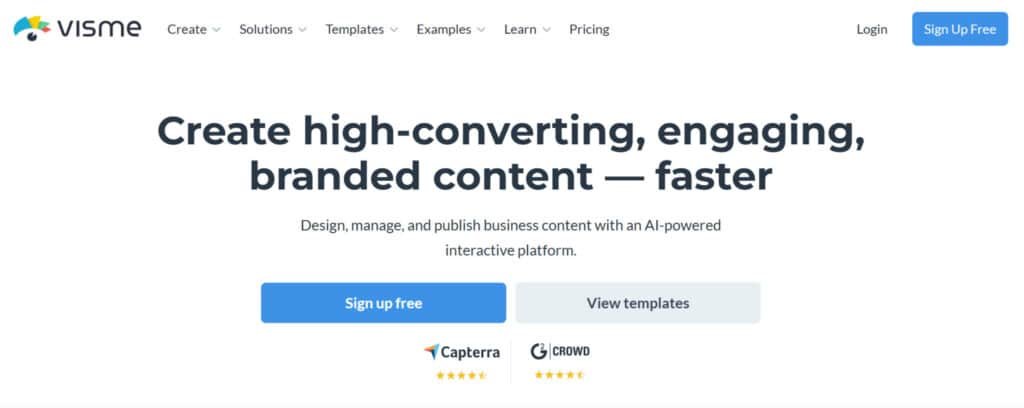
At its heart, Visme is an all-in-one design workshop for your browser. I’ve found it’s the answer for anyone asking, “How can I create professional presentations, infographics, and even video content without a designer on speed dial?”
Core Functionality and Inner Workings
This platform operates entirely online. You just log in and start a new project. The magic lies in its drag-and-drop interface and vast library of templates.
As BrightCarbon notes, it’s “fully HTML5-based,” meaning everything happens right in your web browser. No downloads. The software is extremely responsive, making real-time editing smooth. You simply choose a starting point and customize.
User Benefits and Ideal Use Cases
The biggest benefit? Design consistency. You can set up a brand kit once, and the tool automatically applies your colors and fonts. This is a game-changer for businesses.
It’s perfect for non-designers who need to make information engaging. Marketers build social media graphics. Educators create course content. The options are extensive.
Ideal use cases include:
- Engaging business presentations
- Educational materials and reports
- Marketing infographics and documents
This platform removes technical barriers while offering professional-grade features. It truly makes complex things simple.
In-Depth Feature Analysis of Visme
Diving into the feature set, I discovered tools that address common pain points for content creators in surprisingly elegant ways. The platform goes beyond basic design with professional-grade capabilities.
1. AI Designer: Prompt-to-Polish Magic
The AI Designer transforms simple text prompts into complete, professional projects within minutes.
Users input a description and receive fully structured designs that include layouts, text, images, and charts. This tool supports over 50 content formats, making it a versatile designer solution for marketing teams and educators.
Generates full multi-page designs
One prompt creates up to 10 pages with coordinated templates and brand-aligned elements, helping users skip manual layout work entirely.
Supports multiple content types
From infographics to social graphics, the system offers flexible options that adapt to specific project needs without requiring separate tools.
Built-in animation suggestions
Generated projects include ready animation options that enhance engagement when exported as video or interactive files.
Brand-aware generation
By connecting to a brand kit or website URL, every output matches existing styles, ensuring consistency across all materials. This feature benefits readers searching for fast, on-brand content creation by reducing revision time significantly.
2. AI Image Generator
Visme’s AI Image Generator produces original, high-resolution images directly inside the editor. A short description yields multiple visual variations tailored to the project’s tone and purpose.
Multiple style choices
Users access a broad selection of artistic directions, including photorealistic, illustration, and 3D renders.
Seamless project integration
New image assets insert instantly and scale perfectly alongside existing templates, streamlining the overall design process.
Aspect ratio control
Preset dimensions cover social posts, banners, and presentations, eliminating guesswork for platform-specific visuals.
Unlimited generations on paid plans
Higher tiers remove restrictions, enabling heavy users to create dozens of custom images daily without interruption. Readers looking for quick, royalty-free visuals find this tool essential for maintaining fresh content across campaigns and website updates.
3. AI TouchUp Tools
Four targeted editing functions deliver professional photo corrections in seconds, no advanced skills required.
Background removal
Clean cutouts appear with one click, ideal for product showcases or profile images.
Object replacement
Unwanted elements can be erased and swapped realistically, preserving lighting and perspective.
Quality enhancement
Blurry or low-resolution uploads are sharpened and upscaled automatically for modern displays.
Smart resize
Visuals adapt to new sizes while protecting key details, saving time during repurposing. These tools help users who search for simple yet powerful editing options achieve polished results comparable to dedicated software, all within the same platform.
4. AI Writer
The AI Writer crafts complete text blocks, headlines, and sections based on context, tone, and length preferences.
Tone and length customization
Formal, conversational, or persuasive styles are available with exact word-count control.
Source-based content
Upload a document or URL to generate accurate summaries or expanded explanations grounded in real data.
SEO-friendly output
Copy includes natural keyword placement to improve search visibility when published online.
Direct canvas insertion
Text appears pre-formatted and ready for styling inside chosen templates. This capability assists readers needing fast, high-quality copy that integrates seamlessly with visual work, cutting content creation time in half for blogs, reports, and social posts.
5. AI Resize
AI Resize converts any finished project to new dimensions while preserving layout integrity and visual quality.
One-click format switching
Switch from widescreen slides to square social graphics instantly.
Intelligent content reflow
Text, charts, and images reorganize automatically to suit the new canvas size.
Batch processing support
Export the same design in multiple formats simultaneously for cross-channel use.
No quality loss
Vector-based scaling keeps everything sharp for print or digital delivery. Users managing omnichannel content benefit from this feature by eliminating repetitive redesign work and ensuring brand consistency across every platform.
6. AI Presentation Maker
This specialized tool builds complete slide decks from a single prompt or uploaded data source.
Full deck generation
Up to 20 slides appear with speaker notes, charts, and smooth transitions included.
Interactive element inclusion
Clickable hotspots, quizzes, and embeddable video segments boost audience participation.
Data-driven visuals
Spreadsheets convert into animated charts and graphs that update dynamically.
Template foundation
Decks start from proven templates and adapt to the described topic automatically. Professionals preparing pitches or training sessions gain a significant advantage by receiving investor-ready or classroom-ready decks in minutes instead of hours.
7. AI Flyer Generator & AI Document Creator
Dedicated generators produce print-ready flyers and structured documents with minimal input.
Event and promo flyers
Complete layouts with headlines, images, and call-to-action sections appear instantly.
Professional document formatting
Reports, proposals, and whitepapers gain auto-generated tables of contents and branded styling.
Custom length control
Specify page count and depth for short handouts or detailed guides.
Export flexibility
High-resolution PDF or interactive web versions are available immediately. These niche tools serve users who need targeted marketing collateral or business documents without starting from blank templates, delivering polished results quickly.
8. Data Visualization
Visme converts raw numbers into compelling visual stories using over 20 chart types and widgets.
Interactive charts and maps
Viewers can hover or click to explore data layers in real time.
Animated data reveals
Numbers build progressively during presentations for greater impact.
Spreadsheet integration
Direct import from Excel or Google Sheets updates visuals automatically.
Design-first approach
Every chart matches selected templates and brand colors by default. Organizations aiming to make complex data accessible and memorable rely on this feature to transform statistics into audience-friendly narratives that drive decisions.
9. Templates
The platform offers thousands of professionally designed templates covering more than 50 content categories.
Category-specific libraries
Separate collections exist for social media, presentations, infographics, and print materials.
Fully customizable foundations
Every template allows color, font, and layout changes while preserving structure.
Regular updates
New templates launch weekly based on trending formats and seasons.
Searchable database
Advanced filters help users locate the perfect starting point quickly. Starting with a proven template dramatically reduces creation time and ensures high-quality output even for beginners.
10. Branded Content
End-to-end brand application happens automatically through the Brand Wizard and saved kits.
One-click brand import
Enter a website URL to extract colors, fonts, and logos in seconds.
Universal application
All templates, AI generations, and manual designs inherit the brand style instantly.
Multi-kit management
Teams can switch between client or department kits without resetting projects.
Consistency enforcement
Locked elements prevent accidental style drift across large teams. This system guarantees professional, on-brand materials every time, which is critical for agencies and enterprises managing multiple identities.
11. Content Calendar
A built-in planner lets users create, schedule, and publish content from one centralized view.
Visual timeline layout
Drag-and-drop scheduling across platforms and dates.
Task assignment
Team members receive notifications for reviews and approvals.
Direct publishing
Connect social accounts to post straight from the calendar.
Performance preview
See upcoming content gaps at a glance. Marketing teams use this to maintain consistent posting cadence and coordinate campaigns effectively.
12. Graphic Assets
Access millions of photos, icons, video clips, audio tracks, and 3D elements inside the editor.
Curated premium library
High-resolution assets are royalty-free and commercially licensed.
Advanced search filters
Find exact matches by color, style, or orientation quickly.
One-click insertion
Drag assets directly onto the canvas for instant placement.
Regular expansions
New collections appear monthly to keep content fresh. Having an extensive built-in library removes the need for external stock search and ensures legal, high-quality visuals are always available.
13. Interactivity & Animations
Turn static designs into engaging experiences with built-in interactive elements and motion.
Hotspots and links
Make any object clickable to reveal more information or navigate.
Animated entrances
Elements fade, slide, or bounce in sequence for dynamic storytelling.
Hover effects
Tooltips and color changes appear on mouse-over for web versions.
Embed support
Add forms, polls, or external video seamlessly. These features increase viewer time-on-page and improve comprehension, especially valuable for training materials and marketing landing pages.
14. Bonus Perks: Collab, Integrations & More
Additional enterprise-grade capabilities round out the platform.
Real-time collaboration
Multiple users edit simultaneously with presence indicators and comments.
Version history and restore
Every change is tracked for easy rollback after review.
20+ app integrations
Connect to 20+ app integrations for automated workflows.
- Google Drive – Sync and import files directly into Visme projects
- Dropbox – Drag-and-drop uploads from Dropbox folders
- OneDrive – Seamless import of Microsoft Office files
- Salesforce – Pull customer data into dynamic reports and dashboards
- HubSpot – Automate lead-based visuals and embed into emails
- Pipedrive – Visualize sales pipelines with real-time deal data
- Mailchimp – Embed Visme designs into newsletters and campaigns
- Zapier – Connect Visme to 5,000+ apps for custom automations
- Buffer – Schedule and publish Visme graphics to social media
- Slack – Send project notifications and previews to channels
- Google Workspace – Live data from Docs, Sheets, and Forms
- Microsoft Teams – Share interactive previews in Teams chats
- Google Analytics – Embed live metrics into infographics
- Mixpanel – Import user behavior data for custom visuals
- Google Forms – Turn survey results into interactive charts
- Typeform – Sync quizzes and forms for embedded experiences
- Embedly – Auto-embed videos and media from any URL
- Airtable – Build dynamic content from Airtable bases
- Intercom – Pull chat data into customer-facing visuals
- Segment – Route analytics streams to Visme dashboards
- Google Sheets – Live spreadsheet imports for auto-updating charts
- YouTube – Embed videos with automatic thumbnails
Advanced analytics
Track views, downloads, and engagement on published projects. These tools enable large teams to work efficiently, maintain quality control, and measure content performance in one ecosystem.
I love integrating high-quality photos and videos into my presentations to give them a polished, professional look.
Pricing Plans of Visme
Understanding the cost breakdown is crucial before committing to any design platform, and I’ve analyzed the options thoroughly. The pricing plan structure offers clear tiers that cater to different user needs.
Free Option vs. Subscription Tiers
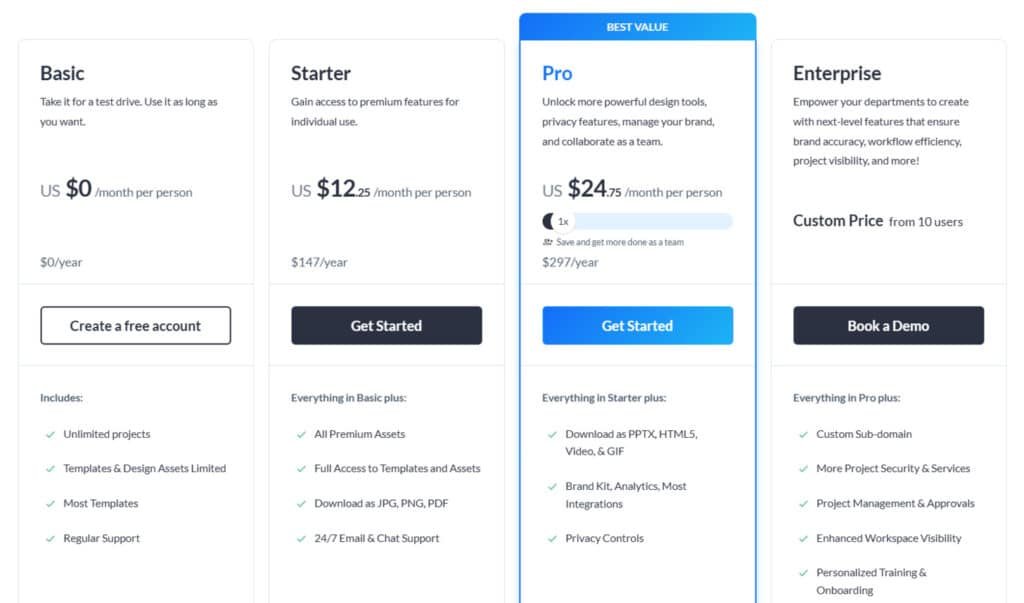
The Basic option gives you a generous free trial with no time limit. You get 100MB storage and limited templates—perfect for testing the waters.
Plan Features and Cost Breakdown
Basic
Free forever at $0/month or $0/year. Unlimited projects, most templates, limited premium assets, regular support.
Starter
$29/month or $12.25/month ($147/year – save 58%). Everything in Basic + full premium assets & templates, JPG/PNG/PDF downloads, 24/7 email & chat support.
Pro – Best Value
$59/month or $24.75/month ($297/year – save 58%). Everything in Starter + PPTX/HTML5/Video/GIF exports, Brand Kit, analytics, most integrations, privacy controls.
Enterprise
Custom pricing (from 10 users). Everything in Pro + custom sub-domain, advanced security, approvals, SSO/2FA, dedicated manager, personalized onboarding.
| Plan | Monthly | Annual (per month) | Video/GIF Export | Brand Kit | Team Features |
| Basic | $0 | $0 | No | No | No |
| Starter | $29 | $12.25 | No | No | No |
| Pro | $59 | $24.75 | Yes | Yes | Basic |
| Enterprise | Custom | Custom | Yes | Yes | Full |
Annual payments offer significant savings. The Teams plan provides custom pricing for collaborative environments with enhanced support.
Choose your plan based on how many files you need to download and what image quality you require.
Pros & Cons of Visme
No tool is perfect, and my hands-on experience revealed both standout strengths and frustrating limitations. Let’s examine what real users love—and what makes them groan.
Advantages Highlighted by Users
The interface consistently earns praise.
One user shared, “The platform is extremely easy to use thanks to its intuitive user interface.”
This makes complex design work accessible to non-designers.
Professional templates save significant time. The drag-and-drop approach means anyone can create stunning marketing pieces. Customer support also receives glowing reviews for being responsive and genuinely helpful.
| Strength | User Benefit | Impact Level |
|---|---|---|
| Intuitive Interface | Easy for beginners | High |
| Quality Templates | Professional results fast | High |
| Brand Consistency | Unified visual identity | Medium |
| Responsive Support | Quick problem resolution | Medium |
Drawbacks and Areas for Improvement
Some users find the interface confusing or slow. Essential AI features being locked behind additional paywalls frustrates many. Subscription requirements for basic options like downloading files create friction.
One Trustpilot reviewer noted, “The programme didn’t seem to register that I had upgraded.” Support response time inconsistencies also concern business users relying on the platform.
These limitations might make you consider alternative tools for specific presentation needs.
Alternatives to Visme
I’ve discovered that no single platform solves every design challenge equally well. Sometimes you need to explore other options to find your perfect creative tool. Let me share what I learned from testing the competition.
If you’re using Visme for presentations, infographics, and videos, you might want tools that focus on similar creative stuff.
I poked around tools for AI visuals last week, hunting for ones that nail product shots or social posts without the hassle. They’re solid if you’re after niche AI magic over Visme‘s all-in-one vibe.
These options help make branded content like interactive designs and engaging visuals. I know finding the right tool can take time. You want something easy that gives pro results. Here are some good picks that fit well.
Pic Copilot AI
Pic Copilot uses AI for product images, backgrounds, and virtual try-ons. Great for e-commerce marketing visuals. Many sellers like how it cuts photo costs fast. Perfect for quick ad graphics. – Read Full Review
Orshot
Orshot automates image and video generation from templates. Supports API and integrations for bulk work. Teams love the simple pricing and fast renders. Ideal for marketing at scale. – Read Full Review
Slides AI
Slides AI turns text into Google Slides presentations quick. AI handles layouts and content. Users enjoy the time saved on decks. Strong for simple slide creation. – Read Full Review
Simplified
Simplified offers all-in-one tools for presentations, graphics, and videos. AI helps with writing and design. Creators use it for full workflows. Good for social and branded content. – Read Full Review
Scenario AI
Scenario trains custom models for consistent images and videos. Great for game assets or brand styles. Pros like the control over outputs. Suited for pro creative teams. – Read Full Review
Imagine.Art
Imagine.Art generates images and videos from text prompts. Multi-model access for styles. Users experiment with artistic ideas easily. Fun for creative visuals. – Read Full Review
Exactly AI
Exactly AI lets you train models on your style for custom images. Ownership stays with you. Artists build unique generators fast. Best for personal brand consistency. – Read Full Review
Decktopus
Decktopus creates AI presentations with themes and notes. Fast from prompts or PDFs. Many pick it for quick pro decks. Ideal for busy presenters. – Read Full Review
| Tool | Key Features | Video Support | Starting Pricing | Best For |
|---|---|---|---|---|
| Visme | Presentations, infographics, videos, templates | Yes | Free / $29+/month | All-round visual content |
| Pic Copilot AI | AI product images, try-ons, backgrounds | Limited | Free / $4-9/month | E-commerce visuals |
| Orshot | Template automation, API, videos | Yes | Free renders / paid plans | Marketing automation |
| Slides AI | Text-to-slides for Google | No | Free / $10+/month | Quick presentations |
| Simplified | AI writing, design, video editing | Yes | Free / $20+/month | Full content workflows |
| Scenario AI | Custom models, image/video generation | Yes | $15+/month | Consistent branded assets |
| Imagine.Art | Text-to-image/video, editing | Yes | Free / $10+/month | Artistic creations |
| Exactly AI | Style training, custom generation | No | Freemium / paid | Personal style replication |
| Decktopus | AI decks from prompts/PDFs | No | $15+/month | Fast slide decks |
Your best one depends on what you make most. For marketing videos and images, Scenario or Simplified work well.
Presentations? Slides AI or Decktopus.
These tools help create engaging content easier.
Real-World Case Studies and User Experiences
When testing tools, I always pay close attention to how they perform under real-world pressure from diverse users. The stories below show how this platform handles both triumphs and challenges.
Success Stories and Effective Use Cases
One educator shared an impressive result: “I uploaded my first course to Udemy on Monday, and it went live the very next day—Tuesday!”
The platform met all technical requirements, saving valuable time.
Another user reported six years of outstanding experience. They found the intuitive interface made creating high-impact content easy without design skills. Nonprofits also benefit—one small organization confirmed it met all their communication needs.
Challenges Encountered and Resolutions
Not every experience is smooth. One parent shared a school project crisis when PDF download failed at deadline time. The support team quickly resolved it, saving the day.
However, another user faced subscription issues without resolution. They upgraded to download their work but the system didn’t register it. After unanswered emails, they switched to alternatives.
My Experience: I’ve seen how responsive support can turn frustrating moments into positive outcomes. But consistency matters—users need reliable systems for important projects.
Getting Started with Visme
Getting started is surprisingly straightforward, designed to get you creating in minutes, not hours. I found the initial experience focuses on immediate action rather than lengthy tutorials.
You jump right into the template selection after signing up. This hands-on approach respects your time.
User Onboarding Process
The first screen presents a vast library of templates, neatly organized. Categories like Presentations, Documents, and Social Media make searching easy. Each category has subgenres for precise matching.
If you feel overwhelmed, a blank template or a custom-sized canvas are great options. The left sidebar gives you instant access to a huge library of assets—icons, stock photos, videos, and graphics.
Starting a new project is intuitive. I recommend choosing a design close to your vision and using the ‘replace’ function to swap elements quickly.
| Template Category | Common Use Cases | Best For |
|---|---|---|
| Presentations | Business pitches, educational slides | Formal projects |
| Social Media | Posts, stories, banners | Quick graphics |
| Documents | Reports, infographics, flyers | Print and digital media |
| Videos | Short clips, animated content | Engaging video work |
Training Resources and Tutorials
Help is always a click away. The question mark icon in the corner unlocks a wealth of resources. You’ll find video tutorials and documents explaining every feature.
The Learning Centre is a standout. It offers excellent content on visual design principles, not just software how-tos. This is perfect for building your skills over time.
For users with limited tech experience, these resources are a lifesaver. They help you move from using pre-made templates to creating custom designs confidently.
Community and Customer Support
Behind every great platform lies a support system that can make or break the user experience. I’ve tested this firsthand by reaching out through different channels at various times.
Responsive Support and Technical Assistance
The support team delivers remarkably different experiences. Some users report “the best customer service I’ve ever experienced” with same-day resolutions. Live chat typically provides faster responses than email.
However, consistency remains an issue. While the company promises 24/7 availability, response times vary dramatically. Paid subscribers receive priority treatment over free users.
User Community Feedback and Interaction
Long-term users who’ve stayed with the platform for multiple years often develop positive relationships with the support team. Community feedback reveals both glowing praise and frustrating experiences.
One user shared how Lincoln from the support team quickly resolved a school project deadline crisis. Yet others report unanswered emails despite promised turnaround times.
The team shows impressive responsiveness to feature requests—implementing specific changes within days when properly communicated.
Conclusion: Visme Review
Raamish’s Take
Visme delivers a powerful all-in-one platform for creating professional visual content, from presentations and infographics to social graphics and reports.
Its AI Designer stands out by generating fully editable designs from simple text prompts, speeding up the process significantly.
Key strengths include the Brand Wizard that instantly applies your fonts, colors, and logo for consistent branding, plus advanced data visualization tools to turn stats into engaging charts and graphs.
The vast library of customizable templates, millions of stock assets, and interactive elements like animations and hotspots add real polish.
Team collaboration features, including real-time editing and comments, make it smooth for group work.
With AI tools for image editing, text generation, and quick resizing, it helps non-designers produce high-quality results efficiently.
Trusted by over 27 million users worldwide, Visme combines ease with depth for reliable branded visuals.
The final verdict on any tool comes down to one simple question: Does it solve more problems than it creates for your specific workflow?
After my comprehensive review, I can say Visme excels for teams needing brand consistency across presentations, videos, and documents.
Choose this plan if you’re an educator, marketer, or business prioritizing design quality. But avoid it if you need reliable free downloads or prefer simpler interfaces. The Pro plan offers the best value for serious creators.
Start with the free version to test the workflow. Remember to verify download functionality and use live chat for faster support. Despite some frustrating things, Visme delivers professional results for those willing to learn its system.
My final advice? Test it thoroughly against your actual needs before committing. The right tool depends entirely on your specific content creation requirements.
Frequently Asked Questions
Is Visme better than Canva for presentations?
It depends on your project’s focus. Visme often has the edge for data-heavy presentations, offering superior charts and graphs. Canva is fantastic for quick, visually-driven social media graphics. If your primary need is deep data visualization and interactive elements, Visme is a strong choice.
How good is the AI presentation maker feature?
The AI feature is a solid time-saver. You provide a text prompt, and it generates a full presentation draft with layouts and content. I find it’s excellent for creating a first draft quickly, but you’ll still want to customize the design and text to match your brand’s voice perfectly.
Can I use my own brand colors and fonts in the templates?
A> Absolutely. The Brand Kit feature is a major plus. You can upload your company’s specific fonts, set your brand’s color palette, and even add your logo. This ensures every presentation, infographic, or document you create stays on-brand without extra effort.
What kind of customer support can I expect?
Support is generally responsive, especially on paid plans. You get access to email support, a comprehensive help center, and video tutorials. The user community is also active, which is great for picking up tips and tricks from other professionals.
Are the free stock photos and assets high quality?
Yes, the built-in media library is impressive. You get access to millions of high-quality stock photos, icons, and graphics. The search function works well, making it easy to find the perfect visual assets for your project without leaving the platform.
Is it easy to collaborate with my team on a project?
Team collaboration is straightforward. You can invite team members to edit or comment on projects in real-time. The ability to leave feedback directly on the design canvas streamlines the review process and keeps everyone on the same page.
Can I download my projects for offline use?
You can. Download options include PDF, JPG, and PNG for static content. For presentations, you can download them as HTML5 files, which preserve animations and interactivity for offline viewing, which is a huge benefit for sales teams or conference speakers.