Staring at a blank page is a special kind of torture. You have the research, you know the topic, but the words just won’t come.
Deadlines loom, and the pressure to produce high-quality content feels overwhelming.
Whether you’re drafting a complex research paper or a week’s worth of blog posts, the struggle is real.
I’ve tested countless AI writing assistants, and most leave you with generic, soulless text. You spend more time editing than you save.
It’s frustrating to invest in a tool that promises the world but delivers a bland, robotic first draft. The market is flooded with options, making it hard to find a platform that genuinely understands your needs.
That’s why I had to put WriterBuddy through a rigorous test. This content writing tool claims to help academics and professionals create excellent content ten times faster. With over 30 specialized tools and support for 20+ languages, it aims to be a true partner in the writing process.
So, does it live up to the hype?
This hands-on WriterBuddy Review cuts through the noise. I’ll give you my honest take on its features, pricing, and real-world performance.
Let’s find out if this is the tool that can finally conquer your blank page anxiety.
Key Takeaways: WriterBuddy Review
- This review provides a firsthand, unbiased assessment of the WriterBuddy platform.
- We explore whether it effectively speeds up academic and professional writing tasks.
- The analysis covers core features, usability, and value for the price.
- Learn if this AI assistant can adapt to your specific writing style and needs.
- Get a clear verdict on who will benefit most from integrating this tool into their workflow.
WriterBuddy Review: An Overview

Raamish’s Take
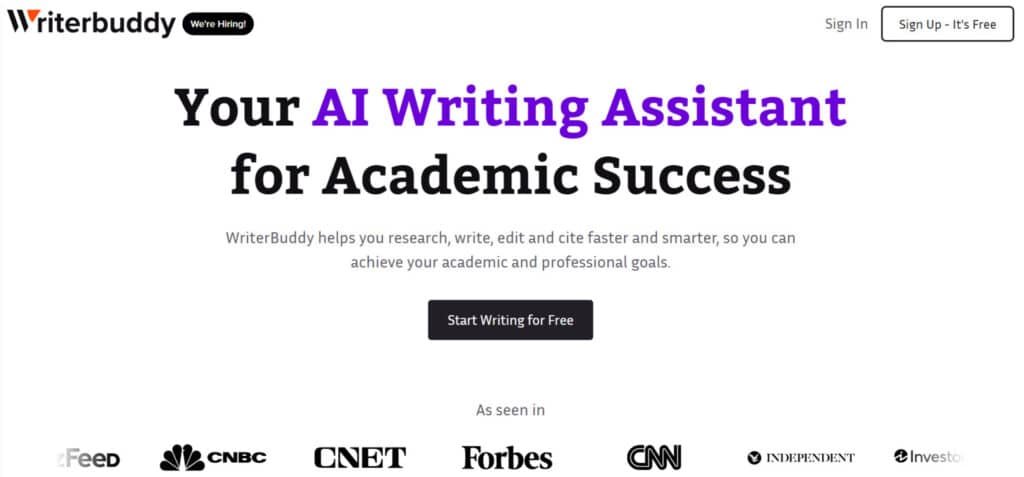
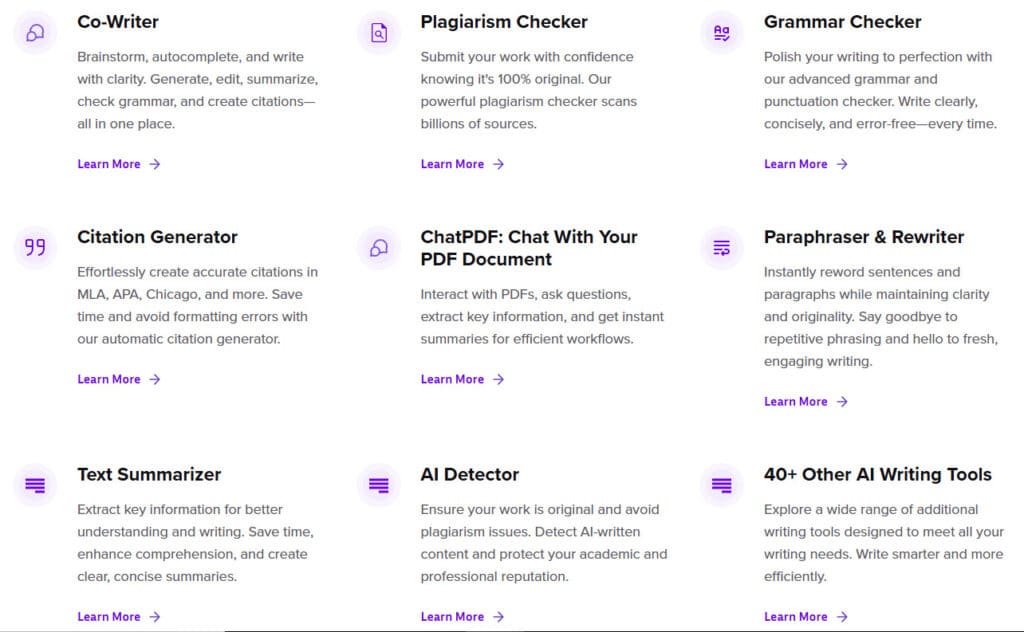
WriterBuddy AI is a comprehensive writing assistant tailored for academic and professional success, integrating over 40 AI tools to streamline research, drafting, editing, and citing in one platform.
Its Co-Writer feature stands out, enabling brainstorming, autocomplete, summarization, grammar checks, and citation creation seamlessly within the editor.
I am particularly impressed with the ChatPDF tool, which lets users interact with documents to ask questions, extract insights, or generate summaries instantly, boosting efficiency for dense materials.
The Plagiarism Checker scans billions of sources for 100% originality, while the Citation Generator handles MLA, APA, Chicago, and more without errors.
Additional strengths include the Paraphraser & Rewriter for fresh phrasing, Text Summarizer for key takeaways, Grammar Checker for polished prose, and AI Detector to verify human-authored content.
Supporting 25+ languages, WriterBuddy AI‘s all-in-one design saves time on deadlines, making high-quality work accessible and stress-free for over 540,000 users.
Introduction to WriterBuddy
Navigating the crowded AI writing market feels like trying to find a reliable coffee shop in a city full of mediocre chains.
Every tool promises to revolutionize your workflow, but few deliver genuine value. This landscape has evolved from basic text generators to sophisticated platforms that actually understand context.
AI Landscape and Industry Context
The AI writing assistant space has exploded with hundreds of options. Most claim they’ll transform your content creation process overnight. I’ve tested many that produce generic text requiring more editing than they save.
What separates serious tools from the rest? Practical integrations and understanding real workflow needs. The best platforms connect seamlessly with where you actually publish content.
| Platform Integration | Primary Use Case | Target Audience |
|---|---|---|
| WordPress & Shopify | Blog posts & product descriptions | Bloggers & e-commerce managers |
| Facebook & Twitter (X) | Social media content | Social media managers |
| Google Ads & Amazon | Advertising copy | Marketers & entrepreneurs |
Company Background and Endorsements
WriterBuddy enters this competitive space as a US-based company focused specifically on professional content needs. Their approach targets copywriters, marketers, and businesses needing scalable output.
The platform’s perfect 5.0/5 rating from verified users stands out.
One reviewer noted it’s “much much better than Apple’s AI rewriting tool“—high praise in a market full of average options.
This credibility matters when choosing tools for serious work.
Their integrations with major platforms show they understand content doesn’t exist in isolation. This practical focus makes WriterBuddy worth examining for anyone creating professional writing.
What is WriterBuddy?
The real magic happens when AI understands your specific writing needs rather than just generating generic text.
This platform uses advanced natural language processing to create content that actually sounds like you wrote it.
Inner Workings and Core Capabilities
At its core, this writing tool operates through a smart template system. You choose from 30+ specialized templates organized by content type. The system then tailors output to your specific requirements.
The platform’s structure makes it easy to jump between different writing tasks. Here’s how the templates are organized:
| Content Category | Primary Tools | Ideal For |
|---|---|---|
| Blogging | Article outlines, blog posts | Research dissemination |
| Academic | Literature reviews, paper drafts | Research writing |
| Professional | Emails, reports | Academic communication |
Benefits for Academic Professionals
For academics, the value is immediate. You can draft complex paper sections in minutes instead of hours. The tool helps organize research notes into coherent arguments.
Project management features let you separate personal research from client work. Multi-language support makes international collaboration smoother.
The platform learns your style over time, producing increasingly relevant content.
Complete Features of WriterBuddy
I’ve tested enough AI assistants to know when a platform’s features are genuinely useful versus just marketing fluff.
After extensive use, several aspects of this writing tool stood out as particularly valuable for daily content creation.
1. Core Writing Magic: Co-Writer
Brainstorms ideas
The service generates dozens of topic ideas, angles, and outlines in seconds. Writers who struggle to start projects instantly get structured starting points to create content that aligns with their brand or assignment goals.
Autocompletes text
Real-time sentence completion predicts the next words as the user types inside the clean interface. This removes pauses and helps writers maintain momentum when producing large volumes of text.
Generates full content
From blog posts to emails and reports, the tool builds complete drafts with headings, paragraphs, and conclusions. Marketing teams and solo writers create content that is ready for minor tweaks instead of starting from zero.
Edits existing text
Uploaded drafts receive instant improvements in tone, clarity, and flow. The solution refines wordy sections and strengthens weak arguments so every business document sounds professional.
Summarizes long text
Lengthy articles or research papers turn into concise overviews while keeping essential information. Users absorb key points faster and use the summary as a foundation to create content of their own.
Checks grammar
Context-aware grammar and style correction scans the entire text in one pass. The interface displays fixes inline so writers produce error-free copy without separate proofreading rounds.
Creates citations
Automatic formatting in APA, MLA, Chicago, Harvard, and 20+ other styles. Users simply drop source links or details and receive perfectly formatted references ready for insertion.
2. Originality Guard: Plagiarism Checker
Scans billions of web pages and academic sources
The service compares submitted text against an enormous database and returns originality percentage in under 30 seconds.
Highlights exact matching phrases
Side-by-side view shows duplicated sections with source links so writers can rewrite problematic areas immediately.
Generates detailed originality reports
Downloadable PDF reports include match percentages and references, perfect for users submitting to universities or business clients.
Supports multiple file formats
Upload DOCX, PDF, TXT, or paste directly; the solution processes everything without conversion hassle.
Unlimited document length on higher plans
Long theses or marketing whitepapers scan fully regardless of word count for complete peace of mind.
3. Polish Pro: Grammar Checker
Contextual spelling and grammar correction
The service analyzes full sentences instead of isolated words, catching tricky errors like subject-verb agreement, tense shifts, and misplaced modifiers that basic checkers miss.
Writers producing marketing copy or business reports end up with text that reads naturally and professionally every time.
Style and tone enhancement
The tool suggests changes to match the desired voice—formal for business proposals, friendly for brand social posts, or academic for research papers.
Users can set a target tone once and have the entire document adjusted automatically, ensuring consistent brand messaging across all content.
Punctuation and capitalization fixes
It corrects comma splices, serial comma usage, quotation mark placement, and proper capitalization in titles or headings.
Marketing teams and individual writers who handle a lot of text daily save hours that would otherwise go into manual proofreading rounds.
Vocabulary enhancement suggestions
The solution flags overused words, jargon, or weak verbs and offers stronger, more precise alternatives without changing meaning.
This helps writers elevate simple drafts into compelling copy that engages the target audience and improves overall readability scores.
Readability score and improvement tips
After scanning, the interface displays Flesch-Kincaid grade level, sentence length averages, and actionable steps to simplify complex text.
Business professionals and content writers use these insights to create content that matches their audience comprehension level perfectly.
4. Citation Wizard: Citation Generator
Supports 9,000+ citation styles
Every major academic and professional style stays updated automatically, from APA 7th edition to niche journal requirements. Users never worry about outdated formats ruining their business reports or academic submissions.
Auto-fill from URLs, DOIs, or ISBNs
Paste a web link, DOI, or book ISBN and the service instantly retrieves author, publication date, publisher, and other metadata. This removes manual data entry for writers researching large projects and speeds up the entire citation process dramatically.
Book, journal, website, and video citations
One unified interface handles all source types with accurate fields for chapters, volume numbers, or timestamps. Researchers and marketing teams building whitepapers create content with properly credited multimedia sources in seconds.
In-text citation creator
Generates matching parenthetical citations, footnotes, or numbered references that sync perfectly with the bibliography. Users insert them directly into their text without leaving the main editing window.
Bibliography and reference list builder
Automatic alphabetization, hanging indents, and drag-and-drop reordering produce publication-ready reference pages.
Writers working on long theses or business proposals export flawless lists that meet even the strictest guidelines.
5. PDF Power-Up: ChatPDF
Natural language questions to PDFs
Ask conversational questions like “What are the main findings on page 12?” and receive exact answers with page citations. Researchers and business analysts extract precise information from 100-page reports without endless scrolling.
Multi-PDF conversation memory
Upload multiple related documents and query across all of them at once—perfect for comparing contracts or research papers. Users handling a lot of technical reading stay in one interface instead of flipping between files.
Table extraction and export
Detects and converts tables into editable Excel or CSV formats with perfect column alignment. Marketing teams pulling data for presentations save hours of manual retyping.
Highlight and annotation sync
Any highlights or notes made during the chat stay attached to the original PDF for future reference. Teams collaborating on reviews keep everyone on the same page literally.
Summary generation by section or entire document
Create executive summaries, chapter breakdowns, or full-document overviews with adjustable detail levels. Writers turn dense material into concise briefs ready for meetings or content creation.
6. Freshen It Up: Paraphraser & Rewriter
Four rewriting modes
Fluency, standard, creative, and shorten modes let writers choose the exact level of change needed for SEO, academic, or marketing purposes. The interface previews results instantly.
Bulk paragraph processing
Rewrite entire articles or dozens of paragraphs in one batch—ideal for business teams refreshing old blog posts or product descriptions across a website.
Plagiarism-safe rephrasing
Changes sentence structure, synonyms, and phrasing while keeping 100% of the original meaning. Users avoid accidental duplication when they need to create content based on existing sources.
Tone shifter
Switch instantly between professional, casual, persuasive, or empathetic tones to match brand guidelines or campaign needs. Marketing writers adapt the same core message for different platforms effortlessly.
Synonym strength slider
Fine-tune how aggressively words are replaced, from light refresh to complete overhaul. This gives writers full control over natural flow and originality.
7. Quick Digest: Text Summarizer
Adjustable summary length
Slide from ultra-short TL;DR to detailed 500-word versions depending on how much information the user needs. Perfect for quick scans or deeper reference.
Bullet-point or paragraph output
Choose the format that fits emails, slides, or reports—business teams love bullet points for meetings, while writers prefer paragraphs for articles.
Key sentence extraction
Pulls and ranks the most important sentences from the original text with relevance scores. Users see exactly what matters most at a glance.
Multi-document summarization
Combine several articles or reports into one unified summary, great for market research or literature reviews in a single click.
Focus topic option
Instruct the service to summarize only around specific keywords or themes, helping marketing teams zero in on competitor pricing or feature mentions.
8. Authenticity Shield: AI Detector
Per-sentence AI probability scoring
Color-coded heatmap highlights exactly which sentences look AI-generated and which read human. Writers and editors make targeted fixes instead of rewriting everything.
Supports latest models detection
Trained continuously on GPT-5, Claude Sonnet 4, Gemini, and others for industry-leading accuracy. Users stay ahead of evolving detection systems used by schools and publishers.
Batch file analysis
Process up to 50 documents at once—perfect for agencies or professors checking multiple submissions quickly.
Confidence percentage and risk level
Clear 0–100% score plus low/medium/high risk label tells users instantly if content is safe to submit to strict platforms.
Humanizer suggestions
Optional one-click rewrites lower detection scores while preserving meaning, helping writers meet authenticity requirements without starting over.
9. Bonus Arsenal: 40+ Extra AI Tools
Email writer & cold outreach templates
Full sequences with subject lines, follow-ups, and personalization tokens ready for sales and marketing campaigns.
Social media caption & thread generator
Platform-optimized copy for LinkedIn carousels, Twitter threads, Instagram reels, and TikTok scripts with hashtag suggestions.
Ad copy creator
A/B variations for Google Ads, Facebook, Meta, and LinkedIn with character counters and emotional triggers built in.
Product description generator
SEO-friendly, benefit-focused descriptions with bullet points and power words tailored for Amazon, Shopify, or any e-commerce store.
YouTube script & title generator
Hook-first intros, timestamped outlines, and click-worthy titles designed to boost watch time and rankings.
10. Global Reach: Multi-Language Support
28 native languages with cultural adaptation
Goes beyond literal translation—adjusts idioms, formality, and cultural references so text feels natural to local audiences.
Real-time switching mid-document
Write an English intro, Spanish body, and French conclusion without changing tools or losing formatting.
Grammar and style rules per language
Each language runs its own native proofreading engine for accurate corrections specific to that tongue.
Voice-to-text in multiple languages
Dictate directly in Spanish, German, Arabic, etc., and get clean transcribed text ready for editing.
Localized templates
Resumes, cover letters, and emails pre-formatted to regional standards (e.g., European CV vs. American resume).
11. Workflow Wins: How It All Ties Together
Single unified dashboard
Every tool lives in one sidebar—writers jump from paraphrasing to citation to summarization without ever leaving the interface.
Project folders and version history
Organize by client, semester, or campaign and roll back to any previous version instantly.
Team collaboration features
Real-time co-editing, comment threads, and task assignment available on Pro plans for business and agency teams.
Browser extension & integrations
Write and edit directly inside Google Docs, WordPress, Gmail, Notion, and more without copy-pasting.
Export in multiple formats
One-click download as PDF, DOCX, HTML, Markdown, or plain text with perfect formatting preserved.
12. Quick Hits: User Perks and Accessibility
Free plan with generous daily limits
Start immediately with core writing, grammar, and plagiarism tools—no credit card required.
Mobile-responsive interface
Full desktop experience on phones and tablets so users can write or edit anywhere.
Offline draft saving
Continue working and auto-sync when back online—ideal for travel or unstable connections.
24/7 live customer support
Real human agents available via chat for every user, even on the free tier.
Regular feature updates
New tools, languages, and improvements roll out monthly at no additional cost.
These features work together to create a platform that understands real writing workflows rather than just generating text.
The project management system keeps personal and client work separate—essential for academics juggling multiple responsibilities.
Pricing Plan of WriterBuddy
Let’s get straight to the numbers—because even the most impressive features need to make financial sense for your workflow. I’ve seen too many tools that look great on paper but break the bank in practice.
Overview of Free and Paid Plans
The free plan offers 2,000 words per month, which is perfect for testing the waters. You can explore basic writing tools without spending hard-earned cash. This approach shows confidence in their product’s quality.
Here’s how the pricing tiers break down:
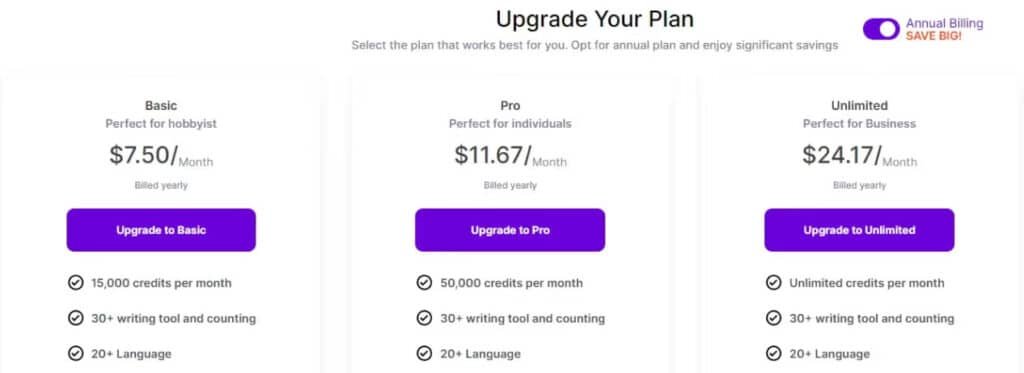
| Plan Type | Monthly Cost | Word Credits | Key Features |
|---|---|---|---|
| Free | $0 | 2,000 words | Limited tool access |
| Basic | $9 per month ($7.50 per month on Annual Plan) | 15,000 credits | 30+ tools, 20+ languages |
| Pro | $14 per month ($11.67 per month on Annual Plan) | 50,000 credits | Full tool suite |
| Unlimited | $29 per month ($24.17 per month on Annual Plan) | Unlimited | Maximum productivity |
Value for Different User Needs
The Basic plan at $9 per month suits occasional users nicely. Students and casual writers get solid value here. The Pro tier delivers serious power for regular content creation.
One reviewer noted,
“Unlimited account is slightly pricey, but the free plan lets you test properly.”
This tool scales well with your output needs. The price per word drops significantly as you move up tiers. Choose based on your actual monthly content volume.
Pros & Cons of WriterBuddy
Let’s be real—no tool is perfect, and finding the right fit means understanding both the highs and the lows. I believe in giving you the unfiltered truth. After rigorous testing, here’s my balanced breakdown.
Advantages in Speed and Versatility
This platform shines in several key areas. It’s a solid AI-powered tool that genuinely accelerates the content creation process.
- Impressive Speed: It churns out drafts remarkably fast, saving you hours of initial writing.
- Generous Free Plan: The 2,000-word free tier is a standout, allowing for proper testing without commitment.
- User-Friendly Interface: The clean design makes navigating different types of projects intuitive.
When combined with your own skills, it becomes a powerful partner for producing quality content quickly.
Drawbacks and Consideration of Alternatives
However, it’s not without its flaws. The content structure sometimes needs manual tweaking to flow naturally.
More importantly, the output can be detected by tools like Originality.ai. This highlights a crucial point: the AI provides a great foundation, but human expertise is essential to polish the content and make it truly exceptional.
As one review wisely noted,
“Simply generating content and publishing it will not help you gain more traffic.”
This reality makes it vital to consider other platforms if you need more advanced AI or different features.
Alternatives to WriterBuddy
The AI writing assistant market offers several compelling alternatives, each with unique strengths for different content creators. I’ve tested most competitors personally, so you get real insights rather than marketing fluff.
Competing AI Writing Tools Overview
If you’re staring at a blank page, feeling that familiar frustration of deadlines and ideas that just won’t flow, I totally understand.
WriterBuddy is a reliable AI writing assistant — it handles paraphrasing, summarizing, grammar checks, chat with pdf, citations, and even plagiarism detection, making it great for everyday high-quality content or academic work.
But if you’re looking for something more tailored to blogging, research, or marketing, here are some strong alternatives:
JotBot AI
JotBot AI acts like your personal note-taking genius. It mimics your writing style, suggests sentences in real-time, pulls sources with citations, and even summarizes videos or PDFs.
Perfect for essays, blogs, or research without losing your voice. If writer’s block hits hard, this one keeps you moving smoothly — Read Review
SciSpace
SciSpace is a powerhouse for deep research and academic writing. It chats with PDFs, explains complex papers/math, generates literature reviews, paraphrases, and cites from 280M+ sources.
Ideal when you need to understand tough topics fast. For students or researchers feeling overwhelmed, this brings real clarity — Read Review
Koala AI
Koala AI excels at SEO-optimized blog posts and affiliate content. It pulls real-time data from SERPs, creates full articles with outlines/links, and sounds naturally human.
Great for bloggers wanting ranked content quick. When traffic growth is your goal, this tool delivers serious boosts — Read Review
Rytr
Rytr keeps things simple and affordable for short-form wins. It generates emails, ads, social posts, or blog sections in 40+ use cases, with tone matching and SEO tools.
Super versatile for marketers on a budget. If you need quick, punchy copy without fuss, this eases the load — Read Review
WordHero
WordHero packs tons of templates for everything. It write blog posts, emails, ads, or captions fast, with keyword help and long-form support.
Handy for creators juggling multiple formats. When variety is your daily challenge, this one feels empowering — Read Review
Pepsoft AI
Pepsoft AI focuses on human-like, plagiarism-free text. With 140+ tools, it covers blogs, social media, or articles in 95+ languages.
Strong for multilingual or natural-sounding needs. If robotic output worries you, this brings authentic relief — Read Review
HyperWrite
HyperWrite offers smart autocomplete and rewrites anywhere. It learns your style, suggests contextually, generates paragraphs, and works via extension.
Perfect for refining on the fly. When polishing feels endless, this speeds things up nicely — Read Review
| Tool | Main Strength | Best For | Biggest Drawback |
|---|---|---|---|
| WriterBuddy | Paraphrase + grammar + citations | General/academic everyday writing | Less specialized for SEO/long-form |
| JotBot AI | Style matching + real-time suggestions | Personal essays & notes | Video features can be hit-or-miss |
| SciSpace | Deep PDF/research interaction | Academic & technical papers | More research than pure generation |
| Koala AI | SEO articles with real data | Blogging & affiliate speed content | Higher cost for heavy use |
| Rytr | Affordable short-form templates | Marketing copy & social experts | Limits on long-form depth |
| WordHero | Tons of templates & fast output | Multi-format creators | Can need editing for nuance |
| Pepsoft AI | Humanized multilingual content writing tool | Global blogs & social | Newer, fewer integrations |
| HyperWrite | Contextual autocomplete & rewrites | Refining anywhere you write | English-only for now |
Comparative Features and Pricing
Each alternative brings distinct features to the table. Neuraltext excels in advanced copywriting capabilities, while Krater AI dominates SEO-focused tools.
Pricing varies significantly across these services. Some offer freemium models, while others focus on premium features. Your choice depends on which types content you produce most often.
For articles and academic content, each writing tool has strengths. Test their free tiers to see which copy style matches your voice best.
Case Study / Personal Experience with WriterBuddy
I decided to take this platform for a real spin with an actual content project I needed to complete. Theory is great, but practical application reveals the true value of any writing tool.
My Experience Using WriterBuddy
I tested the “Article Writer Pro” template with a prompt about building a gaming PC—a topic I genuinely needed to write about. The tool generated a solid foundation quickly. While the structure needed some work, the actual content provided a great starting point.
This experience showed me how different types of writers could benefit. Whether you’re creating blog articles or social media posts, the platform adapts to your specific needs.
Real-World Results and Insights
The output required refinement, but it saved me hours of initial writing. When I ran the content through Originality.ai, it was detected as AI-generated—an important consideration for professional writers.
Here’s how my expectations measured against reality:
| Aspect | What I Expected | What I Actually Got |
|---|---|---|
| Content Quality | Publish-ready articles | Solid foundation needing polish |
| Time Savings | Complete automation | Significant head start |
| Originality | Undetectable AI content | AI-detected but usable |
| Adaptability | One-size-fits-all | Flexible for different content types |
The tool works best when combined with human writing skills. It’s particularly useful for writers who need to produce a lot of content quickly for clients or personal projects.
Conclusion: Should You Buy It?
Raamish’s Take
WriterBuddy AI is a comprehensive writing assistant tailored for academic and professional success, integrating over 40 AI tools to streamline research, drafting, editing, and citing in one platform.
Its Co-Writer feature stands out, enabling brainstorming, autocomplete, summarization, grammar checks, and citation creation seamlessly within the editor.
I am particularly impressed with the ChatPDF tool, which lets users interact with documents to ask questions, extract insights, or generate summaries instantly, boosting efficiency for dense materials.
The Plagiarism Checker scans billions of sources for 100% originality, while the Citation Generator handles MLA, APA, Chicago, and more without errors.
Additional strengths include the Paraphraser & Rewriter for fresh phrasing, Text Summarizer for key takeaways, Grammar Checker for polished prose, and AI Detector to verify human-authored content.
Supporting 25+ languages, WriterBuddy AI‘s all-in-one design saves time on deadlines, making high-quality work accessible and stress-free for over 540,000 users.
Having tested every feature and compared it against alternatives, I’m ready to deliver my final verdict. This WriterBuddy Review reveals a solid 9.4/10 platform that delivers real value for specific users on having an AI as your writing buddy.
You should absolutely try this tool if you’re an academic building a public presence or a content creator needing consistent output. The generous free plan lets you test without risk.
However, look elsewhere if you need cutting-edge AI or publication-ready content. This product works best as a writing assistant, not a replacement for human expertise.
My recommendation? Start with the free plan today. Test it with your actual needs for 30 days. If it saves you time like it did for me, the affordable paid services are worth every penny.
Frequently Asked Questions
Is WriterBuddy suitable for writing academic research papers?
Absolutely. I’ve found its tools particularly strong for structuring arguments and ensuring formal tone. It helps with outlining and drafting sections, but you’ll still need to provide the core research and data. It’s a fantastic assistant, not a replacement for your expertise.
How does the AI writing tool handle citations and references?
While it can suggest phrasing for in-text citations, it doesn’t automatically generate full bibliographic entries in specific styles like APA or MLA. You’ll need to use a dedicated citation manager for that final step. Its strength is in the body of the content, not the reference list.
Can I use WriterBuddy to improve my existing writing?
Yes, and this is one of its best features for academics. The platform offers robust editing and rewriting tools. You can paste your draft and use it to enhance clarity, adjust tone, or even shorten content while preserving your original meaning—a huge time-saver.
What’s the biggest advantage for a university student?
Speed. The sheer velocity of content creation is a game-changer. When you’re facing multiple deadlines for essays, discussion posts, and reports, WriterBuddy helps you overcome writer’s block and produce quality drafts much faster than typing from scratch.
Are there any major limitations I should know about?
The main consideration is the need for fact-checking. Like any AI, it can sometimes produce plausible but incorrect information. For academic work, you must rigorously verify all facts, figures, and claims it generates. It’s a tool for drafting, not a source of truth.
How does the pricing compare to other AI content writing services?
Its pricing is competitive, especially if you need a wide variety of content types. For the cost of a single premium subscription, you get access to templates for everything from social media posts to blog articles and academic writing, which offers great value for versatile needs.