Feeling overwhelmed by the sheer number of AI tools promising to revolutionize your business?
You’re not alone. The market is flooded with options, each claiming to be the ultimate solution for automation. It’s enough to make any savvy professional skeptical.
I felt that same frustration. That’s why I decided to put this specific platform through its paces. I wanted to see if it could truly deliver on its promise to simplify building powerful, multilingual chatbots.
Could it actually handle real-world customer support without a massive technical headache?
The good news? After extensive testing, I found a tool that stands out. This no-code builder leverages advanced language models to create assistants that understand context naturally. It supports over 100 languages, making it a genuine contender for global operations.
This YourGPT AI Review cuts through the hype. I’ll share my honest experience, from core functionality to pricing. You’ll get a clear picture of whether this is the right fit for automating your customer interactions and business processes in the ai digital landscape.
Let’s dive into the details and see what makes this option worth your consideration.
Key Takeaways: YourGPT AI Review
- This platform is a no-code solution, making advanced chatbot creation accessible to non-technical users.
- It specializes in building multilingual assistants capable of understanding natural, contextual conversation.
- A primary use case is automating and enhancing customer support interactions efficiently.
- The review is based on hands-on testing and comparative analysis against other market options.
- The goal is to help you determine if this tool aligns with your specific business automation needs.
YourGPT AI Review: An Overview

Raamish’s Take
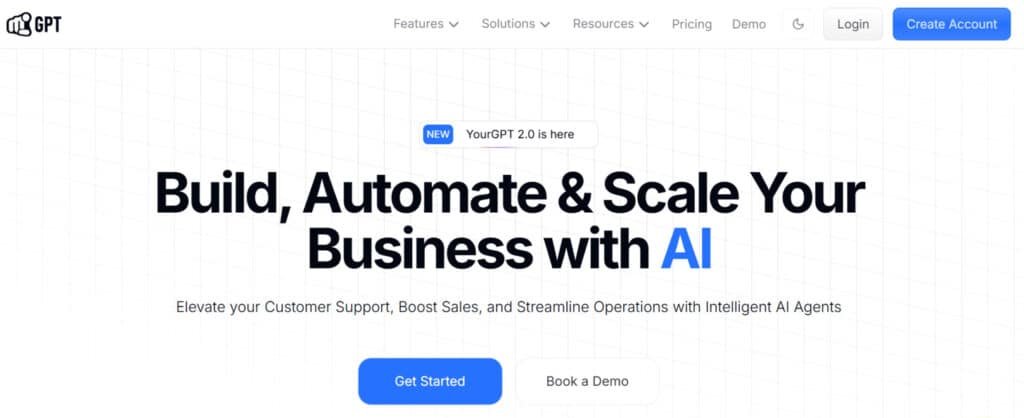
YourGPT AI is a versatile no-code platform for building intelligent AI agents that automate customer support, sales, and operations across multiple channels, scaling businesses with advanced automation.
Its no-code AI chatbot builder stands out, enabling sophisticated flows without programming, while omni-channel integration connects web chat, WhatsApp, Instagram, Slack, and more for unified interactions.
I am particularly impressed with the multi-source training and self-learning capabilities, allowing agents to draw from documents, APIs, or feedback for accurate, evolving responses in 100+ languages.
Features like human handoff for seamless escalations, lead generation to capture opportunities, AI analytics for performance insights, and voice agents for enterprise calls enhance efficiency.
Additional tools include conversational flows with buttons, forms, carousels, API/code execution, whitelabel branding, and integrations via Zapier or webhooks. Trusted by brands like Mageplaza and Healthbird, it handles complex queries autonomously.
YourGPT AI‘s robust, customizable agents reduce costs and boost revenue through 24/7 intelligent automation.
Introduction to YourGPT AI
The current AI landscape is a jungle of competing tools, but some platforms manage to carve out a truly useful niche. I’ve tested many options, and this one stands out for its practical approach to automation.
How It Fits in the Current AI Landscape
In the digital landscape’s crowded market, this platform found its sweet spot. It bridges the gap between simple template-based chatbots and complex custom development. The solution appeals to businesses wanting power without technical headaches.
What impressed me most is how it democratizes access to advanced language models. You don’t need a development team to build sophisticated conversational AI. The platform makes enterprise-grade capabilities accessible to non-technical users.
Company Background & Endorsements
While details about the founding team are scarce, the commitment to GDPR compliance suggests strong European privacy standards. This focus on data security gives me confidence in recommending the tool.
Companies across e-commerce, SaaS, and education sectors are adopting this chatbot. They use it for everything from basic FAQs to complex customer inquiries. User reviews consistently praise the responsive support team.
The endorsements speak volumes about their commitment to customer success. Real businesses are seeing response times drop from hours to seconds with this yourgpt chatbot solution.
What is YourGPT AI?
The magic behind this solution lies in its ability to turn your existing content into an intelligent conversational partner. I’ve tested many platforms, but this one stands out for its practical approach to automation.
Inner Workings of the Platform
At its core, this is a no-code platform that eliminates the need for complex coding. You simply upload your business data—website content, PDFs, FAQs—and the system does the heavy lifting.
The platform processes your information to create a custom-trained assistant. What impressed me most is how it handles technical aspects like data ingestion and vector embeddings behind a simple interface.
You can train your chatbot once, and it learns to answer questions specific to your business. The responses aren’t generic—they’re based on your actual products and policies.
Benefits for Ideal Users
For small business owners and support teams, the benefits are immediate. You get 24/7 customer support without hiring additional staff. Common questions get instant answers, freeing your human team for complex issues.
The multilingual capability is a game-changer. Train your chatbot once, and it communicates in over 100 languages. This opens global markets without language barriers.
Within an hour, you can deploy a sophisticated assistant on your website. The platform scales customer interactions without requiring proportional team growth.
Complete Features of YourGPT AI
What separates exceptional tools from mediocre ones is how their key features translate into tangible business results—and this platform delivers exactly that.
I’ve tested dozens of chatbot builders, and the practical benefits here are what truly impressed me.
1. AI Agent Creation
Businesses can quickly build powerful agents that handle customer interactions, automate sales processes, and resolve complex queries without constant oversight.
This feature lets teams create multiple agents tailored to specific roles, such as support or sales. Each agent pulls from real-time data to deliver accurate answers, improving response times and boosting conversion rates.
Companies using AI agent creation report higher customer satisfaction because agents operate 24/7, turning every visitor interaction into a potential conversion opportunity.
2. No-Code Chatbot Builder
The YourGPT chatbot builder removes the need for developers entirely. Anyone can design advanced YourGPT chatbot experiences using a simple drag-and-drop builder.
This no-code approach means faster deployment of intelligent agents that understand context and maintain natural conversations.
Businesses achieve higher conversion by launching personalized YourGPT chatbot flows in hours instead of weeks.
The builder empowers marketing and support teams to iterate quickly based on live data and reviews, ensuring the agents always align with current goals.
3. AI Studio
AI Studio provides a visual environment to design, test, and refine agent behavior before going live.
Users map out decision trees and conversation paths that guide agents through complex queries. Real-time preview shows exactly how the agent will respond to different data inputs.
This precision helps businesses maximize conversion by eliminating dead ends in customer journeys. Agents built in AI Studio consistently outperform basic scripts because they adapt using live data sources.
4. AI Copilot
Autonomous AI Copilot runs agents that complete full workflows independently.
From qualifying leads to updating records, the copilot agent processes data across connected sources without human input.
This directly lifts conversion numbers in sales pipelines by moving prospects faster through stages.
Support teams see fewer repetitive tickets because the copilot agent resolves issues using the latest data available, operating around the clock.
5. AI Helpdesk
The AI Helpdesk turns any website into a self-service portal powered by smart agents. Customers resolve issues instantly while agents log every interaction as structured data.
This reduces ticket volume dramatically and increases conversion on support-heavy sites. Agents in the helpdesk pull answers from trained data sources, ensuring accuracy even on niche queries.
Businesses keep conversion momentum because visitors get help without leaving the page.
6. Enterprise AI
Large organizations scale unlimited agents with role-based controls and audit trails. Enterprise AI ensures every agent complies with security standards while accessing restricted data sources.
High-volume sales and support teams deploy hundreds of specialized agents that share centralized data. The result is consistent conversion performance at scale, with full visibility into how each agent impacts revenue and customer retention.
7. Phone AI Agent
Voice-enabled agents handle incoming and outgoing calls exactly like human reps. The phone agent books appointments, qualifies leads, and updates data in real time during conversations.
This feature drives conversion in industries where phone remains the primary channel. Callers experience zero wait times, and every interaction feeds back into the central data pool for other agents to use.
8. Task Automation
Pre-built automation covers booking, order tracking, invoicing, lead scoring, and report generation. Each task runs through dedicated agents that pull and update data automatically.
Sales teams close deals faster because agents handle follow-ups instantly. The automation layer removes manual work, letting human staff focus on high-value activities that directly improve conversion.
9. Intelligent Interactions
Agents maintain full conversation memory and make context-aware decisions. They understand intent across multiple turns and select the best response from available data.
This depth creates trust and guides users toward conversion naturally. Intelligent interactions make every YourGPT chatbot session feel personalized, significantly raising completion rates and sales outcomes.
10. Self-Service AI
Customers access instant solutions without agent intervention. Self-service agents search trained data and present answers in seconds.
Websites with strong self-service see massive drops in support costs and simultaneous rises in conversion because friction disappears. The agents continuously improve as more data flows in from resolved cases.
11. Omni-Channel Chatbots
One set of agents works seamlessly across web, WhatsApp, SMS, Instagram, Facebook, and more. All channels share the same data and conversation history.
This unified presence captures conversion opportunities wherever the customer appears. Businesses maintain consistent messaging and sales momentum no matter which platform the prospect prefers.
12. Contextual Understanding
Every agent remembers past interactions and uses that data to shape current responses. Returning visitors receive tailored guidance that accelerates conversion.
Contextual understanding eliminates repetition and builds rapport fast. The result is higher engagement and more completed sales funnels.
13. Workflow Automation
Visual workflow tools connect agents into multi-step processes with conditional logic. Automate entire customer journeys from first contact to closed deal.
Workflows trigger data updates across systems the moment conditions are met. This automation directly correlates with improved conversion metrics across marketing and sales.
14. Human-in-the-Loop
Humans can step into any conversation instantly when agents flag uncertainty. Seamless handoff preserves context and data.
This safety net protects conversion during complex or sensitive cases while still letting agents handle the majority of volume.
15. Multi-Model Selection
Choose the best LLM for each task—GPT-5 for reasoning, Claude for creativity, Gemini for mass content creation. Different agents can run different models based on workload.
Selecting the optimal model improves answer quality and keeps conversion-driving interactions fast and accurate.
16. Bring Your Own Model
Connect private or custom-trained models to power agents. Enterprises maintain full control over proprietary data and behavior.
This flexibility ensures agents never compromise compliance while delivering top-tier conversion performance.
17. Data Training
Upload documents, website content, FAQs, and support history to train agents. The system processes all sources into searchable knowledge.
Well-trained agents answer with pinpoint accuracy, building trust that translates directly to higher conversion rates.
18. Fine-Tuning
Adjust tone, terminology, and response style to match brand perfectly. Fine-tuned agents sound native to the business, increasing customer comfort and conversion. Regular fine-tuning with fresh data keeps performance sharp.
19. Unlimited Knowledge Bases
Store and access unlimited files and data sources (Pro and above). Growing knowledge directly improves agent accuracy and scope. More data equals fewer escalations and stronger conversion at every touchpoint.
20. Multilingual Support & Data Customization
Agents detect and respond in over 50 languages automatically. Global businesses reach new markets without building separate agents.
Customized data ensures responses stay relevant in every language, protecting conversion across borders.
21. Integrations Hub
Native connections to Shopify, Zapier, Twilio, Intercom, CRMs, and more. Agents read and write data across the entire tech stack.
Tight integrations mean no lost leads and seamless sales handoffs that protect conversion.
22. Lead Generation & 24/7 Availability
Conversational forms inside the YourGPT chatbot capture contact details while delivering value. Agents qualify and score leads in real time.
Non-stop availability ensures no prospect slips away, maximizing conversion around the clock.
23. Zero Data Retention
Customer data is deleted immediately after use. Privacy-first design builds trust that indirectly supports higher conversion rates. Visitors engage freely knowing their information stays protected.
24. GDPR & SOC 2 Type II Compliant
Full compliance removes legal barriers for regulated industries. Enterprises deploy agents confidently, maintaining conversion momentum without compliance delays.
25. SSO & Access Controls
Granular permissions protect sensitive data while allowing team collaboration. Secure access keeps agents running safely at scale.
26. Analytics Dashboard
Track resolution rates, conversion impact, cost savings, and agent performance. Data-driven insights show exactly which agents drive revenue and where to optimize.
27. White-Label Option
Remove branding and use custom domains. Clients see only the business logo, strengthening brand trust and supporting higher conversion.
28. Sentiment Analysis
Agents detect frustration and route to humans instantly. Early intervention saves at-risk conversion opportunities.
29. Smart Scheduling
Visitors book meetings directly in chat. Frictionless scheduling lifts sales pipeline velocity and conversion rates.
30. File & Image Understanding
Agents analyze uploaded files and images to answer questions. This capability resolves complex support queries faster, preserving conversion flow.
31. Custom Actions & API Calls
Trigger any external system from inside a conversation. Agents update CRMs, create tickets, or process payments seamlessly—closing the loop on conversion without leaving the chat.
Pricing Plans of YourGPT AI
The real test of any platform’s value comes down to its pricing structure and whether it scales with your business needs. I’ve seen many tools with impressive features that fall short when you look at the cost-to-benefit ratio.
Let’s examine how the subscription plans stack up against what you actually get. This breakdown will help you determine which tier makes sense for your specific situation.
Subscription Plans and Costs
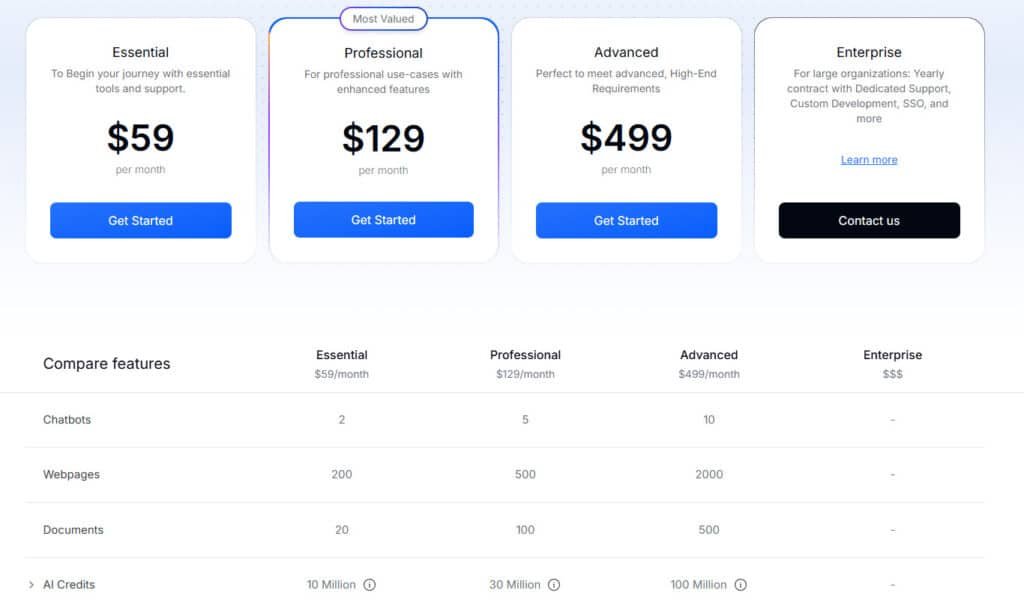
The Essential plan starts at $59 monthly (billed annually). It’s perfect for small businesses testing the waters. You get 2 chatbots, 200 webpage connections, and 20 documents for training data.
Growing businesses will appreciate the Professional tier at $129 per month. This gives you 5 chatbots and 500 webpage connections.
The Advanced plan at $499 monthly supports agencies with 10 chatbots and massive 2,000 webpage capacity.
What yourgpt offers that I really like is a risk-free trial period. You can test the platform thoroughly before committing financially.
Value and Scalability
The value becomes clear when you compare costs to hiring support staff. Even part-time help costs more than these plans. Your chatbot works 24/7 across your entire website.
Scalability is built right into the pricing structure. Start small and upgrade as your traffic grows. You’ll never pay for capacity you don’t need.
For users managing multiple sites, the higher tiers provide excellent value. The platform handles increasing data volumes without performance issues.
Pros & Cons of YourGPT AI
When evaluating any business tool, I always look for both the shining benefits and the practical limitations—here’s my honest breakdown. Every platform has strengths and weaknesses, and I believe in giving you the complete picture so you can make an informed decision.
Key Advantages
The most significant advantage is how this platform democratizes access to enterprise-level capabilities. You get sophisticated chatbot functionality without needing a development team. This levels the playing field for small businesses wanting powerful customer support solutions.
I’m particularly impressed by the data integration flexibility. You can train your assistant on virtually any text-based information source. This ensures responses are accurate and specific to your business rather than generic outputs.
The user-friendly interface means your team can manage the chatbot without ongoing technical support. This reduces long-term costs and gives you control over the customer support experience. The comprehensive support from the team itself is another major benefit that users consistently praise.
Potential Drawbacks
The platform’s effectiveness depends heavily on your training data quality and initial prompt configuration. There’s definitely a learning curve to achieving optimal performance.
Like all AI systems, I’ve noticed potential for occasional inconsistent responses with edge cases. You’ll want to monitor conversations initially and refine your approach. The customization, while good for a no-code solution, has limits compared to building completely custom capabilities.
Some user feedback mentions that third-party integration options could be broader. Feature requests can also take time to implement. If these limitations are deal-breakers for your specific needs, it’s worth exploring alternatives that might better fit your requirements.
Alternatives to YourGPT AI
Before committing to any platform, smart users always check the competitive landscape—here’s my breakdown of the alternatives.
I’ve tested several competing tools that offer similar capabilities for building intelligent chatbots.
Competing AI Chatbot Solutions
The market offers several strong platforms like the one we’ve reviewed. Each has unique strengths depending on your specific needs. Here’s how the main competitors compare:
If you’re juggling endless customer queries, sales leads slipping away, or operations that eat up your day, I totally get the stress.
YourGPT AI is a powerful AI platform that automates customer support, boosts sales, and streamlines business operations — with no-code agents, multimodal chats, voice calls, and seamless handoffs across channels like WhatsApp and email.
But if you need more specialized agents, a marketplace, or deeper workflows, here are strong alternatives teams use.
Relevance AI
Relevance AI lets you build an entire AI workforce for sales outreach, lead engagement, CRM updates, and support tasks. Low-code templates make scaling automation feel easy. Perfect when you want agents that adapt like real teams — Read Full Review
CustomGPT AI
CustomGPT AI creates secure, accurate agents trained only on your data — no hallucinations, with citations. Great for reliable support chatbots or internal ops without privacy worries. If data security keeps you up at night, this brings solid relief — Read Full Review
Quickchat AI
Quickchat AI powers multilingual agents with human handoff, actions, and analytics. Handles support, sales recommendations, and workflows across channels. Ideal for global teams needing natural conversations — Read Full Review
FlowGent AI
FlowGent AI offers no-code agents for messaging like WhatsApp/Slack, with voice, actions, and white-label options. Strong for appointment booking, leads, and agency reselling. When client automation piles up, this scales smoothly — Read Full Review
FounderPal
FounderPal generates personalized marketing strategies, personas, and ideas fast. Acts as your virtual CMO for solopreneurs driving sales growth. If solo marketing feels overwhelming, this gives quick wins — Read Full Review
Watermelon AI
Watermelon AI automates up to 96% of inquiries across channels, with actions like refunds and feedback collection. Central inbox keeps support teams sane. For high-volume customer service, this lightens the load — Read Full Review
AI Agent Store
AI Agent Store is a marketplace to discover, buy, or list ready-made agents for support, sales, and ops. Fast way to deploy proven solutions without building. When time is short, this jumps you ahead — Read Full Review
| Tool | Main Strength | Best For | Biggest Drawback |
|---|---|---|---|
| YourGPT AI | Multimodal agents + voice across channels | Unified support/sales/ops | Can feel broad for niche needs |
| Relevance AI | Autonomous AI teams & templates | Sales automation & workflows | Learning curve for complex setups |
| CustomGPT AI | Secure, citation-backed custom agents | Privacy-focused support | Fewer built-in actions |
| Quickchat AI | Multilingual + handoff/analytics | Global customer interactions | More chat than deep ops |
| FlowGent AI | Voice/actions + white-label | Messaging channels & agencies | Newer integrations |
| FounderPal | Fast marketing strategies/personas | Solopreneur sales growth | Limited beyond marketing |
| Watermelon AI | High automation + central inbox | Volume-heavy support | Support-focused primarily |
| AI Agent Store | Marketplace of ready agents | Quick deployment without coding | Quality varies by agent |
For maximum customization, building directly with APIs might be worth considering. These platforms each serve different customer support needs effectively.
The right choice depends on your priorities. Some businesses prefer platforms like Watermelon AI & AI Agent Store for balanced AI agents models. Others need specialized tools for social media, where Relevance AI excels.
Ultimately, your assistant should match your business context. Test multiple chatbots to find the perfect fit for your data and workflow requirements.
Case Study / Personal Experience with YourGPT AI
Numbers don’t lie, and the real-world results I’ve seen with this platform speak volumes about its effectiveness. While features and pricing matter, what really counts is how a tool performs when real customers interact with it daily.
Real-World Success Story
One business reported their yourgpt chatbot handled 60-70% of incoming inquiries automatically. This freed their human team to focus on complex issues requiring judgment.
The user praised the multiple training methods available. They could upload documents, link their website, and paste FAQ content. This gave their chatbot comprehensive knowledge of products and policies.
“The team deserves special mention—they respond quickly, understand user needs, and even build custom features when required,” the reviewer noted. This level of support is rare at this price point.
My Personal Experience
I’ll be honest—I was skeptical during my trial. I’ve tested many “revolutionary” platforms that delivered mediocre template responses.
My testing involved creating a chatbot for a fictional SaaS product. Within 30 minutes, I had a functioning assistant answering specific questions about pricing and features.
What impressed me most was how it handled tricky questions. Instead of guessing, the chatbot asked clarifying questions. This behavior helps enhance customer support quality significantly.
The setup experience was genuinely intuitive. I didn’t struggle with confusing settings, which suggests thoughtful design for users.
Integration and Automation Capabilities
What good is a brilliant chatbot if it can’t seamlessly connect to where your customers actually spend their time?
I’ve seen many platforms with great features that fall flat when it comes to practical implementation. The real test is how easily you can integrate yourgpt chatbot into your existing workflow.
Seamless Website and Platform Embedding
The most straightforward way to integrate yourgpt is through simple code snippets. YourGPT provides copy-paste code that takes minutes to implement. I tested this on a WordPress website and had a working widget in under two minutes.
The platform offers dedicated guides for popular platforms like Shopify and Wix. This eliminates guesswork for non-technical users. You can customize colors, position, and greeting messages without any coding knowledge.
Omnichannel and API Integrations
Where the platform truly excels is its omnichannel capabilities. You can integrate yourgpt chatbot across WhatsApp, Messenger, Instagram, and Slack. This means one assistant serves all customer touchpoints consistently.
For advanced automation, yourgpt provides API access for developers. The Chatbot Studio feature allows calling external APIs. Your chatbot could check inventory or create support tickets automatically.
| Integration Method | Best For | Setup Time | Technical Level |
|---|---|---|---|
| Website Embedding | Basic website chat | 2-5 minutes | Beginner |
| Platform Plugins | WordPress/Shopify | 5-10 minutes | Intermediate |
| Omnichannel | Multi-platform reach | 15-30 minutes | Intermediate |
| API Development | Custom solutions | 1+ hours | Advanced |
The flexibility in integration options means businesses of any size can find suitable integrations. Whether you need simple website chat or complex automation, the platform scales with your development needs.
Additional Insights and User Feedback
Beyond the technical specifications, the human element—how real people interact with and benefit from this platform—tells the most compelling story. I’ve gathered insights from real users to give you the complete picture.
Expert Ratings and User Reviews
The platform receives consistently positive feedback for striking a balance between power and accessibility. Users particularly praise the accurate responses and multiple training methods available.
What stands out is the exceptional human support. One reviewer noted, “The team responds quickly, understands user needs, and even builds custom features when required.” This level of attention is rare in tech platforms.
From a data security perspective, the platform’s GDPR compliance provides crucial privacy protection. This commitment to data security builds trust for businesses handling sensitive information.
Future Outlook and Feature Requests
The development team maintains a feature requests backlog, showing they listen to user feedback. Common requests include expanded CRM integrations and better analytics.
As the chatbot market grows, this platform’s foundation should become more valuable. Expect deeper automation features and industry-specific templates as the technology evolves.
For developers and power users, the platform provides solid resources to maximize your use of the available features. The way forward looks promising for continued performance improvements.
Conclusion: YourGPT AI Review
Raamish’s Take
YourGPT AI is a versatile no-code platform for building intelligent AI agents that automate customer support, sales, and operations across multiple channels, scaling businesses with advanced automation.
Its no-code AI chatbot builder stands out, enabling sophisticated flows without programming, while omni-channel integration connects web chat, WhatsApp, Instagram, Slack, and more for unified interactions.
I am particularly impressed with the multi-source training and self-learning capabilities, allowing agents to draw from documents, APIs, or feedback for accurate, evolving responses in 100+ languages.
Features like human handoff for seamless escalations, lead generation to capture opportunities, AI analytics for performance insights, and voice agents for enterprise calls enhance efficiency.
Additional tools include conversational flows with buttons, forms, carousels, API/code execution, whitelabel branding, and integrations via Zapier or webhooks. Trusted by brands like Mageplaza and Healthbird, it handles complex queries autonomously.
YourGPT AI‘s robust, customizable agents reduce costs and boost revenue through 24/7 intelligent automation.
Let’s cut to the chase—after putting this platform through its paces, the final verdict is clear. I can confidently say it delivers a powerful solution for any business wanting to enhance customer support without a technical team.
The key features are genuinely useful. You can easily train chatbot models on your own information. This creates a smart assistant that handles lead generation and provides 24/7 customer support.
Considering the value, the pricing is more than fair. The free trial is your best next step. You can use it to test the platform with your actual resources.
My final recommendation? If you’re serious about scaling your operations and improving data security, this chatbot solution is absolutely worth your time. Go try it for yourself and see the difference it makes.
Frequently Asked Questions
How do I integrate the chatbot into my website?
You can embed it easily using a small code snippet or a plugin. The platform offers step-by-step guides. I found the process straightforward, even with minimal coding knowledge.
Can it handle customer support in multiple languages?
Yes, multilingual support is a core feature. You can train the assistant on data in various languages to serve a global audience effectively.
What kind of data security and privacy features are in place?
The service prioritizes data security with encryption and compliance measures. Your information and user interactions are protected, which is crucial for business trust.
Is there a free trial available?
Typically, there is a free trial period. This lets you test the chatbot’s capabilities and performance before committing to a subscription plan.
How does the platform handle lead generation?
The chatbot can qualify leads 24/7 by engaging users, answering questions, and collecting contact information. This automation enhances your marketing efforts.
What resources are available to help me train the chatbot?
You get access to a knowledge base, documentation, and sometimes direct assistance. These tools help you customize the assistant’s responses for a better user experience.
Can I connect it with other tools I use, like CRM systems?
Absolutely. Through API integrations, you can connect the chatbot to various platforms and business tools, creating a seamless workflow automation solution.