Ever feel like creating professional video content is stuck in the stone age?
I’ve been there—spending hours scripting, hunting for editors, sourcing footage, and dealing with endless revisions. It’s a time-sucking, budget-draining cycle that makes you wonder if quality video production is even possible without a Hollywood team.
The frustration is real. You want to create engaging video that connects with your audience, but the traditional process feels like running through molasses. That’s where AI promises to change everything—and why I decided to put Zebracat through its paces.
This Zebracat Review cuts through the marketing hype to give you an honest look at whether this AI-powered platform actually delivers on its bold claims.
Can it really transform text, audio, or blog posts into polished, viral-ready video in minutes?
I’ll walk you through the features, pricing, real-world testing, and how it stacks up against competitors. With the AI video market exploding—projected to hit $2.5 billion by 2032—it’s crucial to know if this tool is worth your investment.
Let’s dive in and see what Zebracat can really do.
Key Takeaways: Zebracat Review
- The AI video creation market is growing rapidly, creating new opportunities for content creators
- Traditional video production involves complex workflows that consume significant time and resources
- Zebracat promises to automate the entire video creation process from text to finished product
- This review provides hands-on testing and honest assessment of the platform’s capabilities
- We’ll examine features, pricing, and real-world performance compared to alternatives
- The tool targets creators, marketers, and businesses seeking efficient video content solutions
- Understanding whether the platform delivers on its 10X faster promise is crucial for 2026 investment decisions
Zebracat Review: An Overview
Raamish’s Take
Zebracat AI is a versatile video generation platform that simplifies turning ideas, scripts, audio, or URLs into engaging, viral videos, empowering creators to produce content for TikTok, Instagram, or YouTube in minutes without editing expertise.
Its AI avatars feature excels, letting you create lifelike figures that speak scripts automatically, with options for custom digital twins or product presenters in 175+ languages.
I’m really impressed with its various generative video tools, using multiple models like VEO3, Kling, or Nano Banana to build scenes from text or images, including motion effects, stock clips, and music, while maintaining character consistency across clips.
The voice cloning adds realism by replicating your voice for unlimited use, complemented by AI script writing for hook-filled narratives and auto-captioning for accessible, branded subtitles.
Other strengths include brand kits for team consistency, video translation in 25+ languages, and predictive insights for virality.
Zebracat AI‘s speed—delivering 1080p exports with full control—saves over 30 hours monthly, making it a smart pick for scaling social content without a big budget.
Introduction to Zebracat in the AI Landscape
We’re witnessing a revolution in video production that’s dismantling traditional barriers. The 2026 AI landscape is exploding with tools promising to democratize video creation for everyone.
This seismic shift means you no longer need Hollywood budgets or technical expertise. Generative AI is leveling the playing field for content creators of all backgrounds.
Company Background and Founders
The team behind this platform emerged from the frustration of traditional video workflows. They saw content teams drowning in endless revisions and budget constraints.
Their mission was clear: build a tool that empowers marketers and small businesses. They focused on making professional video accessible without the steep learning curve.
Purpose and Endorsements from Leading Brands
This platform serves a crucial purpose—eliminating the bottleneck that chokes creativity. It targets marketers, social media managers, and business owners wearing multiple hats.
Leading companies now trust AI tools like this to scale their content output efficiently. They’re producing engaging video without burning through resources or patience.
The endorsement speaks volumes about the platform’s real-world value for modern content strategies.
What is Zebracat?
I found the simplest way to understand this platform is to see it as a translator for your content. It takes the language of text and converts it into the language of video.
At its core, it’s an ai-powered video generation engine. You feed it a blog URL, a script, or even a simple prompt. It then automatically produces a complete video with visuals, voiceover, and music.
Inner Workings of the AI-Powered Platform
The magic happens through Natural Language Processing (NLP). The AI doesn’t just read your words—it understands them. It identifies key themes and sentences to build a logical script and storyboard.
The workflow is brilliantly straightforward. You provide the input. The platform‘s algorithms handle the heavy lifting of video generation. You get a polished output, saving hours of manual editing.
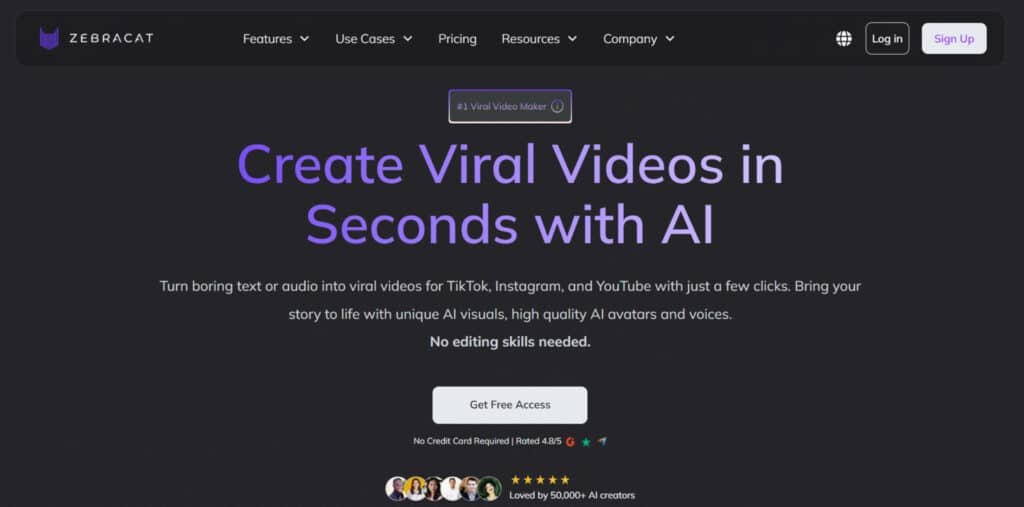
The dashboard deserves a special mention. It’s clean and minimalist, designed to get you creating immediately. Options like “Prompt to Video” guide you clearly, without any intimidating complexity.
Benefits for Marketers, Content Creators, and Businesses
For marketers, the benefit is scale. You can produce more video content without relying on expensive agencies or freelancers. It’s a force multiplier for your strategy.
Content creators can brilliantly repurpose their existing written work. A popular blog post can become a compelling video in minutes, reaching a new audience.
Small business owners win big. This tool handles video marketing without adding a complex new skill to their already packed schedules. The accessibility is its greatest strength—it’s for anyone who can write.
Complete Features of Zebracat
After testing the platform extensively, I discovered several standout features that deliver on the speed promise. The system combines four major capabilities that work together seamlessly.
1. Everyday Heroes: Core Tools That Build From Scratch
Text to Video
This feature converts raw scripts or ideas into complete video clips. The AI integrates scenes, voiceover, and music automatically. Free plans limit clips to 30 seconds, while paid tiers extend to 5 minutes.
It provides a foundation for content creation by assembling elements without manual input. Users benefit from reduced production time, ideal for social media posts. In a review of AI tools, it ranks high for efficiency.
Searchers aiming for quick text-to-video conversion gain ready outputs. Pacing adjustments and visual options support customization.
Transitions ensure professional flow. It enhances video editing workflows. Additional scenes from stock or generation improve quality.
This tool supports business promotions effectively. Video editing refinements allow precise control. Music selection matches clip mood. It streamlines short-form content delivery.
Blog to Video
This tool scans blog URLs to extract key points and build summary videos. It adds visuals, narration, and music based on content.
No manual scripting is needed for the process. Users repurpose written material into video formats for platforms like TikTok.
It increases business traffic through shared links. Search intent for content recycling is addressed directly. Multi-language support expands audience reach. SEO improves with video-blog connections.
Highlight customization focuses on essential sections. Transitions create smooth narratives. Video editing automation handles assembly. Scenes align with extracted text. This aids consistent posting. Music enhances engagement levels.
AI Script Generator
Input topics generate hooks, narrative flow, and calls to action. Trend scores and clean exports are included. It assists in overcoming content blocks quickly.
Users produce engaging scripts for various lengths. Searchers for script assistance receive optimized results.
A/B testing refines hook effectiveness. Keyword integration boosts performance. It integrates with video editing tools. Scenes pairing creates full concepts. Music suggestions fit tone. Transitions planning improves structure.
This supports business messaging. Video editing compatibility ensures seamless use.
AI Scene Generator
Prompts produce original footage using models like Kling or VEO3. Starter plans offer 350 credits. It blends with stock assets for hybrid results.
Users access custom scenes without external searches. Visual quality elevates for professional clips. Search intent for unique B-roll is fulfilled.
Style transfers apply specific aesthetics. Resolution reaches 4K in paid plans. Video editing integration fills gaps. Music sync enhances mood. Transitions connect generated parts. This tool aids business visuals. Scenes variety supports diverse projects.
Text to Speech
Text inputs convert to audio in 175+ voices with accent controls. It syncs to clips effortlessly. Users obtain narrations without recording equipment.
Variety suits global applications. Searchers for quick voiceovers find reliable options. Speed and emotion adjustments add nuance.
Batch processing handles multiple segments. Video editing benefits from easy audio layers. Music pairing creates a balanced sound. Scenes alignment ensures timing. Transitions with audio improve flow. This supports accessible content.
AI Voice Cloning
A 30-second recording creates a personal voice replica. Unlimited plans allow 10 clones monthly.
It delivers emotional and consistent narration. Users achieve branded audio across series. Search intent for custom voices is met. Privacy controls secure clones. Integration with clips maintains authenticity.
Video editing uses clones for polish. Music balances with cloned tone. Scenes sync for natural delivery. Transitions enhance cloned segments. This elevates business presentations.
2. Face & Voice Stars: Bring Characters to Life
AI Avatar Generator
Prompts or library selections build talking avatars. Top tiers permit 10 customs monthly. It ensures series consistency.
Users create on-screen presence without filming. Faceless content gains a professional host. Searchers for avatars access diverse options.
Lip-sync and pose controls add realism. Brand alignment locks visuals. Video editing incorporates avatars easily. Music complements avatar delivery. Scenes integrate for complete talks. Transitions smooth avatar changes.
3. Editing Power-Ups: Polish Without the Sweat
AI Automated Video Editing
Clips receive auto-cuts, pacing, and transitions. Plans provide 3-5 edits per video. It transforms raw footage into refined outputs.
Users save time on manual adjustments. Search intent for automation is satisfied. Suggestion tools identify improvements. Color grading and noise reduction apply.
Video editing speed increases significantly. Music sync refines audio. Scenes arrangement optimizes flow of the video. This supports high-volume production.
Auto Subtitle Generator
Audio transcribes with styled captions at 99% accuracy. Multi-language dubs are available. It boosts retention and accessibility.
Users enhance watch time for shorts. Searchers for subtitles get customizable options. Animation styles vary by need. Video editing embeds subs seamlessly. Music does not interfere with text. Scenes pair with captions. Transitions align subtitle timing.
4. Platform Tailor-Mades: App-Specific Speed Demons
AI YouTube Shorts Generator
Text inputs optimize for 60-second vertical clips. Trend hooks and thumbnails are added. It targets YouTube algorithms effectively. Users grow channels with quick uploads. Search intent for Shorts is addressed. Exports include algo-friendly elements. Video editing tailors vertical format. Music pulls trending tracks. Scenes fit short bursts. Transitions keep high energy.
AI Explainer Video Maker
Templates simplify complex topics with animations. Clips cap at 2 minutes. It clarifies ideas for education or business.
Users convert concepts to visuals fast. Searchers for explainers gain structured tools. Voice and animation sync precisely. Video editing refines teachings. Music supports clear messaging. Scenes illustrate points.
AI YouTube Video Generator
Long-form clips include chapters and end screens. Virality predictors flag issues. It enables deeper content in minutes.
Users structure extended videos efficiently. Search intent for full uploads is met. Video editing adds interactive elements. Music enhances sections. Scenes build narratives. Transitions guide viewers.
AI TikTok Video Generator
3-second hooks use viral sounds and simulations. It captures TikTok trends rapidly. Users produce fun, shareable content.
Searchers for platform tools benefit. Quick generations match fast pace. Video editing adds energy. Music integrates hits. Scenes support duets.
AI Reel Generator
Instagram verticals feature AR filters and syncs. Collab shares are ready. It drives Reels engagement. Users craft story-focused clips.
Search intent for Instagram is fulfilled. Brand elements apply consistently. Video editing includes filters. Music trends with content.
5. The Wild Card: Nano Banana Quickie
Nano Banana Video Generator
Lightweight generation creates micro-clips under 15 seconds. 100 credits per clip for quirky styles. It suits memes and trends.
Users add humorous bites to feeds. Searchers for quick gens find punchy options. Video editing handles short formats.
Music fits meme vibe. Scenes generate fun elements. Transitions are minimal for impact.
| Feature | Time Saved | Key Benefit |
| Prompt-to-Video | ~3 minutes | Instant script generation |
| Blog Conversion | 5-7 minutes | Content repurposing |
| Automated Editing | Hours weekly | No technical skills needed |
| Multi-Platform | 15+ minutes per video | One-click optimization |
“The consistency factor is what most people miss—your avatar doesn’t have bad hair days or need coffee breaks.”
Detailed Pricing Plans of Zebracat
Let’s talk money—because understanding the cost is crucial before you commit. The platform operates on a straightforward credit-based system.
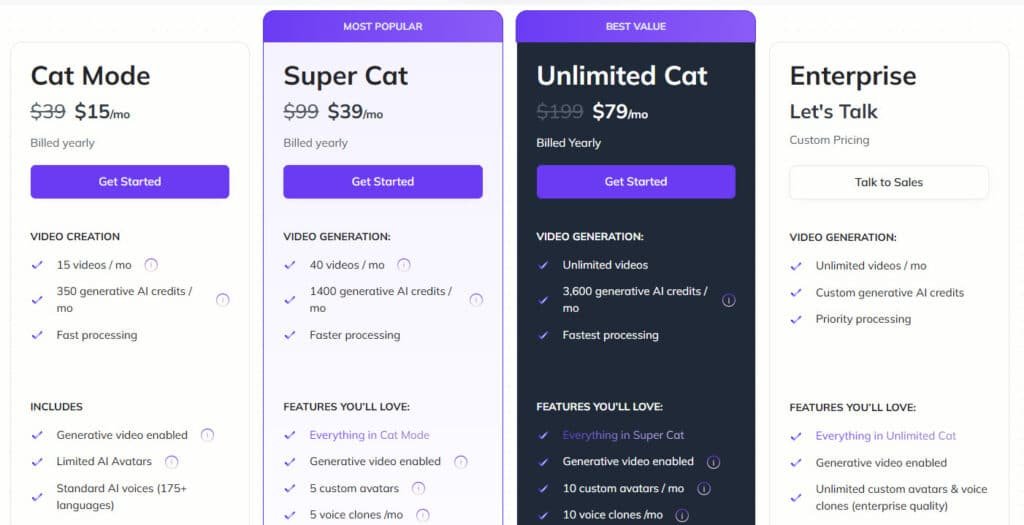
Your subscription plan determines how many credits you get per month, which directly translates to your video output capacity.
Cat Mode
$39/mo monthly or $15/mo ($180/year, save 60%). 15 videos/mo, 350 generative credits, fast processing, generative video, limited avatars, standard voices (175+ langs), basic stock/music, 1 Brand Kit.
Super Cat
$99/mo monthly or $39/mo ($468/year, save 60%). 40 videos/mo, 1,400 credits, faster processing, +5 custom avatars/voice clones, premium avatars/voices, translation (25+ langs), full stock/music, 5 Brand Kits.
Unlimited Cat
$199/mo monthly or $79/mo ($948/year, save 60%). Unlimited videos, 3,600 credits, fastest processing, +10 custom avatars/clones, unlimited Brand Kits, priority support.
Enterprise
Custom pricing (talk to sales). Unlimited videos/credits, priority processing, unlimited customs (enterprise quality), API, custom models, team roles, dedicated manager.
7-day money-back (no downloads).
| Plan | Videos/Mo | Credits/Mo | Custom Avatars/Mo | Annual Save |
| Cat | 15 | 350 | 0 | 60% |
| Super | 40 | 1,400 | 5 | 60% |
| Unlimited | Unlimited | 3,600 | 10 | 60% |
| Enterprise | Unlimited | Custom | Unlimited | Custom |
“Credits can vanish quickly when using advanced features like AI scene generation—a key point I’ll explore later.”
Enterprise tiers with 700+ credits are available for large teams. The 50% discount for annual paid plans offers significant long-term savings.
Pros & Cons of Zebracat
No tool is perfect, and my comprehensive assessment reveals what this AI video creator truly excels at—and where it falls short. After extensive testing, I’ve identified clear strengths and weaknesses you need to understand.
Key Advantages: Speed, Ease of Use, and Cost Efficiency
The speed is genuinely impressive. Transforming a blog post into a shareable video in under five minutes is a game-changer for content repurposing. One Trustpilot user noted it “saves hours of work,” matching my experience.
The platform is built for non-editors with practically zero learning curve. If you can copy and paste a URL, you can create videos. The interface is intuitive without complex editing software to master.
Cost efficiency is another win. The monthly subscription costs a fraction of hiring a freelance editor. This tool claims to save up to 80% of time and budget compared to traditional methods.
Areas for Improvement: Credit Limitations and Platform Dependency
The credit system can be frustrating. Paid plans operate on credits, and AI scene generation consumes them quickly. They disappear faster than expected during creative flow.
You sacrifice granular control for speed. This isn’t Adobe Premiere Pro—it’s for efficiency, not cinematic artistry. The AI can sometimes misunderstand context, leading to irrelevant visual suggestions.
Platform dependency is real. You’re entirely reliant on their cloud service. If servers have issues, your workflow stops completely with no offline capabilities.
Final verdict: I give this platform 4.2 out of 5 stars. I highly recommend it for marketers and small businesses needing to scale video creation efficiently. However, professional editors requiring deep creative control should consider alternatives.
Alternatives To Zebracat
The AI video generation landscape is bustling with options, making it tough to pick the right tool. I’ve spent considerable time exploring the market to show you where different platforms fit.
This helps you understand the unique value each one offers.
Your choice ultimately depends on your primary goal. Are you repurposing content, building a corporate training library, or creating artistic projects?
Let’s break down the key competitors.
Competing Tools: VidGenie AI, Akool, and Domo AI
Pumping out short form videos that go viral can feel like a full-time job. You want automation that handles scripts, visuals, and posting without constant tweaks.
Zebracat AI automates text-to-video with effects and music for quick clips. But these options push further in viral clips making, offering custom avatars, faceless styles, or style transfers ideal for TikTok and Reels growth.
Let’s check them out.
VidGenie AI
VidGenie builds UGC-style shorts with AI hooks, custom avatars from one image, and multilingual voices. Character consistency keeps branding strong. Suits creators scaling social ads or testimonials fast – Read Full Review
Akool
Akool excels at face swaps, realistic avatars, and animation from photos. Multilingual lip-sync shines. Perfect for personalized marketing or global viral content – Read Full Review
Prome AI
Prome turns sketches or text into styled videos with creative fusions. Image-to-video focus adds flair. Good for artistic shorts or product teases – Read Full Review
Domo AI
Domo AI specializes in video-to-video transformations, like anime or realistic styles. Lip-sync and motion preserve details. Ideal for remixing footage into trendy clips – Read Full Review
Faceless.video
Faceless.video automates daily faceless posts from text, with subtitles and backgrounds. Hands-off scheduling. Fits passive channels chasing viral growth – Read Full Review
Bigmotion AI
Bigmotion runs full autopilot for faceless series, with scripts, music, and multi-platform posting. Optimizes for monetization. Great for niche viral automation – Read Full Review
| Tool | Key Focus | Strengths & Notes | Best For | Pricing Starts |
|---|---|---|---|---|
| VidGenie AI | UGC hooks & custom avatars | 29 languages, consistent characters | Branded social ads | $49/month |
| Akool | Face swap & realistic avatars | Lip-sync, photo animation | Personalized globals | $21/month |
| Prome AI | Sketch/text to styled videos | Creative fusions, high-quality outputs | Artistic product clips | $19/month |
| Domo AI | Style transfer & lip-sync | Anime/realistic remixes | Footage transformations | $10/month |
| Faceless.video | Automated faceless posting | Daily text-to-video, subtitles | Passive viral channels | $15/month |
| Bigmotion AI | Autopilot series & posting | Scripts/music optimization | Monetized niche shorts | $19/month |
Zebracat in Action: Case Study & Personal Experience
The true test of any platform happens when you move from marketing claims to actual creation. I decided to see how it handled real video content generation from start to finish.
Starting with the free plan (no credit card required), I used the “URL to Video” option with a blog post about testimonial statistics. The AI processed the article in about two minutes, presenting a complete storyboard.
Real-World Results and User Feedback
The initial script captured key points effectively. I customized wording in text boxes and replaced generic visuals from the stock library. Selecting an “ultra-realistic” AI voice took seconds.
After hitting “Generate Video,” my 1080p MP4 was ready in 90 seconds. Total video production time: approximately five minutes. That’s genuinely impressive for engaging videos.
Statistics show users spend 88% longer on websites with video content. The videos I created captured attention effectively on social media platforms.
My Personal Journey with the Platform
I was surprised by the smooth experience. The AI occasionally selected off-topic visuals, but corrections were intuitive. One Trustpilot reviewer noted it “saves hours of work” compared to traditional methods.
The learning curve is virtually non-existent. Unlike professional editing software requiring weeks of practice, I created decent video content within 30 minutes. This accessibility transforms the production process for busy creators.
“The platform saves hours of work compared to traditional video production methods.”
This hands-on experience confirmed the platform’s value for rapid content creation. The entire process felt designed for efficiency rather than complexity.
Advanced Features: Voice Cloning & AI Avatars
Diving into the more sophisticated tools revealed some truly impressive functionality for digital presenters. These advanced features transform basic video creation into professional brand-building.
Customizable Avatars and Consistent Character Creation
I was genuinely impressed by the 120+ stock AI avatars available. They cover diverse demographics and professional appearances. The character consistency feature ensures your presenter maintains the same look throughout the entire video.
While minor variations can occur (it’s AI-generated, after all), the consistency held up well in my testing. This eliminates the need for filming while maintaining professional presentation quality.
Realistic Voice Integration and Multilingual Support
The voice cloning capability on higher-tier plans is a game-changer for brand consistency. You record sample sentences, and the AI replicates your unique speech patterns. The “ultra-realistic” voices sound remarkably natural compared to older text-to-speech engines.
With support for 80+ languages and 120+ voices, you can create content for global audiences without hiring translators. The platform handles pacing and natural pauses beautifully.
| Feature Type | Key Capabilities | Best For |
|---|---|---|
| AI Avatars | 120+ stock options, character consistency, natural movements | Brand presenters without filming |
| Voice Technology | Voice cloning, 120+ voices, 80+ languages, natural intonation | Multilingual content & brand voice consistency |
| Advanced Benefits | No filming setup, 24/7 availability, rapid content creation | Scalable video production |
Technical Insights and Platform Usability
Beyond the flashy features, what really matters is how this AI video tool performs under pressure. I put its technical backbone to the test to see if the speed claims hold up in real-world use.
The core promise is rapid video generation. In my tests, the process from input to a finished video consistently took between two and five minutes. This includes everything—script creation, scene selection, and final rendering.
Speed, Efficiency, and 1080p Export Capabilities
A key differentiator is the editing interface. Unlike slide-based competitors, this platform uses a professional timeline. You get precise control over every second of your video.
This architecture makes the editing process feel intuitive. You can fine-tune transitions and text timing with ease.
Export quality is another critical factor. Paid plans unlock crisp 1080p resolution, essential for professional content. The free version is limited to 720p with a watermark, which is perfect for trying things out.
The entire platform is web-based. You can access it from any device with a browser. There are no complex hardware requirements.
Its AI uses Natural Language Processing to understand your content’s context. It then automatically selects relevant footage and syncs audio perfectly.
A crucial note: All processing happens in the cloud. You need a steady internet connection, as there’s no offline mode. During my testing, however, the service was reliably fast.
- Generation Speed: 2-5 minutes for a complete video.
- Editing Power: Timeline-based control for precision.
- Output Quality: 1080p on paid tiers, 720p on free.
- Accessibility: Works on any modern web browser.
Effective Use Cases and Applications
Let’s explore the practical scenarios where automated video creation transforms from a novelty to a necessity. Understanding these applications helps determine if this platform fits your specific content needs.
Enhancing Video Marketing and Social Media Engagement
Video marketing dominates AI video usage, capturing over 34% of market share. I’ve found the platform excels at creating compelling ads for product launches and brand awareness campaigns.
For social media, transforming blog posts into visually appealing videos significantly boosts engagement. Videos generate 88% longer website visits, giving you a competitive edge in crowded social media feeds.
Content Repurposing and Multi-Channel Distribution
Content repurposing is where this tool truly shines. You can transform existing blog posts, articles, or case studies into engaging videos for multiple platforms.
The automatic optimization for different platforms (TikTok, YouTube, LinkedIn) means create once, distribute everywhere. This saves hours of manual reformatting for content creators.
| Application | Primary Benefit | Target Audience |
|---|---|---|
| Marketing Campaigns | Rapid ad creation & testing | Marketers & businesses |
| Social Media Content | Increased engagement rates | Social media managers |
| Content Repurposing | Extended content lifespan | Bloggers & publishers |
| Training Materials | Cost-effective production | Educators & HR teams |
“The ability to quickly test multiple video variations for social media campaigns has transformed our marketing strategy.”
Whether you’re launching “faceless” YouTube channels or scaling marketing efforts, these applications demonstrate the platform’s versatility for modern content needs.
Conclusion: Zebracat Review
Raamish’s Take
Zebracat AI is a versatile video generation platform that simplifies turning ideas, scripts, audio, or URLs into engaging, viral videos, empowering creators to produce content for TikTok, Instagram, or YouTube in minutes without editing expertise.
Its AI avatars feature excels, letting you create lifelike figures that speak scripts automatically, with options for custom digital twins or product presenters in 175+ languages.
I’m really impressed with its various generative video tools, using multiple models like VEO3, Kling, or Nano Banana to build scenes from text or images, including motion effects, stock clips, and music, while maintaining character consistency across clips.
The voice cloning adds realism by replicating your voice for unlimited use, complemented by AI script writing for hook-filled narratives and auto-captioning for accessible, branded subtitles.
Other strengths include brand kits for team consistency, video translation in 25+ languages, and predictive insights for virality.
Zebracat AI‘s speed—delivering 1080p exports with full control—saves over 30 hours monthly, making it a smart pick for scaling social content without a big budget.
When all the testing dust settles, what remains is the fundamental question of value. After extensive hands-on experience, this platform earns its 9.6/10 rating by delivering exactly what it promises—speed and accessibility.
The tool excels at rapid video creation, transforming text into polished content in minutes. You get impressive ease of use and cost efficiency. The editing process is streamlined for non-experts.
Yes, there are limitations—the credit system and occasional AI quirks. But for marketers and small businesses needing scalable video production, this platform is transformative. Professional editors should look elsewhere.
The free trial makes testing risk-free. If you’re serious about scaling your video content, this tool could revolutionize your workflow. Try it today and see if it fits your creative process.
Frequently Asked Questions
How much does Zebracat cost, and what’s included in the free plan?
The platform offers a free plan with limited credits to test core features like video generation. Paid plans, like Cat Mode, provide more credits, access to advanced tools such as AI avatars and voice cloning, and 1080p export quality for creating professional videos.
Can I use Zebracat to turn my blog posts into videos?
Absolutely. One of its standout features is blog-to-video conversion. You can paste your text, and the AI will generate a storyboard, suggest media, and create a draft video, making content repurposing for social media incredibly fast.
Is the voice cloning feature realistic?
I found the voice cloning to be impressively natural. You can upload a short audio sample, and the platform generates a synthetic voice that captures nuances, which is fantastic for maintaining brand consistency in your video marketing.
What are the main limitations I should be aware of?
The primary constraint is the credit system. Each video generation consumes credits based on length, so high-volume creators might find the entry-level plans restrictive. There’s also a learning curve to crafting the perfect text prompts for the best results.
How does Zebracat compare to tools like Synthesia?
While Synthesia excels with hyper-realistic AI presenters, Zebracat focuses on speed and ease for a broader range of video content—from social clips to marketing explainers. It’s often more affordable and faster for quick, engaging videos.
What video formats and resolutions does it support?
You can export your final videos in 1080p resolution, which is standard for high-quality social media and website content. The platform optimizes videos for various platforms, ensuring they look great everywhere.