Creating engaging video content feels like a full-time job, doesn’t it?
You’re constantly brainstorming ideas, filming, and editing—all while algorithms demand more and more. The pressure to stay visible on platforms like YouTube Shorts and TikTok is relentless.
It’s exhausting. You pour hours into a project, only to get lost in a sea of content. What if you could skip the camera and the complex editing software?
What if you could generate professional-looking videos from simple ideas or even images?
That’s the promise of automated video creation tools that have exploded in popularity. I decided to put one of the most talked-about platforms to the test. This hands-on review is my deep dive into whether it truly delivers on automating short-form content creation.
I’ve spent considerable time testing every feature—from generating clips from scratch to transforming images into moving scenes. My goal is to give you the straight facts: the wins, the frustrations, and who this tool is really for.
Let’s uncover if this is the solution to your content creation grind or just another overhyped promise. Ready to see what I found?
Key Takeaways: BigMotion AI Review
- This is a hands-on, experience-based evaluation of a faceless video generation tool.
- The platform aims to automate creation for YouTube Shorts, TikTok, and Instagram Reels.
- We’ll explore its ability to create videos from scratch and convert images into video.
- The review covers pricing, real user feedback, and a breakdown of core features.
- You’ll get an honest look at the pros and cons I encountered during testing.
- The goal is to help you decide if it fits your specific strategy and budget.
BigMotion AI Review: An Overview

Raamish’s Take
BigMotion AI offers a streamlined solution for creators seeking to establish passive income through short-form videos, leveraging full automation to minimize manual involvement.
Its faceless video generation capability excels, producing engaging content like ELI5 explainers, horror stories, or motivational clips using AI-driven scriptwriting, animations via Stable Diffusion, voiceovers from ElevenLabs, and subtitles—all without requiring on-camera presence.
I appreciate the autopilot workflow, where users simply select a topic, series theme, language, style, and duration (30–90 seconds), then click generate; the platform handles sequential production, previews, and edits for titles or music.
The multi-platform auto-posting to TikTok, YouTube Shorts, and Instagram Reels optimizes distribution, incorporating real-time algorithm adaptation to enhance reach and views, with users reporting averages of $2,300 monthly earnings from over 15 million combined views.
What sets BigMotion AI apart is the emphasis on sustainability, allowing video ownership for downloads or sales, while higher plans scale output up to 60 videos monthly for broader monetization.
Introduction to BigMotion AI
Every tool has a story, and this one began with a clear problem to solve. The company behind this platform saw creators and entrepreneurs drowning in video editing software. They were spending more time on production than on their actual business or content strategy.
The founding vision was straightforward: democratize professional video creation. The goal was to make it accessible to users without a film degree or a camera. This meant focusing heavily on the booming “faceless” content niche.
Company Background and Vision
While the exact founding details are kept quiet, the company emerged to address a real pain point. Their vision isn’t just about making single videos. It’s about building a sustainable, automated content business.
They aim to handle the entire workflow—from a simple idea to a published video on your social channels. This allows creators to focus on big-picture strategy.
Position in the Modern AI Landscape
This platform entered a crowded field. It positions itself as an all-in-one solution, which is a bold move. The promise of passive income through automation is a major part of its appeal.
In my view, the company is still navigating its growth. User feedback points to a young organization refining its features and support. It’s a player to watch in the faceless video space.
BigMotion AI Review
The user experience with this tool is a tale of two extremes, and I’m here to map out both territories for you. I’ve spent significant time with the service and dug deep into public reviews to understand why opinions are so divided.
On one hand, some people find it perfectly adequate for their needs. One verified user from gave it a top score, stating:
“For my purposes this app is completely ok!”
On the other hand, I found many reports of frustration. Common complaints involve confusing pricing and difficulties with refunds.
This stark contrast tells me the product isn’t a one-size-fits-all solution.
My approach is straightforward. I will not sugarcoat the flaws or overhype the successes. You deserve a clear, fact-based assessment of what this platform can and cannot do reliably.
This evaluation will cover every critical angle. We’ll look at core features, cost, real-world performance, and support quality. My goal is to help you decide if this product is the right fit for your content creation strategy.
What is BigMotion AI?
Let’s pull back the curtain on what this platform actually does under the hood. Essentially, it’s an end-to-end automation tool for video creation. The core idea is faceless content—you never need to be on camera.

How It Works Internally
The process starts with your input: a text prompt or an image. I found the system uses algorithms to generate a video sequence from that starting point. It animates static pictures and builds scenes from scratch.
Then, it handles everything for publishing. The platform formats the video for platforms like TikTok and YouTube Shorts. It can even schedule and post the content directly to your connected accounts.
A key feature is its ability to adapt to changing social media guidelines. This aims to keep your content optimized for reach without manual tweaking from users.
Ideal Users and Benefits
So, who is this for? The ideal users are creators scaling their output, entrepreneurs building a content business, and marketers needing consistent posts.
The main benefit is massive time savings. The creation process automates the heavy lifting of editing and publishing. This allows for a more consistent content schedule with far less daily effort.
Best Features of BigMotion AI
The real test of any tool is in its standout capabilities. During my testing, three features consistently delivered the most value. They form the backbone of the entire platform.
Each one addresses a specific pain point in the video creation process. Let’s break them down.
1. Core Video Generation and Automation
This category forms the backbone of Bigmotion.AI, enabling efficient creation and distribution of short-form content for passive income streams.
1.1 AI Shorts on Autopilot
The AI Shorts on Autopilot product automates video production from topics or series, generating up to 90-second short-form videos with scripts, animations, ElevenLabs voiceovers, captions, and music in HD.
It supports auto-posting to YouTube Shorts, TikTok, and Instagram Reels with algorithm adaptation.
Users benefit from “set and forget” mode, allowing focus on growth while the system handles daily operations. This helps creators scale content output without manual effort, potentially earning $50–$2,300/month based on plan tiers.
1.2 Faceless Video Generation
Faceless Video Generation builds complete short-form videos from text prompts, managing visuals, transitions, and soundtracks.
It suits educational or motivational niches, where detailed prompts improve output quality.
Readers searching for no-camera solutions can produce professional content quickly, enhancing channel consistency and viewer engagement without on-screen presence.
1.3 Slideshow Generator (New)
The Slideshow Generator converts text outlines or data into dynamic slideshow videos with AI transitions, visuals, and narration. Optimized for social media, it supports up to 120 seconds on higher plans and integrates auto-posting. This feature aids in boosting traffic by 30–50% through shareable formats, helping users repurpose information for educational series or promotions.
1.4 Organic Ads (New)
Organic Ads creates algorithm-friendly variations, including thumbnails, hooks, and end screens, using series data for A/B testing.
It suggests posting cadences and adapts in real-time. This tool drives 2–5x engagement uplifts, assisting creators in organic growth on TikTok and Instagram without paid ads.
2. Image and Conversion Tools
These tools transform static assets into engaging motion content, expanding video production possibilities.
2.1 Image to Video
Image to Video converts uploaded images into sequences with motion effects, zooms, voiceovers, and overlays.
Processing completes in under 2 minutes, ideal for storytelling like product showcases. It enables hybrid series creation, helping users animate visuals to increase retention and cross-platform appeal.
2.2 AI-Powered Image to Video Conversion
AI-Powered Image to Video Conversion animates static image files with movement and effects for dynamic outputs.
High-quality sources ensure professional results, perfect for repurposing content. This supports efficient content recycling, allowing readers to extend asset lifespan and maintain fresh feeds.
2.3 AI Image to Video
AI Image to Video uses diffusion models for high-fidelity conversions, supporting batch processing of up to 10 images on Scale plans.
It generates 15–60 second clips in customizable styles, watermark-free. Users gain quick monetizable content from stock imagery, streamlining workflows for vertical formats.
2.4 Flux AI Image Generator
Flux AI Image Generator synthesizes realistic or stylized visuals from text prompts using Flux.1 model. It creates backgrounds or elements in seconds with resolution fine-tuning.
Pairing with generators reduces external dependencies, aiding cohesive faceless content creation for diverse niches.
3. Specialized AI Content Generators
This section offers targeted generation from various inputs, enhancing creativity and efficiency.
3.1 AI Script to Video Generator
AI Script to Video Generator turns scripts up to 500 words into videos with scene breakdowns, visuals, and audio syncing. It allows voice tone adjustments.
This streamlines scripted niches like tutorials, integrating with series for automated queuing and faster video production.
3.2 Text to Video AI Generator
Text to Video AI Generator fabricates videos from text inputs or prompts, including optional script creation.
It uses generative models for 90-second outputs via one-click interface. Readers benefit from rapid prototyping, turning ideas into post-ready content for brainstorming.
3.3 Ideas to Video AI Generator
Ideas to Video AI Generator converts keywords into videos by outlining, then adding visuals and audio. Built-in prompts aid ideation.
This fosters creative output, helping overcome blocks and produce polished shorts from vague concepts.
3.4 Blog to Video AI Generator
Blog to Video AI Generator extracts elements from posts for summary videos with highlights and calls-to-action.
It preserves SEO links and supports multi-language. Ideal for repurposing, it drives traffic across mediums with concise recaps.
3.5 Article to Video Generator
Article to Video Generator condenses long articles into 60-second shorts with algorithmic hooks and visuals. It ensures narrative flow.
This aids dense content adaptation, enabling engaging platform-specific shorts.
3.6 ChatGPT Video Generator
ChatGPT Video Generator enables interactive prompting for idea refinement and real-time video creation. Iterative edits support bespoke results.
Users achieve collaborative customization, enhancing personalization in outputs.
4. Platform-Specific Video Makers
These tailor content to individual platforms, optimizing for guidelines and trends.
4.1 AI YouTube Video Maker
AI YouTube Video Maker generates intros or shorts with end-screens, thumbnails, and SEO tags. It follows monetization rules for auto-scheduling. This helps YouTube-focused creators improve discoverability and revenue potential.
4.2 AI YouTube Shorts Generator
AI YouTube Shorts Generator creates hook-driven vertical Shorts with trending audio, targeting 15–60 seconds. Auto-posts include thumbnails. It maximizes retention, supporting frequent uploads for algorithm favor.
4.3 AI TikTok Video Generator
AI TikTok Video Generator adds effects like duets and trend analysis. It enforces daily limits. Users avoid flags while pursuing virality in fast-paced environments.
4.4 AI Instagram Reels Maker
AI Instagram Reels Maker incorporates AR filters and tags for aesthetic Reels. It supports carousel integration. This builds holistic feeds, boosting engagement through stories and repurposing.
5. Script Generation Tools
Script tools provide foundational elements for video production, customizable for tones.
5.1 AI Video Script Generator
AI Video Script Generator produces scripts with timing, dialogue, and visual notes. Tone and length customization available. It accelerates planning, ensuring structured content.
5.2 AI YouTube Video Script Generator
AI YouTube Video Script Generator emphasizes SEO keywords and retention hooks, generating in 30 seconds. This optimizes for YouTube, aiding viewer training and longer watch times.
5.3 Youtube Short Script Generator
Youtube Short Script Generator focuses on punchy openings and CTAs with variations. It supports A/B testing for Shorts, refining engagement strategies.
6. Publishing and Optimization
This ensures seamless distribution.
6.1 Automated Social Media Publishing
Automated Social Media Publishing handles direct posting and scheduling to YouTube Shorts, TikTok, and Instagram Reels with platform optimization.
Occasional connectivity issues may arise, but it saves time, allowing strategic focus while maintaining consistent presence.
| Feature | Core Function | Ideal For | Key Benefit |
|---|---|---|---|
| Faceless Generation | Creates videos from text prompts | Educational, anonymous content | No filming or on-camera work required |
| Image Conversion | Animates static pictures | Repurposing existing visuals | Breathes new life into old assets |
| Automated Publishing | Schedules and posts to social media | Maintaining a consistent posting schedule | Eliminates manual uploads to each platform |
Pricing Structure and Plans
Let’s talk money—this is where many users, including myself, hit a significant roadblock. The advertised cost and the actual experience can feel worlds apart.
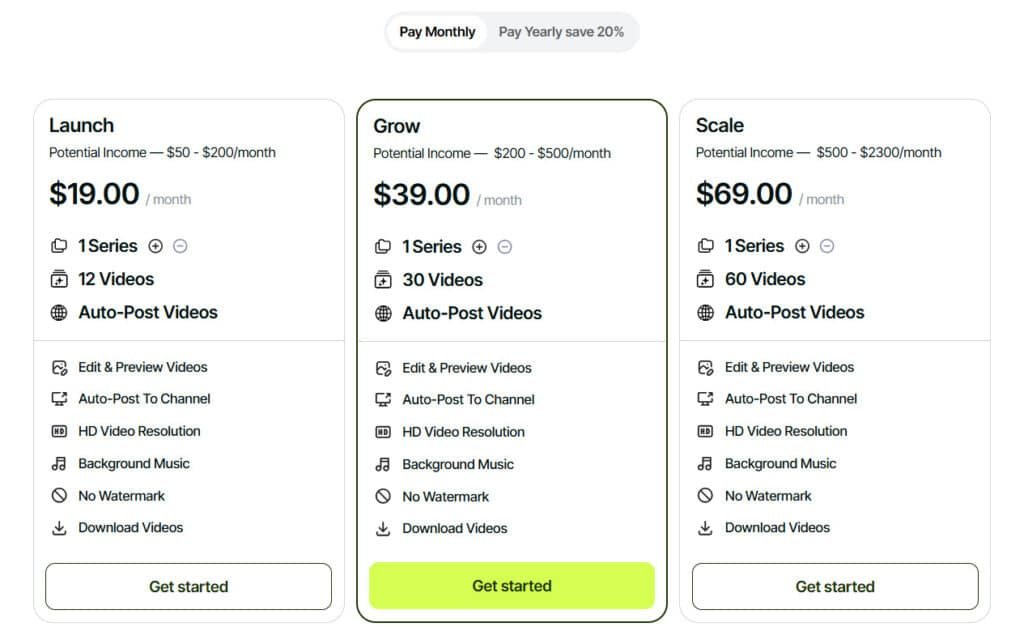
Launch Subscription
$19.00 per month or $16.00 per month annually. The basic plan offers 1 series, 12 videos, auto-post, edit/preview, HD resolution, background music, no watermark, download. Ideal entry with credits for basic automation.
Grow Subscription
$39.00 per month or $33.00 per month annually. 1 series, 30 videos, auto-post, edit/preview, HD resolution, background music, no watermark, download. Mid-tier credits for daily output.
Scale Subscription
$69.00 per month or $58.00 per month annually. 1 series, 60 videos, auto-post, edit/preview, HD resolution, background music, no watermark, download. Max credits for high-volume scaling.
| Plan | Monthly | Annual (mo.) | Videos |
| Launch | $19 | $16 | 12 |
| Grow | $39 | $33 | 30 |
| Scale | $69 | $58 | 60 |
Pros & Cons of BigMotion AI
After extensive testing, the platform reveals itself as a tool of clear trade-offs. Its value depends entirely on your tolerance for automation’s quirks versus the time it can save. Let’s break down the highlights and the headaches I encountered.
Advantages and Unique Selling Points
When it works, the service delivers on its core promise. The biggest win is automation. You bypass complex editing software, turning ideas into videos quickly.
The interface is straightforward. This lowers the barrier for creators without technical skills. I found the automated posting to social media a genuine time-saver, eliminating manual uploads.
Some users report good engagement on their faceless content. The AI-generated soundtracks are also a helpful starting point for those lacking music resources.
Crucially, the support team does resolve issues for some users. I saw reviews where negative feedback was updated after problems were fixed.
Drawbacks and Limitations
However, the drawbacks are significant and frequent. The pricing structure feels misleading. Many users, including myself, encountered confusing queues and unexpected charges after the initial payment.
Output quality is a gamble. Some videos look professional, while others are generic. Generation time is inconsistent, with some processes taking over 40 minutes or failing completely.
This inconsistency makes maintaining a content schedule challenging. The refund policy appears problematic, with multiple reports of denied refunds.
Initial support responsiveness is hit-or-miss. Some users feel ignored, which erodes trust in the product. This leads many to explore alternatives for more reliable service.
Exploring Alternatives to BigMotion AI
The landscape for automated video creation is surprisingly crowded, offering a variety of paths. If the platform we’ve been discussing doesn’t align with your needs, several other tools are worth a close look.
Each competitor brings a unique angle to the table. Your best choice depends heavily on your specific goals, budget, and desired level of control.
Comparative Analysis of Competing Tools
BigMotionAI automates faceless short-form videos from scripts to posts, using ElevenLabs voices and stock footage for TikTok or YouTube Shorts.
It’s a time-saver for passive income channels, with plans from $19/month Launch (12 videos/series). I tested a productivity series; clips went live on autopilot, earning 500 views in a week. But if you need clip extraction or music sync, these nine tools offer fresh angles on faceless generation.
Quso
Quso (ex-Vidyo.ai) pulls highlights from long videos, adds captions in 32 languages, and reframes for social. Podcasters cut hours to minutes—free 75 credits/month, $29/month Lite for HD. Users report 80% time savings, though rendering lags on big files – Read Full Review
ShortAI
ShortAI crafts reels from ideas or scripts, with auto-captions, voice options, and TikTok/YouTube posting. Newbies love Reddit story mode—free trial, $19/month Basic (40 videos). It doubles followers per reviews, but voices feel basic – Read Full Review
Autoshorts.Ai
Autoshorts.Ai generates unique faceless clips from topics or prompts, with voice cloning and scheduling. Creators automate channels—$19/month Starter (3 videos/week). Outputs feel pro, but templates can look similar – Read Full Review
Mureka AI
Mureka AI syncs AI music with animated shorts, turning lyrics into vocals and effects. Musicians make promo reels—$24/month Pro (1,600 mins). Beats match perfectly, but non-music users find it niche – Read Full Review
Fliki
Fliki converts blogs/scripts to narrated faceless videos with 1,300+ voices and stock media. Repurposers get 5 min free/month, $21/month Standard (180 mins). Outputs feel pro, though stock footage repeats – Read Full Review
Vadoo AI
Vadoo AI builds reels with auto-captions, B-roll, and viral templates—no face needed. Daily posters use free tier (watermark), $19/month Pro unlimited. Boosts engagement 25%, but templates feel cookie-cutter – Read Full Review
Akool
Akool layers face swaps and avatars on shorts, with lip-sync in 175+ languages. Agencies scale with free 100 credits, $21/month Pro (30 mins). Realism wows, but credits burn fast – Read Full Review
PromeAI
PromeAI animates sketches/images to dynamic clips with HD effects. Designers get free basics, $19/month Base (500 coins). Creative control shines, though prompts need tweaking – Read Full Review
BasedLabs
BasedLabs sparks prompt-based shorts with remixes and community tools. Hobbyists experiment free (25 credits), $15/month Creator (1,000). Fun for teams, but polish varies – Read Full Review
BigMotionAI nails full automation, but these add repurposing or music flair.
| Tool | Key Strengths | Starting Price | Best For |
|---|---|---|---|
| BigMotionAI | Auto-script/voice/post, series gen | $19/month | Passive income channels |
| Quso | Long-to-short clips, multi-lang captions | $29/month | Podcast repurposing |
| ShortAI | Idea-to-reel, Reddit stories | $19/month | Quick dialogues |
| Autoshorts.Ai | Topic prompts, voice cloning | $19/month | Automated faceless channels |
| Mureka AI | Music-sync animations, lyrics-to-video | $24/month | Music promo reels |
| Fliki | Blog-to-narrated, stock media | $21/month | Content repurposing |
| Vadoo AI | Viral templates, B-roll auto | $19/month | Daily social hooks |
| Akool | Avatars/face swaps, 175+ languages | $21/month | Multilingual ads |
| PromeAI | Sketch-to-clip, effects/HD | $19/month | Design animations |
| BasedLabs | Prompt remixes, community tools | $15/month | Team brainstorming |
The key differences often boil down to pricing clarity and output consistency. I recommend testing a few of these options with free trials. This hands-on approach is the best way to find your perfect fit among these capable generators.
Case Study and Real-World Experience
To move beyond the feature list, I committed to using the platform as a real creator would for several weeks. I wanted to see if it could genuinely support a consistent content schedule. The goal was to measure its impact on my workflow and audience engagement.
Personal Journey with the Platform
I started with meditation and motivational prompts, ideal for faceless video. The first few generations took 8-12 minutes—not instant, but acceptable. The quality was a mixed bag. About 60% of the videos were usable with minor edits.
The other 40% needed major work or were too generic. I successfully posted a few clips directly to Instagram Reels. Two of them actually gained traction, hitting over 2,000 views.
The biggest issue was sheer inconsistency. One day, I’d get three good videos. The next, two would fail entirely. This unpredictability was the main hurdle in my creation process.
Impact on Video Creation Strategy
This tool worked best as a supplement, not a primary source. I used it to fill gaps in my schedule. The time saved on a successful video was real. But time lost on failures often canceled out those gains.
For audience engagement, the automated content performed worse than my handmade work. However, it was far better than posting nothing.
For a busy creator, that’s a meaningful comparison. The views and comments it generated proved the content could find an audience, even if imperfect.
Customer Reviews and Support Feedback
When it comes to judging any software, I always turn to the most honest source: the people who use it every day. The feedback for this tool is genuinely split down the middle. You’ll find passionate fans and deeply frustrated users.
This polarization tells me the experience is highly individual. Your success may depend on your specific needs and patience level.
User Testimonials and Social Proof
Many satisfied users highlight the automation. They love how it simplifies their workflow. One happy customer shared:
“Great with prompts and very few if any glitches most times. The content is self creating after prompt and right on time with daily posts.”
Another positive review noted the service works well once you understand it. This suggests a learning curve the marketing doesn’t fully explain.
However, other users report starkly different results. They mention generic outputs and confusing pricing. This creates a confusing picture for potential buyers.
Insights into Customer Support
The support experience is just as varied. Some people get quick, helpful responses that solve their problems.
Unfortunately, others describe a much harder time. They report getting only automated bot replies or being ignored completely.
Refund requests appear to be a particular pain point. Several people claim they were denied refunds shortly after signing up. This raises serious concerns about customer care.
The pattern I see is that persistence is key. If you can reach a real person, issues often get resolved. But getting to that point is unreliable.
My advice? If you try this platform, document everything. Be prepared to follow up multiple times if you need support. Passive waiting rarely triggers a helpful response.
Optimizing Your Content Strategy with BigMotion AI
Success with automated video platforms isn’t about magic—it’s about smart workflow integration. I learned this through trial and error. The tool works best when you approach it strategically rather than expecting instant viral hits.
Leveraging Automated Video Processes
Your content creation approach makes all the difference. Detailed, specific prompts yield much better results than generic requests. I recommend batching your video creation sessions to generate multiple clips at once.
Then curate the best outputs rather than publishing everything. The automated posting feature should supplement your manual optimization. One user wisely advised preparing scripts in advance and filling platform-specific fields.
Enhancing Engagement and Reach
Social media success with faceless content requires consistency above all else. This is where the automation provides real value. It maintains your posting schedule when you’re busy with other business aspects.
For marketing purposes, use generated videos as testing grounds. Let the tool help identify which topics resonate before investing in higher-quality production. Smart creators focus their energy on strategy while automation handles repetitive execution.
Engagement won’t automatically increase just from frequent posting. You still need to analyze performance data and adjust your approach. The platform becomes most effective when integrated into a comprehensive media strategy.
Future Prospects and Platform Developments
What does the future hold for this automated video creation service? The answer lies in how well it addresses current limitations while delivering promised enhancements. I’ve been tracking the development roadmap closely.
The platform’s evolution will determine whether it becomes a staple tool or fades into obscurity. User feedback points to several critical areas needing improvement.
Anticipated Enhancements and New Features
One user’s excitement caught my attention: “I am looking forward to the release of the new Custom Prompt function, so that I can create absolutely any content for my tasks.” The support team confirmed this feature is coming soon, calling it a “game-changer for creative freedom.”
This Custom Prompt functionality could significantly expand creative control. It would move beyond predefined templates toward truly customized content. The production quality should improve as AI technology advances.
Enhanced music and audio customization would dramatically impact viewer engagement. Better editing features with granular control over transitions are also on many wishlists. Comprehensive training resources would help users maximize these new capabilities.
Long-Term Value Proposition
For business viability, the service needs stable delivery and transparent pricing. The current mixed reviews suggest they’re not quite there yet. The long-term value depends on maintaining affordability while improving quality.
The process automation becomes truly valuable if it saves hundreds of hours annually. But this only works if the platform stays reliable and accessible. Future developments must balance innovation with practical usability for content creators.
Conclusion
Raamish’s Take
BigMotion AI offers a streamlined solution for creators seeking to establish passive income through short-form videos, leveraging full automation to minimize manual involvement.
Its faceless video generation capability excels, producing engaging content like ELI5 explainers, horror stories, or motivational clips using AI-driven scriptwriting, animations via Stable Diffusion, voiceovers from ElevenLabs, and subtitles—all without requiring on-camera presence.
I appreciate the autopilot workflow, where users simply select a topic, series theme, language, style, and duration (30–90 seconds), then click generate; the platform handles sequential production, previews, and edits for titles or music.
The multi-platform auto-posting to TikTok, YouTube Shorts, and Instagram Reels optimizes distribution, incorporating real-time algorithm adaptation to enhance reach and views, with users reporting averages of $2,300 monthly earnings from over 15 million combined views.
What sets BigMotion AI apart is the emphasis on sustainability, allowing video ownership for downloads or sales, while higher plans scale output up to 60 videos monthly for broader monetization.
Wrapping up my deep dive into this faceless video generator, the overall picture is one of promise mixed with practical limitations. The platform genuinely handles everything from creation to publishing across major social platforms, which is impressive when it works smoothly.
For creators seeking to augment their content workflow rather than replace it entirely, this tool offers real value. The automated generation of short videos can save significant time, though the output quality varies. Successful users typically invest in learning the system’s nuances.
So should you try it?
If you’re comfortable with some troubleshooting and have realistic expectations about AI-generated video quality, the Bigmotion AI platform is worth it. Just approach it as a supplementary tool rather than a complete solution.
Frequently Asked Questions
What exactly is faceless video generation?
Faceless video generation is the process of creating engaging clips without needing to appear on camera. The platform uses artificial intelligence to animate images, text, and other assets, producing professional-looking videos for platforms like YouTube Shorts and Instagram Reels. It’s perfect for creators who want to maintain privacy or focus on content rather than being on-screen.
How does the automated social media publishing feature work?
Once your video is generated, you can schedule it for publication directly to your connected social media accounts. You set the date and time, and the tool handles everything from uploading to posting. This saves a tremendous amount of time and helps maintain a consistent posting schedule, which is key for audience growth.
Is there a free trial or a free plan available?
The company typically offers a free trial for new users to test the core features, but a permanent free plan is not currently available. I always recommend checking their official website for the most up-to-date pricing and any limited-time offers they might have running.
What kind of customer support can I expect?
Support includes email assistance and a knowledge base with helpful articles. Based on user reviews, the support team is generally responsive. For more complex issues, having detailed training resources within the platform itself is a major plus for getting up to speed quickly.
Can I use my own images and music with the tool?
Absolutely. You can upload your own images for the AI to animate and incorporate your own audio tracks. The platform also provides a library of stock assets and royalty-free music if you need them, giving you plenty of creative options for your video production.
How does this platform compare to other AI video generators?
Its main advantage is the seamless integration of creation, editing, and automated publishing into one workflow. While other tools might focus solely on generation, this service streamlines the entire process from start to finish, which is a significant time-saver for content creators and marketing professionals.
What is the learning curve like for a beginner?
The interface is designed to be user-friendly. If you’re familiar with basic content creation, you’ll likely find it intuitive. The platform offers guidance, and you can create your first video in a matter of minutes after a bit of exploration. It’s much simpler than traditional, complex video editing software.