
Staring at another empty room that just won’t sell?
I’ve been there. As a real estate professional, you know the struggle: vacant properties that feel cold, outdated interiors that turn buyers away, and traditional staging costs that eat into your hard-earned profits.
The frustration is real. You’re competing against bigger firms with bigger budgets, while every dollar spent on physical staging feels like money flying out the window.
Why does making a property look inviting have to be so expensive and time-consuming?
That’s where this AI-powered platform changed everything for me. After testing InstantDecoAI extensively, I discovered a tool built specifically for our industry. Unlike generic photo editors, it understands property dimensions and buyer psychology.
In this honest InstantDecoAI Review, I’ll share everything—the stunning 4K renders, the 50+ design styles, and yes, even the support hiccups I encountered. You’ll see if this solution deserves a spot in your marketing toolkit.
Ready to transform empty rooms into sold properties?
Let’s dive into how AI can revolutionize your visual presentations.
Key Takeaways: InstantDecoAI Review
- AI virtual staging eliminates costly physical furniture rentals
- The platform specializes in real estate dimensions and buyer preferences
- Accessible from any device with web-based functionality
- Offers 50+ interior design styles for diverse property types
- 4K resolution capabilities create professional-grade visuals
- Personal testing revealed both strengths and areas for improvement
- Compares favorably against traditional staging methods for speed and cost
InstantDecoAI Review: An Overview

Raamish’s Take
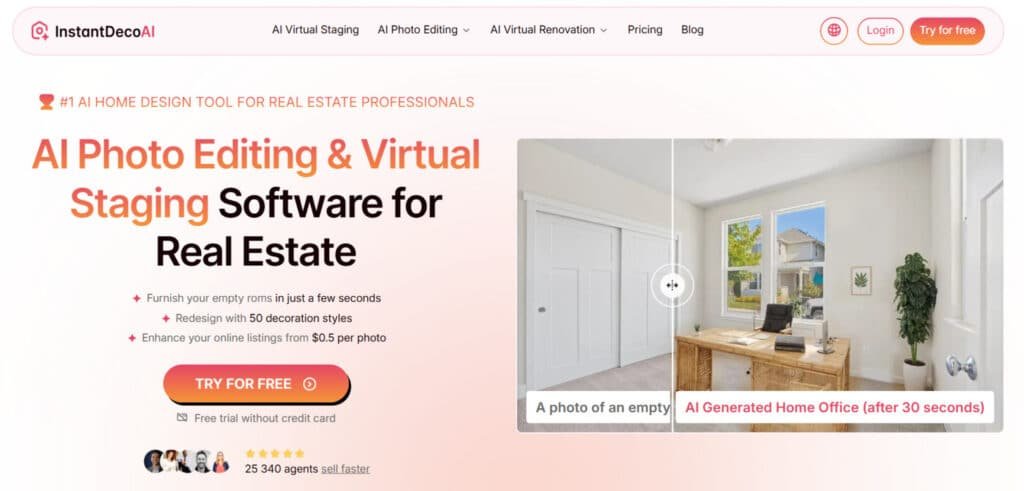
InstantDeco AI is a specialized real estate photo editing platform that delivers hyper-realistic virtual staging, renovations, and enhancements in 30 seconds, empowering over 25,000 agents to triple listing clicks without design expertise.
Its AI Virtual Staging stands out, furnishing empty rooms with 4 layout proposals and unlimited regenerations across 50+ styles like Bohemian, Scandinavian, or Rustic for warm, buyer-ready visuals.
I am particularly impressed with the AI Virtual Renovation tool, simulating walls, floors, ceilings, and furniture upgrades in 4K for worksites or outdated spaces, plus Exterior Design for facade modernizations, landscaping, and curb appeal previews.
Additional strengths include Image Enhancement to brighten, sharpen, declutter, or remove objects, Day to Dusk conversions, and furniture buy lists for practical execution. MLS-compliant and privacy-focused (photos deleted post-use), it supports 10+ room types including patios and pools.
Agents note faster sales—one highlighted effortless phone-shot transformations.
InstantDeco AI‘s speed, style variety, and pro-grade outputs (from $0.50/photo) streamline workflows, turning bland listings into compelling stories that close deals quicker.
Introduction to InstantDecoAI
The digital transformation of real estate has accelerated dramatically, pushing artificial intelligence from novelty to necessity in property presentation. I’ve watched this shift firsthand—what was once experimental is now essential for staying competitive.
AI Landscape and Company Background
InstantDecoAI emerged from this rapidly evolving space, also operating as Interieur.ai. While specific founder details are limited, the platform clearly understands the pain points we face daily. It’s built by people who get the struggles of property marketing.
Traditional staging costs $2,000-$5,000 per property and takes days to execute. Meanwhile, agents need to market multiple properties simultaneously. The timing couldn’t be better for AI solutions that deliver results in seconds.
Product Purpose and Industry Endorsements
This isn’t just about creating pretty pictures. It’s about helping your business sell faster and serve clients better without breaking the budget. The platform serves thousands of users across real estate, design, and property sectors.
Solo agents, property management companies, interior designers, and even homeowners use it for visualization. They’ve integrated AI staging into their standard workflow because it works.
Now that you understand the context, let’s explore exactly how this technology delivers benefits to different user types.
What is InstantDecoAI?
Ever uploaded a photo of an empty property and wished you could magically furnish it in seconds?
That’s exactly what this AI platform delivers. I tested it on several vacant listings, and the results surprised even this skeptical agent.
Inner Workings and Technological Insights
The technology analyzes your uploaded image like a seasoned designer. It recognizes room dimensions, windows, and architectural features. Then it intelligently places furniture that respects scale and perspective.
The AI has learned from thousands of interior design examples. It creates believable spaces rather than awkward pasted objects. This makes the virtual staging look authentic.
“The first time I saw how it respected room proportions, I knew this wasn’t just another photo editor.”
Key Benefits for Real Estate Professionals
This tool transforms empty rooms in minutes, not days. You can stage multiple properties simultaneously without physical inventory. The variety of design styles lets you match any buyer demographic.
| Traditional Staging | AI Virtual Staging | Time Savings |
|---|---|---|
| $2,000-5,000 per property | Fraction of the cost | Days vs minutes |
| Physical furniture required | Digital assets only | No logistics needed |
| Single style per staging | 50+ design options | Instant revisions |
The platform works directly in your browser. No technical expertise required.
This makes professional virtual staging accessible to all real estate professionals.
Complete Features of InstantDecoAI
Let me show you the specific tools that turned my property marketing from frustrating to fantastic. These aren’t just shiny features—they’re practical solutions I use daily.
1. Core Features: Virtual Staging Magic
Instant Staging for Empty Spaces
InstantDecoAI harnesses advanced artificial intelligence to convert empty room photos into fully furnished home environments within seconds.
The platform carefully examines each uploaded photo for accurate room dimensions, natural light sources, and architectural details before placing furniture that respects the space proportions completely.
This results in four distinct layout variations per photo, each rendered in ultra-sharp 4K resolution that looks completely natural. Real estate agents benefit directly because buyers connect emotionally with the staged home photos, leading to faster sales cycles and higher final offers.
The feature eliminates the need for physical staging companies, saving thousands while delivering professional-grade photos ready for any website or social media campaign.
Users can stage living rooms, bedrooms, kitchens, and offices with equal precision, making every listings asset more competitive in crowded markets.
Exterior and Facade Overhauls
The same robust system applies to outdoor photos, allowing instant transformations of house exteriors in just seconds.
Upload a single photo and update paint colors, replace windows, modify roofing materials, change siding textures, or enhance landscaping elements like trees and pathways.
The AI ensures every addition blends seamlessly with the original structure for photorealistic results.
Property flippers and agents use these overhauled photos to dramatically improve curb appeal on their website listings and social media profiles, often seeing click-through rates triple within the first month.
Homeowners preparing for sales avoid expensive physical upgrades while presenting a fresh, modern home appearance that attracts serious buyers.
The feature supports various architectural styles, ensuring the final photo matches market trends and buyer expectations perfectly.
2. Advanced Photo Editing and Virtual Renovation
Object Removal and Image Enhancement
InstantDecoAI provides powerful photo editing tools that remove unwanted objects, correct lighting imbalances, and enhance overall clarity automatically.
Users select items like old furniture or wall marks, and the system erases them cleanly while preserving background integrity.
Color correction and exposure adjustments happen in seconds, turning average photos into polished assets suitable for premium website displays.
Agents rely on this capability to rescue smartphone shots taken under poor conditions, ensuring every home photo meets professional standards without hiring external editors.
Full Virtual Renovation Tools
The platform enables complete virtual renovations directly within uploaded photos. Change wall colors, replace flooring types, update kitchen countertops, swap bathroom fixtures, or modernize cabinetry styles instantly.
Day-to-dusk conversion creates warm evening photos that highlight architectural features beautifully.
Clients receive multiple designs from one original photo, helping renovation business owners demonstrate possibilities without generating construction data or scheduling physical work.
Real estate professionals showcase before-and-after sequences on their website and social media channels, building trust and accelerating sales decisions.
The tool supports over ten room categories, making it versatile for any home improvement project presentation.
3. Enhancement Tools: Polish Like a Pro
AI Photo Retouching
Comprehensive AI retouching fixes common photo flaws across entire image sets. The system adjusts brightness, contrast, sharpness, and color temperature automatically while removing dust spots or lens distortions.
Users process batches of home photos quickly, ensuring consistent quality for website galleries and social media posts. This level of polish increases viewer dwell time and improves lead conversion rates significantly.
Enlarge, Deblur, and Weather Fixes
Low-resolution photos upscale to 4K without quality loss, while deblur functions restore crisp details to motion-blurred shots.
Weather enhancement adds clear blue skies or removes rain effects from exterior photos. These tools prove essential for agents working with older property archives or smartphone captures.
Clean, vibrant home images perform better across all digital platforms, driving steady lead flow month after month and supporting long-term marketing success.
4. Style and Design Options: Mix It Up
50+ Preset Interior Designs
InstantDecoAI offers more than fifty curated interior designs, including Scandinavian minimalism, coastal elegance, industrial loft, bohemian warmth, and mid-century modern.
Each style applies to any uploaded photo with one click, generating photorealistic results tailored to the room’s architecture.
Users explore trending aesthetics that match current buyer preferences, keeping website content relevant.
Endless Customization Freedom
Beyond presets, the platform allows fine-tuning of individual elements like furniture scale, fabric textures, and accessory placement.
Generate unlimited variations from a single photo to create personalized home visions for different buyer demographics.
Marketing teams refresh social media feeds and website galleries regularly with new designs, maintaining high engagement levels and supporting sustained lead generation efforts throughout the year.
5. Customization and User-Friendly Design
Intuitive Dashboard and Controls
The dashboard features clean layouts with dropdown menus, color pickers, and real-time preview panels.
Clear text instructions guide every step, making complex edits accessible to beginners.
Users adjust furniture positions, lighting moods, and decor density effortlessly, producing professional photos on first attempts.
Business-Friendly Workflow
Project folders organize multiple listings while bulk processing handles entire property portfolios at once.
The data-driven system remembers user preferences for faster repeat work. Real estate business teams collaborate seamlessly, maintaining brand consistency across all website and social media outputs while scaling operations efficiently.
6. Extra Goodies: Videos and Tours
AI Video Generation
Convert staged photos into dynamic video walkthroughs using only two credits per clip. The AI creates smooth camera movements that highlight room flow and spatial relationships.
Export ready-to-share videos in high resolution for immediate website embedding or social media posting.
Short video content captures attention longer than static images, boosting lead capture rates dramatically.
360-Degree Mini Virtual Tours
Generate immersive 360-degree spins of furnished spaces for ten credits each.
These interactive videos embed directly into website listings, allowing prospects to explore rooms from every angle.
The format outperforms traditional photos in engagement metrics, helping agents collect more lead information in fewer seconds while providing a premium viewing experience.
7. Furniture Shopping Lists
Automatic Buyable Item Lists
Every staged photo produces a detailed shopping list with direct links to retailers showing current pricing and stock data.
The AI identifies exact furniture matches used in the virtual designs, complete with dimensions and material specifications.
Revenue Bridge for Professionals
Interior designers monetize virtual work by guiding clients to purchases, while agents include lists as added-value service items.
The feature strengthens client relationships and creates new revenue streams for any business using the platform regularly.
8. How It Actually Works
Simple Three-Step Process
Upload any photo, choose room type and style preferences, then receive finished results in under thirty seconds. Multiple 4K variations appear instantly for selection and download without restrictions on paid plans.
Privacy-First Data Handling
The company deletes all original photos and processing data automatically after completion. Users retain full ownership of generated content while benefiting from enterprise-grade security measures throughout the service.
Case Study: My Personal Experience Guiding a Client with InstantDeco AI
A few months back, I worked with a client named from upwork. She was a busy real estate agent feeling really stressed.
Her problem? An empty living room in a listing that looked cold and uninviting. Buyers just scrolled past it online. Sarah worried the house wouldn’t sell fast, and she couldn’t afford traditional staging—it costs thousands!
I totally understood her frustration. I’ve been there myself with tough listings.
So, I suggested trying InstantDeco.ai together. We hopped on a call, and I guided her step by step.
First, she uploaded a photo of the empty room. In just 30 seconds, the AI gave us 4 layout options. We both got excited seeing realistic furniture appear!
But we didn’t stop there. Sarah wanted a cozy feel, so we explored the 50+ styles. She loved Scandinavian for its clean, bright look. We picked that, and boom— the room transformed with light woods and soft textiles.
Then, we discovered the virtual renovation feature. The original photo was a bit dark, so we used AI enhancement to brighten lighting and sharpen details. It made everything pop in 4K quality.
Sarah was amazed. “This helps buyers picture living here,” she said.
We even tried decluttering a cluttered corner in another photo. Super easy!
In the end, her listing got 3x more clicks. The house sold quicker, and Sarah saved big on costs.
Helping her through this felt great. We both learned how powerful features like virtual staging and style options can solve real problems.
Have you tried something like this?
It really builds confidence for clients.
Pricing Plans and Cost Breakdown
Let’s talk numbers – because no matter how amazing the features are, the cost ultimately determines if a tool fits your budget. As someone who’s tested countless software solutions, I always weigh the value against the price.
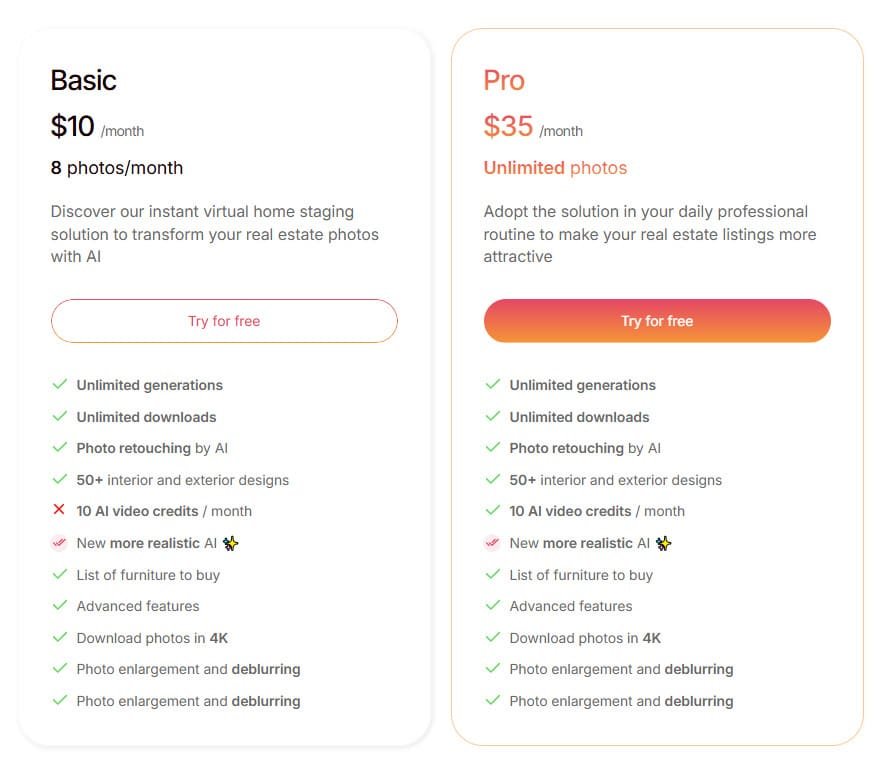
The platform starts at just $10 per month, which honestly surprised me. There’s also a free trial so you can test it risk-free. Compare this to competitors like DreamStaging.AI at $49 monthly, and the value becomes clear.
For real estate agents on a tight budget, this pricing structure makes professional virtual staging accessible. It’s a smart solution that won’t break the bank.
Basic Plan
Monthly: $14 | Annual: $10/month (billed $120/year, save 30%) Perfect entry for casual agents.
- 8 photos/month
- Unlimited generations & downloads
- AI photo retouching
- 50+ designs
- 10 video credits/month
- 4K downloads
- Furniture lists
- Enlargement & deblurring
Pro Plan
Monthly: $49 | Annual: $35/month (billed $420/year, save 30%) Unlimited everything for full-time agents and teams.
- Unlimited photos
- All Basic features included
- Same 10 video credits/month
- Advanced tools & more realistic AI
AI Real Estate Video Credits (Add-On Packs)

20 Credits – $20 | 500 Credits – $75 | 1,000 Credits – $99
- 1 Staging Video = 2 credits
- 1 Mini Virtual Tour = 10 credits
| Plan | Photos/Month | Price (Monthly) | Price (Annual) | Video Credits | Best For |
| Basic | 8 | $14 | $10/mo | 10 | Part-time agents |
| Pro | Unlimited | $49 | $35/mo | 10 | Busy agents & teams |
| Credit Packs | Add-on only | $20–$99 | — | 20–1,000 | Heavy video users |
Pros & Cons of InstantDecoAI
Pros Analysis:
- Lightning-fast staging in seconds
- Ultra-realistic 4K results that wow buyers
- Unlimited generations and downloads on every plan
- Affordable entry at just $14/month
- Built-in photo retouching and enhancement tools
- Furniture shopping lists add real value
- Excellent privacy – originals deleted automatically
- Top-tier customer support team
Cons Analysis:
- Video features require separate credit purchases
- Only 8 photos/month on Basic plan
- No dedicated mobile app yet
- Occasional wait times during peak hours
- Advanced bulk features limited to Pro
- Credit-based videos can add up for heavy users
- Customer support limited to email/ticket (no live chat)
- Software relies on good original photo quality for best results
Alternatives of InstantDecoAI
If you’re loving how InstantDecoAI turns empty or outdated rooms into furnished spaces fast — with over 50 styles, photo enhancements, renovations, and quick 4K renders — but want more realism or easier controls, I totally understand.
It’s great for real estate pros needing instant pro-level virtual staging and AI interior/exterior design. But sometimes you need shoppable items, unlimited ideas, or better precision.
Here are strong alternatives many users switch to for smoother workflows.
Collov AI
Collov AI delivers ultra-realistic staging with shoppable furniture from real brands. It handles precise placements and natural details that make spaces feel lived-in. Perfect for listings that need to wow buyers and close deals quicker — Read Full Review
HomeDesignsAI
HomeDesignsAI packs 75+ styles covering interiors, exteriors, and gardens. It spits out endless fresh ideas in seconds for non-stop creativity. Ideal when you want variety without hitting a wall — Read Full Review
REImagineHomeAI
REImagineHomeAI masters decluttering, full redesigns, and exterior tweaks. It cleans up messy photos into polished, ready-to-sell visuals fast. Great for depersonalizing properties without the hassle — Read Full Review
AI HomeDesign
AI HomeDesign shines with bulk processing and smart object removal. It stages high volumes with reliable speed and quality. Handy for agents juggling multiple homes at once — Read Full Review
MyRoomDesigner
MyRoomDesigner keeps it fun and simple with chat-based tweaks. Upload, swap items, upscale, or clean photos easily. Super for beginners testing personal or quick ideas — Read Full Review
Virtual Staging AI
Virtual Staging AI focuses on cheap, one-click fills for empty rooms. It offers solid realism at budget prices per image. Best when cost and speed top your list — Read Full Review
Archi AI
Archi AI provides high-res renders with architectural accuracy. It works from photos or sketches for detailed pros. Awesome for precision that stands up to scrutiny — Read Full Review
Easy-peasy AI
Easy-peasy AI builds designs step by step with iterative control. Start empty, add elements, and refine while keeping changes. Perfect for casual users wanting hands-on fun — Read Full Review
| Tool | Main Strength | Best For | Biggest Drawback |
|---|---|---|---|
| InstantDecoAI | Fast 4K staging + enhancements | Quick pro renovations | Mixed reviews on support/consistency |
| Collov AI | Photorealistic + shoppable items | Buyer-engaging real estate | Credit-based for heavy users |
| HomeDesignsAI | 75+ styles & unlimited generations | Endless creative ideas | Option overload for some |
| REImagineHomeAI | Declutter + exterior focus | Full property makeovers | Limits on lower plans |
| AI HomeDesign | Bulk + precise object removal | High-volume listings | Less unique styles |
| MyRoomDesigner | Chat tweaks + easy cleanup | Beginner personal projects | Not as pro-level realism |
| Virtual Staging AI | Affordable one-click | Tight budgets | Basic customization |
| Archi AI | High-res architectural detail | Pro precision renders | Steeper for casual users |
| Easy-peasy AI | Step-by-step iterative builds | Hands-on casual refining | Fewer advanced pro features |
Each solution has strengths depending on your specific needs. The key is finding what works for your business and target buyers.
Conclusion: InstantDecoAI Review
Raamish’s Take
InstantDeco AI is a specialized real estate photo editing platform that delivers hyper-realistic virtual staging, renovations, and enhancements in 30 seconds, empowering over 25,000 agents to triple listing clicks without design expertise.
Its AI Virtual Staging stands out, furnishing empty rooms with 4 layout proposals and unlimited regenerations across 50+ styles like Bohemian, Scandinavian, or Rustic for warm, buyer-ready visuals.
I am particularly impressed with the AI Virtual Renovation tool, simulating walls, floors, ceilings, and furniture upgrades in 4K for worksites or outdated spaces, plus Exterior Design for facade modernizations, landscaping, and curb appeal previews.
Additional strengths include Image Enhancement to brighten, sharpen, declutter, or remove objects, Day to Dusk conversions, and furniture buy lists for practical execution. MLS-compliant and privacy-focused (photos deleted post-use), it supports 10+ room types including patios and pools.
Agents note faster sales—one highlighted effortless phone-shot transformations.
InstantDeco AI‘s speed, style variety, and pro-grade outputs (from $0.50/photo) streamline workflows, turning bland listings into compelling stories that close deals quicker.
When the platform went down for four days, I nearly lost my mind – but what happened next changed everything. The support team responded within hours, acknowledging the update issues and working tirelessly to restore image generation capabilities.
My Experience taught me that technical hiccups are inevitable, but responsive customer service builds lasting confidence. Despite the initial frustration, the quality of the final staging visuals proved worth the wait.
Should You Buy It? Absolutely. For real estate agents and businesses needing affordable property staging, this .ai solution delivers professional design options without the traditional costs. The team’s commitment to fixing problems shows they’re invested in your success.
Transform your property photos into compelling visuals that sell faster. The value outweighs the occasional technical growing pains.
Frequently Asked Questions
How accurate is the AI virtual staging?
The AI is surprisingly accurate. It realistically places furniture and decor, considering room dimensions and lighting. I’ve found it handles different architectural styles well, making empty rooms look professionally designed. The quality is high enough for property listings and social media marketing.
Can I use InstantDecoAI for video tours or just static images?
Currently, the platform focuses on enhancing static property photos. It’s a powerful tool for creating compelling listing images, virtual renovations, and interior design mockups. For video content, you would need to use a separate video editing software.
Is this software easy for someone without a design background to use?
A> Absolutely. The interface is very user-friendly. You simply upload your photo, choose a design style, and let the AI work. You don’t need any prior interior design or photo editing skills. It’s designed specifically for real estate agents and property managers to use efficiently.
What kind of customer support can I expect?
From my experience, their customer support team is responsive. They offer help via email and have a knowledge base. For businesses on higher-tier plans, support is typically faster, which is crucial when you’re on a tight deadline to get property photos ready for buyers.
How does it compare to hiring a professional stager or using other software?
It’s significantly faster and more cost-effective than hiring a professional. Compared to other virtual staging tools, its AI-powered generation is a standout feature. The main advantage is the speed—you get high-quality visuals in minutes, not days, which is a game-changer for busy real estate agents.
Are there limitations on the number of images I can process?
Yes, this depends on your pricing plan. Most plans have a monthly credit system for image generation. It’s important to choose a plan that matches your business volume. If you’re staging multiple properties regularly, you’ll want a plan with enough credits to avoid interruptions.